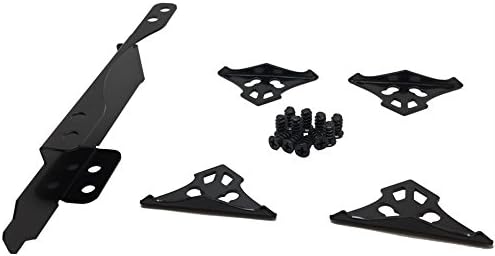



Evercool Fan Bracket for 1 or 2 x 92 or 120mm Fans - Desktop Compatible
Product ID: 57008106
Details
- BrandEvercool
- Power connector typePCI
- Cooling methodAir
- Compatible devicesDesktop
- ManufacturerEvercool
Desertcart purchases this item on your behalf and handles shipping, customs, and support to Iceland.
• Allows you to connect 1 or 2, 92mm or 120mm Fans• Compatible with other manufacturers• Increase cooling over key components• Simple installation Review: Highly recommended. I now have a very quiet and cool PowerColor RX580 - My graphics card was getting very noisy playing Tomb Raider and Far Cry 5. I was happy with the performance but not the noise! I looked around for a solution but could not find anything ready-made at a reasonable cost, then I found Evercool PB-01. Seeing the great price I thought it was worth an experiment. I removed the graphics card fans and plastic shroud and replaced them with the PB-01 fitted with 2 x 120mm Artic PWM fans. I plugged the fans in to the motherboard and I used Argus Monitor to control the fans speed linked to the graphics card temperature. The PB-01 fits in the next slot to the graphics card with about 5mm clearance from the cooling fins. I did think about making my own cover to direct more air to the fins but is was clear from my first test with Furmark that under extreme load the card stays under 75 degrees C. Even at the highest speed the new fans are much quieter. Playing games its never that stressed with the card getting close to 65 and the fans stay quiet. Very happy with this solution - its a lot less cost than any other solution out there. Review: Very good quality fan mount - EDIT: I have installed 2 fans and can say there is no issues so far on sagging or noise. This was easy to install and very simple yet useful item. My GPU heats up quite a bit so having a fan mounted directly below it will help. There is 4 brackets to link 2 fans together, however you probably could try 3 fans linked together (not that i've tried). I only have 1 fan installed as of now, even at full speed there is no issues. Only thing I would say is possibly a down side is there is 1 singular screw that holds the whole contraption to the case which wasn't an issue for me but might be when there is 2 full speed fans.
| ASIN | B0737L7HX5 |
| Best Sellers Rank | 91,385 in Computers & Accessories ( See Top 100 in Computers & Accessories ) 170 in Laptop Cooling Pads |
| Brand | Evercool |
| Compatible Devices | Desktop |
| Compatible devices | Desktop |
| Cooling Method | Air |
| Cooling method | Air |
| Customer Reviews | 4.4 out of 5 stars 96 Reviews |
| Manufacturer | Evercool |
| Manufacturer Part Number | ECPB-01 |
| Number of Items | 2 |
| Number of Packs | 1 |
| Power Connector Type | PCI |
| Power connector type | PCI |
| Unit Count | 2.0 count |
P**K
Highly recommended. I now have a very quiet and cool PowerColor RX580
My graphics card was getting very noisy playing Tomb Raider and Far Cry 5. I was happy with the performance but not the noise! I looked around for a solution but could not find anything ready-made at a reasonable cost, then I found Evercool PB-01. Seeing the great price I thought it was worth an experiment. I removed the graphics card fans and plastic shroud and replaced them with the PB-01 fitted with 2 x 120mm Artic PWM fans. I plugged the fans in to the motherboard and I used Argus Monitor to control the fans speed linked to the graphics card temperature. The PB-01 fits in the next slot to the graphics card with about 5mm clearance from the cooling fins. I did think about making my own cover to direct more air to the fins but is was clear from my first test with Furmark that under extreme load the card stays under 75 degrees C. Even at the highest speed the new fans are much quieter. Playing games its never that stressed with the card getting close to 65 and the fans stay quiet. Very happy with this solution - its a lot less cost than any other solution out there.
C**R
Very good quality fan mount
EDIT: I have installed 2 fans and can say there is no issues so far on sagging or noise. This was easy to install and very simple yet useful item. My GPU heats up quite a bit so having a fan mounted directly below it will help. There is 4 brackets to link 2 fans together, however you probably could try 3 fans linked together (not that i've tried). I only have 1 fan installed as of now, even at full speed there is no issues. Only thing I would say is possibly a down side is there is 1 singular screw that holds the whole contraption to the case which wasn't an issue for me but might be when there is 2 full speed fans.
B**E
very nice
very good product 4 stars because it need 2 space not 1
S**N
Absolutely brilliant way to add some more cooling to video card
Yes, it does take up one or two internal PCI slots, but if you don't have much in your case, no big deal. But it does allow you to fit either 1 ot 2 120mm fans, or 1 or 2 92 mm fans. I've a passive cooled (no fan) video card which normally runs around 70 degrees centigrade when gaming, with this bracket fitted beneath with a single 120mm case fan running at 450 rpm (very quiet) the temperature dropped to 40 degrees. I also tried with 2 x 92 fans running at 500 rpm, but the temperature ran around 50 degrees, so switched back to the single 120mm fan
S**N
Good quality
Needed some extra cooling for my GPU..so purchased this kit, plus pair RGB case fans..certainly helped dropped the temp by 9°c. You get all the screws to fit most fans and this kit holds the fans together perfect.
R**D
Simple yet very effective
Easy to put together and really does make a difference to your cards temps. The one issue I did have is with the Corsair ML 120 Pro fans. They have a rubber dampener near the screw holes. Which stops you from placing one of these fans as the first fan. But most fans will fit on the PCI plate without any issue.
B**.
Overpriced
Does what it ought to do, but really a pretty expensive bit of kit for what it is - 2 grams of metal shouldn't cost more than 50p.
C**N
Does it's job
Used to move a front case fan alongside a passive 1050ti for better air flow management. This reduced the GPU temps from 81c to 54c. Well worth £4.
Trustpilot
2 months ago
2 months ago