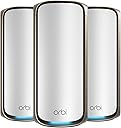
🚀 Future-proof your home network with the ultimate WiFi 7 powerhouse!
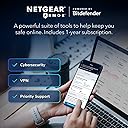
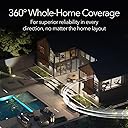
The NETGEAR Orbi 970 Series is a cutting-edge WiFi 7 mesh system delivering ultra-fast speeds up to 27Gbps and expansive 10,000 sq.ft. coverage. Featuring patented quad-band technology with dedicated backhaul, it supports over 200 devices simultaneously with low latency. Equipped with multiple 10Gbps Ethernet ports and advanced security via NETGEAR Armor, it’s designed for seamless 8K streaming, gaming, and smart home integration—perfect for demanding millennial professionals seeking reliable, future-ready connectivity.


| ASIN | B0CGJGXFCS |
| Best Sellers Rank | #4,977 in Electronics ( See Top 100 in Electronics ) #27 in Whole Home & Mesh Wi-Fi Systems |
| Customer Reviews | 4.0 4.0 out of 5 stars (3,850) |
| Date First Available | September 19, 2023 |
| Item Weight | 16.91 pounds |
| Item model number | RBE973S-100NAS |
| Manufacturer | Netgear |
| Package Dimensions | 17.25 x 12.5 x 8.5 inches |
P**R
Consistent near-gigabit WiFi and solid coverage
Just got upgraded from my old Orbi to the Orbi 970 WiFi 7 system, and it’s been a solid improvement. I’m on a 2-gig internet connection, so having hardware that can actually keep up makes a noticeable difference. Setup was easy using the Orbi app and everything came online without issues. WiFi performance has been very strong. Even with a wireless backhaul, I’m seeing close to 1 Gbps download speeds, and uploads hit the 300 Mbps limit of my ISP plan, so the router clearly isn’t holding anything back. Latency has been low and stable, which matters a lot for work calls and streaming. We have a lot of family devices connected, including smart home gear, TVs, and phones, and coverage has been consistent across rooms and floors with smooth handoff. Overall, it feels like a reliable, future-proof upgrade that works well for everyday family use.
B**B
Fantastic! Works great
I upgraded from an older Orbi WiFi 6, and the Orbi 970 blows it away. I pay for 1 GB from my ISP but constantly receive 1.5Gb. I couldn’t be happier! Performance was considerably noticeable immediately! Set up was easy. Simply rename your Orbi to the previous name and password used on your router your replacing and everything will connect without re signing in. All my devices run constantly faster. Keep in mind that speeds will vary depending on age and WiFi acceptance on your current devices, i.e. if you have a tv or smart phone that is only capable of let’s say WiFi 4, then that’s all you’ll get, But I will say even my older devices run better. I could go on and on about this router. And best of all it future proofs you for later as your ISP increases speed and you replace devices with newer ones. The app makes setup a breeze. This router will allow for more complicated setups via the Orbi web site where after creating an account you can change just about everything you need if your a power user.
C**S
Infuriating!
Update 2: Replaced with the router in my first update and everything now works flawlessly. I can’t believe the difference. My system is completely stable now. The instability that I was getting with the Orbi 970 was extremely painful. When you buy a router system, what you should expect is that it just works. Even the app was bad. It frequently had errors causing me to not be able to see any devices. When I searched online, sure enough a lot of other people were also having these issues. Please, don’t put yourself through the trouble of this router. Update: This is the most frustrating router that I have ever used. I stopped buying from Netgear along time ago and for some reason forgot why. The router randomly restarts every couple of weeks (common issues with others that have this router as well). The real problem is, when it restarts my Hue and Nest cameras get very messed up. Lights won’t respond. Cameras going offline. It takes several restarts of the satellites and router, plus several hours to get everything running again. This mesh system is just pure garbage. I’ll be selling this trash and moving to an Eero Max 7. Had several frustrations so far. It was going very well for the first three weeks. I had no issues at all. Then, it randomly rebooted by itself. That random reboot led to some serious issues with my Philips Hue system. I had lights not responding and dimmer switches having connection issues. I started troubleshooting my Hue system because it seemed that was the likely issue. Then, I upgraded my Orbi firmware and magically everything was fine again. During the upgrade the Orbi satellites also upgraded and all of them rebooted. Several days later I needed to unplug a satellite. When I tried to replug it back in, it struggled to reconnect. I restarted the router thinking that might fix the issue. The satellite did eventually reconnect, but ALL of the Hue problems came back. It took me literally hours of troubleshooting Hue, restarting the router and satellites to get it working again. Finally, I restarted the router and all satellites (which I had already tried several times), and everything worked again. What a hassle this system is for $2,000. I contemplated between the 970 and the Eero 7 before settling on the 970. The only reason I chose the 970 was the dedicated 2.4 Iot channel. I regret not going with the Eero 7. What it does well is speed, range and keeps all of Nest cameras from disconnecting. My old Asus AXE16000 had issues with cameras going offline, the 970 fixed that completely. However, I’m sure the Eero 7 would have done that as well.
K**N
Unbelievable Fast Wi-Fi 6 and easy to setup.
Easy to setup with the NetGear Orbi app from the play store, Just follow the set up. Use the default SSID and passphrase until you're completely done Then change your SSID and passphrase to what you want. Note: I had to reinstall the NetGear Orbi app because the diagram map showed red for not connected to the internet and router when I was connected. The satellite showed green. Called tech support and the tech suggested that I remove the app and reinstall After I reinstalled the app everything showed green. The web page interface shows a lot more options and a better view of your attached devices. Don't forget to change web page password. The web page allowed me to assign IP addresses to my devices. When I did noy have the TV assigned an IP address, I would sometimes get a not connected when going into HULU (pretty much everyday) I just had to cancel the error message and try again., After I assigned the TV an IP address, I never had that problem again. Note: If you have a TV with Wi-Fi 6, do not use the ethernet cable connected to your satellite. It's a slower connection, Use the Wi-Fi for your connection, I don't like the Armor because it wants you to install Bitdefender on all your devices. I like the Asus Aiprotection because it does not require any software to be install on your devices, I'm still sticking with Netgear Orbi, but I won't be subscribing for the Armor. I'm happy with my with my whole experience with the Netgear Orbi. I believe Netgear Orbi is one of the best routers out there. A bit expensive, but you get what you pay for and you are getting a quality router that will last you a long time. Especially since it can handle 100 devices,
L**S
It came with 110v POWER ADAPTER. I ordered from amazon.sa, it should be all electronic in KSA is 220v.
V**S
I have 4 units in a mesh system, When this works it's great. However, for the price it is disappointing. My good experiences are tempered by too many drop outs and random disconnects. Occasionally iPhones/Ipads disconnect and the wi fi has to be switched on and off to reconnect. The app is slow and clunky and not really of much help - in particular, devices connected. It often appears out of sync with reality. Also its very irritating that every time the app is opened, Netgear bug you with adverts for paid subscriptions to anti malware protection. It's a router .. not an advertising platform !! When it works it's fast - but I couldn't whole heated recommend this product.
R**Z
Sin ningún problema y midiendo las velocidades, se aprecia la mejora del mis equipos ya con 8 años de uso, pero que se pudieron integrar a través de cable y como AP Mode
M**D
I originally had a basic Velop mesh system and decided to upgrade to a premium option. I chose Netgear, expecting great performance given its price and marketing. However, when I set it up in the same spot as the Velop, the units couldn't even connect to each other. Despite the large size of the device, I was willing to overlook its appearance for a superior connection. Unfortunately, this turned out to be my worst experience ever, and I felt completely ripped off. I will be replacing it with the Deco X90.
S**K
after trying a few other products, this is the only one that managed to cover my full 2 stories house with no gaps in any rooms.. I needed to install one router plus 3 satellites in order to maximize the coverage and cover all the wholes, but after that it's been working perfectly for more than a year. Also with as many satellites, all rooms have strong coverage with very good speeds. Only issue is it's one of the most expensive options in the market, but amazing quality and installation is super easy following the steps on their application.
Trustpilot
2 days ago
2 months ago