
DOWNLOAD THE APP


Customer Services
Copyright © 2025 Desertcart Holdings Limited
DOWNLOAD THE APP


🎬 Elevate your presence with pro-grade 4K clarity — don’t just show up, stand out!
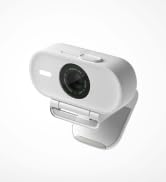
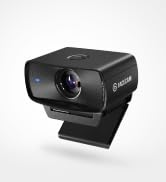
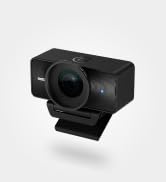
The Elgato Facecam Pro is a premium 4K60 UHD webcam featuring a large Sony STARVIS sensor for superior low-light performance, an f/2.0 21mm premium autofocus lens, and DSLR-style manual controls via dedicated software. With a wide 90-degree field of view and seamless compatibility with major streaming and conferencing platforms, it’s designed for professionals and creators who demand crystal-clear, customizable video quality in any environment.








| ASIN | B0BJL7Q3SR |
| Best Sellers Rank | #738 in Webcams |
| Brand | Elgato |
| Color | Black |
| Customer Reviews | 4.4 4.4 out of 5 stars (427) |
| Date First Available | February 16, 2023 |
| Item Dimensions LxWxH | 4.6 x 1.5 x 3.1 inches |
| Item Weight | 8.5 ounces |
| Item model number | 20WAB9901 |
| Manufacturer | Elgato |
| Max Screen Resolution | UHD Pixels |
| Operating System | Windows 10, macOS 11.0 |
| Product Dimensions | 4.6 x 1.5 x 3.1 inches |
| Rear Webcam Resolution | 8.3 MP |
| Series | Facecam Pro |
| Standing screen display size | 2 |
| Wireless Type | 802.11ac |
A**R
A Game-Changer for Content Creators
The Elgato Facecam Pro has completely transformed my streaming and video conferencing experience. The true 4K60 resolution delivers crystal-clear visuals, making my content stand out with professional-grade quality. The Sony sensor combined with advanced light correction ensures that I look my best, even in less-than-ideal lighting conditions. What sets this webcam apart is its DSLR-style control, allowing me to fine-tune settings like exposure, white balance, and field of view directly through the Camera Hub software. The wide-angle lens captures more of my background without distortion, adding depth to my streams. Integration with OBS, Zoom, and Teams is seamless, making setup a breeze. While it's on the pricier side, the investment is justified by the exceptional build quality and performance. If you're serious about content creation or seeking top-tier video quality for professional meetings, the Elgato Facecam Pro is worth every penny
H**G
Good quality and upgrade your PC setup
Definitely work as intended, Ive been using elgato for awhile, my mic, cam, even other accessories, I love it, it's easy to use they give u software to do all of their stuff , good quality on the camera - only buy these for upgrade your setup otherwise they have cheaper option , I buy these bc I am upgrading my PC setup
B**L
I wanted a high quality webcam that was easy to use
I love this webcam! I purchased it because I wanted a very high-quality picture with good software that had background replacement options. What I like is that Elgato software is free and very powerful and easy to use. The image quality is SO GOOD on this camera and the background replace and background blur options work better than any other one I tried. You must have a NVidia RTX graphics card for the background replace options to work so keep that in mind. I really can't think of any negatives beside the fact that it's a little pricey. I was a little hesitant because of the price and I tried a couple other $150 price range webcams before I purchased this one and I just wasn't happy with them. As soon as I plugged the Elgato Facecam PRO in I was instantly impressed by the image quality. This webcam makes everything look better and more professional. I am happy with my purchase for sure.
S**S
Best Streaming Camera I’ve Ever Used – Worth Every Penny!
Just upgraded to the new Elgato camera for my streams, and I can confidently say—it’s 100% worth it. I own professional videography cameras, and somehow, this compact little beast still outperforms them when it comes to streaming. The image is crisp, the colors are clean, and the low-light performance is impressive. It’s small, sleek, and doesn’t clutter my setup, making it perfect for both streaming and meetings. Whether I’m live on TikTok or Twitch (@solarties), this camera keeps me looking sharp every single time. Elgato really nailed it with this one.
G**T
Great Webcam for streamers! (using with PC)
The quality is just as good as my mirrorless Sony alpha 6300 camera. My only suggestion is if you have a close monitor to get a stand for it to put behind your monitor vs on top of your monitor. This Webcam comes with a screw in mount built in so you can mount this on a tripod or selfie stick or anything you could mount a regular camera on. The settings are very easy to use, it's quiet, and if you have a Nvidia graphics card, you can utilize the blur feature or the very disturbing AI eye tracker that makes it so it looks like you're always looking at the camera lol 😆. My recommendation for streamers is to get the lighting decent in the camera hub app and then overlay a favorite LUT in OBS for the perfect portrait.
I**H
Love it!!
Looks amazing
S**.
Great webcam
I use this camera everyday for Zoom calls. Crystal clear and works flawlessly.
D**Y
Overpriced, Laggy 4K
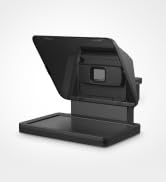
I bought this to work with the Prompter as a simple plug and play replacement for using a mirrorless camera. While I knew that the dynamic range and colors wouldn't be as good, I figured for $300 that this camera would at least run so smoothly I'd be able to forget about it and concentrate on all the other aspects of running my stream. I was wrong. First and foremost, let me say that I believe the biggest handcuff to this camera is the software. While you can plug the camera in and select it as a hardware source in OBS or Teams, it operates at it's base settings. To get more out of it, you need to run Camera Hub where you can select the resolution and framerates, add background blur, pan/tilt/zoom, adjust exposure and auto focus, and preview the feed before using it in your signal chain. I have never had issues running Camera Hub for the Prompter or EppocCam before so I didn't think this would be any different. But as soon as you try to run 4K, the feed gets so choppy and laggy the Preview is unusable. Okay, so maybe it's just the Preview function that's laggy and the feed into OBS won't be. Wrong. Any time I tried using anything other than 1080p, in any framerate combination, the feed became unusable. This is all running on a PC with an RTX3090, i9, and 64gb RAM so the machine is not the limitation here. Oh, and selecting the resolution doesn't mean other programs like Teams won't force change the resolution in Camera Hub when the Elgato Virtual Camera is selected. My only solution to all this was to set it at 1080p and leave it. Paid for 4k, forced to use 1080p. Then there is the rediculous autofocus shifting every few seconds with no way to adjust the 'speed' or 'rate of acquisition' like you can in even the most bottom tier cameras. Moved a little? The displayed scene aggressively resets focus by cycling through the focal distance range. Looks like a quick zoom out/in/center. I don't expect mirrorless camera caliber focusing, but this just looks and feels awful. The way around this is to, you guessed it, use Camera Hub and change some settings. Like turn off auto focus and set a manual distance, or 'lock' the focus once you're in. Sounds great until you notice the 'lock' has turned off on it's own and now your audience is getting that ugly focus stutter every time you move. TL;DR this camera was promising but is poorly executed, dependent upon poorly optimized software, and exceedingly frustrating to use. If you want to blow $300 on a "4k" camera that will only comfortably run at 1080p and make you regret using autofocus, then sure get this. Otherwise look elsewhere. P.S. I used the provided usb-c cable plugged directly into my tower's usb-c port, which is a 3.2 gen 2 10gbps port. The hardware chain beyond the camera itself was not the issue.
N**R
Una webcam de gama alta que realmente marca la diferencia. La calidad de imagen en 4K a 60 fps es espectacular, con colores vivos y detalles nítidos. El sensor Sony y la corrección de iluminación hacen que se vea bien incluso en condiciones de poca luz. Además, los controles avanzados permiten ajustar todos los parámetros a gusto. Perfecta para streaming, videollamadas o creación de contenido. Un poco cara, pero merece la pena si buscas la mejor calidad.
R**E
Came from a Logitech 4k Brio and was looking for an upgrade, This Elgato Facecam Pro has the worst white balance of a webcam I've every experienced and especially at this price point. Orange is red, and the white balance in the Camera Hub application don't do the term white balance any justice it makes things worse. It's really really bad! Just can't get a good picture. The Noise in the image is also really noticeable. You see the camera has potential but you will have to use LUTS in OBS, and they will not work for normal webcam calls. Fix it Elgato!
D**E
In my quest for enhancing the video quality of my streams and video conferences, the Elgato Facecam Pro has emerged as a surprisingly effective solution, offering compelling value when juxtaposed against the hefty investment of a high-end mirrorless DSLR. It also works brilliantly with my Elgato TelePrompter. It bridges the gap between affordability and performance with commendable finesse. The Facecam Pro delivers crisp, vibrant visuals that significantly elevate my online presence, a feat that, until now, I assumed only a pricey DSLR could achieve. Certainly, a mirrorless DSLR might offer superior sensor size and lens quality, enabling exquisite detail and performance in low-light conditions. However, this comes at a substantial cost, not just in terms of pounds, shilling and pence; but also in complexity and the need for additional gear like lenses. In contrast, the Facecam Pro integrates seamlessly into my setup, requiring minimal adjustments to produce a clean, professional-looking video. Its software, while offering depth for those who wish to dive into customisation, remains accessible enough not to intimidate the less technically inclined. Moreover, the practicality of the Facecam Pro cannot be overstated. Its plug-and-play convenience, combined with Elgato's user-friendly software, means I spend more time creating and less time tweaking settings. This ease of use, coupled with the noticeable uplift in video quality over standard webcams, makes the Facecam Pro a wise investment for improving video presentations without breaking the bank. The value proposition of the Elgato Facecam Pro becomes even clearer when considering the total cost of ownership and learning curve associated with a mirrorless DSLR. For creators, streamers, and professionals seeking to enhance their video quality without the complexity and expense of DSLR setups, the Facecam Pro stands out as a smart, effective choice. It offers a balance of quality, convenience, and affordability that's hard to beat, making it a preferred option for those looking to make a significant impact on their video content without the hefty investment of a mirrorless DSLR.
M**N
Excellent
A**.
Non costa poco ma Elgato non delude mai. Qualità di immagine top. Per i miei videos e lives è perfetta
Trustpilot
1 month ago
1 week ago