🐷 Unlock a world of safe, smart fun with the Peppa Pig Fire HD 10 Kids Tablet!
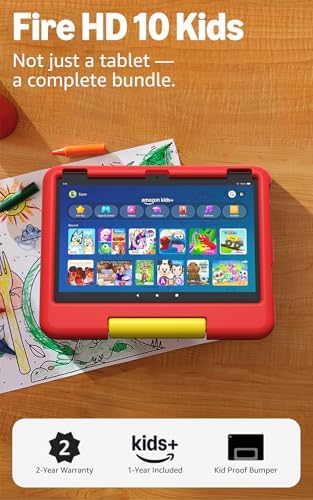
The Amazon Fire HD 10 Kids tablet (13th generation) is a powerful, kid-friendly device featuring a vibrant 10.1" 1080p display, an octa-core processor with 3GB RAM for smooth performance, and up to 13 hours of battery life. It comes with a durable kid-proof case, 32GB internal storage expandable up to 1TB, and a 1-year Amazon Kids+ subscription offering thousands of ad-free educational and entertainment content. Robust parental controls and a 2-year worry-free guarantee make it the ultimate tablet designed to grow with kids aged 3-7, now available in a limited-edition Peppa Pig design.
| Display | Brilliant 10.1” 1080p display (1920 x 1200) with over 2 million pixels (224 ppi), for bright, vivid image quality. Screen strengthened with aluminosilicate glass. |
| Size | Kid-Proof Case: 10.5” x 8.19” x 1.06” (266.88mm x 207.98mm x 26.85mm). |
| Weight | 23.61 oz (669.61g) Actual size and weight may vary by configuration and manufacturing process. |
| CPU & RAM | Octa-core processor - 2x Arm Cortex-A76 up to 2.05 Ghz and 6x Arm Cortex A55 up to 2 Ghz with 3 GB RAM. |
| Storage | 32 GB (24.0 GB available to user) of internal storage. Add microSD card for up to 1 TB of additional storage. Some apps may require that they are installed on internal storage. App or feature updates may impact available storage. |
| Battery Life | Up to 13 hours of reading, browsing the web, watching video, and listening to music. Battery life will vary based on device settings, usage, and other factors such as web browsing and downloading content. Certain software features or apps may reduce battery life. |
| Charge time | Fully charge in under 4 hours with USB-C cable and 9W power adapter included in the box. Fully charge in under 3 hours with 15W adapter and USB type C to C cable (adapter and cable sold separately). |
| Wifi connectivity | Dual-band wifi. Supports public and private wifi networks or hotspots that use the dual-band 802.11a/b/g/n/ac standards with support for security standard of WEP, WPA3 OWE, WPA/WPA2/WPA3 Personal and WPA/WPA2/WPA3 Enterprise. Wi-Fi 6 (802.11 ax) is currently not supported. |
| Ports | USB-C (2.0) connector for charging; microSD slot for external storage. |
| Audio | 3.5 mm stereo jack and dual integrated speakers; external volume controls. |
| Sensors | Accelerometer, ambient light sensor. |
| Camera specs | 5 MP front-facing and rear-facing cameras with 1080p video recording. |
| Location services | Location-based services via wifi. |
| Available colors | Blue, Pink, Disney princess, Disney Mickey Mouse. |
| Bluetooth | Built-in Bluetooth 5.3 with support for A2DP compatible stereo headphones, speakers, microphone, and LE accessories support. |
| Accessiblity features | VoiceView screen reader enables access for customers who are blind or visually impaired. • Screen Magnifier enables customers to zoom in/out, and pan around the screen. • Fire tablet Accessibility features also include settings for Closed Captioning, Font Size, Display Size, High Contrast Text, Color Inversion, Color Correction, and Convert Stereo to Mono audio. (Captions and ability to modify font size are not available for all content and experiences). |
| Warranty and service | 2-year worry-free guarantee. See more details about this coverage. Use of Fire HD 10 Kids tablet is subject to Amazon's Conditions of Use and these terms. |
| Subscription | Includes 1 year of Amazon Kids+ for new subscribers. Learn more about this here. |
| Included in the box | Fire HD 10 tablet, Kid-Proof Case, USB-C (2.0) cable, 9W power adapter, and Quick Start Guide. |
| Generation | 13th generation, 2023 release. |
| Age Range | Ages 3 and up. WARNING: CHOKING HAZARD – Small parts. Not for children under 3 years. |
| Software security updates | Learn more about these software security updates. If you already own a Fire tablet, visit Manage Your Content and Devices for information specific to your device. |
A**R
Great Tablet for Young Kids
I’m very happy with this tablet. The bright 10.1-inch screen is perfect for kids, and the included ad-free content provides a safe and enjoyable learning experience. The parental controls are easy to set up, making it simple to manage screen time and choose appropriate content. The battery lasts a long time, so my child can use it throughout the day without needing frequent charging. The protective case is sturdy and has already saved the tablet from a few accidental drops. The performance is smooth for games, videos, and educational apps, and the 32 GB of storage is enough for everyday use. Overall, this is an excellent tablet for children ages 3–7. It offers a great combination of entertainment, education, and durability, making it well worth the investment.
L**S
Perfect Kids Tablet
This tablet has been a fantastic buy for our kids. It’s very easy to set up and comes with great parental controls, so you can manage screen time and content without any hassle. The protective case is sturdy and perfect for little hands—no stress about drops or bumps. The battery life is impressive and lasts long enough for travel or a full day of use. The screen is clear and responsive, and the content available for kids keeps them both entertained and learning at the same time. Overall, it’s a great value for money and ideal for young kids. Highly recommended for parents looking for a reliable, kid-friendly tablet!
M**S
Great tablets
These tablets have been a fantastic upgrade from the older ones we had. It was definitely time for a replacement, and we're really happy with them. The graphics are crisp, the battery life lasts a long time, and they recharge fairly quickly, which is a huge plus with kids. My boys are obsessed with them, and I also love the built-in stand because it makes them much easier to use for watching videos, playing games, or traveling. The only small drawback—and it's really just a minor preference—is that the back of the case has a textured geometric design. Since both of my boys have the same color tablet, they like to decorate them with stickers so they can easily tell them apart. The textured pattern doesn't allow most stickers to stick well, so we were only able to place one sticker on the smooth area of the stand. That doesn't affect the tablet's performance at all, and it certainly wasn't enough to take away a star. Overall, these have been an excellent purchase, and I'd definitely recommend them to other families with kids.
S**.
Great for learning, games, movies and more
Great tablet and comes with a kids proof protective cover. Safe for kids and adults can use this tablet as well. Comes with games and a feature to have the parents approve downloads or you can leave the feature off. Simple to transport and very user friendly. Stable operating system and does not glitch. Touch screen is spot on and it comes with a great warranty. Price is great for this unit.
A**V
Educational if you are picky and turn off WiFi!
Quick tip: for little kids, set it up and download your favorite apps, then turn off WiFi (AND "forget" the wifi info which prevents it from reconnecting from the drop down menu) This prevents them from accessing and downloading tons of new games which will lead to a full hard drive and reduced attention spans. With this workaround it's very easy to pick and choose educational content with limited access! Full review: I got this tablet for a good price and wanted to customize it for my 4 year old to take to grandparents house. I have plenty of of experience with tablets for the older siblings so I know how easy it is to get addicted to garbage apps and low quality entertainment. During setup, I was very worried with the "unlimited kids content" even when I set the age range to 2-3 years there are A LOT of videos and apps that I would like to restrict. You think it would be easy, but it's not. It seems you have to go and block each app/book/video individually (there are thousands....) I also found a way to press and hold the account and block apps in bulk (you can search for a keyword and block all) but this is not ideal!! Then I remembered the pro tip I read during my research. Just because you see apps and videos in the library doesn't mean they all have to be used. Simply click to download the ones you want and then turn WiFi off. Note: I found the next day wifi connected automatically so I removed the wifi details completely and did airplane mode too. You'll need WiFi to setup the tablet but then you're safe to remove it. If you want to add apps again you have to just sign into the parent account and then add wifi details, download desired apps, and then "forget" it again 😅 I plan on enjoying these apps as I set it up and then once every few months I can remove and add new apps manually. This might seem tedious but it's totally fine to get a nice variety of apps and my kid is thrilled by it. The only problem I see is that I can't do screen time / timed access / share my purchased movies as those require wifi but it has been working for us because I only loaded 20 apps and Dr Suess content which I would gladly allow him to play. This is way better than my previous attempts to give my kids a tablet (iPad) because Amazon Kids+ gives you so many ad-free games that are amazing. Toca Boca, Educational apps, etc. I paid a lot to buy these apps on iPad but this Fire tablet experience is much better as it's designed for kids and the interface is locked down for kids! I set it to the kids account, put a nice long password for parents dashboard, and a pin for kids account. Size: 10" screen is great! So far so good with some tweaks for kid friendly access. **Update: my plan has worked as intended although my kid does ask for new apps a lot. He also got a taste of games for older kids and so I needed to make adjustments to the age range and app selection fairly often. But I do have full control over what is on the tablet and I'm happy he can play educational and entertaining games
K**O
DURABLE TABLET
I bought this tablet for my 4 year old and she loves it. Brings it on long car rides etc. For the first time we accidentally left it on the top of the car and it went flying off the roof onto the busy road. A car or two had run over it by the time we circled back to grab it and believe it or not it was perfectly fine. The only thing messed up is the screen protector. The case that came on this tablet protected it and the camera (which we disabled). We are very impressed with the quality of the tablet and its case. It is very user friendly. Straight forward set up. Storage isnt the greatest but not the worst. Graphics and sound quality are great.
C**R
Perfect Tablet for Younger Kids
We bought this tablet with the blue case for our son and he loved it so much and it was so perfect we decided to get the pink one for our daughter. The fact that you can get a replacement if your child breaks it really makes it more than worth it. Our son broke his screen a few months after we got it and getting a replacement was so simple and quick! You have to use the Amazon kids subscription to make it the best but it comes with a year subscription and it’s only like $50 for a year and you only need one subscription for up to 4 kids I think is what it said. It’s not heavy and we haven’t had any issues with it working correctly or anything. I wish there was a little more storage but that’s an easy fix with an added memory card. The tablet doesn’t lag and is actually pretty fast which is good because kids are not patient! They are very durable tablets and the cases are amazing! This is the best kids tablet, in my opinion, for many reasons but the replacements of your child breaks their tablet is really what sold me because kids are so accident prone and almost always end up breaking at least one screen. The only downside is that when we did get a replacement, I made sure I followed the steps to back up my sons old tablet before we switched to the new one, but none of his game progress was saved on any of his games. The only thing that transferred were things we paid money for. He’s still little so it didn’t matter too much to him but if you have an older child that’s something to keep in mind! I know the help center said that it depends on the game developer too and how you’re signed into the game and whether it will transfer or not. Other than that, I have absolutely no complaints about this tablet and absolutely love it for our 2 little ones. I probably wouldn’t get this tablet for our older 11 year old son, but for younger kids it’s perfect!
D**U
Great Tablet!
I’m not big on using technology to “babysit” children but when we went on a long road trip this tablet was an absolute lifesaver for my toddler who hates long car rides with a vengeance. We were able to download a couple of movies for him and it made the ride so much easier to get through. There has been plenty of storage space to download movies for him. We aren’t to the age of trying any of the educational games on it but I do want to look into using some of them as additions to learning for him when the time is right. It’s a nice tablet in a nice looking case that is durable for little hands. My toddler has thrown it to the ground several times and it has not messed with it one bit. The size of the icons and the ability to adjust settings make it easy to read and use.
Trustpilot
1 day ago
5 days ago