🚀 Print Smarter, Ship Faster, Stay Ahead!
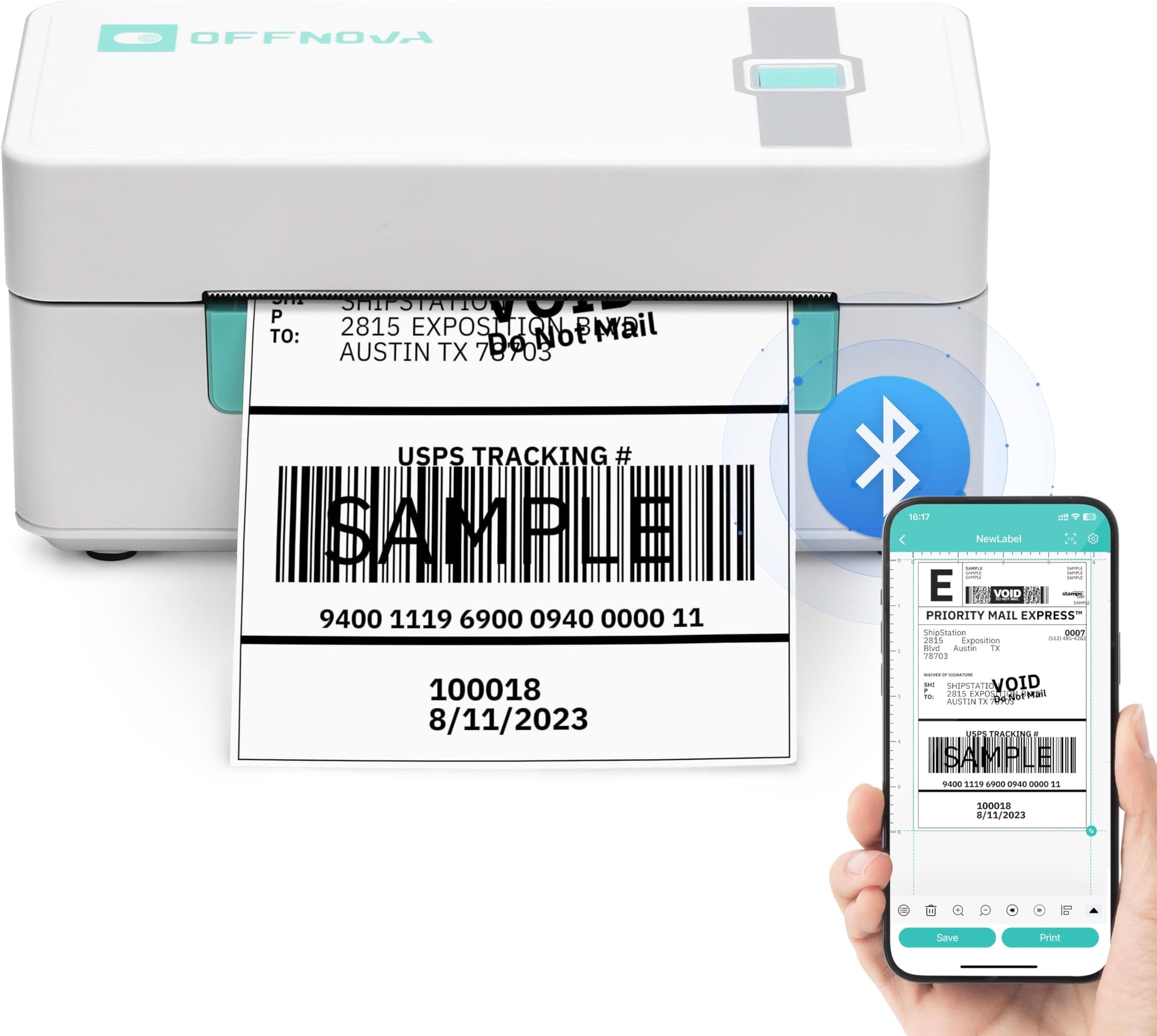
The OFFNOVA Shipping Label Printer is a compact, thermal 4x6 label printer designed for small businesses and shipping pros. It offers wireless Bluetooth printing for iOS and Android, USB connectivity for Windows, Mac, Linux, and Chromebook, and supports a wide range of label sizes with auto calibration. Compatible with major shipping platforms like USPS, eBay, Shopify, and Etsy, it delivers fast 203 DPI prints at up to 72 ppm without ink, making it an efficient, versatile tool for seamless logistics and e-commerce operations.


| ASIN | B0CDX7JKPK |
| Additional Printer Functions | Print Only |
| B&W Pages per Minute | 72 ppm |
| Best Sellers Rank | #93,081 in Office Products ( See Top 100 in Office Products ) #219 in Desktop Label Printers |
| Brand | OFFNOVA |
| Built-In Media | Power Adapter & Cable, Printer, USB Cable, User Guide |
| Color | White |
| Color Depth | 1 bpp |
| Color Pages per Minute | 5 ppm |
| Compatible Cartridge | No ink needed |
| Compatible Devices | Laptops, PC, Smartphones, Tablets |
| Connectivity Technology | Bluetooth |
| Control Method | App, Touch |
| Controller Type | Android, iOS |
| Customer Reviews | 4.2 out of 5 stars 1,494 Reviews |
| Dual-sided printing | No |
| Duplex | Simplex |
| Hardware Interface | USB |
| Ink Color | black |
| Item Dimensions D x W x H | 6.3"D x 7.68"W x 4.13"H |
| Item Height | 4.13 inches |
| Item Type Name | Multifunction Printer |
| Manufacturer | OFFNOVA |
| Maximum Copy Resolution Black and White | 203 DPI |
| Maximum Copy Speed Black and White | 72 ppm |
| Maximum Print Resolution Black and White | 203 DPI |
| Maximum Sheet Capacity | 72 |
| Maximum print Resolution Color | 203 DPI |
| Media Size Maximum | 4 x 6 inch |
| Model Name | ZPL-2054N |
| Model Number | ZPL-2054N |
| Model Series | ZPL-2054N |
| Number of Drivers | 4 |
| Other Special Features of the Product | Bluetooth connection, Portable |
| Output sheet capacity | 72 |
| Paper Size | 1 - 4.1 Inches |
| Print media | Labels |
| Printer Connectivity Type | Bluetooth |
| Printer Output Type | Monochrome |
| Printer Type | Thermal |
| Printing Technology | Thermal |
| Resolution | 203 DPI |
| Scanner Type | Portable |
| Series Number | 6140 |
| Special Feature | Bluetooth connection, Portable |
| Specific Uses For Product | shipping and logistics label printing |
| Total Usb Ports | 1 |
| Warranty Description | 1YEAR |
| Warranty Type | 1 Year Warranty |
A**A
Yay!! PDF Opens in FBA Print Directly from Pirate Ship
I wanted Bluetooth so I can use my thermal printer with iPhone because I wanted wireless so I don’t have to worry about connection to devices being compatible. I have a very old (probably incompatible with everything) MacBook & will likely be getting the new MacBook that no longer has a USB. This is easy to use & works great, but there was a slight learning curve in the beginning when I had no idea what I was doing. The assembly instructions were fine but after that the instructions to print were not the best. While first getting it to print I messed up on 2 labels, and a corner piece of the labor got wrapped around the roller (which was difficult to get off bc the label is sticky). I had to trick the roller into moving so I can peel the part of the label that stuck to the roller or else it would keep giving me a blinking error. I was able to get it all out after a few attempts, but troubleshooting instructions would have been super helpful!! So this is what I learned so you can skip my mistakes. (1) Make sure the label printer & label holder are pretty much perfectly aligned with the device so it does not get fed at an angle. Also make sure after you tear off the label, that it doesn’t take any of the backing off of the next upcoming label. (2) I could not figure out which option to use when printing from an image screen shot to work for the full size of the label (it was printing small or blurry) but I learned I can *easily open with PDF. I did NOT need to do all of those steps of transferring to WhatsApp or Skype or Facebook... I do not understand why that step is even necessary. While in Pirate Ship (the app I use for my small business), after I generate the label, I select *open PDF file* in FBA Print (you select this from all your apps that come up). And then the label shows up in FBA Print without those extra steps. It then prints on the 4x6 label perfectly. All packages I have ever shipped with this device has been received my clients. For those new to shipping you will use this printer, extra thermal labels (since it comes with only a few), a mail scale & measuring tape to get weight & dimensions additionally in order to get the correct shipping rate from your shipping label vendor of choice. For everyone, not all color options of the thermal printer are Bluetooth. Please check the description if Bluetooth is what you are after. Overall I recommend this product, which makes my life easier and it is super easy to use now that I know what I actually know what I am doing.
E**.
It was Great, Until it Wasn't... Printed Great for just over a Year.
UPDATE: I'm not sure why it wouldn't work the last Couple Hours, but it just started Working through FBA Print. Unfortunately, the Post Office is now Closed, so I'll have to wait til Monday, which is a Huge Inconvenience. I read ALOT of Information while trying to figure out why it wouldn't work & a Site had a Comment from the OffNova Manufacturer & I found out something I didn't know: If there's too many people using the App, it won't stay Connected. They also said if your Memory is Low it might not Work, so make sure you have adequate Storage (I had Plenty, So it wasn't bc of a Lack of Storage)... I can only surmise that there were too many people using the App earlier. Thank Goodness it started working again! I bought the OffNova Printer in January 2021. After ALOT of Research, I chose this Printer bc I didn't have a Printer or Computer & needed something that would Connect to my Phone through Bluetooth... & this was the Most Affordable Option for a Wireless/Bluetooth Printer, not to mention that it's Thermal, which means No Extra Expense w/ Refilling Ink. When I bought this the App needed was "FBA Print", I've never been able to Print a Label from a PDF File, but I could take a Screenshot of the Label, Crop it in my Gallery & then Open it as an Image in the App & Print it w/ No Problems... UNTIL TODAY. Today, I turned the Printer on, I have 3 Labels I need to Print for Packages & as soon as I Click on the "Image" Option to Find the Label, the Printer Disconnects. FBAPrint had a PopUp that said the App wouldn't be Updated & to D/L "Shipping Label" in the Play Store, so I did that. I Connected the Printer, Click on "File", & as soon as I choose the Photo of the Label, the App Closes. It won't even Open the Photo!! I'd appreciate it if someone could help me figure this out! I rely on this Printer for Sales & I've only had it 1yr, 2mons! I Paid too much Money for it to Stop Working in such a Short Amount of Time! Idk what else to try, bc I never had this Kind of Frustrating Problem, until today, but maybe there's a New Way of getting it to Work? I'll adjust my Rating as soon as the Manufacturer or App Developer tells me how to get my Printer Working in a Timely Fashion. Thank you very Much!
M**Y
Great Printer for Small Business Needs
As a small business owner, the OFFNOVA Shipping Label Printer has been a game-changer for my shipping process. Here's my detailed experience: Setting up the printer was straightforward. The instructions were clear, and connecting via Bluetooth to my Windows PC and iPhone was seamless. It's also compatible with Mac and Android, making it versatile for various devices. The ability to print directly from apps like USPS, eBay, Shopify, and Etsy is a significant advantage. The printer produces sharp and clear 4x6 labels quickly. The thermal printing technology means I don't have to worry about ink, which is a big cost saver. The print speed is impressive, and I've never experienced any jams or issues with alignment. The printer has a compact and sleek design, which fits well on my crowded desk. It's sturdy and feels like it can withstand daily use without any problems. The Bluetooth connectivity eliminates the need for extra cables, keeping my workspace tidy. The accompanying software is user-friendly and intuitive. I appreciate the customization options for labels, which allow me to tailor them to my specific needs. The ability to print from various platforms and devices is incredibly convenient, especially when I'm on the go and need to print from my phone. Considering the features and performance, the OFFNOVA Shipping Label Printer is a great value for money. It's a reliable and efficient tool that has significantly improved my shipping workflow. Overall, I highly recommend the OFFNOVA Shipping Label Printer to any small business owner looking for a reliable, efficient, and cost-effective labeling solution. It supports multiple platforms, prints high-quality labels, and is easy to set up and use. This printer has been a fantastic addition to my business, and I couldn't be happier with my purchase.
F**D
Need a simple, stress free, easy to use printer? DONT BUY THIS ONE!
I've written a review before when I was much more optimistic, but honestly its not worth it anymore. Don't buy this. It's absolutely too much effort for printing a single sheet. There's multiple problems and over-all its pointless to buy this. I sell my old clothes on poshmark and was tired of printing and taping regular paper labels onto the box. If you have a business, this will add on stress. 1.) Its confusing to set up. I bought this because a youtuber recommended it and I had known ahead of time the set up was weird. Not only is the set up weird but consistent use is aggravating. You need to download 2 apps and set up each individual label in order to print. 2.) THIS IS NOT SIMPLE TO USE! You are basically forced to take screenshots of each label and make sure you put them in the app the right way in order for it to successfully print. Its time-consuming per each label. 3.) This machine malfunctions way too much. I use to think it was getting jammed or something from consistent use but nope. It seems as though whatever technical program its based off of in order to work is absolutely terrible. It will malfunction every 2-3 labels. This forces you to shut it down, reload, and waste labels. 4.) This took forever to find out but certain labels don't scan or read correctly by usps. For example if you're selling on Mercari and need to print their label (which looks like ever other shipping label aside from postage level and such) then they will be forced to hand put the order # in. It tracks perfectly fine but something to do with this specific printer makes certain shipping labels un-scanable. Again, this isn't to do with the labels, they scan fine when printed on any other printer. 5.) I DONT WANT TO DEADL WITH CUSTOMER SERVICE: My first review was 4 stars but I was open about the issues I was already facing within the first month. Whoever decided to email me about my product review treated it as if I was doing something wrong. That they would "walk me through it". Walk me through what? I already know how to use it. The problem wasn't what I was doing, the machine is faulty and aggravating. Lets say you buy a dancing monkey and the seller says "He will dance if you give him a banana". He dances, but not only did you have to give him a banana you had to basically teach him the dance step by step. Do you understand the weird example? Its too much aggravation. After all this I find more joy in hitting the item with a bat then I do printing from it. It does what it needs to do but at the end of the day I had to put more effort into getting this printer to print each label then my grandparents had to do to maintain their marriage.
M**L
Fantastic Bluetooth printer for Pirate Ship
For what I need, this little printer is perfect. I use a Wix website to sell my products, and I buy my postage through Pirate Ship since it has the same discounted rate I used to get on Etsy. I wanted a small Bluetooth printer to set up on my pool table, which is my packaging/shipping station whenever I don't have guests over to play pool with. This printer needs to be plugged in to a wall outlet for power, which isn't a problem for me, and the Bluetooth connection works perfectly. I just purchase shipping on my phone, and from Pirate Ship I click "Download PDF" which opens it in Safari. Then I hit the share button, and share to the FBA Print app. This opens up the app, and I tap "PDF Files," tap the file I want to print, then tap "print" a couple times on the next few pages that pop up checking to make sure dimensions are correct. It's all really straightforward once you know how to share to the app. I included a picture of part of a label I printed today, to show the print quality. It's not perfect, there are definitely some places where you notice little flaws but it's not enough to be a big deal. I'm not even sure if the flaws are due to the printer or my labels, as I'm using a cheap stack of 1000 generic labels I found here on Amazon so they might not be the best quality. But it's still a huge step up from printing labels on a normal printer and having to spend the time cutting them out and taping them onto packages, plus this looks way more professional. Overall I would highly recommend this to any small business owners who need a Bluetooth printer as long as you're not too picky about print quality. Considering this is half the price of the Brother wireless shipping label printer, and I didn't see many other options in all my research, I'd say this is a really good product at a reasonable price. As of today 4/27/21, I've been using this printer for about three weeks, so I can't really speak to its longevity yet. I'll try to remember to update this review in a few months to see how it's holding up.
C**.
Decent lil printer. I'd give it 5 stars if it printed labels directly from amazon/ebay/etsy.
I have wanted one of these thermal shipping label printers for a while, especially after this year and how busy it was. I tried a cheaper one and it wouldnt work with Windows 10. There was a $20 off coupon for this one and 1 day prime delivery so I decided to try it out. I ended up having it shipped 2 day since the 1000 bifold labels wouldnt be here till then...the printer comes with 25 labels, which I didnt notice or i'd of kept the 1 day delivery. Easy to connect and windows 10 picked it up and installed it right away. Came with a lil thumb drive with drivers and video tutorials. Watched the tuts and installed the driver just to be sure, printed off sample label.....getting excited now. Printed out 3 amazon labels from amazon and while they looked ok you could see they werent nice and crisp, light on some areas of letters and the barcode. Took them to the post office and only 2 of em would scan. Came home and tried doing ebay...these labels were much worse, some letters could barely be seen, this wasnt gonna work. Long story shortened...windows 10's edge (pdf viewer) sucks giant ones. Install adobe reader, download labels to your PC and then print em with adobe. Id give this thing 5 stars if it wasnt for the extra step needed (they do mention that the file may not be great if print quality isnt good (not a very obvious note), but then thats it, not how to solve it, I tried several things that didnt work at first)
K**S
Works great. The size it perfect. Prints great every time.
Fast printing, works great every time! I like that it’s smaller than your average big printer it takes us way less space. We use it daily for shipping. It’s held up pretty good.
Z**Y
Follow the instructions!!
I’ve needed a printer for a while now because I sell on depop/poshmark and hated going to the library or staples every time I had to print a label, but I didn’t want an ink printer because of the cost of replacing ink itself. A thermal printer seemed like the best choice but I needed a wireless option because I don’t have a computer. THIS printer was the right choice, no doubt about it. Setup and label loading was easy (comes with 20 labels to start you off), and it’s so small and compact, so you can just pack it up and go! I saw so many reviewers complaining about how the actual printing process is too tedious and they don’t like it, but the seller lets you know that themselves before purchase, so there’s no need to expect differently AFTER purchase. After going through the process myself, it’s nowhere near as bad as people are making it sound. As someone who doesn’t have the luxury of being able to just get up and go print a label the second I get one, I don’t see a problem with this printer AT ALL and It’s something I’m gonna keep until it dies on me. With that being said, FOLLOW THE DIRECTIONS!!! I decided to listen to a couple of reviewers who said to just take a screenshot of the shipping label and crop it and print it as an image and that’d save you the trouble of doing it the other way. I wasted EIGHT LABELS trying to adjust crop and density and speed to get my barcode printed right because people SWORE it worked, but I finally just followed the directions in the manual and it came out and scanned perfectly on the first try. The picture is of the results I had with the 2 different methods: the top is when I followed the directions and the bottom is screenshotting. It may have worked for some people, but all of my barcodes came out unable to be scanned and the font was thick and illegible. So this is the way I did it, per manual instructions. I opened my email and opened the label in safari, then saved it to iBooks, then shared it to WhatsApp. It’ll share as a pdf in the message, so you click on that and then it opens in the FBA printing app and you just print. Yeah it sounds like a lot of steps but it literally took me not even five mins and was definitely a breeze compared to the hour and a half I spent trying to fix the janky barcodes. PROTIP: I downloaded the usps app so I’d be able to test scan my barcodes.
Trustpilot
1 month ago
2 weeks ago