✂️ Unlock your creative genius with Cricut Joy Xtra — where ideas come to life in style!
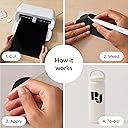
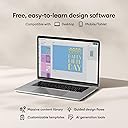
The Cricut Joy Xtra Smart Cutting Machine is a compact, lightweight device designed for professional-quality crafting. It supports over 50 materials, integrates with inkjet printers for full-color Print-Then-Cut projects, and connects to the powerful Design Space app offering 1.5 million+ images and fonts. Ideal for millennials seeking personalized, on-demand creativity with easy setup and portability.


| ASIN | B0CF6L9SMJ |
| Active Surface Area | 218.75 cm² |
| Best Sellers Rank | #3,326 in Arts, Crafts & Sewing ( See Top 100 in Arts, Crafts & Sewing ) #5 in Scrapbooking Die-Cut Machines |
| Brand | Cricut |
| Color | White |
| Date First Available | September 7, 2023 |
| Department | Unisex Adult |
| Global Trade Identification Number | 20093573787144 |
| Is Discontinued By Manufacturer | No |
| Item Weight | 6 pounds |
| Item model number | 2010313 |
| Manufacturer | Cricut |
| Material | Plastic |
| Operation Mode | Automatic |
| Print media | Unknown |
| Product Dimensions | 6"D x 12.5"W x 5.5"H |
| UPC | 093573787140 |
C**E
Will buy again
I love it. I have discovered so many things I can create. I feel like I found a treasure. I can bring my creativity off paper and make it more. It’s easy to use with just a few clicks and the size makes for easy storage and travel. Great quality
S**I
Super fun & easy to use
8 year old girl was ecstatic & is addicted to it! It's better than watching tv.
F**L
Great machine
I’m still learning how to use the machine. So far the one thing is time is definitely needed. Seems to be easy to use. The great thing is there is plenty of vids to watch for tips. I believe it’s worth the money. It does take up some space but not too large. It functions well and is great for making thank you cards so far. It does all the work for you. Has designs people have already created so it’s just choose and follow the steps and it’s all done. When I have time I can sit down and learn to create my own designs, but like I said that will need time
C**D
Excellent product!
Excellent product, ships sturdy. Easy to use and super fun! Ended up returning for an upgraded model because it's so fun!!!
A**I
Awesome machine that does way more than the cricut joy
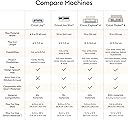
This cricut joy xtra is affordable and can do way more than the cricut joy. Would highly recommend getting this one instead of the joy since this has a sensor and is compatible with a home printer allowing you to make stickers without any problem. It also allows you to do bigger projects than the cricut joy since it’s bigger. You could easily make larger than mat projects with this machine, 3 foot piñatas, larger logos, and it is easy to use. Love that you can make many projects without spending too much like you would with the bigger versions. It’s a great size so you could even fit it on one of those 3 tier carts with wheels and have your own movable cricut station. The downside is that it does not have the scoring option and you won’t be able to engrave. Love this machine and would highly recommend if you want to get into the cricut wagon. It’s a perfect first cricut.
S**S
Cricut Joy: The Small Machine with Big Dreams!
I bought the Cricut Joy thinking it’d be a cute, little craft tool to help me make cards and labels. What I didn’t expect was a machine that had more ambition than I do. This tiny powerhouse is like the underdog of crafting devices—it's small, but every time I use it, I feel like I’m unlocking hidden crafting superpowers. One minute, I’m making custom vinyl decals, and the next, I’m wondering if I could create an entire new wardrobe with just this thing. It’s so easy to use, it’s like Cricut read my mind and decided to make a machine that could be operated by a toddler (or, more realistically, me, because I can't handle complicated tech). The fact that it can cut out intricate designs that make my DIY projects look like I hired a professional? Absolutely unfair. My only complaint: now every time I see a blank surface, I hear the Cricut Joy whispering, “What about me?” It’s got me looking at the world like it’s one giant crafting project. In short, it’s compact, capable, and quietly shaming my lack of creativity. 10/10, would totally recommend for anyone who wants to craft like they’ve got their life together.
T**M
I've always wanted a Cricut...
So I have always wanted a Cricut cutting machine, but I don't really have the space in my house, they're fairly expensive and the original Cricut Joy was too small for my tastes. Enter the Cricut Joy Xtra machine...I'm loving this thing. I found it on sale on Amazon and it was small enough to be stored away when not in use, but big enough to be useful. So far I've cut some vinyl decals for a friend to sell to raise money for her nonprofit, I've cut some vinyl decals for myself, for my family, and I've made a few T-Shirts with heat transfer vinyl. I also have some printable vinyl sticker paper to try out soon. This machine cuts up to 8.5 inches wide and 12in long on a mat, but up to 4ft long with smart materials. That said I don't like the Cricut smart materials. There aren't enough colors/variety and the vinyl is difficult to handle due to the thick paper backing. I cut a vinyl decal of lettering for my Dad's truck using a mat and carefully aligning the letters and words to make it long enough. Is that convenient, no not at all, but it's doable and for my needs it worked well. Most of what I cut (so far) are small decals and hopefully small stickers soon, so this machine is excellent for my needs. It does officially support print then cut which is wonderful and one of the main reasons I ordered it. I also ordered sublimation markers that fit in the Cricut Joy Xtra and can be used like the infusible ink markers and I haven't had a chance to use them, but I'm looking forward to it. The downsides in my opinion are the smaller cutting width (not too big an issue if plan ahead carefully), the lack of official tools (like engraving tools or different cutting blades, etc), and there are no buttons on the machine so no off button (it must be unplugged to turn it off), and then there is the software... Cricut Design Space is designed to be intuitive and easy to use and for the most part it is...however too many features are behind the subscription/paywall and I don't think the subscription is worth $10 a month. It is easy enough to manipulate your own images and import them into Design Space though. I have been using GIMP to edit photos like PNG and JPG files as well as InkScape for vector graphics like SVG files. It's easy to create a vector graphic importing a JPG into Inkscape and tracing the bitmap. However this is easy for me as I have a bit of graphic design experience and a degree in Information Technology. Design Space might be easier to use for people without that background. Another downside that I absolutely despise is the need for internet in order to not only use Design Space, but to cut an image. Why do I need internet to cut something on a cutting machine. That's just dumb in my opinion. Overall, for a first time Cricut user and a first Cricut machine, I love this thing. If Cricut would improve Design Space and eliminate the need for internet connectivity to cut files, I would give it 5 stars.
K**N
Love it!!
I really love this machine! I had a Cricut Maker, lived that as well. Due to certain circumstances, I do t have the Maker. But this Joy Xtra is awesome.
A**H
Glad I went with this size. It fits an A4 size paper in it, and I can't wait to see how many things I can make.
E**Z
Todo llegó en muy buen estado, la máquina sirve bien, aparte del material que trae, tiene un sobre con vinilo para que practiques y te dan un mes gratis de la app, me encantó
ط**ي
رائععععع و اصلي يجي معاه قلم و دبوس و ورق فينيل ٤ قطع و لصق نقل فينيل كلها بحجم صغير
C**A
Ich finde es schon komisch, dass mir bei Amazon Deutschland kein Kabel mitgeliefert wird, dass ich benutzen kann! Ich musste das nachbestellen und nochmal Geld ausgeben! Kein guter Service!!!!
R**M
ممتاز جدا أعجبني
Trustpilot
1 month ago
5 days ago