Buy anything from 5,000+ international stores. One checkout price. No surprise fees. Join 2M+ shoppers on Desertcart.
Desertcart purchases this item on your behalf and handles shipping, customs, and support to Iceland.
🚀 Elevate Your Workspace: See More, Do More, Be More
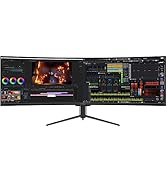
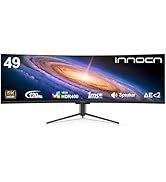
The INNOCN 49C1R is a premium 49-inch curved ultrawide monitor featuring a 5120x1440 QHD resolution with a 32:9 aspect ratio and 1800R curvature. It delivers smooth 120Hz refresh rates, HDR400 certification, and 99% sRGB color accuracy for stunning visuals. Equipped with USB-C (65W), DisplayPort 1.4, HDMI 2.1, and multiple USB ports, it supports versatile connectivity for gaming, content creation, and multitasking. Its ergonomic adjustable stand and eye-friendly curved design make it ideal for professionals seeking immersive productivity and entertainment.


| ASIN | B0BXZY18SB |
| Adaptive Sync | FreeSync Premium, G-Sync Compatible |
| Additional Features | Built-In Speakers, Curved, Flicker-Free, USB Type C, Ultrawide Screen |
| Aspect Ratio | 32:9 |
| Best Sellers Rank | #4,362 in Electronics ( See Top 100 in Electronics ) #168 in Computer Monitors |
| Brand | INNOCN |
| Brightness | 400 nits |
| Built-In Media | 1 x 49C1R Monitor with stand, 1 x DP Cable, 1 x Power Kit, 1 x USB Type C, 1 x User Guide |
| Color | black |
| Compatible Devices | Laptop, Mac, Phones, Tablets, Gaming Console, Switch, PS5/4/3, XBOX Series |
| Connectivity Technology | HDMI |
| Contrast Ratio | 3000:1 |
| Customer Reviews | 4.1 4.1 out of 5 stars (206) |
| Display Resolution Maximum | 5120x1440 |
| Display Technology | LCD |
| Display Type | LCD |
| Hardware Connectivity | DisplayPort, HDMI, USB |
| Has Color Screen | Yes |
| Item Dimensions D x W x H | 6.28"D x 45.5"W x 14.57"H |
| Manufacturer | Guangxi Century Innovation Display Electronics Co.,Ltd |
| Model Name | 49C1R |
| Model Number | H3CQR-P |
| Mounting Type | Desk Mount |
| Native Resolution | 5120x1440 |
| Number of Component Outputs | 1 |
| Picture Quality Enhancement Technology | HDR 400 |
| Refresh Rate | 120 Hz |
| Resolution | QHD Wide 1440p |
| Response Time | 1 Milliseconds |
| Screen Finish | Matte |
| Screen Size | 49 Inches |
| Shape | Rectangular |
| Specific Uses For Product | Gaming |
| Total Number of HDMI Ports | 1 |
| Total USB 3.0 Ports | 2 |
| Total Usb Ports | 2 |
| Unit Count | 1.0 Count |
| Viewing Angle | 178 Degrees |
F**T
Amazing upgrade for work and personal computing
UPDATE 12-30-2025: 1 year of use and it is still going strong, no issues. Great monitor for work! Original review: I looked on at the curved monitor craze with amusement for a few years before finally deciding to try it. At home I had been using one large 27” 4k monitor that I would toggle between my work Windows laptop and personal Mac laptop. Then I ended up adding another 24” Dell 1080 monitor to get more work real estate. Figured that would do for now but the mismatch and seam was a bit annoying. Found this INNOCN 49” curved monitor as a Black Friday deal and went for it. Easy setup, works perfectly for me. Not a gamer, so I’m not sure how well it would do there. But it works great via USB-C from my work Dell Latitude 5500 w/ the Thunderbolt support. And I have it going usb-c from the Mac to DisplayPort, which gives the faster 120mhz support. Easy to switch between inputs using the menu buttons. The stand legs are thin and unobtrusive. It doesn’t emit much heat at all. So far no odd behavior after about a month of daily use. Only mild annoyance is that after a time it seems to go to sleep and then it disconnects from the work laptop which causes all the windows to move back to the laptop screen when I log back in. I’m not sure if that is the monitor’s fault or a Dell thing. Regardless I highly recommend this as a solid basic and inexpensive 49” QHD curved monitor for productivity use. Just make sure your computer can support it, and remember it only has one USB-C input. But using DisplayPort is also available and would give you the better refresh rate, without the benefit of a wired USB keyboard/mouse connected straight to monitor.
V**O
Solid Contender for Traders Using TradingView
I will return to update this review in 6-12-18-24 months. Wow! I’m absolutely impressed with this monitor. Note that I’m NOT a gamer, I’m a trader and needed a wider monitor to run my active charts on TradingView, and that is accomplished well by this monitor. I could not be happier. That is essentially the only reason I got this. More Detail: I picked this up on a fantastic deal and I’ve gotta say I will never go back to a flat panel again. The quality is right up there with any Samsung or higher end Acer monitor, this one has a matte screen and there are many intuitive controls for adjustments. This is not a 5k monitor, thats a gimmick, and so is the “eye saver” feature which seems like a passably dumb sepia filter, but for the money if you need a wide monitor this is a contender. I havent explored all the color adjustments, for my purposes its not essential. The build quality is good, the box it ships in is sturdy not flimsy, the stand snaps right in, no need for screws. Comes with a VESA mount bracket. It may be a tad on the heavy side for smaller people to handle and assemble, so have a burly friend like me around to help if you’re in that category. It’s Apple friendly and Mac compatible: I’m running this natively at 5120 x 1440p hooked up via USB-C cable to a 2018 Mac Mini with 64gb of ram. Unfortunately the 2018 Mac Mini uses DP1.2 so you’re best bet may still be your Thunderbolt USB-C port to connect this monitor. But hey, that aint too shabby. And the upside is that it supports the default 5120 x 1440p resolution without any extra apps or external graphics cards needed. You may get WAY better options going with an external graphics card. I’ll check back in later, hope this review is helpful to some. Happy monitor hunting!
J**.
Awesome Value
Awesome Ultrawide Value. I use this monitor for excel, outlook, chrome, teams, and other apps related to my work. My previous setup consisted of 2x 32" monitors (1x1080p and 1x1440p) and my 17" laptop (also 1080p). The 49" size is a much better fit for my desk and far more simple to setup, not to mention Windows has an easier time dealing with 1 monitor instead of 3. Since this monitor is 1440p, I actually ended up with about the same screen real-estate as I had before. Aside from the size and resolution, the color is quite good (HDR is non existent, just leave it in SDR mode) and the contrast is very good. This is also by far the cleanest and fastest VA panel I've seen. The pixel reaction performance and input lag feel comparable to IPS, but with the awesome contrast performance of a VA panel. Since this is used in an office, I didnt want a monitor with "enthusiast gamer" vibes. This one is very reserved, with just a couple red accents spread throughout. For the money, you can't beat this screen size and it's performance. Awesome contrast, color, sharpeness, and screen real-estate for around $500 and no OLED burn in concerns. Not bad!
Trustpilot
1 month ago
2 months ago