



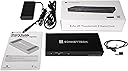


Sonnet Echo 20 Thunderbolt 4 SuperDock
Product ID: 542373891
⚡3x Thunderbolt 4 ports
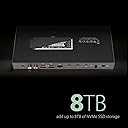
💾M.2 NVMe SSD slot (up to 8TB)
🔌Up to 100W laptop charging
Buy anything from 5,000+ international stores. One checkout price. No surprise fees. Join 2M+ shoppers on Desertcart.
Desertcart purchases this item on your behalf and handles shipping, customs, and support to Iceland.
🚀 Power, speed & versatility — the dock your desk deserves!
The Sonnet Echo 20 Thunderbolt 4 SuperDock is a powerhouse docking station featuring 20 ports including three Thunderbolt 4, multiple USB 3.2 Gen 2 ports, HDMI 2.1, 2.5Gb Ethernet, and an M.2 NVMe SSD slot supporting up to 8TB storage. It delivers up to 100W charging and supports ultra-high-resolution displays up to 8K@60Hz. Compatible with a wide range of devices from Apple M series Macs to Windows Thunderbolt PCs and iPad Pro, it’s designed for professionals demanding seamless connectivity, fast data transfer, and future-proof versatility.


| ASIN | B0C9VTDXY6 |
| Best Sellers Rank | #7,408 in Computers & Accessories ( See Top 100 in Computers & Accessories ) #563 in Laptop Docking Stations |
| Customer Reviews | 4.3 4.3 out of 5 stars (224) |
| Date First Available | June 30, 2023 |
| Item Weight | 1.75 pounds |
| Item model number | ECHO-DK20-T4 |
| Language | English |
| Manufacturer | Sonnet Technologies |
| Product Dimensions | 9.63 x 4.25 x 1.38 inches; 1.75 Pounds |
| Type of item | Electronics |
F**O
Stopped working and my files from my NVME got deleted
Changing my rating to 5 since the problem i stated below was caused by my ipad that updated to the latest release of ios version at the same time i connected it to the dock, just coincidence i guess. But after restarting my ipad, i could now see all my files. And is the most capable dock i have ever tried. Worked great out of the box, connected it to my ipad pro then shows up on my "files" the connected samsung 970 evo plus inside the enclosure. Transferred all my files there, then after 20 minutes i can no longer see my files on the ssd enlcosure. Seems like all the files got deleted!!! Luckily i haven't deleted my original files on my samsung ssd yet.
C**E
The right ports and more
Pros: • Number of USB ports. You will be hard pressed to find a dock with as many USB A and C ports as this one has. • SSD slot. Great for backups or added storage. • Size. As with most Thunderbolt docks, this is large and heavy. You will not want to travel with it. But that is where your manufacturer’s power supply and a cheap USB-C hub come it. Cons: • No MicroSD card slot. You can use the SD card slot with an adapter, but most people are using MicroSD cards these days for everything except for photos. • Price. At $300 MRP, this is in the upper-mid range for quality docks. I do think the SSD capability and number of USB (C and A) makes it worth the price. I have had USB-C-powered laptops (a 2019 and a 2023 HP Spectre x360 13.3” models) for 3-1/2 years. In that time, I have used several cheaper USB-C hubs. While these can be great for business trips, I wanted something more powerful to have at my office desk allowing me to leave my normal charger at home. And so, I spent a couple of months talking with respected IT friends and doing my research for the best Thunderbolt dock for my needs. I wanted at least one (possibly two) HDMI 2.1 ports. One or two Thunderbolt USB-C outputs. Three or more USB-A 10Gbps ports. Headset combo jack. The Echo 20 SuperDock more than met those needs. I have my Samsung 32” 4K monitor plugged into the HDMI 2.1 port. A KYY 15.6” 1080p portable monitor plugged into one of the USB-C Thunderbolt ports. A Logitech Unifying USB receiver is plugged into one of the rear USB-A ports. My headset for Zoom meetings and audio recording is plugged into the headphone jack. Many Thunderbolt docks sacrifice the number of Thunderbolt USB-C ports in exchange for adding another DisplayPort or HDMI port. I prefer more Thunderbolt ports and fewer HDMI or DisplayPorts because that allows more flexibility. It is easy enough to use a USB-C-to-HDMI or a USB-C-to-DisplayPort adapter or cable. And many newer monitors are coming with USB-C video input. My Samsung 32” can do either USB-C or HDMI 2.1 input so I chose HDMI so that it isn’t using up a Thunderbolt port unnecessarily. My KYY portable monitor can use either HDMI or USB-C so I chose one of the Thunderbolt ports as that will provide it with both video and power resulting in fewer cables on my desk. I now just take my laptop back and forth from the office rather than also needing to remember a charger, mouse, and cheap hub. And I don’t have to fumble around with lots of cables. Just plug in the Thunderbolt cable from the dock to my laptop’s USB-C power port and I and up and running. And the ability to have an SSD installed in the dock means I am more likely to remember to backup my files more regularly. I installed a WD Black 1TB SN770 NVME into the slot in the dock, mounted the drive on my computer (YOU MUST DO THIS BEFORE THE SSD WILL SHOW UP ON YOUR COMPUTER), and then configured SyncBackPro to backup the desired folders onto the dock. I no longer need to plug an external drive into a USB port in order to do a backup. As long as I am connected to the dock, I just run the backup profile group. Some people have complained about not having drivers for Windows 11. You do not need any special drivers. Any drivers for the dock are included in Windows. If you are having issues with a specific device, it is not an issue with the Sonnet Echo but rather an issue with your device.
J**.
Good Dock for MacBook Pro but not effortless to use
This Dock has plenty of connectors to attach all the peripherals I needed to the new 2023 MacBook Pro. The M.2 drive port is also a nice added bonus for archiving data from the laptop's internal drive. I was able to connect dual 27" Dell 4K monitors to the Dock and they run at 3840x2160 60Hz using USB-C to Display port cables connected to the 2 thunderbolt ports on the Dock (no adapters needed-link below). https://www.amazon.com/dp/B0B8GP2H17?ref=ppx_yo2ov_dt_b_product_details&th=1 The RCA connectors for the audio output were an interesting choice but I was able to use an adapter cable to make them work with the speakers I was using: https://www.amazon.com/dp/B06XCR898P?psc=1&ref=ppx_yo2ov_dt_b_product_details The ethernet port works great and there are plenty of ports for various USB accessories. The front ports are great for charging devices such as an iPhone and Apple watch or for quickly connecting a thumb drive. I also added a Samsung 970 EVO Plus drive to use for backups. And while the connectivity is great and the Dock works for the most part it does have some drawbacks. The most blatant to me is the lack of a power button. If a company is going to build a Dock with virtually every connection type possible why omit something as simple as a power button? While this is a minor thing it would just be nice not to have to open the laptop lid, hit the power button and close it each time I power on the laptop. And while I am able to get the dual displays to work at the resolution I want they are very flaky. Sometimes when powering up the laptop or after a long sleep the displays will not come on. Powering them off and back on often fixes this or unplugging and plugging back in the Thunderbolt cables will do the trick. A minor hassle but still something a user shouldn't have to do. And finally the internal M.2 Drive while a nice add on is not very stable. After a while it will just disappear from the desktop and no longer be visible to the Mac (even in disk utility). A reboot is required usually of just the Mac but sometimes both the Mac and Dock to get the drive to reappear. I have not yet lost any data on the drive but now only use it for temporary storage of non-critical data because I don't feel confident in its reliability. In summary while the Dock has a few quarks it does offer full connectivity of everything I need and most of the issues listed above are brief inconveniences that can be easily overcome. The M.2 slot is something that I would not really count on using especially if you are doing video editing or other work that requires a reliable hard drive.
M**5
Big difference in performance and supportive vendor.
I've had dock for about 6 months and it has made a big difference in the performance of my computer. Adequate ports for all my devices and has sped up performance. I was able to install a memory card into the dock so also serves as portable drive. It doesn't take a sata ssd but I bought (acer FA200 NVMe Gen4 SSD 4TB, PCIe 4.0, M.2 2280, Read Speeds Up to 7200MB/s, Internal Solid State Drive for Laptop, Desktop PC and PS5 Upgrade - BL.9BWWA.150) on amazon that worked great. The company was very responsive and helpful in guiding me to the correct ssd specs.
A**.
Disconnected my external hard drive
I wanted to replace my previoius docking station, because it was sometimes causing my Zoom meetings to disconnect, often when I was leading meetings of dozens of people. This one was recommended online as being the best in one review, so I decided to try it, even tho it's pricey. It hasn't disconnected a zoom call yet, but I did get an improper disk ejection message the most recent time I asked the computer to go to sleep. This device apparently also goes to sleep when the computer does, which may have caused this improper disk ejection message. Also this thing tends to run hot, which is not good for summer. I had a second instance where I put my laptop (MacBook Pro) to sleep. This device did not seem to wake up properly after the laptop woke up -- at least the second screen wouldn't come on. I had to eject the external hard drives (which weren't ejected improperly this time) and disconnect the dock then reconnect the dock, before the second screen came on. Irritating. I also had a weird issue with Zoom, where I was doing real time interpretation into a foreign language, and people could not hear me. I did not have this problem before. I don't know if it's due to the docking station. I had another issue one time, where I was starting up from a complete shut down, that I got about 10 messages indicating that my external hard drive had been improperly disconnected, even tho nothing was happening in terms of connections. I unplugged the Sonnet for about 15 minutes and then tried again. It seems to be working now, but I am *not* happy Also, it does not seem to be successful in starting up my external screen. I tried connecting it directly and there is no problem
D**D
It just works.
I purchased an M1 Macbook Pro at the end of 2022, and ever since have been juggling a mess of dongles and adapters to give me the connectivity I need. This puts an end to all of that -- with just one cable! The Sonnet Echo 20 has given me all the connectivity I need and more in a relatively small, well-built package. Several of the dongles I've purchased in the past year have required some kind of driver to get working properly, which Apple makes a pain to set up. This dock doesn't require any drivers. I plugged it in for the first time, and it just worked. I have a 1440p 49" ultrawide monitor, and this thing handles it great! Other USB hubs I've bought will only send a maximum of 1080p signal to my monitor, yet they claim to be able to handle 4K @ 60fps. This dock has no problems sending a true 1440p signal to my monitor and did so without having to go into display settings to fiddle around with the resolution. I am a music producer and have been running my audio interface through this dock for a while, and I've experienced no noticeable added latency or drop in audio quality. I also have a Samsung 980 Pro 2TB installed into the M.2 slot, and it has been working flawlessly. Overall, this is a great dock. It works out of the box with no additional setup required, is built to last, and has been a pleasure to use. I plan to continue using it for years to come.
A**R
The most feature rich TB4 dock for the price
I love this dock. I tried a couple of different ones and this one just works. It allows me to plug my M2 macbook pro into my UA Apollo thunderbolt, NI Komplete Kontrol Keyboard, several hardrives, multiple monitors all with one included TB4 cable. It even powers the Komplete Kontrol keyboard via the single USB C cable and it powers the Macbook too so truly one cable is all you need to plug in. It makes it so easy to take the computer with me without dismantling the entire studio. The SD card slot is fast, and I have so many inputs that are not in use. I haven't even installed a hard drive in this beast and i still think it crushes the direct competition for a much cheaper price.
J**O
Nothing but problems
I was using this with my 16" M2 MacBook Pro, and I had constant issues: • I have a 38" LG Ultrawide monitor, and it was connected to this dock using an HDMI 2.1 cable from Belkin. I was able to connect if the monitor was set to 60 Hz. However, switching to 85 Hz became unreliable. Sometimes the monitor would flicker on/off every 5 seconds. • Since HDMI didn't work well, I decided to use an HDMI to DisplayPort cable, and connect that to the DisplayPort connector on my monitor. That didn't work at all. There was no video signal. • Then I tried using a USB-C to DisplayPort cable. Once again, there was no video signal at all. I finally gave up, and went back to 60 Hz HDMI. That's a shame, because my monitor is capable of 144 Hz. • Moving on from the video signal, I tried to connect an Anker 10-port USB hub to the dock. It was plugged into the USB-C port on the back of the dock. Unfortunately none of the USB ports on the hub worked. I later discovered that the hub needed to be plugged into a Thunderbolt port on the back of the dock. This is a known limitation that is documented on the OWC website. (To be fair, the CalDigit TS4 dock has the same problem.) Ultimately it worked, but it required using one of the Thunderbolt ports, and I would prefer to keep that available for devices that need a very high speed connection. • I also had this dock attached to a KVM switch that allowed me to share USB devices between two computers. Unfortunately, on two occasions the shared USB devices failed to work when switching back from the other computer. I never had this problem with other Thunderbolt docks, and everything was wired up the same way. Ugh...after all that I gave up, and went back to using my CalDigit TS3 dock. That dock reliably gives me 144 Hz DisplayPort video on my monitor, it works with my USB Hub, and it works with my KVM switch.
P**P
Powerful, fast, easy to use, supports M2.NVMe 2280 PCIe SSD internally, expensive but worth it
Matched with a modern Apple Silicon Mac running Ventura connected via Thunderbolt4 it "just works", and is very fast, easy to connect and use, versatile, did I mention fast? The main downsides are: it does run fairly warm - today with ambient at 26.0 deg.C it measures 42.1 deg.C (over the top logo area) and it needs a fair bit of shelf or desk space around it by the time everything is all plugged in and in use. Used with current 1080MB/s external SSD it's astoundingly fast. All the Thunderbolt and USB peripherals have worked fine too. Also recommend installing the M2.NVMe 2280 PCIe SSD internally, it works very well with my Mac. Overall: recommended.
A**Z
Alles drin, alles dran, alles läuft. Die Mutter aller Thunderbolt 4 Docks!
Ich hatte eine Menge Thunderbolt 3 und 4 Docks doch dieses ECHO20 hier von Sonnettech schlägt alle und wird zu Recht mit dem Zusatz „SuperDock“ beworben. Das ECHO20 bietet 20 Schnittstellen und zwar richtig schnelle Schnittstellen! 8 x USB mit 10G/sec. (4 x USB-A, 4 x USB-C), Ethernet mit 2,5G, RCA Line-Out Schnittstellen (bietet kein anderes Dock!) und - als Sahnehäubchen - eine nVme Schnittstelle um eine bis zu 8TB große nVme SSD einzubauen (diese ist zwar nur mit 1 Lane angebunden und bietet somit „nur“ bis zu 800GB/sec Durchsatz, was in der Praxis aber nicht wirklich einen Unterschied macht). Weiterhin stehen 2 Downstream Thunderbolt Ports, 1 HDMI 2.1 und ein schneller SD Card Slot zur Verfügung, auch separate Mikrofon und Headset Anschlüsse sind vorhanden. Dort wo sie dieses Dock an ihren Portablen Rechner (MacBook Pro) anschließen können sie in der Regel das Netzteil des Rechners vergessen, es werden bis zu 100 Watt an den Rechner weitergeleitet. Bei dieser Fülle an Anschlussmöglichkeiten muss man sich eher fragen „was fehlt“. Vielleicht ein DisplayPort Anschluss, eine zweite nVme Einbaumöglichkeit wäre auch nett, andererseits sind die 40G Bandbreite das Maximum, das sich alle angeschlossenen Geräte teilen müssen. Jeder Anwender und Interessent muss sich aus dem Angebot an TB4 Docks das heraussuchen was seine Anwendungsfälle in Kombination mit Preis/Qualität und Zuverlässigkeit am besten abdeckt. Das „SuperDock“ von Sonnettech ist bedauerlicherweise nicht das günstigste. Sonnettech ist keine Klitsche, ganz im Gegenteil bietet der Hersteller aus Kalifornien ein breites Sortiment an hochwertigen Zubehörprodukten/Steckkarten etc. an und ist im professionellen Apple-Markt wohlbekannt. Meine ersten Praxistests des ECHO 20 an einem Mac mini M2 fielen durchweg positiv aus: Alle Schnittstellen funktionieren OOB wie man so schön sagt, keine Treiberinstallation erforderlich. NVMe wird erkannt und gemountet oder zur Formatierung empfohlen. 2,5G Ethernet geht, die RCA Anschlüsse, Kopfhörer, Mikrofon, HDMI etc., funktionieren wie man es erwartet, keine Ausfälle, Abbrüche oder sonstigen Auffälligkeiten bisher. Das Dock selbst ist solide gebaut, wird mit eingebauter nVme handwarm. Einen Ein/Ausschalter sucht man vergebens, das Gerät schaltet sich mit dem angeschlossenen Rechner ein und aus. Den professionellen Eindruck rundet eine Verriegelungsschraube für den Thunderbolt Anschluß zum Rechner ab. Für mich ist die Anschaffung eines Thunderbolt 4 Docks vergleichbar mit der Anschaffung eines Monitors: Einen Monitor hat man über 2, 3 oder mehr Rechnergenarationen hinweg. Ebenso verhält es sich mit TB3/4 Docks, die kauft man ebenfalls für mehrere Rechnergenerationen, insofern lohnt es sich hier etwas mehr in ein professionelles Gerät zu investieren an dem man lange hat. Deshalb ist es für mich kein Problem das mein neues „SuperDock“ nur unwesentlich weniger kostet als der Mac mini M2 an den es angeschlossen ist. Hinweis zum Schluss: Das ECHO20 wurde von mir persönlich gekauft, ich bin zufriedener Anwender und bin kein professioneller Rezensent der durch kostenlose Geräte gesponsert wird. Wenn ich zufrieden mit einem Produkt bin dann schreibe ich schonmal ein Review und bringe meine Begeisterung zum Ausdruck. Vielleicht hilft es dem einen oder anderen bei seiner Anschaffung.
A**F
Ottimo
Veramente top anche se il prezo non e' basso. Lo uso con um macbook pro M1 e funziona perfettamente. Si scalda il giusto ma nel mio caso non conta perch'e e' in una posizione sacrificata.
T**E
Beware of that 'SoNNeT Echo 20 Thunderbolt 4 SuperDock' can be shutdown without reason
Connected to MacBook Air 15" M3, when computer is in sleep mode it "sometimes" shut down the SoNNEt Echo 20 without no reason, I have no problem when computer is running as normal though.
C**V
Extraordinario Dock
Este es un Dock extraordinario realmente es el mejor que existe en el mercado para mac estoy muy contento con esta compra lo único que me preocupa es que se calienta mucho y como se ve la fotografía yo lo tengo debajo de un monitor incluso me preocupa que afecte el monitor por el calor que genera Pero si eso no provoca que falle Y tiene una buena duración entonces habría sido la mejor compra de cualquier complemento para Mac que haya hecho en mi vida, pero ya veremos el tiempo nos dirá la realidad
Trustpilot
2 days ago
2 months ago