


Desertcart purchases this item on your behalf and handles shipping, customs, and support to Iceland.
🔐 Unlock the future of home security—smart, sleek, and always connected.
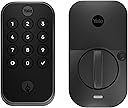
The Yale Assure Lock 2 is a Z-Wave enabled smart keypad lock designed for keyless, remote access and seamless integration with popular smart home systems. Featuring Auto-Unlock, Auto-Lock with DoorSense, and unlimited shareable access codes, it offers advanced security and convenience in a stylish black suede finish. Compatible only within the U.S. and Canada, it’s perfect for professionals seeking effortless, trackable home entry control.



| ASIN | B0C2FQ3T5Z |
| Additional Features | Adjustable Deadbolt, Auto Unlock, Auto-Lock, Keypad Entry, Z-Wave |
| Best Sellers Rank | #75,154 in Tools & Home Improvement ( See Top 100 in Tools & Home Improvement ) #152 in Deadbolts |
| Brand | Yale |
| Brand Name | Yale |
| Color | Black Suede |
| Connectivity Protocol | Z-Wave |
| Control Method | Touch |
| Controller Type | iOS |
| Country of Publication | Vietnam |
| Customer Reviews | 3.9 out of 5 stars 133 Reviews |
| Finish Types | Powder Coated |
| Included Components | Yale Assure Lock 2, Yale Z-Wave Smart Module, Yale DoorSense, Deadbolt, Strike Plate, One Key, Mounting Hardware, Installation Manual |
| Item Dimensions | 6.4 x 9.4 x 5.8 centimeters |
| Item Type Name | Lock |
| Item dimensions L x W x H | 6.4 x 9.4 x 5.8 centimeters |
| Lock Type | Keypad |
| Lock type | Keypad |
| Manufacturer | Yale |
| Manufacturer Part Number | YRD410-ZW2-BSP |
| Material | Nickel |
| Material Type | Nickel |
| Model Name | Keypad |
| Model Number | YRD410-ZW2-BSP |
| Number of Pieces | 2 |
| Recommended Uses For Product | Entry Door, Front Door |
| Recommended uses for product | Entry Door, Front Door |
| Shape | Rectangular |
| Smart Home Compatibility | Smart Home Compatible |
| Special features | Adjustable Deadbolt, Auto Unlock, Auto-Lock , Keypad Entry, Z-Wave |
| Style Name | Keypad |
| UPC | 081023112307 |
M**R
Doesn’t work No warranty
Bought the lock from Amazon and tried to install it. When I tried to pair the lock the Yale all says unable to find manufacturing info for this product. I raised a query with Yale Middle East and they responded saying that this product is not sold by them In Dubai and I should contact Yale USA support. The Amazon app has no way of reporting a warranty issue except to contact the seller. The seller is Q Tech Trading LLC but there is no way to contact them. Apparently they are the holding company for Amazon.ae. The return period has expired and there seems to be no answer to resolving this
A**.
Does not work in UAE. Do not buy
This product works only in USA and Canada. Do not work in UAE. Complete waste of money
E**Y
Cerradura y manipulación defectuosa
Esta cerradura estaba defectuosa después de que fue instalada por el cerrajero y las baterías añadidas. Los puntos de contacto en la cerradura se calientan indicando un cortocircuito en la cerradura. Además, según el cerrajero, era evidente que la cerradura fue manipulada porque faltaban tornillos, un tornillo tenía grasa y las llaves no estaban en la caja. Desde entonces he devuelto la cerradura a Amazon y estoy esperando mi reembolso a mi tarjeta de crédito. Compré otra cerradura de Yale a Amazon y fue entregada hoy. El cerrajero lo instalará pronto. Espero que todas las partes estén en la caja esta vez.
N**K
Bought new, got used. Would not Connect.
Product was a previously returned item, missing the strike plate and allen tool, plus 4 random batteries that are not OEM batteries, and factory seals were cut. Considering there is a cost difference to purchase “NEW,” or “Used - Like New,” I purchased the more costly NEW option and received the a used product with missing parts. That said, the lock was in good shape, so I decided to take on the chin, and proceed with installation…. Physical installation was simple, and the device feels well made, but after numerous failed attempts to setup the device, I finally discovered that it had not even been factory reset which prevented it from ever entering setup/pairing mode. I Googled how to factory reset the device, and was successful in performing a factory reset. With the lock now in setup/pairing mode, I made 20+ attempts to connect (uses Bluetooth for initial connection, to allow WiFi setup) using 3 separate devices (two iPhone 13 Pro Max’s, and one iPad Pro M1), the device was never recognized by the Yale Access app on any device, even with the paring lights active. Extremely frustrating. Device is now being returned. Additionally frustrating, is the fact that this device was purchased to replace the same type of device, but non-keyed version, that I had to CUT WITH A SAW to open the door since the 9v backup FAILED to work after the batteries died. I will take blame for this as the non-keyed version should never be installed on a door which is a single access point…but failure of the 9v factory fail-safe system after 2hrs of attempts on a device that was only 1 year old meant I had to destroy the $200+ device just to open the door and replace it with another $200+ device that failed to work. Final point with the failed 9v backup is that I was very diligent to regularly replace the batteries to avoid this very issue. In the week leading up to the dead batteries, I was receiving WiFi connection lost / WiFi connected notifications constantly from the device via the Access app. I think this played a role in the expedited draining of the batteries. Seriously questioning my commitment to Yale. But, I will be trying one last time. My goal is to have my shop door on the same network and control systems as my home front/back entrance doors, which are both Yale Assures (no key) with Z-wave, and connected to / controlled by my Ring Alarm system and Alexa. This is my final attempt with Yale…. I have ordered another Assure 2 w/ lock and z-wave. If this final attempt does not work, I will be transition my entire system to a new brand and platform.
D**R
Great lock easy setup
Love this lock and all its options. Love how it integrates with my home automations!
D**R
Good lock. I know Yale's customer service is trash, and difficult to return or replace
DO NOT BUY THE YALE LOCKS THAT HAVE BEEN RETURNED OR SAY 'IN GOOD CONDITION, LIGHTLY USED' you will regret it. We first bought a opened one, had ton of issues with it. MIssing screws, no pamphlet. Thankfully we bought it from Amazon and was able to do an easy return. We have three of these in a few different varations. So far, all of them have been great. I've read a ton of reviews for this specific lock (and other Yale locks) and alot of people have had a ton of random issues with it. Also, apparently the customer serivce for Yale is a nightmare, and they can be finicky about letting you return, and just drag everything out to where its past the return time.
M**.
Home Assistant compatibility
It works with Home Assistant so you can control it locally without the need to use any cloud service. It requires you to first configure the lock using the Yale Access on an smartphone (Iphone worked well and Pixel 8 Pro had some issues). Here are the steps to integrate the Zwave module with HA: On HA: Make sure you have a Zwave controller working with your HA Install and launch the Z-Wave JS UI Click the button in the botton/right and select Manage Nodes Select Inclusion and click Next Add a name (optional) and click Next Select Default option but mark the Force Security checkbox (prefer S0 over no encryption) and click Next On Yale Access (assuming the lock is already added to the app): Go to the Settings (right botton gear icon) Select the lock Select Smart Yale Module Put the lock in Enrollment mode You can also set the codes via HA. For that go back to Zwave JS UI, click on the device and expand the User Code v1 section. I couldn't get the Door Sense (open/closed) to work. There is a binary_sensor.device_name_lock_current_status_of_the_door but it doesn’t change when I open or close. I will do some more testing later.
Trustpilot
3 days ago
1 month ago