We remain fully operational. Our teams are working around the clock to ensure your deliveries continue safely.

DOWNLOAD THE APP


Customer Services
Copyright © 2025 Desertcart Holdings Limited
DOWNLOAD THE APP
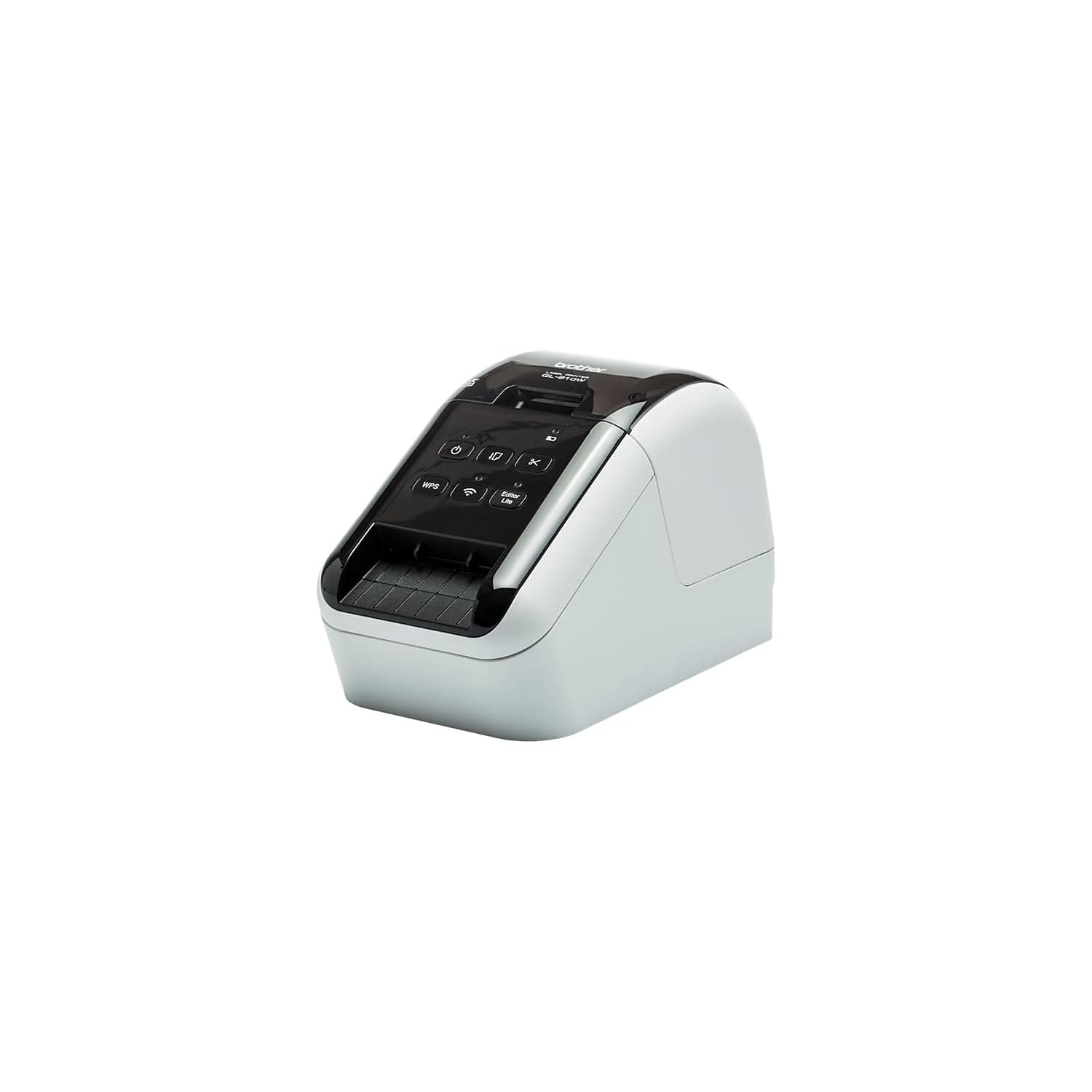
⚡ Print Fast, Connect Smart, Label Like a Pro!
The Brother QL-810WC is a professional-grade label printer designed for high-speed, high-impact labeling with ultra-fast printing up to 110 labels per minute at 300 dpi. Featuring dual-color black and red printing, it supports seamless wireless printing over 2.4 GHz WiFi and USB connectivity. Ideal for office environments, it enables mobile device printing and comes with user-friendly software for quick setup and versatile label creation.


| ASIN | B0BTTVDJDM |
| Additional Printer Functions | Print Only |
| B&W Pages per Minute | 110 ppm |
| Best Sellers Rank | #12,541 in Office Products ( See Top 100 in Office Products ) #46 in Desktop Label Printers |
| Brand | Brother |
| Built-In Media | Brother QL-810wc Label Printer, P-touch Editor Software & Driver, AC Power Adapter, USB Cable, & Starter Rolls: DK-1201 Die-cut Address Labels (100 labels) and DK-2251 Continuous Red/Black Length Paper Tape – 2.4” (62mm) x 16.4’ |
| Color | Black |
| Color Depth | 1 bpp |
| Color Pages per Minute | 110 ppm |
| Compatible Devices | Android, Laptops, PC, Smartphones, iPhone |
| Control Method | App |
| Controller Type | Android, iOS |
| Customer Reviews | 4.0 4.0 out of 5 stars (77) |
| Dual-sided printing | No |
| Duplex | Simplex |
| Hardware Interface | USB |
| Ink Color | Black, Red |
| Item Dimensions D x W x H | 5"D x 9.2"W x 5.7"H |
| Item Type Name | Direct Thermal Printer |
| Item Weight | 2.4 Pounds |
| Manufacturer | Brother |
| Maximum Copy Resolution Black and White | 300 dpi |
| Maximum Copy Resolution Color | 600 dpi |
| Maximum Copy Speed Black and White | 110 ppm |
| Maximum Media Size | 11 x 17 inch |
| Maximum Print Resolution Black and White | 600 Dots Per Inch |
| Maximum Sheet Capacity | 200 |
| Maximum print Resolution Color | 600 dpi |
| Model Name | Model: QL810WC Differentiator: New Processor |
| Model Number | QL810WC |
| Model Series | QL |
| Other Special Features of the Product | Energy Star |
| Output sheet capacity | 200 |
| Paper Size | DK Series Labels and Tapes |
| Print media | Labels |
| Printer Connectivity Type | USB, Wi-Fi WPA3 |
| Printer Output Type | Color |
| Printer Type | Thermal |
| Processor Count | 1 |
| Resolution | 300 x 300 |
| Specific Uses For Product | labeling various items |
| Total USB 2.0 Ports | 1 |
| Total Usb Ports | 1 |
| UPC | 012502672371 |
| Unit Count | 1.0 Count |
| Warranty Description | 2 year limited |
| Warranty Type | Limited |
A**S
I love it
Still works to this day easy to connect to the internet and to devices and works great for our church
F**E
Excellent label printer
Really great label printer. Easy to set up and use with Brother's software. It works well with generic labels, unlike the competitor machine.
C**.
Brother makes great stuff
Love this new Lable printer. I have had other Brother products, mainly label makers, and this one is just as nice to use as the others in the past. I have only had experience with Zebra printers before this new one, but they both work great and get the job done.
N**R
Way too difficult to install.
Edit: Finally, got this to install and work by some intuitive guesses and luck. Changed review to four stars from one. Called their support line. Keep in mind, they have very limited knowledge about the product and software. They only could help specifically, with reinstalling the software and printing a test label. Also, the instructions don't always match up with the outcome printed in the instructions or what is expected. Somehow, this may connect to wifi without having to know the network code. Maybe, because there is already another Brother printer that knows it? Also, be aware you may be asked for the device's password while trying to use some of the software. Only by luck when trying to reset the network connection by pressing the power button and cutter button, and then pressing the cutter by itself, it printed out some report on the labels. On one of them was the default password. The default password will have to be changed after entering it, but it doesn't tell you that directly. This is done in the WPAdmin software. And here is where it tells you to update the firmware, several times. At first, the printer may not appear. Even if other Brother printers do. Press the search or seek button, and it looks for other devices. This whole process took about 4 hours. Original: Could not get it to work. Installation instructions confusing. Installed using USB cable, now would like to connect using Wi-Fi. Not easy to figure how to update settings. And when opening some software, an error saying the driver is missing, even after installing the driver.
S**K
Won't connect to network, abysmal instructions from support site
Purchased so I can print labels from my network, same network my Brother laser printer is on. Will not connect to the network, and trying to load the driver and trying to go to any type of user interface - DOES NOT WORK. Instructions on Brother support site are abysmal. Maybe this works OK for PCs, but not worth the hassle on a Macbook Pro connected to a regular EERO router.
C**L
Did not work with surface pro
Does not work with the newest windows tablet.
G**T
LOVE this machine!
Since I bought this machine this machine has performed perfectly helping me to make lables for my cards. I have used it to make addresses for packages I am sending just amazing. It is so simple to use.
S**Y
Works great
This was to replace an older label printer that finally quit on me and this one performed great once I got it set up wirelessly.
Trustpilot
2 weeks ago
1 month ago