Buy anything from 5,000+ international stores. One checkout price. No surprise fees. Join 2M+ shoppers on Desertcart.
Desertcart purchases this item on your behalf and handles shipping, customs, and support to Iceland.
๐ผ Elevate your server game with hot-swappable power and pro-grade cooling!
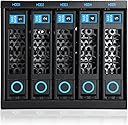
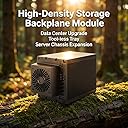
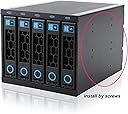
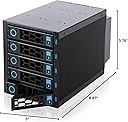
The RackChoice Internal Hard Drive Enclosure transforms 3 external 5.25" bays into a versatile hot-swappable backplane supporting 5 SATA/SAS drives at blazing 6 Gbps speeds. Featuring a robust metal chassis with an 80mm cooling fan, it ensures efficient heat management and reliable performance. Compatible with all rack types, it offers tool-less mounting for 3.5" HDDs and secure SSD installation, making it an ideal solution for professionals seeking scalable, high-speed storage with easy maintenance.


| ASIN | B0BV142WM5 |
| Best Sellers Rank | #174 in Enclosures |
| Brand | rackchoice |
| Built-In Media | DVD |
| Color | Black |
| Compatible Devices | Personal Computer, Laptop |
| Customer Reviews | 3.7 out of 5 stars 122 Reviews |
| Enclosure Material | Metal |
| Global Trade Identification Number | 00787996911748 |
| Is Assembly Required | No |
| Item Dimensions D x W x H | 8.87"D x 5"W x 5.76"H |
| Item Weight | 1.94 Kilograms |
| Manufacturer | RackChoice |
| Material | Metal |
| Mfr Part Number | R35-6GB |
| Model Number | R35-6GB |
| Mounting Type | Rack Mount |
| Product Dimensions | 8.87"D x 5"W x 5.76"H |
| Size | 5.756 x 5 x 8.87 inches |
| UPC | 787996911748 |
| Warranty Description | 2 year manufacturer |
J**7
Nice Internal 5-in-3 Enclosure and Good Value.
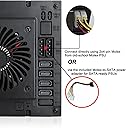
I bought two of the RackChoice Internal Hard Drive Enclosures on sale for use in a CoolerMaster tower with 6 exposed 5.25 bays. I run an UnRaid server with 10 HDD/SSDs and this is a perfect solution. As other reviewers have noted I had to make minor modifications to the internal bays of the CoolerMaster tower, bending some tabs out of the way to fit the 5-in-3 enclosures but otherwise it was a simple plug-and-play. No instructions needed. The enclosures have 2 Molex power connectors for redundancy, assuming you have two separate independent power rails and you choose to use them in a redundant fashion. Otherwise a single power connection from the PSU to the enclosure works fine. I am powering 5 HDD on a single power rail without issue using a 750W PSU. The HDD sleds require no screws to mount a 3.5 HDD, they just snap-in-place. For 2.5 SSDs screws are required and supplied with enclosure along with 5 SATA cables, but I chose to use my own cables. The sleds latch into place with minimal effort and hold the drives securely in the enclosure. The power and activity lights on each sled work as expected, so you can see at glance what bays have drives installed and when they are active. I did replace the fans in the enclosures with Noctua NF-A8 FLX 80mm fans as mentioned in another review. I have used Noctua fans in other builds and they are excellent and silent fans. Itโs not that the stock fans are bad or excessively loud, but for my application and server location I wanted something a bit quieter and lower pitched. I think a lot may depend on your case size/design and the other fans installed in the case as to whether noise is an issue for you. The stock fans run at 2500rpm and in their favor they do keep the 5-in-3 enclosures a few degrees cooler then the Noctua NF-A8 that have set to run 1650rpm which is the middle speed. Even so my drive temperatures range from 29C to 34C under normal use after replacing the stock fans vs. 27C to 33C with the stock fans. Bottomline is that RackChoice Internal Hard Drive Enclosures are a good value and work well if you are looking to clean up you case and have easy access to your drives for replacement. Just to put a final point this: These enclosures are for internal use only. They have no internal controllers and are not a standalone NAS. Read the description carefully before purchasing.
L**S
Exceeded Expectations
I bought this to replace an Icy Dock originally in my Unraid home server. At the time I chose the Icy Dock I opted not to spend the extra money for a "tool-less" design, but have since regretted that choice every time I needed to swap out hard drives, and had to mess with four tiny screws to mount each drive in it's sled. So I decided to switch. The Rack Choice is considerably less expensive than the Icy Dock. Apparently it was deliberate on the part of Rack Choice to opt for lower cost using lighter gauge metal and more plastic. While the Icy Dock has a very solid and precise mechanical construction with a high-end feel, I think the choices made by Rack Choice make sense from a value proposition. The design and materials actually function better than I expected. (The unanswered question is whether it will be reliable long term.) As noted in other reviews, for some reason the spacing between the drive sleds is slightly inconsistent, so the design appears to lack some precision. But that's merely an aesthetic flaw. From a functional aspect it works fine. All four 3.5" HDDs (installed tool-less-ly) and an SSD (installed in the sled with supplied screws) mated seamlessly with the connectors. The insertion and removal is smooth and precise, although not with the extremely solid "feel" of the Icy Dock. I did run into one problem using the tool-less thumbscrews supplied with my case to mount the Rack Choice in the case's drive bay. Those screws proved to be a bit too long and impeded the right-most ("HDD5") sled, so I had to use the shorter Philips head screws supplied by Rack Choice. The performance of the Rack Choice 80mm cooling fan actually surpasses the more expensive Icy Dock's two-speed 80mm fan. The Icy Dock's low speed provided less airflow than I found necessary, while the high speed was far too noisy. The Rack Choice fan provides better overall cooling without excessive noise. It's likely aided by the less restrictive airflow design of it's drive sleds relative to the Icy Dock's. Since Icy Dock has been using SATA power connectors for some time, I thought the use of the Molex power connectors by Rack Choice to be a bit surprising. However Rack Choice uses two of the Molex, simplifying their design compared to the Icy Dock's with three SATA power connectors. I'm guessing that the Molex connectors are rated to handle higher amperage. Icy Dock's three SATA power connectors result in a messier rear panel with power and data connectors scattered all over in various orientations, whereas the Rack Choice connectors are laid out adjacently resulting in a cleaner design with connectors easier to access from inside the server case. On the other hand, the two Molex sockets are tightly adjacent leaving no room for "squeeze-to-release" Molex connectors, so I had to bend the "squeezers" out of the way for my Molex plugs to insert. Overall, while there are various tradeoffs, I am very pleased with the Rack Choice product. I think thoughtful choices where made to achieve a good value / performance ratio.
H**S
Poor ventiation is a show-stopper; drives run hot
This item has a major flaw: poor ventilation. The fan is incapable of adequately cooling five NAS drives. The fan is weak, and the grille might as well be a cork because it blocks most of what little airflow there is. I was getting drive temp > 40C in a 20C ambient room. I made two modifications. First, I cut the plastic grille out and replaced it with the typical wire fan grille. Second, I replaced the fan with a much stronger fan. It cools the drives adequately now, but it is much louder than it was originally. Drive temps max out around 36C under heavy load, and normally run under 30C. I have the fan on a thermal PWM that will ramp up the fan speed when airflow around the drives reaches 35C, which it hasn't needed to do yet. It'll happen later in summer. If this thing were properly designed, it would have one 120mm fan on PWM so that it could move enough air without the high-speed fan whine. If you put a powerful 80mm fan in it, as I did, the combined noise of the fan and the air whistling through the inadequate square holes in the backplane AND the NAS drives banging around is obnoxiously loud. Now I wish I would have bought a new case instead of this drive rack. Bottom line: I don't recommend this item because it won't properly cool your HDDs unless you modify it, which you shouldn't need to do. If you do modify it, it'll be loud. This thing only makes sense if you really do intend to hot-swap drives, otherwise just put the drives in bays like I should have done. It's a poor choice for a NAS.
R**L
I'm impressed!!!
I bought two of these to better house my 15k SAS drives. Before they were sitting in a cheap enclosure. I was able to easily mount the drives on the trays and insert them in the enclosure. I wasn't sure if the two molex connectors for power would be enough since all the drives run at 15K RPM but they were. This enclosure also has flashing LEDs for each drive. Makes it very useful when troubleshooting a defective drive. Highly recommend!!!
A**N
This rack works outside PC case standalone with a standard PC power supply and SAS IT HBA
Perfect for ZFS pools. First of all, I don't understand the people that are complaining that this enclosure has no instructions. It's LITERALLY plug and play. I use it in combination with a 5-bay external HDDRACK and (1) standard PC power supply - using both will get you (8) drives on your desktop. And it doesn't have to go inside a PC case - works just fine standalone sitting on top of the tower case. The 5-bay HDDRACK uses standard SATA power cable for each drive, and this enclosure uses 2x Molex 4-pin power. Connect everything to a bog-standard -8E LSI 2008 (or better) SAS HBA in IT mode and add a UPS for battery backup and power protection, and Bob's your uncle. This is **PERFECT for ZFS** if you only need up to 8 drives. If you need more than that, add on another PC power supply, another -8E SAS HBA in a 4x PCIe slot (or replace with a -16E 4-port HBA) + one of these enclosures, and another 5-bay HDDRACK and you've got (16) drives running without spending a whole lot of money for a disk shelf. I verified it works fine with both SATA and SAS drives by buying a cheap 4TB used SAS drive and putting it in with a 4TB SATA Seagate Ironwolf NAS drive, they both mirrored fine with ZFS (ashift=12) even though the SAS drive is 512-sector and the SATA is 4k-sector. Didn't even need to use the 5x included SATA cables. I have tested it with up to 10TB Toshiba NAS drives. Not sure what the maximum drive size is for this enclosure but it does work fine with all drives tested so far, I don't know of any reason why it wouldn't take 16TB or 18TB drives. Very happy with it, would buy again and have recommended it to my mates on /r/DataHoarder. PROTIP: I leave the 5th bay open for drive swaps. They do die, and then all you need to do is switch the cable to the 5th port.
R**K
good value SAS/SATA, can be used externally with extra effort
Good price, has a fan, supports SAS, internal or portable/external. Not top quality in terms of materials as there is a substantial amount of plastic, but overall, good. It's tool-less; swapping drives is faster than any other hotswap enclosure I've used. Drives slide in and engage easily. Because it's really an internal design, it does not have a built-in power supply. It uses a typical molex 4-pin, 5v/12v input. Therefore, if used externally, you will have to source your own power supply(s). My understanding is that SAS/SATA use 5v on the circuit, and 12v on the spindle. Problem: there are no 5v/12v power supplies with sufficient amperage to power up the drives; I tried with a 3 amp, and it didn't work. Therefore, you will have to use two separate power supplies, ideally: Y-power cord -> two power supplies, 5v/12v -> molex 4-pin (custom spliced). According to Seagate specs (3.5 drives), for startup: peak 0.876 amps on the 5V rail, 2.126 on the 12v rail. Five drives total: 4.38 amps/5V, 10.63 amps/12V. With staggered/delayed spinup on lsi controllers: storcli /c0 set spinup delay / spinupdrivecount you might be able to get by with 5 amps on the 12v rail. I have two 8 amp power supplies on order and we'll see how it goes. Currently I'm using the 4-pin connector off the power supply. Will update the review later after I get the power supplies setup. Update 12/12/24: see picture of my custom power supply. Also, the fan is slow spinning and therefore quiet, but temps are higher than I'd prefer, average: 49C 52C 51C 45C. Up to 8C difference between the coolest and hottest drive. For better air distribution with four drives, narrowing the gap to 4/5C difference, it's best to use the top four and tape off the last tray. Update 2: 12/12/24: As I was rearranging my drives I ended up with slot #1 not working, but the other slots seemed to work, albeit with a tight fit. It turned out I did not properly place the drive in the tray, which caused the ends to protrude. Make sure you align the drive screw holes perfectly with the two nibs and it will work as expected. Update 3: 12/23/24: Note: the drive temps I stated were with a high ambient temp of around 83-85 F.
C**D
I'm Using it, But Needs to be Modernized
To be honest, this is the only real 5 bay hot swap available, that I've been able to find, so it's hard to compare. The following are the issues I had to deal with getting everything up and running. In my opinion Molex 4pin for power is just archaic at this point. If you build a device that supports SATA hard drives why not also build the connector to power them with the SATA15. I'd even rather connect four of the power satas instead of dealing with molex connectors at all. On top of that power supplys are shipping less molex connectors. I get worried enough when I'm plugging in a molex to a molex, but I almost lost it plugging that connector into this unit. Not much you can do to try and hold all the bins straight, and it felt like there was some give...so I was afraid I was going to damage the drive bay while pushing the connector into the back. The punch tabs on the housing, which I'm guessing is so they can save money by only have one housing manufactured and then customize it based on unit. That would be fine if there were instructions to tell you about the unit and they were little hard to punch out. I accidentally pushed the one that has a power symbol on it, because without instructions I was wondering why there was a power button on the back of the bay and ended up popping the punch out into the unit. Which I then had to fish out. No documentation. Aside from it being helpful to know what screws are for what, the main thing is knowning what the molex connections are for. On the back of the unit, next to the molex connections, it's labeled 4PIN1-1 with an arrow pointing in and under that 4PIN1-2 with an arrow pointing out. What the hell am I supposed to make of that? Does that mean I only need to connect one molex to power the unit and the second one is to daisy chain off of the unit, or do I need two molex to power all five drives in the unit? When trying to find an answer about the molex connectors, on amazon, the response from the seller is "To use on will be OK, we design two is for standby" I have no idea what that means. A customer resonpded with "As far as I am aware, you do not have to use both to power the unit. For testing, I only plugged in one and everything seemed to work. I only powered both just for power redundancy purposes." That also doesn't really make sense to me...like what is power redundancy, does this person have seperate power supplies in the case? and What does it mean everything seemed to work? Did the person plug in five drives and have them all accessing data at the same time to see if one power connection held up with five mechanical drives spinning? So I guess this means I just have to test it myself, hopefully not messing up my array in the process. Aside from that, they fit in my 4U case and were easy to get the drives in. I haven't had any of the connection issues other people mentioned, and I like all the lights working to show me what drives are in and active. I'm also not having any fan noise issues that I saw others mention. They aren't any louder than the case fans...if anything they are softer and I haven't even put the case cover on yet. FYI: It only needs 1 Molex to power all five bays, at least in the tests I done so far(which is 5 mechanical drives all being spun on startup). I'll know for sure the next time there is a parity check, so if you don't see this updated within a month it's working with just 1 Molex per 5 Bay Drive. Also, I didn't want to risk 15 bays being powered by a daisy chained Molex so I have them all on their own seperate leads from the PSU.
D**E
Not bad. Not perfect.
I did need to modify the case to accommodate this enclosure. Everything seems to work well enough I will say the drive carriages don't always smoothly insert or eject. You need to push on the frame to get it to fully seat, the levers don't send it home and the plastic slides aren't great as far as tolerance goes. The fan is noticeable, but probably not much louder than the drives themselves. That said, I think some trade offs were made to fit 5 instead of only 3 in this space and the price was the best for this configuration, with shipping less than a month, at the time of purchase. It was nice to have the cables included. There are now competitors that are 15% cheaper with entirely metal frames that I would try before purchasing this again.
G**N
Quality
Took a little while to arrive as coming from another country, build quality is excellent and works very well with my SAS drives /SATA card combination, hot-swap seem to be quite reliable and hasn't had any issues finding drive when inserted.
A**R
I love it
I love this drive bay! Unfortunately it can't go all the way into my case (the case is quite small, so it hits my ram) but it doesn't look too bad sticking out a bit! I love having access to the drives, hot swsping works great, but the main reason I wanted this is it keeps my drives cool. No overheating anymore. I think my next case will be bigger, and with more 5.25" drive bays so I can get. A second one of these.
J**O
Bit of a waait for delivery, worth the wait however.
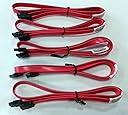
So that there is no doubt, this fits inside your PC case. The array takes up x3 5.25in bays. now to the unit itself, while its not made to HP standards of blade array quality, I am extremely impressed with this, i am now able to swap drives in and out of my PC at my pleasure, while it took about 2 weeks to arrive, [coming from over the Atlantic, to Scotland] it has been worth the wait, 5 good quality SATA cable included and a screw pack for the fitting of the unit and all the drives too. yes it takes desktop and laptop size drives. best 100 quid ive spent for a long time. you wont be disappointed.
D**Y
Good unit
Fairly nice unit. It worked fine for my purposes. Installing/removing 3.5" drives is different from all other that I have used. Uses only 3 screws to secure the drive. You need to install one side of the drive at an angle to snap the drive in place.
D**L
Beyond Pleased with this so far
I work in IT have changed thousands of drives in disk enclosures. I was very pleased with the operation of removing and inserting drives into the enclosures and the mounting flexibility of the drive caddies to accept drives. Since this uses Sata connections and not a USB you will need to have enough available sata ports on your motherboard or will need to invest in a Sata Card. I got a Vantec Sata host card for my setup as well as a 1m Sata Cable with six connections "CableDeconn High Speed 6pcs/Set Sata 3 SATA Cable SAS Cable 6Gbps for Server 1M". While you will need to figure out how to power it you could power it from your PC withh 4 pin molex i opted for to build a custom power supply out of an old Xbox360 powerbrick. Its been 2 weeks of heavy use and I can't believe i didn't buy it sooner. The package comes with 5 average quality 20 inch sata cables and enough screws to mount 5 3.5" or 2.5" drives or a mix of your choosing.
Trustpilot
3 weeks ago
1 month ago