


Buy anything from 5,000+ international stores. One checkout price. No surprise fees. Join 2M+ shoppers on Desertcart.
Desertcart purchases this item on your behalf and handles shipping, customs, and support to Iceland.
🚀 Triple your screens, quadruple your productivity!
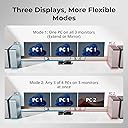
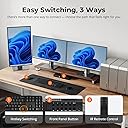
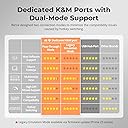
The TESmart USB 3.0 4 Port Triple Monitor HDMI KVM Switch empowers professionals to control up to four computers using a single keyboard, mouse, and three 4K monitors at 60Hz. Featuring 3 USB 3.0 ports (including USB-C), lockable audio and USB channels, an EDID emulator for seamless display transitions, and multiple switching modes (hotkey, IR remote, LAN), it streamlines multi-device workflows while safeguarding privacy with a lock function. Designed for high performance and reliability, it’s the ultimate tool for multitasking managers and IT pros seeking a clutter-free, efficient workspace.






| ASIN | B0B5RD9G9K |
| Actuator Type | Push Button |
| Best Sellers Rank | 113,822 in Computers & Accessories ( See Top 100 in Computers & Accessories ) 392 in KVM Switches |
| Brand | TESmart |
| Circuit Type | 4-way |
| Colour | All ports are HDMI |
| Compatible Devices | Laptops, Desktops, Computers, PCs, PS/Xbox/Media Box, MST Triple Monitor Docking Station, Wired/Wireless/Mechanical/Multimedia/Gaming K&M |
| Connectivity Protocol | USB |
| Connector Type | Plug In |
| Contact Material | Metal |
| Contact Type | Normally Closed |
| Control Method | Push Button |
| Control Type | User Control |
| Controller Type | Push Button,remote |
| Country Of Origin | China |
| Current Rating | 2 Amps |
| Customer Reviews | 5.0 5.0 out of 5 stars (4) |
| Included Components | KVM Switch,KVM Cables,IR Remote Control,IR Extension Cable,Rack-ears.... |
| International Protection Rating | IP00 |
| Item Dimensions | 39.6 x 19.6 x 10.7 centimetres |
| Manufacturer | TESmart |
| Manufacturer Part Number | HKS0403A1U-UKBK |
| Material | Metal |
| Model Number | HKS403-P23 |
| Mounting Type | Rack Mount |
| Number of Items | 1 |
| Number of Positions | 4 |
| Operating Voltage | 12 Volts (DC) |
| Operation Mode | ON-OFF |
| Specification Met | CE, RoHS |
| Switch Type | Push Button |
| Terminal | Solder |
| Unit Count | 1.0 count |
| Wattage | 40 watts |
A**R
Excellent multi-computer control solution – powerful and reliable setup
Review: I have been using the TESmart HKS0403A1U triple-monitor KVM switch to manage multiple computers from a single workstation, and overall it has been a very impressive piece of equipment. The ability to control up to four computers across three monitors from one keyboard and mouse is incredibly efficient and has streamlined my entire workflow. Switching between systems is quick and straightforward, and once set up correctly, the unit performs exactly as intended. The build quality feels solid, and the unit integrates well into a professional workspace. It has been particularly useful for managing different systems simultaneously without needing multiple sets of peripherals or desk space. Image quality across all three monitors is excellent, with no noticeable lag or signal degradation, which is essential when working across multiple screens. The USB functionality also works reliably, allowing seamless control of peripherals. Overall, this is a very capable and well-designed KVM switch for anyone who needs to manage multiple computers in a clean, efficient setup. It has significantly improved my workflow and productivity.
J**J
Does exactly what it’s supposed to. Well built. A worthy investment.
If you need to have a tidy workspace and the convenience of switching multiple source devices between multiple monitors without changing over cables etc… This could be just right for you. It’s sometimes cheaper to buy this direct from the TESmart by as much as £100 less but I believe it will be shipped from Germany and if you’re in a rush, then amazon is perfect. Especially as Amazon has the infrastructure and is particularly good at dealing with returns etc. The KVM comes with all the HDMI cables but if you have any Display Ports then you will need to buy adaptors. Pretty much all input output combos can be achieved. I can have any source extended or mirrored across 1,2 or 3 displays or i can have computer 1 display on a screen and computer 2 display on another screen or extend over two screens or computer 1, computer 2 & Apple TV each display on a dedicated screen etc etc. I use the wireless Logi (Logitech) MX Keys (keyboard) and Logi MX Master Mouse with the KVM, no issues. Have also used a Razer Pro Click wireless mouse with the KVM without issue. I have the KVM within easy reach so I use the buttons to change combinations but this KVM does accommodate keyboard shortcut switching meaning you could hide the KVM away altogether if you desired. This model of the KVM has both a USB C and a USB3 and LAN inputs that are shared across devices. If you need more inputs to be shared, advise buying a discreet small usb hub to expand. The only thing I think this device needs is to add a second 3.5mm audio out jack to the rear of the device. It does have a audio in/out 3.5mm jack on the front panel so headphones/with microphone etc can be plugged in conveniently but if you just want an audio out to go to a dedicated pair of speakers I dont want to run a cable from the front of the device round to the back… I have the following for my set up. INPUTS (video sources): - PC tower - Laptop - Apple TV - 1 spare source left free for attaching any incoming transient equipment. OUTPUTS: - Large computer monitor A - Large computer monitor B - Large TV
W**T
Amazing.
Although pricey this has been going strong now for over a year with no issues. The ability to have several devices visable across 2 or more screens and that you can switch these in under a second with keyboard shortcuts is fantastic. Swapping mouse inputs is as easy as a double press of the alt key. If you don't fancy keyboard shortcuts and want to use the buttons on the device itself a small digital screen provides you all the info you need. People will try to use USB switches or in built monitor KVM's but really if your use case is 3+ devices with triple monitors buy this. You won't regret it.
M**0
Very Good - Takes some getting used to if not Techie
The is my second TESMart KVM. The first was 2port and worked a dream. This version is very good but you need to be on your A Game from a tech point of view. Managed to get my head around it and will keep testing and playing with it... thanks for your support from the team too. very good, thanks.
Trustpilot
5 days ago
2 weeks ago