🎤 Elevate Your Presentations with Style!
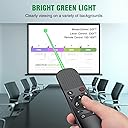
The Presentation Clicker Mouse Control is a versatile wireless remote designed for seamless PowerPoint presentations. Featuring a bright green laser pointer, intuitive air mouse functionality, and a wide compatibility range, this clicker ensures you command attention in any setting. With a long control range and easy USB storage, it's the perfect tool for professionals looking to impress.


| ASIN | B0BDFS9QYH |
| Best Sellers Rank | #10,453 in Office Products ( See Top 100 in Office Products ) #11 in Office Presentation Remotes |
| Customer Reviews | 4.4 4.4 out of 5 stars (1,913) |
| Date First Available | September 7, 2022 |
| Item Weight | 2.39 ounces |
| Item model number | 6975441520759 |
| Manufacturer | Shenzhen Qixun Space Technology Co., Ltd. |
| Package Dimensions | 6.02 x 2.32 x 1.26 inches |
B**I
2.5 years of reliable use!
I absolutely loved this presenter remote. I used it every day during lessons. The Laser was nice because when I wanted to point out something around the room or on the board, I was able to use the laser. The remote did not feel cheap, it held up to being in an elementary class that had over 700 students aged Kinder through 5th come through. Worked great! I plugged in the dongle and never had issues with the remote not responding or connecting, that was as complicated at the set up was - just plug and go. Overall, the value of this remote wasn't bad. I have had this remote since Sept 2023. After 2.5 years of having this remote, I do believe my battery has fully died. As it no longer will hold a charge. I am heavily considering purchasing a replacement of the same model!
P**L
Highly recomend
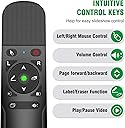
Very cool presenter tool. Has a forward and back functions, volume control. But it also has a lazer pointer, and a function that allows you to control your mouse. Very easy to use too. Comes with a usb connector that works witg the remote via bluetooth. It also has a good battery life, and it charges easy.
G**E
A Great product with one Mac issue...
This presenter controller is a great device. Controlling slides is easy and slightly customizable: you can switch the up and down arrows depending on the way you think about slide movement--nice feature. The volume control on the side is very handy. The magnetic slot for the laptop dongle(why do I always smile when I type that word?) is brilliant. Charges quickly and holds a charge. Every thing you need. The only issue I had was a BIG ONE. Using it on a MacBook Pro running the Monteray OS, whenever I pressed and held down the "Up" button it would bring up a print dialog box and freeze the MacBook. I mean Freeze Solid. No force Quit, no nothing. Had to restart the computer. An absolute deal-breaker. Having a button on your remote that can derail your presentation completely is Just. Too. Dangerous. I finally found out a semi-fix. The laptop was never assigned a printer. So once I went to settings and selected a printer, it would still bring up the print dialog box when I held down the Up button, but I could click on the "Cancel" button and would be back with a mouse click. It still isn't perfect, but I can at least recover without restarting the MacBook.
L**N
Its multiple functions bails me out time and time again when making presentations
I purchased this "clicker" as they call it a long time ago. I give lots of presentations where I depend on this clicker to get me through the PowerPoint slides and keep the audience engaged in the content. Its always surprising but it is really a remote mouse, a laser pointer and an up/down arrow all in one. I can wander back in the audience and still keep talking and moving the mouse cursor. Note: if the screen is instead, a huge monitor, then a laser pointer doesn't work. No problem with this pointer - I simply revert to the mouse arrow. Its a Swiss army knife "clicker". Bluetooth pairing is really simple and quick. It comes with its own bluetooth module that plugs into the USB port of the laptop.
J**I
Perfect class tool
This is the perfect tool to reset a timer from across the room. Has made classroom management a bit easier.
P**H
Great Product ⭐⭐⭐⭐⭐
Wow! I honestly didn't though I was going to end up writing a review on this product, but I love it, it fits and feels great on my hand, the green laser light is super bright I pointed it to my monitor and TV and I was able to see it clear. The functions on the remote work as expected. Also, the 1 year warranty card that comes in the box gives me confidence and relief that I make the right purchase. Thank you for this product. I love it. Oh yes! and before I forget, the small USB receiver its just the perfect size for me to leave it attached to my laptop, and don't worry about damaging it on accident. Product 10/10 ⭐⭐⭐⭐⭐ I am satisfied. A little tip for everyone reading my comment, and using the pointer option, after playing your PowerPoint presentation give a right click and select the laser pointer option, it works amazing, just like the laser. 😃👍🏻
J**E
Swiss Army Knife of Presentation Tools — Perfect for Speaking Engagements
I recently started doing speaking engagements at colleges and realized I might be a bit out of the loop on modern laser pointers. When I found this, I was genuinely impressed by how versatile it is. It’s not just a laser pointer—it also works like a computer mouse on your laptop (almost like a Nintendo Wii controller), making it easy to move the cursor naturally. Switching slides is effortless with dedicated buttons, which makes presentations feel smooth and professional. The battery lasts a long time, and I love that it can be charged via USB-C or the older USB option. The dongle design is smart and interchangeable, keeping everything compact and flexible. It even clips into your pocket like a pen, so you can carry it easily during a talk. I’ve used this at every speaking engagement so far, and other colleges and presenters constantly ask to borrow it—so it’s definitely a crowd-pleaser. Pros: Extremely versatile (laser pointer + cursor control + slide navigation) Cursor control feels intuitive and natural Easy, one-button slide switching Long-lasting battery life Charges via USB-C or standard USB Compact, all-in-one dongle design Pocket clip for easy carrying Simple setup and quick connection via dongle Professional and impressive during presentations Cons: May feel like overkill if you only need a basic laser pointer Slight learning curve if you’ve never used motion-style cursor control Overall Verdict: This is an outstanding presentation tool that does everything I need and more. It’s made my speaking engagements smoother, more interactive, and honestly more fun. If you present regularly—especially in academic or professional settings—this is absolutely worth it. I’m sure there are other options out there, but this one works flawlessly and has become a must-have for me.
J**D
This product does the job but the cover for the battery is very delicate. As a teacher, I would place this in my pencil case and each time I would go to grab it to teach, the battery cover would slide right off. The slightest grip would move it and so eventually it came right off and would barely stay on. I’ve purchased this product twice because it’s affordable compared to other products but you have to be VERY careful with the backing otherwise you will have an exposed battery like I do now.
A**L
ممتاز جداً ويمكن استخدامه مع بوربوينت وملفات بي دي اف وبرامج اخرى كثيرة عيبه لا يمكن ربطه عن طريق بلوتوث لازم عن طريق الوصله المدمجه
س**ي
جيد للتحكم عن بعد
A**R
Take about 2 weeks to receive it. Can use.
R**7
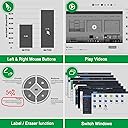
We have a smart board in my class and this makes it a breeze to launch videos, draw on the screen and highlight text without having to stand near the board.
Trustpilot
5 days ago
1 day ago