Desert Online General Trading LLC
Dubai, United Arab Emirates
Desert Online General Trading LLC
Dubai, United Arab Emirates


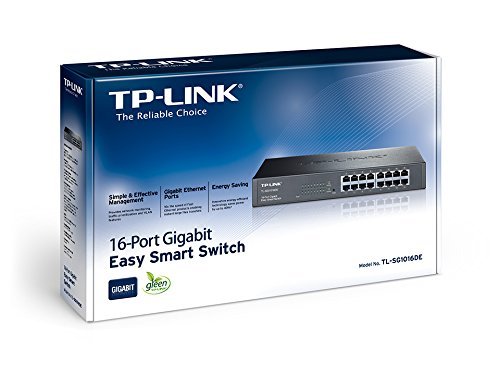
🚀 Elevate your network game with the ultimate 16-port gigabit switch!
The TP-Link TL-SG1016DE is a 16-port desktop gigabit Ethernet switch featuring a durable steel case and 13-inch rack-mount design. It supports 10/100/1000Mbps speeds, advanced VLAN security, and energy-efficient technology that reduces power consumption by up to 18%. With easy web-based management, port mirroring, loop prevention, and cable diagnostics, it’s engineered for professional-grade network performance and reliability.

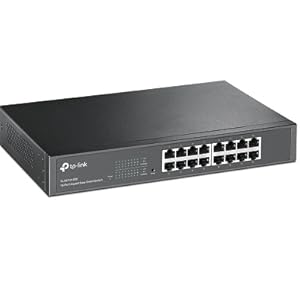
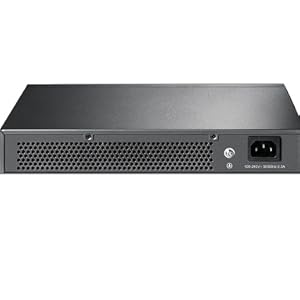
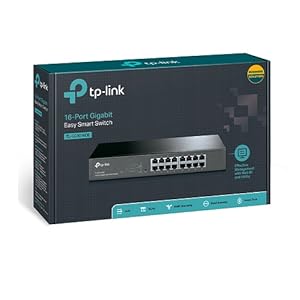
| Product dimensions | 29.4L x 4.4H centimetres |
| Item weight | 1.12 Kilograms |
| Voltage | 220 Volts |
| Case material type | Metal or Plastic |
| Upper temperature rating | 4E+1 Degrees Celsius |
| Interface type | RJ45 |
| Data transfer rate | 16000 Megabits Per Second |
| EU Spare Part Availability Duration | 2 Years |
| Global Trade Identification Number | 06935364021269, 06935364021276 |
| Manufacturer | TP-Link |
| Batteries | 1 Lithium Ion batteries required. |
| Item model number | TL-SG1016DE |
| Processor Count | 1 |
| Computer Memory Type | DDR3 SDRAM |
| Wireless Type | 802.11a |
| Wattage | 11.73 watts |
| Hardware Platform | PC |
| Are Batteries Included | No |
| Lithium Battery Packaging | Batteries packed with equipment |
| Lithium Battery Weight | 2 Grams |
| Number Of Lithium Ion Cells | 5 |
| Number of Lithium Metal Cells | 5 |
| Item Weight | 1.12 kg |
| Guaranteed software updates until | unknown |
J**F
TP-Link TL-SG1016DE - What your money buys
Easiest switch set up so far no problems once I familiarized myself with the settings it has a web interface which is password protected & help buttons on each topic to let you know what your doing. Each of the sixteen ports can be enabled or disabled separately allowing full control of what each port does including speed duplex & Flow control. Included as well is Port Monitoring, Mirror Porting,MTU VLAN (Multi-Tenant Unit VLAN) Qos(Quality Of Service),Band width control & Storm control.Not a bad piece of kit recommended by my dad. I was a bit dubious at first but I am happy with my purchase, If you just want a switch control its very good at that, but the on board features make this worth its money
S**N
Perfect, cheap and simple
Perfect, cheap and simple, fanless and mostly cool to the touch !!! I just bluetacked it onto a flat surface so it wouldn't slip, in the back of my TV cabinet where my tv and receiver and consoles and WiFi and cable modem and router and nas and htpc are. I now have much cleaner cabling than before, and I get to send my guest wifi vlan, private vlan, and raw internet vlan over to the other part of the apartment over the one and the same preexisting cable (where there's an ancient gigabit OpenWrt router and anoter WiFi ap).
M**M
Very nice but surprised at the power consumption
This is the first managed switch I've used for SoHo. Works very well, lots of good configuration options. Love the ability to run cable tests on a per-port basis and get a rough estimate of where any fault lies and/or the length of the cable. Even supports LACP port trunking.Very nicely built in a solid steel case with built-in power supply so no horrible trailing plug top nonsense.Only downside - and why it gets 4 rather than 5 stars from me - is that it chews 12w even when sitting doing nothing which is in stark contrast to a much older GbE 8 port switch that uses less than 1w so on a pro-rata basis would have hoped this would be less than 3w..... Can't believe the management element needs so much power so at a bit of a loss as to where it's all going.
U**H
VLANs, 802.1q trunking and static port aggregation all work
I have very good experience with TL-SG1016DE hw version 4.20. I was looking for a switch that would have VLANs, trunking and port aggregation. I was able to use all of these features with a minimal effort.The port aggregation configuration is straightforward – in Switching > LAG (Link AGgregation) select the LAG Group and assign from 2 to 4 ports to it. In Cisco speak this is a static EtherChannel (there is no support for the dynamic EtherChannel, i.e. LACP/802.1ad). In my case I connected two ports in LAG group 1 to two NICs on a Linux server, which I added to a bond interface configured with bond.options "mode=balance-xor". It worked like a charm.The combination of VLANs and trunking is also easy to configure, albeit it’s a bit confusing. The trunking in this context is specifically the industry standard 802.1q VLAN tagging (which is what Cisco, Arista, etc use as the trunking protocol these days, not the ancient Cisco proprietary ISL trunking). This is what needs to be done:1. In VLANS > 802.1Q VLAN click on Enable and then click on Apply. It will issue a warning, which says something like port based VLAN configuration will be lost. That’s expected, all ports will be in VLAN 1 after this is done.2. In VLANS > 802.Q VLAN create new VLANs, for example VLAN 2 and select some ports as “untagged” (these are the equivalent of ‘switchport mode access’ on Cisco or Arista), and select the ports that should act as a trunk as “tagged” (those are the equivalent of ‘switchport mode trunk’ on Cisco or Arista). If previously any ports were aggregated into LAG groups, those will be selectable as a group (which is expected).3. After that, and this is important, in VLANS > PVID Setting assign the same VLAN to the untagged ports as in the previous step. Leave the “tagged” ports in VLAN 1 (which in 802.1q terminology is known as the native VLAN, and it doesn’t have to be VLAN 1, but that’s not really important).The last step seems redundant, but without it the VLAN configuration won't work.In my case I successfully configured the bond interface in Linux in the balance-xor mode connected to LAG group 1 (2 ports) as an 802.1q trunk with VLANs 1 (native, i.e. untagged), 2 and 3. I was able to test load distribution successfully. While the Linux host uses a deterministic hash over the IP addresses and transport ports to send the traffic down a specific link in the port channel, the switch seems to select the same interface for the return traffic, which is fine.All in all, this switch does exactly what I was interested in.
M**N
So good, I ordered three with an eye on a fourth!
Good quality. A real shame it doesn't integrate with Omada, but who cares?
N**S
Great unmanaged switch
For a small home or small business setup with minimal setup this is a perfect choice. Being unmanaged it basically is like adding extra ports to your modem/router and as such no configuration needed or having to do port forwarding or deal with double NAT issues.... it just works. Very tidy and quiet 1U unit. Perfect for my small home setup. Good job TP-Link. Quick delivery and no issues
U**D
Excellent switch but there seems to be no firmware update
Overall great switch for the money, I got it mostly for creating vlans and it does that job well.The configuration isn't super indept but good enough for your basic networking needs.Only downside there is no mechanism for updating the firmware by the looks of it so hopefully there isn't any vulnerabilities that surface.
R**H
Emergency switch required - delivered, plugged in and works
A simple un-managed switch - perfect and just works....
Trustpilot
1 week ago
2 months ago