🚀 Elevate your office game with speed, color, and wireless freedom!
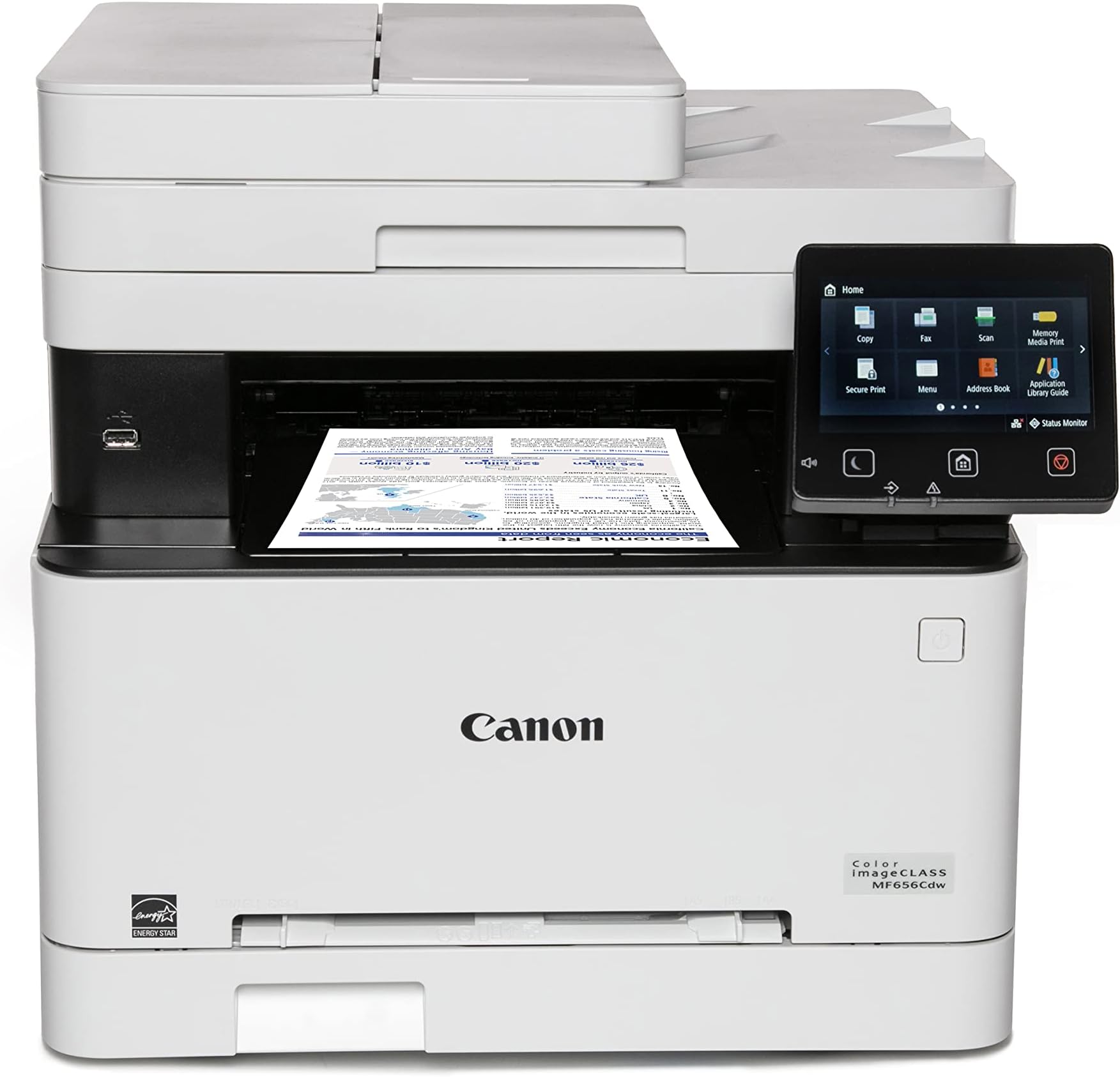
The Canon imageCLASS MF656Cdw is a versatile wireless color laser printer designed for small to medium businesses. It combines fast 22 ppm duplex printing, scanning, copying, and faxing with a large 250-sheet input capacity and a 50-sheet automatic document feeder. Featuring a sharp 5-inch color touchscreen, mobile device compatibility, and eco-friendly certifications, it ensures high-quality, efficient, and reliable performance backed by a 3-year warranty.


| ASIN | B0BSMZVH26 |
| Additional Printer functions | Copy, Fax, Scan |
| Best Sellers Rank | #55,111 in Office Products ( See Top 100 in Office Products ) #64 in Laser Computer Printers |
| Color Depth | 24 bpp |
| Compatible Devices | Super G3 |
| Control Method | Touch |
| Controller Type | Android |
| Customer Reviews | 4.1 4.1 out of 5 stars (1,307) |
| Date First Available | February 8, 2023 |
| Dual-sided printing | Yes |
| Duplex | Automatic |
| EU Spare Part Availability Duration | 3 Years |
| Global Trade Identification Number | 00013803342000 |
| Hardware Interface | Ethernet |
| Included Components | Cartridge 067 CMY: Starter 680 Yield / Black, Standard: 1,350 Yield, Documentation, Fax Cord, MF656Cdw Product, Power Cord |
| Initial page print time | 10.3 Seconds |
| Ink Color | Color |
| Item Weight | 48.5 pounds |
| Item model number | 5158C002 |
| Manufacturer | Canon |
| Max Copy Speed (Black & White) | 22 ppm |
| Max Input Sheet Capacity | 250 |
| Max copy resolution black-white | 1200 x 1200 dpi |
| Max copy resolution color | 1200 x 1200 dpi |
| Maximum Black and White Print Resolution | 1200 x 1200 dpi |
| Maximum Color Print Resolution | 1200 x 1200 dpi Dots Per Inch |
| Maximum Media Size | 8.5 x 14 inch |
| Maximum copies per run | 999 |
| Memory Storage Capacity | 1 GB |
| Model Series | 656 |
| Number of Trays | 3 |
| Number of USB 2 Ports | 1 |
| Output sheet capacity | 250 |
| Print media | Paper (plain) |
| Printer Ink Type | Toner |
| Processor Count | 1 |
| Product Dimensions | 18.2"D x 17.8"W x 16.3"H |
| Scanner Type | Sheetfed |
| Series Number | 515 |
| Sheet Size | 3 x 5, 8.5 x 14 |
| Supported Media Sizes | 3 x 5 inches |
| Total Ethernet Ports | 1 |
| Total USB Ports | 1 |
| UPC | 013803342000 |
| Warranty Type | Limited |
G**G
It's a great printer because it's a color laser printer
I forgive this printer for being bulky, tricky to set up, and noisy. Color laser printers are overall superior to inkjet printers; they are both faster and more reliable. It's a fair comparison given that this model is inexpensive, almost in the price range of inkjet printers. The ink supply lasts a lot longer, and even the color quality is as good as most inkjet printers. This particular model is also dependable with many sizes and types of paper, not just regular paper but also index cards, adhesive label sheets, etc.
D**L
GOOD BY FOR A GREAT PRICE.
I had a Cannon MF644cdw for a few years and it worked great. This one is just the newer version. My mf644cdw started putting black streaks on the prints and then just started running the paper through without no printing at all. Toner was good and new just no printing. Then started making a funny noise. While looking up trouble shooting tips online i came across this newer version. Well being a Tech junkie and my wife not so much, Ummmm, well the old printer became unrepairable and honey we need a new printer. Print quality has been great on both the 644 and 656 but I will have to say a bit better on this 656. time from sleep to print has greatly improved as well. I will also say that this printer has the cheapest toner cartridges to replace of most all color laser printers. I work from home so it does get alot of use. Document feeder work great and to tell the truth I dont remember ever having a paper jam from either printer on the feeder or printer. Cant say much about the fax feature as I have never used it on either printer. Setup is very easy right out of the box. Just plugged it in went through a few setup questions on the display and bam it was hooked to my wifi and up and running as network printer. Scan to email can be a bit tedious to set up but I got the below instructions from another reviewer and worked perfectly. So Hopefully this will help someone (wish I would have found earlier). This type of information should have been in the manual in some way. I found this in the Canon community discussion. Note that this setup is configured for using a gmail email address to configure- so you need a gmail for this to work correctly (otherwise a few steps will need changed like the SMTP server and port number...) 1- If you are using GMail, you have to setup an 'App Password' for your Canon to work. 2- Go to Google.com and click on your picture (upper right hand corner) and select 'Manage Your Google Account'. 3- Click on 'Security on the left hand side'. 4- Scroll down to section that says 'Signing in to Google'. 5- Make sure '2-Step Verification' is setup. If it is not, add 2-step verification now. 6- Click on 'App Passwords' to setup a password for your Canon. You may have to sign into your Google account again. 7- Under the 'Select App' down arrow, select 'Other (custom)' 8- Enter a name for your Cannon. I put my model number in the field: MF644Cdw 9- Select the 'Generate' button. This will generate a password. Copy/Paste this password or write it down. 10- Find your Cannon's IP Address. I selected 'Status Monitor' on my Cannon; then selected 'Network Information'; then selected 'IPv4'; take down the numbers listed under 'IP Address'. 11- Open up Chrome and enter the IP Address from step 10. 12- Select 'System Manager Mode' option and select 'Log In'. If you have setup a 'System Manager ID' and 'System Manager PIN', enter that information and then select 'Log In'. 13- Select 'Settings/Registration' button on the right hand side. 14- Select 'TX Settings' on the left hand side. 15- Select 'E-mail/I-Fax Settings'. 16- Select 'Edit' button on the upper right hand side. 17- SMTP server = smtp.gmail.com 18- Email Address = [enter your email address] 19- Check mark 'Use SMTP Authentication (SMTP AUTH)' 20- User Name = [enter your email address] 21- Check mark 'Set/Change Password' 22- Password = [enter the password generated from step 9 above] 23- Check mark 'Use TLS for SMTP' 24- Check mark 'Verify Certificate' 25- Check mark 'Add CN to Verification Items' 26- Check mark 'Use TLS for POP' 27- Check mark 'Verify Certificate' 28- Check mark 'Add CN to Verification Items' 29- Scroll up to the top of the page and select the 'OK' button to save these settings. 30- Select 'Network Settings' on left hand side. 31- Select 'Port Number Settings' 32- Select 'Edit' button in upper right hand side. 33- Change 'SMTP' field to = 465 34- Scroll up to the top of the page and select the 'OK' button to save these settings. 35- Select 'To Portal' link in the upper right hand corner. 36- Select 'Address Book' button on right hand side. 37- Click on '01' link and select 'Edit' button. Add your email as the first email address. (Later go back and add what other email addresses you may like to scan to in the future) 38- Scroll up to the top of the page and select the 'OK' button to save these settings. 39- Go to your Cannon and test the Scan to Email function. 40- Check email to see if you received the email. If you didn't get email, check 'Status Monitor/Cancel' button under the 'TX Job Log' section for Error Code specifics.
F**C
Canon Color imageCLASS MF656Cdw. Bought TWO for my business. Both failed the same way.
Only thing it can reliably do is cause hypertension for the user. I made the mistake of trusting Canon and bought two of these printers for my business. That decision cost me time, productivity, and money. Both units exhibit the same fundamental failures, which tells me this is not a defective unit problem - it is a defective product line. Yes, print quality is acceptable when it actually prints, but everything related to networking and AirPrint is broken. • Printers randomly disappear from the network • Extremely unreliable Wi-Fi connectivity • Painful, inconsistent setup on Mac and Windows • Gaslights you into thinking you need unnecessary Canon software that still does not work • Goes to sleep and stops responding • AirPrint is advertised but does not reliably function At times, the only way to print reliably has been to download a file to a USB jump drive, physically insert it into the printer, and print directly from the device using the cumbersome, poorly responsive, unintuitive touchscreen. That is not an acceptable workaround in 2025 for a network printer marketed to businesses. And if you are thinking, “this guy just can’t manage IT stuff,” I caution you to think twice. Sometimes it will: • Print from one computer but not another • Print once and then never again • Print today after multiple retries and troubleshooting steps, then refuse to print tomorrow Nothing changes on the network. Nothing changes on the printer. It simply decides to stop working. I am not a casual home user. I spent hours troubleshooting: • Firmware updates • Factory resets • Router reboots • DHCP reservations and static IPs • Separate Wi-Fi bands • Driver reinstalls None of this fixes the core issue. Canon’s Bonjour/mDNS and network discovery implementation is fundamentally unreliable. This printer will gaslight you again and again, making you think you fixed it - until it fails the next time you need it. The fact that both printers behave identically confirms this is a design failure, not bad luck. Canon used to be a brand I trusted. This printer is not worthy of that reputation. If you value your time, sanity, or business productivity: do not buy this printer. I am replacing both with Brother laser printers and will not purchase Canon printers again. Avoid.
E**O
Excelente. Solo que para imprimir tamaño oficio hay que realizarlo hoja por hoja, pues no tiene bandeja para ese tamaño.
J**F
très simple à installer et fonctionne très bien. Un peu bruyant sans plus.
F**.
Magnífica impresora a un precio muy razonable. Primero la conecté usando WIFI y funcionó de maravilla, la cambié a ethernet y también de maravilla. El escaner también funciona muy bien.
G**O
Works great
M**A
PESIMA IMPRESORA, se agotan cartuchos cada semana y no reconoce los tamaños del papel que se carga
Trustpilot
3 weeks ago
3 weeks ago