We remain fully operational. Our teams are working around the clock to ensure your deliveries continue safely.

DOWNLOAD THE APP


Customer Services
Copyright © 2025 Desertcart Holdings Limited
DOWNLOAD THE APP

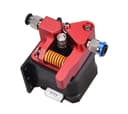

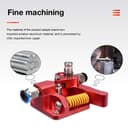
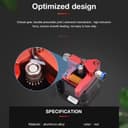

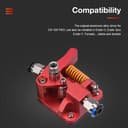
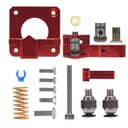

1 Review: To get it out of the way first, yes, as everyone else has mentioned... No instructions. However, if you pay attention when you are removing your old extruder, this is a straightforward process. I have been trying in vain to get a large nozzle (1.0 mm) to work on my ender 3 pro for rapid drafting. The stock extruder laughed in my face and skipped like a record when I tried to print with the 1 mm. I installed this extruder, not really expecting that much of a difference, but I had tried every other suggestion for fixing extruder skipping. Slowed the print down, adjusted up my zed offset, changed stepper motors, checked stepper voltage, all that crap. Long story short, I installed this guy and have run a few tests. I started with a layer height of .6 at a print speed of 30. No problemo. I was surprised. So I jumped it up to the .8, same speed. No issues. I went bananas and jumped it up as far as I could possibly need it to go: 1 mm layer height at 50 mm/s (my usual speed for PETG). I'll note here that I ran it at a 1.1 layer width as well. Holy crap, it ran it no problem. You can watch your spool as the life drains out of it at that height and speed, but it does an amazing job now. Just from the extruder change. Buy it. Buy it now. BTW, you can do a layer height the same as the nozzle, but you need to know how to set your slicer. Most people recommend no more than 75 - 80 percent, and that's perfect if you don't want to muck around too much. Review: Much better than stock. Very simple install that cuts down on clogging and improves overall print quality. Bigtreetech just makes great stuff.


| ASIN | B08D9CNHVN |
| Batteries Required? | No |
| Batteries included? | No |
| Customer Reviews | 4.2 4.2 out of 5 stars (652) |
| Date First Available | 20 July 2020 |
| Item Weight | 73 g |
| Item model number | WGC000291 |
| Package Dimensions | 10.3 x 9.5 x 2.7 cm; 73 g |
| Part number | WGC000291 |
D**.
To get it out of the way first, yes, as everyone else has mentioned... No instructions. However, if you pay attention when you are removing your old extruder, this is a straightforward process. I have been trying in vain to get a large nozzle (1.0 mm) to work on my ender 3 pro for rapid drafting. The stock extruder laughed in my face and skipped like a record when I tried to print with the 1 mm. I installed this extruder, not really expecting that much of a difference, but I had tried every other suggestion for fixing extruder skipping. Slowed the print down, adjusted up my zed offset, changed stepper motors, checked stepper voltage, all that crap. Long story short, I installed this guy and have run a few tests. I started with a layer height of .6 at a print speed of 30. No problemo. I was surprised. So I jumped it up to the .8, same speed. No issues. I went bananas and jumped it up as far as I could possibly need it to go: 1 mm layer height at 50 mm/s (my usual speed for PETG). I'll note here that I ran it at a 1.1 layer width as well. Holy crap, it ran it no problem. You can watch your spool as the life drains out of it at that height and speed, but it does an amazing job now. Just from the extruder change. Buy it. Buy it now. BTW, you can do a layer height the same as the nozzle, but you need to know how to set your slicer. Most people recommend no more than 75 - 80 percent, and that's perfect if you don't want to muck around too much.
A**R
Much better than stock. Very simple install that cuts down on clogging and improves overall print quality. Bigtreetech just makes great stuff.
J**D
I bought two of these (one for my Ender 3 V1 and one for a V2) and love them. They DO NOT come with any instructions so it’s 100% up to you to install them correctly. Take notes removing your old one as these go together very similarly but there’s a few gotchas. Each kit comes two little brass washers. One (preferably both) of those need to go between the idler gear and the face of the aluminum tension arm. The clearance is too small to fit both, so I decided to file the top and bottom of the idler gear down just a hair so I could get one brass washer above and one one below it. If you don’t install the this at least on the bottom, the steal gear teeth will quickly grind straight through the aluminum and you’ll have to replace it. You will also need to change your E-Steps (called “Extruder transmission ratio” on the the E3V2). There are tons of Youtube videos on this, just make sure when you tell it to extrude 100mm of filament, it moves 100mm or your prints will come out ugly or brittle. After 30 large prints between the two machines, I have no issues extruding and don’t have to worry about anything slipping or breaking.
M**N
I have 4 BIQU B1s and installed these on 2 of them so far. I plan to do the other 2. These are a really solid upgrade. For the BIQU B1, you need to be aware of a couple things: - The esteps will need to be changed. Mine defaulted to 98 on the old factory extruder. (That resulted in 105mm instead of 100mm extruded by the way). The correct estep value for these is 136 for a BIQU B1. You can set this via gcode using "M92 E136" then issue a save with "M500". You can also use the "save to eeprom" in the BIQU B1 menu to save. If you're not comfortable entering console commands you can use the tuning menu in the BIQU B1 and do the calibration then ignore the measurements and just increase the esteps to 136. After that, make sure you use the "save to eeprom" option. - Some slicers add esteps to the gcode. The ideamaker app that comes with the BIQU B1 does this. So you'll have to edit the printer config and go to advanced and change it from 98 to 136. You can open the gcode files with notepad or such and search for M92 and make sure it's E136 not E98 in that file. - You can alternatively do none of the above and only change the value in the gcode from M92 E98 to M92 E136 but this requires editing each gcode file after saving it. - Finally, the printer's filament sensor will be slightly too low when installing the new extruder. Ideally you need a couple more 1/4" spacers and a couple longer M3 screws. What I did is unscrew the two screws on the filament sensor and move it to the left so that the right screw went into the left hole on the holding bracket. Then I just used the right screw to hold the sensor in place. This moved it to the left almost an inch and the filament can bend a little and it works with no other spacers. A better long term solution will be to get some longer M3 screws and print a couple extra spacers. But it's been working as I set it without any additional parts.
P**R
I bought two of these. The first one kind of worked kind of fine. The second one didn't work at all. The sleeve on the lever arm is designed to protrude from the body a small amount so that when the screw is tightened, the lever arm will still move. The first one was that way and the lever arm moved freely. On the second one the indented hole that the sleeve sets down in to was not as deep by .5mm as the first one which made the sleeve not protrude from the body. When the screw was tightened, the lever arm would not move. The second problem (with both) is that just below the feed rollers where the filament enters the hole to continue on down the path is poorly designed. The hole is so small that the filament hangs up on the edge of the hole. This makes it impossible to change colors mid print and difficult to even start a print. I think I fixed the problem by using a counter sink to open up the top of the hole and funnel the filament path. Time will tell. Anyway, I returned the second extruder that didn't work at all.
Trustpilot
2 days ago
2 weeks ago