Buy anything from 5,000+ international stores. One checkout price. No surprise fees. Join 2M+ shoppers on Desertcart.
Desertcart purchases this item on your behalf and handles shipping, customs, and support to Iceland.
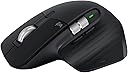
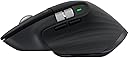
🖱️ Elevate your workflow with the MX Master 3S — precision, speed, and silence in one sleek package.
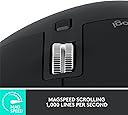
The Logitech MX Master 3S is a premium wireless mouse featuring an 8000 DPI Darkfield sensor for precise tracking on any surface, including glass. It offers MagSpeed electromagnetic scrolling capable of 1000 lines per second, and Quiet Click technology that reduces click noise by 90%. Ergonomically designed for comfort during extended use, it supports multi-device connectivity via Bluetooth and USB-C, with up to 70 days of battery life and quick charging. Enhanced by Logi Options+ software, it enables customizable buttons and cross-computer control for professional multitasking across Windows, macOS, Linux, and Chrome OS.
| ASIN | B0BS9VVQPD |
| Additional Features | 8000 dpi Darkfield Optical Sensor; MagSpeed Electromagnetic Scrolling, Quiet Click Buttons; Up to 70 Days Battery Life |
| Antenna Location | Laptop |
| Are Batteries Included | Yes |
| Are Batteries Required | Yes |
| Best Sellers Rank | #371 in Computer Mice |
| Brand | Logitech |
| Built-In Media | Item |
| Button Quantity | 5 |
| Color | Black |
| Compatible Devices | Laptop |
| Connectivity Technology | Bluetooth, Radio Frequency , USB |
| Customer Reviews | 4.6 out of 5 stars 907 Reviews |
| Hand Orientation | Ambidextrous |
| Hardware Platform | Mac, PC |
| Item Dimensions L x W | 7"L x 5.4"W |
| Item Type Name | Mouse |
| Item Weight | 0.7 Ounces |
| Manufacturer | Logitech |
| Mfr Part Number | 910-006556 |
| Model Name | MX MASTER 3S |
| Model Number | 910-006556 |
| Mouse Maximum Sensitivity | 8000 Dots per Inch |
| Movement Detection | Optical |
| Movement Detection Technology | Optical |
| Number of Batteries | 1 Lithium Polymer batteries required. (included) |
| Number of Buttons | 5 |
| Operating System | Chrome OS, Linux, Windows 10 |
| Power Source | Battery Powered |
| Special Feature | 8000 dpi Darkfield Optical Sensor; MagSpeed Electromagnetic Scrolling, Quiet Click Buttons; Up to 70 Days Battery Life Special Feature 8000 dpi Darkfield Optical Sensor; MagSpeed Electromagnetic Scrolling, Quiet Click Buttons; Up to 70 Days Battery Life See more |
| Style Name | Modern |
| UPC | 097855174819 |
| Unit Count | 1.0 Count |
| Warranty Description | 1 year Manufacturer |
L**E
Perfect mouse - couldn’t ask for better
I’ve been using the MX Master 3S for about 8 months now and this thing is a game-changer. When you’re constantly switching between applications and juggling multiple windows throughout the day, having a mouse that just works flawlessly is crucial. The scroll wheel alone is worth the price - being able to fly through long documents or quickly navigate through pages of content is so much faster than my old mouse. The side scroll wheel is clutch when working with wide spreadsheets or browsing through detailed reports. Battery life is insane - I’m talking months between charges, even with heavy daily use. The last thing you want when you’re in the middle of something important is your mouse dying on you. The precision is spot-on whether I’m working on my main monitor or switching to a secondary display. No lag, no missed clicks, just reliable performance. The customizable buttons save me tons of time - I’ve got shortcuts set up for common functions I use all day. Build quality feels solid, comfortable for those long work sessions. The ergonomics are great and it doesn’t cause any hand fatigue even after hours of use. If you’re looking for a reliable, high-performance mouse that’ll last you years, this is it. Worth every penny.
S**K
Very happy with this mouse!
This mouse has singlehandedly saved my relationship with my Macbook Air. The Macbook was my first laptop. I’ve always had a desktop PC. I’ve heavily used iPhones and iPads, so instead of getting another PC when my old one failed, I decided to get a Mac laptop. I read some reviews that mentioned the track pad on the Macbook was a pain, but I thought “How bad could it be?” Answer: pretty bad! I struggled with scrolling, I struggled with clicking where I wanted to click. It was frustrating enough that I was avoiding using the new laptop as much as possible. This mouse solved all those problems, and it is the nicest mouse I’ve ever used as far as ergonomics and just how it feels under my hand. It paired flawlessly with the Mac. Holds a charge for a long, long time. Makes scrolling and clicking no big deal—which might seem minor until you try a system that makes doing those things a constant irritation! It’s expensive for a mouse, true, but it has saved a much more expensive laptop from serving as no more than a paperweight, so to me it was money well spent.
K**C
super comfortable mouse
I got this mouse because I was starting to have a bit of thumb pain at work and it seemed to stem from using a mouse. This mouse has a little shelf your thumb rests on, and it's much more comfortable to use and my thumb doesn't need to be tensed up, so I haven't been having thumb pain lately since getting this. It has lots of shortcut buttons that I make good use of, and I like that I can toggle between a clicky scroll wheel and a smooth one. Side note: that smooth wheel will just go and go, which can cause some problems if I don't remember to stop it before, say, hitting the Ctrl button for a keyboard shortcut and, oh look at that, I'm zoomed in 800% now. My coworker has much smaller hands than me, and she thinks this mouse is too big for her hand, so think about that if you have hands that are on the small side. Other than that, the battery life is good, lots of customization options for the extra buttons, and it's just a really great mouse.
M**H
Best Mouse I’ve Ever Used for Work
I recently bought the Logitech MX Master 3S, and honestly, it’s one of the best productivity upgrades I’ve made. The first thing I noticed is how quiet the clicks are. They feel soft but still very responsive. If you work in a shared space or attend a lot of meetings, the silent clicks are a huge plus.
T**C
World's best mouse. Seriously.
This is the world's best mouse for professionals, such as SW developers, content creators, and any power user of a computer. I've owned one for four years. I've bought seven more to give to friends and family as gifts, even though they're pretty expensive. I am now those people's best friend. :) After four years the mouse is still in perfect working order and totally reliable. The battery life time on a full charge has diminished maybe 20% in that time. But it's still over a month per charge for me. I love the fact that the same mouse can talk to three different computers with the switch on the bottom, including iPhones and iPads. And I like the Logitech Flow software that lets me just move the mouse pointer to the edge of the screen and it changes the mouse to talk to the next computer over. That's pretty slick. I especially like two things about that. I can copy files from one computer to the other using ctrl-C on one, and ctrl-V on the other. This is by far the easiest way for me to copy files. The other thing is that I have a Logitech MX Keys keyboard, and when I move the mouse focus to another computer with Flow it also moves the keyboard focus. Perfect! I love it! The one caveat is that Logi Flow is not very reliable. I feel like I need to re-set it up every two weeks or so. The computers will just stop seeing each other in Options and I have to delete them and re-add them. Logitech, if you're listening, please fix this. If you can't find the actual problem and fix it, then just simulate what I do as a user to delete a computer and re-add it.
C**N
Really great, except LogiOptions+ creates some friction
I’d give it 5 stars if not for the fact that I keep having to delete and redownload LogiOptions+. Very frustrating and creates a lot of friction in the experience. For context I have a MacBook Air on iOS 15.7. If not for that it’s the best mouse I’ve ever used, and it still works without LogiOptions+ but it’s just a regular mouse then and while it’s comfortable to work with, the real power comes from the programable buttons which makes my workflow so much smoother. Great battery life, easy to connect, size is perfect for me, and when working as advertised it’s very smooth.
S**A
Muy bien mouse, ergonómico!
Excellent
R**D
Great for switching between computers - and for CAD / 3D modeling
Hands down the best mouse I've ever owned! Why? 1. Ergonomically comfortable 2. Love the ability to instantly switch between using it on my Windows laptop, and on my Mac Mini. I pitched my uncomfortable Apple mouse. 3. There are LOTS of functions (scrolling with the wheel, paging backwards and forward, and much more. 4. The resolution on this mouse is perfect for my CAD work in QCAD. And it's perfect for my 3D modeling in Fusion. It's the next best thing if you don't wanna spend $$$ for a Connexion device.
T**O
Super Maus, stolzer Preis
Eine wirklich klasse Maus. Lässt sich am Mac uneingeschränkt nutzen (auch alle zusätzlichen Tasten lassen sich für alles mögliche konfigurieren). Sie liegt gut in der Hand. Der Preis meiner Meinung nach aber schon sehr hoch.
R**I
No lo puedo usar
Bueno pero no para mi muñeca
Y**A
Above imagination
Above imagination
J**N
Parfait et transport rapide!
Article neuf et beaucoup moins cher que le prix régulier ou même à rabais par Amazon! Le colis est arrivé 4 jours plus tôt que l'estimé.
W**.
Great shipping
Excellent product. I used the earlier version for several years until it finally crashed.
Trustpilot
1 month ago
4 days ago