Desertcart purchases this item on your behalf and handles shipping, customs, and support to Iceland.
๐ Unlock convenience, save time, and never miss a beat with your Fordโs perfect key fob match!
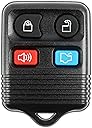
The KeylessOption 4-button key fob replacement offers a cost-effective, easy-to-program solution for 2005-2014 Ford and Lincoln vehicles. Featuring pre-installed batteries, a key ring loop, and compatibility with multiple models, it replicates original functions including Lock, Unlock, Panic, and Trunk controls. Backed by clear DIY instructions and responsive technical support, this remote ensures seamless vehicle access without professional programming fees.


| ASIN | B00KTIY4ZA |
| Automotive Fit Type | Vehicle Specific Fit |
| Best Sellers Rank | #68,214 in Automotive ( See Top 100 in Automotive ) #404 in Keyless Entry Systems |
| Brand | KeylessOption |
| Brand Name | KeylessOption |
| Button Quantity | 4 |
| Color | Black |
| Compatible with Vehicle Type | Car |
| Customer Reviews | 4.3 out of 5 stars 19,277 Reviews |
| Item Dimensions L x W | 4"L x 2"W |
| Item Highlight | Replacement for 1998 1999 2000 2001 2002 2003 2004 2005 2006 2007 2008 2009 2010 2011 2012 Escape Focus (CWTWB1U331) 4-Button |
| Manufacturer | KeylessOption |
| Manufacturer Part Number | KPT1354 |
| Material | Plastic |
| Material Type | Plastic |
| Model Number | KPT1354 |
| Number of Buttons | 4 |
| Number of Items | 1 |
| Product Dimensions | 4"L x 2"W |
| Vehicle Service Type | Car |
C**V
Easy to program, work well.
The first set I got of these, one did not work. On this set, both worked just great. And you can't beat the price. I used these on a 2007 Ford Focus SE. This was a standard car. How I did it? Simple. Got into the car. Put seatbelt on (I don't know if the seatbelt was necessary, but I didn't want to take chances) Put my ignition in the On position first (The position where the power comes on, but the car isn't cranking. Then, I twisted the key four times, very quickly. I heard a beep, which told me the car was in program mode. I hit a button (doesn't matter what button, any one will do) on the first remote I wanted to program and heard a beep. then the second, then the third, and the fourth. Then I tested all four remotes I had. All of them worked. Things to keep in mind: You have to turn the key rapidly, but it isn't impossible to do. I'm 55 and I have arthritis in my right hand, and I had no problem You need to twist the key four times. You have to hear the beeps after you're done turning the key in the ignition, this tells you that you're in "Programing mode." As you hit each remote, you will hear a beep which means the remote was programed. No beep, not programed. Test remotes inside and outside of the vehicle. You have to do all remotes you want to work at the same time. Meaning, if you have two remotes programed and then you decide you need another remote, you will have to reprogram the first two along with the third. I have been told four remotes are the maximum. I haven't tested this theory, because all I need are four remotes. The local ADAP and NAPA stores charge fifty dollars for these remotes. If you break the top part (where you put it on your keychain) which happens, they charge 15-20 dollars for just a replacement case. Two remotes for 11 dollars? You can't go wrong with that. Oh yes, they also include a "registration" card that you can register your remotes online. Then, you can attach the card to your keychain with your remote. (this card looks like one of those "Loyalty" cards that stores use) and if your keys are lost, someone only needs to drop it in any mailbox and the keys will be returned to the company, who I assume, will then return them to you . That's a pretty nice feature.
R**Z
Key Foo
Works
H**R
Easy to program, excellent replacement!
Iโve replaced batteries in my wifeโs auto key fob several times. I drive an older 2007 Mustang and mused two weeks ago about not having replaced the battery in my remote. Wouldnโt ya know, a few days later I found my remote refusing to open the door right away! Swapped out the battery, problem solved. Nope. A few days later the same thing happened. The fob is recently departed. I bought this remote and received fast delivery. Programming is easy. Turn the key to โONโ, but donโt start the engine. Cycle the key off/on 8 times in 10 seconds and touch any button on the remote. The door locks cycle to signal success. Two remotes? Do it again, pushing a button on the second remote. Door locks again herald success. Iโm very happy with my new remote! Highly recommended! Addenda. First, mine came with battery installed, but within a month the battery ran out of juice. Who knows how long it had been waiting in a bin? I swapped in a new battery and have had no failures since. Second, the buttons are very sensitive. Just having the remote in my jeans pocket with two keys, it has managed to sound the horn alarm twice and pop open the deck lid several times. Find a dedicated place to leave your keys and use it unless you are about to use them. Other than these, I am still happy with my purchase.
A**A
Instructions for programming were WRONG and incomplete! no paper instructions either...
Shipped fast, decent quality (almost OEM quality), Batteries included! but the big letdown here was the INSTRUCTIONS! they give you a business card with a website to go on to look up the procedure for programming, not a big deal. The instructions for programming were incomplete and therefore wrong! had to google it to find out! I have a 2007 Ford Focus SE 4dr (North American/Gen1.5) and the procedure is as such: โขClose all doors, foot off brake, car in park. Gather ALL remotes you wish to use with the car, INCLUDING currently programmed remotes! โขInsert key into ignition, rotate to run, and then off 4 times (run position is where the key returns to after starting the car, DO NOT START THE CAR) do this in 6-10 seconds โขAfter the 4th on-off cycle, DO NOT LEAVE THE IGNITION ON! the car will beep at you from the instrument cluster, at this point, hit any button on each of the remotes you wish to program INCLUDING ANY PREVIOUS REMOTES YOU WISH TO CONTINUE USING. (the programming of remotes removes any previous programming to the car, all fords this remote is usable with are this way) โขAfter each remote has one button pressed, the car will again beep from the instrument cluster to signal sucsessful pairing! โขComplete programming by starting the car, and shutting it off at your convenience, and testing each remote (moving the key to run, or removing the key from the ignition did not seem to exit programming mode and the remotes did not work until AFTER starting the car and then shutting it off) The instructions from the website explicitly say to leave the ignition ON the 4th time, which will not let you program the remotes, and also do not mention that programming new remotes removes old remotes and thus they must be reprogrammed if you wish to use them! After i followed the instructions i googled, programed all the new remotes in around 45 seconds, easy as pie. GOOD INSTRUCTIONS MAKE ALL THE DIFFERENCE!
B**Y
SPEED is CRITICAL!
I bought these key fobs for my 2003 Ford Taurus since one key and key fob had been lost. I followed the QR instructions exactly, but neither fob would program to my car despite several attempts. When I looked online again (ignoring the QR code instructions), I found additional information (hitting the unlock button on the driver's side door once in the car with the doors closed), and an emphasis on SPEED (I had not been working fast enough). To program the key fobs for a 2003 Ford Taurus: 1. Only open the driver's side door. 2. Get in the car, close the door and insert key in the ignition (necessary because you are going to have to work FAST once you start). 3. Put ALL of the key fobs (even ones that are already programmed) in your lap since running the programming sequence will reset any key fobs that are already programmed. 4. On the driver's door, hit the unlock door button. 5. IMMEDIATELY after unlocking the doors, turn the key from OFF to RUN (without starting the engine) EIGHT TIMES in less than 10 seconds ending up with the ignition in the RUN position (again without starting the engine). 10 seconds is a LOT shorter than you think, so do this as FAST as you can. 6. Your car should then chime and the door locks will cycle through locking and unlocking over and over again. 7. As soon as the door locks start cycling, press one of the buttons on each of the key fobs you want to program. I took turns with the three I had (one original and these two replacements) pressing each of the buttons on the key fob (unlock, lock, trunk, panic). Pressing the buttons didn't unlock/lock doors, open trunk or set off the horn. The door locks kept cycling through lock and unlock. 8. Once I opened the driver's side door, the locks stopped cycling, and all three key fobs were programmed. They lock and unlock the doors, open the trunk, and set off the panic horn and lights.
B**R
2009 Ford Escape XLT
I have a 2009 Ford Escape XLT I purchased from a used car lot that had 1 key but no remote. The factory key would have had a remote built into it with a transponder chip in the head however the key I have is just a regular non factory transponder chip key without the built in remote. I looked at the ownerโs manual and compared the the factory key buttons to these. I was doubtful these remotes would work due to this fact but from the price I took a gamble. Programming was easy and successful. Now I have remote accessibility and didnโt even need to get a locksmith or dealer. Win win for me.
T**O
Really easy to program on my Mustang GT, decent range
UPDATE 2022: Okay, so the second set of these FOBs I ordered has now lasted three years, including one battery replacement. Honestly, the first set got a lot more use than the second set as I haven't driven a lot during the Covid-19 pandemic, still I can say that these are definitely a cheap solution if you don't have the original car beepers. UPDATE 9 months later: Bummer. Both fobs seem to have died within two weeks of each other, one in late August and the other in early September. I'm investigating. There may be a problem with my car's rfid features but, so far, it appears to be the fobsโฆ as one died and the battery from it worked fine in the other one. Now the other one has died too. Ugh. Have to get a new set of these to see if it's the fobs or my car. The original Ford fob seems to not be working either so there may be something else happening here. I've got good CR2032 batteries so that isn't the issue. ORIGINAL REVIEW: I bought a pair of these fobs for a 2002 Mustang GT and they were easy to program, only one key was necessary. The range is approximately 30-40 feet line-of-sight. All four buttons work just like the FoMoCo fob that came with the car. To program the fobs for the 02 Mustang GT, I had to quickly turn the ignition between off and on with the key 8 times. On the 8th time the locks on the car click once to indicate that programming mode had been entered to add fobs. At this point do not switch the ignition to off until you're done programming the fobs. On each fob to be programmed, press the lock button. That's it/they're now synced to the car. Turn the ignition off. It worked for both these fobs on the first try. A good, cheap car fob.
C**Y
2001 Ford Focus replacement remotes - 4 stars - programming takes some doing but can be done
My experience with these remotes was frustrating at first--and then successful--for my 2001 Ford Focus. The website instructions from the seller were 4 lines long and not quite accurate for my vehicle, so you may have to experiment a little bit to get your specific vehicle to program correctly. I ended up reading some reviews on here and watched a couple videos on YouTube after initially trying to program my remotes to no avail. Here's what I did to get my remotes to program: 1. I rolled all the windows up. 2. I turned off the heater fan control. 3. I turned off the radio. 4. I unlocked all the doors with the driver side door lock. 5. I took the key out of the ignition and waited a couple seconds before sticking it back in. 6. I fastened my driver side seat belt AND my passenger side seat belt and kept my foot OFF the brake pedal. 7. I switched the key from "off" to "run" and then back to "off" (4) cycles as fast as I could--ending on "off". The website says to end the last cycle on "run", but all the other information I got said to end the last cycle on the "off" position. One complete cycle for my car seems to be "off-run-off". "Off" is the position where I can take my key out of the ignition. "Run" is the last position right before the starter engages to start the car. 8. My car made a "ding" noise, and I quickly grabbed and held both remotes--one in each hand--with the "LOCK" button depressed simultaneously on each remote. 9. My car made a "ding" noise again a few seconds later, and I released both remotes' "LOCK" buttons simultaneously. 10. I waited about (10) seconds as per the website instructions. 11. I tested each remote from inside the car, and both remotes worked flawlessly to lock both doors, unlock the driver side door, and unlock both doors--just like the original remote. What I did to program these remotes was not exactly like the website instructions, and maybe I didn't even do it exactly right, but I was able to program both remotes simultaneously. I had originally tried to program one remote at a time as per the website instructions, and it ended up de-programming one or the other of the remotes when I tried to program just one at a time and then program the other. So, again, you may have to play around with it a bit in order to program your particular vehicle successfully. Some newer vehicles allegedly take (8) full cycles to enter programming mode. I have read mostly glowing or scathing reviews--there seems to be no middle ground with the handful of reviews I read. Well, I'm going to give these remotes 4 stars for now because of the initial programming difficulty I experienced. There were also complaints and praise from other reviewers regarding the operating range and battery life of the remotes. I just experimented with both remotes and they performed flawlessly at 36ft with a clear line of sight. This is all the distance I had inside my enclosed garage, but I will try the remotes outside in the parking lot at work tomorrow. I had thought maybe these remotes didn't come with batteries when I originally couldn't get the remotes to program. I popped open one remote (very easy btw--just use a small coin or flat screwdriver to pry the 2 halves apart where the keyring goes on) and removed the CR2032 battery for testing. The battery tested at 100% on my pulse load battery tester, so I am going to assume the other battery in the other remote is 100% as well. I believe 4 stars is fair. If the range decreases with the battery life, I will just put a new battery in the remotes. If the range drops off and the battery is still 100%, I will edit and downgrade my rating. If these remotes eat batteries like crazy, I will edit and downgrade my rating even more. If these remotes stop working altogether, I will edit and downgrade my rating more still. I can tell you until I lost my last factory remote about 2 weeks ago, it had been working for over 17 years on the original factory battery! I had thought on several occasions, "when is this remote battery going to die?" The first factory remote worked for about 9 years with the factory battery until I ran it and my other keys on the ring thru the riding lawnmower...that's another story for another time..., but if I get even 5 years service life out of each of these remotes, I will be overjoyed to have paid about $5 each. Good luck!
S**R
Easy to set up
Nothing to dislike on this fob. Easy set up and no glitches since. Have had it for about 6 weeks. Does exactly what it's supposed to do.
I**L
Buen producto.
Funciona bien.
J**E
Producto de calidad
Excelentes controles, los programe y ya estan funcionando al 100% con el automovil
C**R
Great replacement remotes, very happy.
Blue, quality case and buttons, programmed without a problem. 2005 Mustang. Easy to follow instructions.
J**A
Works perfect
Easy to program, both work as advertised. Very pleased.
Trustpilot
3 days ago
1 week ago