


Desertcart purchases this item on your behalf and handles shipping, customs, and support to Iceland.
🖱️ Elevate your workspace with the sleek touch of precision.
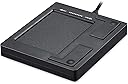
The Perixx PERIPAD-501 is a compact, wired USB touchpad designed for laptop and desktop users seeking a versatile mouse alternative. Featuring 7 multi-touch gestures, plug-and-play USB connectivity, and a durable 5-foot cable, it offers seamless compatibility with Windows XP through Windows 10. Its lightweight, ambidextrous design makes it perfect for professionals craving portable precision and effortless navigation.


| ASIN | B001CX85I8 |
| Antenna Location | Office |
| Best Sellers Rank | 15,553 in Computers & Accessories ( See Top 100 in Computers & Accessories ) 990 in Mice |
| Box Contents | USB Cable |
| Brand | perixx |
| Brand Name | perixx |
| Button Quantity | 2 |
| Colour | Small |
| Compatible Devices | Laptop, PC |
| Compatible Operating System Family | Windows |
| Compatible Tablet Computer Models | AAUB P30 |
| Compatible devices | Laptop, PC |
| Connectivity Technology | USB |
| Connectivity technology | USB |
| Country of Origin | Germany |
| Customer Reviews | 4.0 out of 5 stars 1,222 Reviews |
| EU Spare Part Availability Duration | 1 Years |
| Enclosure Material | Plastic |
| Generation | 2 |
| Global Trade Identification Number | 06920820850101 |
| Hand Orientation | Ambidextrous |
| Item Dimensions L x W x H | 8.6L x 7.5W x 1.1H centimetres |
| Item Type Name | Perixx Peripad-501 II Wired Touchpad Black |
| Item Weight | 70 Grams |
| Keyboard Description | Multi Functional |
| Keyboard Layout | AZERTY |
| Keyboard description | Multi Functional |
| Language | English |
| Manufacturer | Perixx |
| Manufacturer Part Number | 11284 |
| Mechanical Keyboard Switch Model | Capacitive |
| Minimum Required Operating System Version | Windows 10 |
| Model Name | PERIPAD-501 |
| Model Number | 11284 |
| Number of Items | 1 |
| Number of Keys | 19 |
| Number of Packs | 1 |
| Power Source | Corded Electric |
| Processor Count | 1 |
| Product Features | Lightweight, Portable |
| Product Warranty | 24-Month-Limited Warranty |
| Recommended uses for product | Office |
| Series Number | 501 |
| Special feature | Lightweight, Portable |
| Style Name | Classic |
| Switch Type | Capacitive |
| Theme | Office |
| Total USB 2.0 Ports | 1 |
| Water Resistance Level | Not Water Resistant |
P**F
Interesting mouse alternative - love the zoom feature.
I bought this as a first experiment with mouse alternatives, after seeing it mentioned on a YouTube review of the top 10 touchpads to buy. I read a lot of reviews here and elsewhere before finally buying this when the price dropped by almost £5. Plugging it into Win 7 (64bit) it took just a few moments to install the driver automatically, before being able to use the pad. I still had my mouse connected, and could swap between them without any problems. The basic functions such as one finger tap to select, double tap to open, and two finger tap for right menu all worked easily. Moving the pointer around the screen was also fairly easy, although the pad is quite small so you need to lift your finger off and reposition it to get all the way across the screen. If you were using the pad all the time, instead of a mouse you could alter the settings in Control Panel/Mouse to speed up pointer scrolling. The ability to zoom in and out of pdf documents and photos, using two fingers, like you would with Android mobile phones and tablets is quite appealing and works well. The ability to scroll through pdf documents or up and down photos and webpages is a little bit more hit and miss. There is a scrolling area on the right of the pad and using two fingers in that area is supposed to allow scrolling, but I found it was a bit intermittent and often presented the right click menu or simply moved the pointer around. After a little experimenting I discovered that this is not a device that is improved by pressing harder - far from it - the lighter I pressed on the right-hand side of the pad the better the scrolling worked! Overall, I think this is an interesting and useful alternative to the traditional mouse, with a few extra features such as zooming, that could be handy for many people. I am not about to switch over to it permanently, but I will probably use it for photo browsing and possibly more, depending on how well I can master the light touch needed for scrolling.
T**Y
Makes my Desktop feel like a Laptop
I bought this unit because my wife does not like using the mouse on my desk top but likes the touch pad on her laptop. I plugged the Peripad 501 into a spare USB port and it configured itself and was immediately ready for use. It works just like its laptop cousin. The great thing is that I do not have to unplug the mouse so my wife and I can swap machines without any hassles. Well worth the money.
P**S
Reliable mouse alternative offering very good value for money.
Been using this product for about a year now. I use it for typical office applications but also for photo editing and illustration software. I am using it with windows 10 with no problems. In summary, it serves as a reliable and basic mouse alternative. It is responsive but can be intermittent if your fingers are damp. I like the physical, satisfying click buttons. It is nice to click and drag versus (double) tap and drag. This caters for both options and offers good zoom via pinch gesture. The downside for me is the hard wire. If this were wireless, I would be giving 5 stars.
F**K
Reliable, great result
I bought this because the inbuilt tracker pad on my work laptop (Lenovo Thinkpad T14) was unusable as it kept malfunctioning. Happy to say the plug-in one works a treat. It’s very reliable and lets me get my work done without worry. As it’s usb compatible, it would also work on almost all other devices so it should help me avoid any future problems too.
E**Y
Unpridictable Operation
First reactions were good but then it started to produce unperdictable reduction in window size, occasional cursor freezing and switching to multi pane task view whilst movng the cursor. There appear to be no software settings to control sensitivity. Haven't found a user group to find how common my experiences are.
M**S
Good while it lasted (which was not very long)
Stopped working after three months. I would have expected a much longer lifespan at that price. Maybe I was just unlucky, but I would advise looking at something else if you want longevity.
B**R
Great for people with the shakes
It is good to be able to isolate the postionong of the cursor from the left or righ click . It is now possible to click and get the computer to do what is wanted. For anyone with a Parkinsons deisease related problem it is very useful and does not cost the earth.
S**F
Breaks quickly
Been through two of these. The first lasted a month, the second five months. Cheaply made, breaks quickly.
A**R
Works great
Works perfectly, on windows PC and I use it on my raspberry pi.
J**N
touchpad
Mindere responsiviteit. Rammelt ook iets binnenin. Voor de rest doet wat het hoort te doen
J**Z
Usabilidad
Cool
A**T
Ottimo
Il prodotto è molto utile, poco ingombrante e con un buon rapporto qualità-prezzo. Funziona anche con computer Mac nonostante non fosse specificato nella descrizione dell'articolo. Ottimo
D**E
Works on Windows 10, buying another.
Had this about a month. Bought to use on desktop because of tendonitis in my thumb fro using a mouse. Just cannot hold one for more tha a few moments without getting pain. Doctor says repetitive strain injury. Any way it worked well on my desktop but, when I put Windows 10 on my Lenovo I7 laptop, the scroll stopped working. So gave up trying to make it work and moved the pad to it. It works just great on Windows 10. I found it very easy to use especially the one finger scroll never could get used to two finger scroll. Like it so much I am just buying another so I have one for each of my laptop and desktop.
Trustpilot
2 months ago
5 days ago