We remain fully operational. Our teams are working around the clock to ensure your deliveries continue safely.

DOWNLOAD THE APP


Customer Services
Copyright © 2025 Desertcart Holdings Limited
DOWNLOAD THE APP
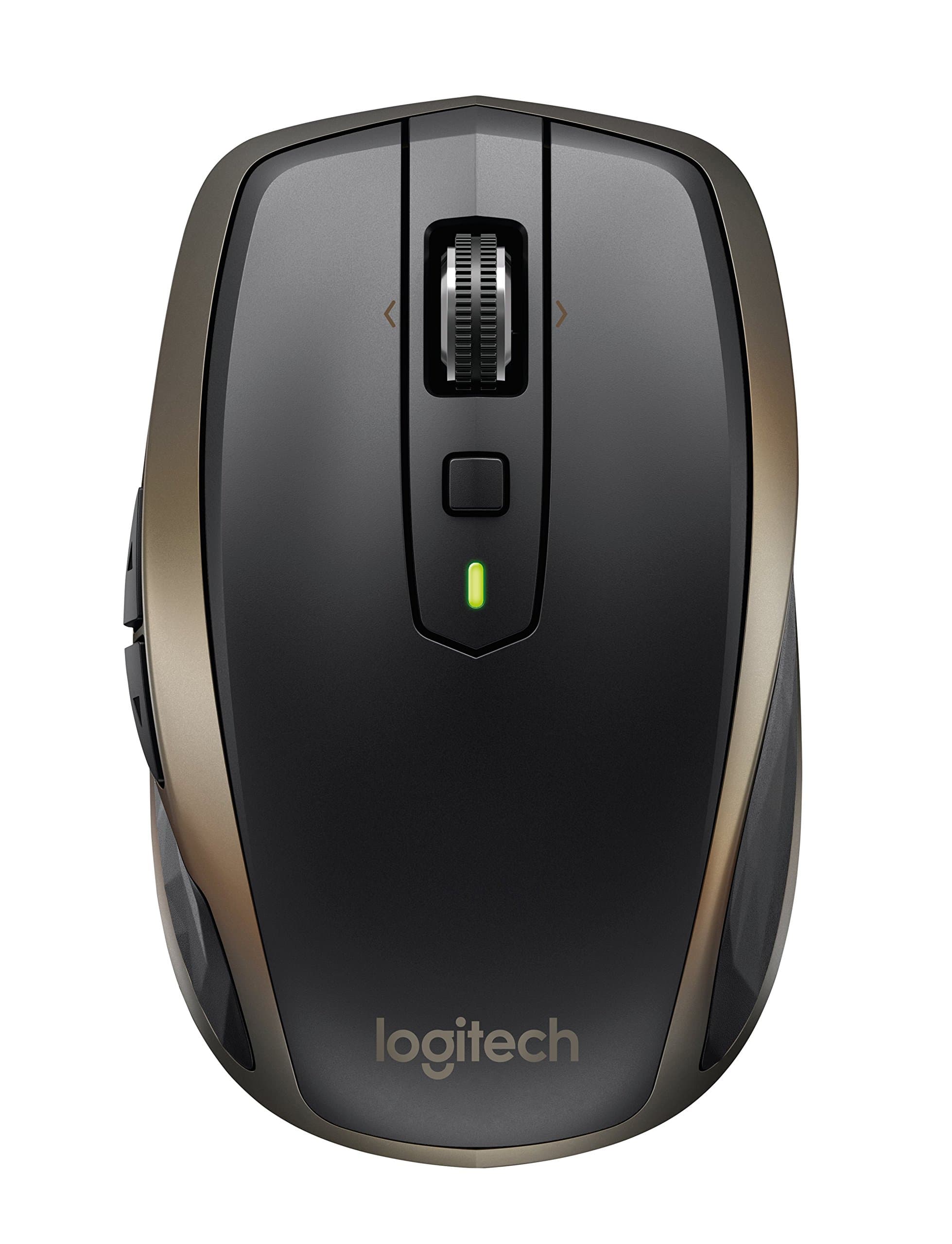


🚀 Master your workspace, anywhere, anytime.
The Logitech MX Anywhere 2 is a compact, rechargeable wireless mouse designed for professionals who demand seamless multi-device control and precision tracking on virtually any surface, including glass. Featuring a 4000-dpi Darkfield sensor, hyper-fast scrolling, and up to 70 days of battery life, it supports both Windows and Mac platforms with dual connectivity options, making it the ultimate productivity companion for mobile workstyles.
| ASIN | B075Y8ZVBB |
| Additional Features | Wireless |
| Antenna Location | Laptop |
| Are Batteries Included | Yes |
| Are Batteries Required | Yes |
| Battery Average Life | 1680 Hours |
| Best Sellers Rank | #2,840 in Computer Mice |
| Brand | Logitech |
| Built-In Media | mouse, user guide |
| Button Quantity | 4 |
| Color | Meteorite |
| Compatible Devices | Laptop, Personal Computer |
| Connectivity Technology | Bluetooth, Wireless |
| Customer Reviews | 4.6 4.6 out of 5 stars (2,291) |
| Enclosure Material | Glass |
| Global Trade Identification Number | 00097855132826 |
| Hand Orientation | Ambidextrous, Right |
| Hardware Platform | Laptop, PC |
| Item Dimensions L x W | 2.4"L x 1.4"W |
| Item Type Name | Logitech MX Anywhere 2 Wireless Mobile Mouse – Track On Any Surface, Bluetooth or USB Connection, Easy-Switch Up to 3 Devices, Hyper-Fast Scrolling – Meteorite |
| Item Weight | 0.23 Pounds |
| Manufacturer | Logitech |
| Model Number | 910-005229 |
| Mouse Maximum Sensitivity | 4000 Dots per Inch |
| Movement Detection | Optical |
| Number of Batteries | 1 Lithium Polymer batteries required. (included) |
| Operating System | Windows, Mac |
| Power Source | Battery Powered |
| Range | 30.0 feet |
| Style Name | Modern |
| UPC | 097855132826 |
| Unit Count | 1.0 Count |
| Warranty Description | 2 - year limited warranty |
A**A
So Far, So Good
Update as of June 1, 2024: It was a good run, but we've finally reached the point of the dreaded double-clicking. It's currently very intermittent and only a very mild inconvenience, but it seems that this is a problem that all mice will deal with at some point. Nevertheless, the battery still lasts just as long as it did when new and all other features still work seamlessly. I would still consider this a great purchase if you're looking for a budget-friendly rechargeable mouse. Second Edit as of July 8, 2021: I had a hard drive from an old laptop hooked up via an HDD dock, and while looking through the files, the mouse was having *serious* lag issues. I can confirm it's the mouse itself because the trackpad had absolutely no issues whatsoever. The issue also went away when I turned the HDD dock off and disconnected it from my laptop. Right now, it's working right as rain with no issues. Not a major issue, but incredibly annoying and time consuming, as I have to wait several seconds at a time for the cursor to reach the spot that I need. (Note: This could potentially be attributed to the hard drive in question being full and well over a decade old.) Edit as of June 22, 2021: The mouse is still working perfectly. No issues to speak of and I just got the "critical battery level" message today. I fully charged the battery when I first received it (April 24, 2021), so it has lasted an approximate total of 59 days. This is after having used it nearly every day for up to 10 hours a day. If you don't use your mouse nearly as much, I imagine you will be able to stretch the time between each charge. Definitely worth what I paid. Original Review: I previously used the AA-battery powered Logitech M325. Just a cheap little $20ish mouse that has lasted about 7 years (purchased it back in 2014 I believe), but just recently developed the dreaded double-clicking issue; it was beginning to drive me nuts. I had already been looking to upgrade to a rechargeable mouse in order to save myself the trouble of going through a multitude of external batteries - though the batteries always lasted several months at a time. Obviously a rechargeable version is going to be a little more spendy, but I wasn't exactly interested in spending $80 on the newest version of this mouse, especially if I ended up not liking it. I figured an older model that was $30 cheaper, and still has essentially the same functions/features, would be a better alternative. Just got it today (April 24, 2021) and first impressions so far are pretty great. No trouble plugging it in to charge, it feels great in your hand, and operation is very smooth. It feels nicely built, very solid - definitely not cheap at all. Feels exactly as I would expect a $50 mouse to feel. Logitech also has a program you can download to your computer to get more out of your new device. Very intuitive and user-friendly, and you can better monitor the battery life of the mouse. However, I do have one or two small gripes with this mouse. - My M325 had an internal storage slot for the USB connector so that I wouldn't have to leave it attached to my laptop, or have it loose in my travel bag. The MX has a *slightly* more low-profile USB connector, but no internal slot to store it. Not a huge issue, but just a little creature-comfort that I'm going to miss. - The only instructions that came with the mouse were in the form of a sticker on the bottom of the mouse. It took a few minutes of dinking around on Logitech's website to figure out how to actually connect the mouse to my laptop. Though once it did connect, I haven't had any issues whatsoever. (note: I am using the USB connector, NOT bluetooth) - Clicking the scroll wheel will switch between two different scrolling modes, and they will feel different. I prefer feeling the wheel "click" as I scroll, but the clicks on this mouse feel a bit clunky. It's not terrible, it definitely does not detract from the performance of the mouse, it's just a tactile thing that I'm not a big fan of. Overall though, it's a great little mouse so far and I am definitely very happy with it's performance out of the box. I'll be interested to see how it holds up once it's been in use for x amount of weeks/months/years.
P**R
Great all-rounder, especially when you don't have a desk/mouse pad.
I got this to use as a mouse to swap between various computers/projects/in-progress builds especially while troubleshooting. My primary day-to-day mouse is the wireless G602 (technically a 'gaming' mouse, but I use it for productivity and general tasks), which I love so much I have one for home and office. But it really could not track well when I found myself working with the couch, my pant leg, my other hand etc. as my mouse surface. So really I bought this hoping it would do what it says on the tin and work anywhere. Pros: - Better tracking, consistency, and accuracy than any other mouse I've tried (MX Master 2S, M385, M325, G602). - Somewhat subjective, but I find it very comfortable, which isn't a given for me (hence buying two of the same mouse as mentioned above). It's on the smaller side, but still very solid. - Recognized and started working immediately by multiple computers without any fuss using the receiver. So far with Windows 10, Server 2016/2019, Windows 8.1, and even in the bios with the receiver plugged into the USB port on a wired keyboard (K70). Very much plug and play in my use cases. Cons: - The USB receiver is small. Not the standard 'small' of most receivers, some how even smaller. It protrudes about 50% as much as the G602 receiver. That said it does have a tactile groove/notch so I suspect this would be a non-issue if I could stop biting my fingernails for a day or two... Other notes/can't comment yet: - Size: I find the size to be a good happy medium for something intended to be at least somewhat portable. I wouldn't want it in my pocket all day, but could definitely keep it there getting from A to B. - Charging/Battery: there is no replaceable battery but it charges with the ubiquitous micro USB. Can't speak to the durability of the charge port and I haven't done a stamina test on a full charge. The things it does well--tracking on arbitrary and difficult surfaces--were my top priorities. Overall I'm very pleased with the mouse so far.
P**S
A huge benefit when you need a beefy scroll wheel in gigantic spreadsheets.
The Logitech MX Anywhere 2 Wireless Mouse is a fantastic mouse that offers smooth and precise tracking on almost any surface. I have been using it for several months now and have been thoroughly impressed with its performance. One of the standout features of this mouse is its ability to connect to multiple devices seamlessly. With the included Unifying receiver or Bluetooth, I can easily switch between my laptop and desktop with just a click of a button. This has been incredibly convenient for me as someone who works on multiple devices throughout the day. The design of the MX Anywhere 2 is also top-notch. It fits comfortably in my hand and the buttons are perfectly placed for easy access. The scroll wheel is also incredibly smooth and precise, making it a pleasure to use for both work and gaming. In terms of battery life, I have found that the MX Anywhere 2 lasts for weeks on a single charge, which is impressive considering how much I use it on a daily basis. Overall, I highly recommend the Logitech MX Anywhere 2 Wireless Mouse to anyone in need of a reliable and versatile mouse. Its performance, design, and battery life make it a standout option in the crowded mouse market.
G**.
buen producto, llego a tiempo, he tenido fallas de configuración en mi lap top, es liviano, sin embrago el costo es mucho a comparación con el nuevo modelo que esta con mas funciones.
M**S
This is a fantastic mouse that I have purchased before. The features are convenient and efficient and I love that the mouse is rechargable to save using disposable batteries. The charging cable is easy to take with you and the mouse holds a charge for weeks even with using it 7-10 hours daily. I expect this mouse will last several years just as the one I purchased 4 years ago did.
C**O
I've been using MX Anywhere 2 for days and honestly I'm speechless the response of the mouse motion is superb no delays. The Bluetooth connection is fast easy to set up, fast connection on changing device from my PC to my iPad and I also tried it on my iPhone x. What I love the most is the mouse wheel because you can click it to go infinite scrolling for long pages and click it again to go back to a regular scrolling. The clicks are not that loud and not that hard to press or click, hand angle comfort dose not strain my hand for long hours of use. Budget wise compared to MX Anywhere 2s this is a must-have and they have the same functions as well. But if you do have a budget for the MX Anywhere 2S id go for it, but if not you won't regret choosing MX ANYWHERE 2 100% legit no regrets. Happy using it recommend this to my friends and family members.
D**L
When I found this mouse, I was actually looking for the 2s version that followed it. I was so happy with it I wanted another. This one fit the bill, and has all the features I needed from the 2s. What I love the most is the programmable buttons. I have programmed mine so I can turn the volume up or down by tipping the wheel right or left. It's such a great feature. I also programmed the small square button to put my laptop to sleep, and this has turned out to be super helpful as my new laptop doesn't have a shortcut button for sleep. With the mouse, now it does!
G**L
The biggest thing about this mouse that bothers me is that there is NO MIDDLE CLICK! For someone who uses 3d productivity apps this is a must have in any mouse. Pressing middle click on this mouse swaps between the friction profiles on the scroll wheel! I find that utterly useless. I cannot believe such a basic facility was ignored. You can program other buttons to act like a middle click but when you pay $80 for a mouse you expect this as a standard function. Battery life is good and the mouse is a bit too small so might be uncomfortable to many people
Trustpilot
2 weeks ago
5 days ago