We remain fully operational. Our teams are working around the clock to ensure your deliveries continue safely.

DOWNLOAD THE APP


Customer Services
Copyright © 2025 Desertcart Holdings Limited
DOWNLOAD THE APP


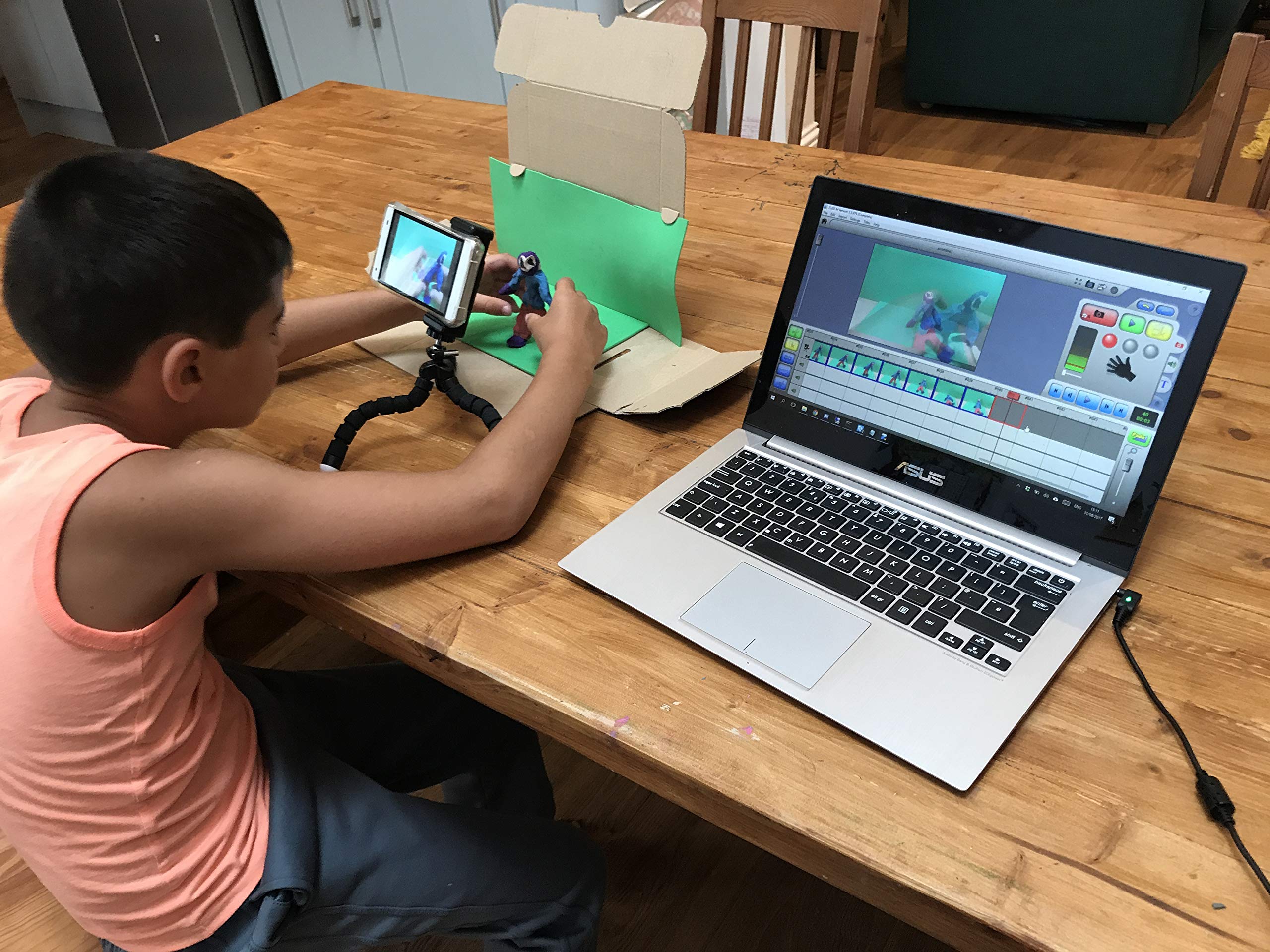


🎬 Bring your stories to life — because every kid deserves a director’s chair!
The Zu3D Complete Stop Motion Animation Kit is a comprehensive creative toolkit designed for kids to produce stop-motion films. It features an HD webcam, two lifetime software licenses compatible across Windows, Mac, and iPad, plus physical tools like modeling clay and a green screen. Trusted by educators globally, it fosters creativity, storytelling, and technical skills with expert support included.


| ASIN | B006O8MA7S |
| Best Sellers Rank | 128 in Software ( See Top 100 in Software ) 2 in Children's Software 9 in Video 21 in Photography & Graphic Design |
| Customer reviews | 4.1 4.1 out of 5 stars (620) |
| Is discontinued by manufacturer | No |
| Manufacturer | ZuLogic Ltd |
| Manufacturer reference | 43188-413879 |
| Product Dimensions | 15 x 10.8 x 20.5 cm; 500 g |
A**R
Everything you need to start animating!
A fantastic complete set for budding animators. Comes with the webcam, green screen, modelling clay and easy-to-use software — everything’s included. My son has spent hours making his own short films and learning the process of animation. It's been wonderful to see his creativity and confidence grow, he's even started teaching me a thing or two, therefore becoming something we can enjoy as a family. Very happy with this purchase, great value and really well thought out! :)
M**L
Great software and now impressed by the camera
The kids love the animation software. It is really helpful and sufficiently feature rich to make super short films. EDIT- it seems that the original camera was faulty. A similar camera was sent by the super ZuLogic team, and although it looks almost the same, it works beautifully. The colours and sound are now much, much better. The new camera only uses a USB connection - the faulty one had a separate connection for the sound. [original text..] Some things were less good - like the Voice recording. It does not let you test to get the volume correct. And getting the camera settings correct was quite difficult... The camera itself was ok - but * colours burnt out in good lighting, meaning that most movies were made in dull lighting. This may be controlled by one of the many settings - but I could not figure it out. You could not immediately see the effect of changing a camera setting. * the led lights, over a shorter distance at least, results in spots of light. Nice idea, but less useful than expected. * the focus ring works - but it is easy to move the camera when you do so. Would be even nicer if the focus could be controlled on the computer [though I guess that that type of camera would cost much more] * for an HD camera, it seemed moderately low quality (grainy and poor colour matching) - though I tried different fps vs quality settings. The green-screen cloth looked quite grey on the computer, even in good light. * the built-in microphone is not very sensitive - you have to shout at it to pick up. Tried all settings and twiddled knobs, but never got really good results. The best bet is to complete the movie first, then hold the camera close to your mouth to record any voice-overs. Not bad enough to be upset - as I said, the kids love it!
J**L
Cool Movie Making Kit
My 9 year old son had being showing an interest in making stop-motion movies for quite some time. His first efforts involved Lego people and a camera to take a photo, then move the Lego person a little, take a photo, and so on. He was getting quite creative and producing some imaginative movies. With Christmas 2014 on its way, we therefore bought the Zu3D Animation Kit. On Christmas morning, the present was unwrapped and this was the gift that got played with first. Setting up the software on our laptop was a doddle and with the supplied camera plugged into a USB Port, the first Zu3D Movie was quickly made. It is now the end of September 2015 and over the last nine months the Zu3D kit has been and continues to be used regularly. Mostly my son uses the Zu3D on his own, but every so often, he and I will use it together, one of us moving the characters and the other one clicking to take the shot. We have used Lego people, as well as the Hamster Ball (spaceship) and clay (plasticine) figures. It is fun planning and preparing to make a movie, although as you can imagine, depending on how serious you are about your movie, the planning and preparation can be just a very quick thought process, then away we go. The quality of the movie you make does to a large extent depend upon your patience. To achieve a realistic character movement on screen, requires many small movements and frame captures during the making. If patience is not one of your virtues, then you will find that the on-screen movements of your characters will be jerky instead of smooth and gradual. Quite honestly does this really matter? If you are serious about making semi-professional stop motion animations, then yes, it does matter. If you are having fun with your movie making, but you and your son or daughter don’t have the patience to invest the time into each small progression of movements, then I don’t think it matters. You’ve just spent some fun time together working on a short movie and have a great result to show for it. With the Zu3D kit, you can do either. The software is very easy to use and you can move or delete frames. This is quite handy when there are two of you. Your itchy trigger finger makes a too quick click which captures a frame with the other persons hand still in the shot. Just delete the frame and click again. The customer service provided by Zu3D is excellent. We swapped laptops and needed to install the Zu3D software onto the new machine. My email to Zu3D support was met with an extremely quick response from Francesa, who reset the registration code for me. Much appreciated. Does my son like the Zu3D kit. No, he loves it. It is fun, creative and easy to use. Do I like the Zu3D kit? Yes, for exactly the same reasons.
Y**O
Very dissapointed
First of all the camera is really not very good at all, Its one of those really old fashioned webcams that you used to plug in. I could have bought it separately online for about £6 or just used the smartphone camera for free which is significantly better. The software is OK but I could have got it free online elsewhere or via new apps - there are many offering brilliant software for free now. The software code you get only works once so when our computer failed months later we no longer had an access code and can no longer access the software to load onto the other computer. I contacted the company asking how to obtain another code and they just don't reply. Lesson learned. I wouldn't waste my money again and have actively recommended friends don't get it. Now purchasing Alternative Hue Animation which allows you to download the software from your account as many times as you need. No worries about the computer failing.
N**L
Dieses Set hab ich für meinen Sohn gekauft (8). Zuerst war ich skeptisch ob es für diese Altersgruppe wirklich geeignet ist. Nach dem ich aber erfahren habe, dass es in Großbritannien in vielen Grundschulen eingesetzt wird, dachte ich, wir versuchen es einfach. Ich war positiv überrascht! Man hat schnell das erste Erfolgserlebnis. Nach etwa einer Stunde hatten wir die erste Filmsequenz! Wir hatten zu wenig Geduld, eine aufwändige Kulisse zu bauen. Dennoch wikte die Aufnahme schon überraschend gut. Die Funktionen sind intuitiv und einfach zu bedienen. Mein Sohn hat sich dann die nächste Stunde alleine damit beschäftigt, Musik und Geräusche auszuprobieren. Eine super kreatives Projekt für kleine und große Kinder und alle Begabungsstufen. Wenn man Zeit und Geduld hat, kann man sich hier wahnsinnig kreativ austoben.
C**S
Zu3D is hands down one of the best stop-motion animation programs available, especially for children, educators, and beginners looking to dive into the world of animation. As summer camp owner, I’ve used many creative tools in our camps, and Zu3D stands out not only for its powerful features but also for how incredibly easy and fun it is to use! Ease of Use: From the moment you open the software, Zu3D welcomes you with an intuitive interface that makes animation feel accessible and exciting. The layout is child-friendly yet professional enough to produce high-quality results. My campers were creating their first animations within minutes, without frustration or confusion. The drag-and-drop functionality, simple timeline controls, and built-in tutorials make it easy for even the youngest users to jump in and get started right away. Special Features That Shine: Green Screen (Chroma Key): This feature lets students add exciting backgrounds to their animations, taking their stories to new worlds—from outer space to underwater adventures! Audio Recording & Editing: Kids can record their own voices, add sound effects, or insert background music directly into the animation, giving each project a personal and dynamic touch. Drawing Tools: With built-in drawing tools, students can add titles, speech bubbles, and extra artistic flair to their animations. Auto-capture and Onion Skinning: These tools help ensure smooth movement and fluid transitions between frames, even for beginners. Cross-Platform & Classroom Ready: Zu3D works brilliantly on both Windows and Mac and is available with school licenses that make setup easy and accessible across classrooms. Whether you're teaching a lesson on storytelling, science, or history, or simply encouraging creativity, Zu3D empowers students to become directors, artists, and storytellers all at once. It supports imagination while also reinforcing key skills like sequencing, collaboration, and digital literacy. In short, Zu3D is not just software—it’s a creativity engine that brings ideas to life. Highly recommended for camps, classrooms, clubs, and home users alike!
S**É
Une prise en main facile malgré l'Anglais, car logiciel très intuitif. Pack très sympa donc à recommander pour les adeptes du stop-motion
M**I
Parfait
M**.
Very easy to use, I bought this for myself to create stop animation comics of my sculptures. Pros: The software interface is very friendly and simple to use. All controls are straight forward and intuitive. Drag and drop from frame to frame is flawlessly executed. I created a short animation in less than five minutes on my desk. (see uploaded video) The camera with the kit is adequate to simple captures and has built in lighting with a dimmer control. The kit includes; a green screen cloth that works very well with the software, some backdrops suitable for kids, an easy manual, multiple colours of clay for claymation, a quick start guide, and the software CD. Cons: The LED lighting on the included camera washes out anything white or glossy even at the lowest setting, so use some old school incandescent. Once any of the limited effects are applied You are stuck with them unless undo is applied before closing the software or applying another effect, so you cannot remove an effect, at least I cannot find a way so far. There is a link in the Readme file on the disk to download media content if you install the older version for Windows XP, however the the link is brings you to a 404 page not found and their main website has no link to download said content. Conclusion: I highly recommend this package for anyone wanting to dabble in simple stop animation, and for anyone with children who interested in making their own animations. Kudos to the Zu3D company for putting together a truly good package for learning stop animation.
Trustpilot
1 month ago
2 months ago