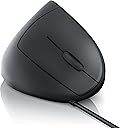
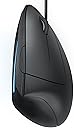
🖱️ Elevate your workflow, ditch the strain — the future of mouse comfort is vertical!
The CSL TM137U Vertical Ergonomic USB Mouse combines a high-precision 1600dpi optical sensor with a unique vertical design to minimize wrist strain and prevent repetitive stress injuries like tennis elbow. Featuring 5 buttons including forward and backward navigation, it offers enhanced productivity and comfort for professionals working long hours on Windows, MacOS, or Linux systems. Its plug-and-play USB connectivity and lightweight build make it an essential upgrade for anyone serious about ergonomic computing.


| ASIN | B00JOC5WZI |
| Antenna Location | For Laptop Desktop PC Computer Macbook |
| Are Batteries Included? | No |
| Are Batteries Required | No |
| Best Sellers Rank | 3,012 in Computers & Accessories ( See Top 100 in Computers & Accessories ) 111 in Mice |
| Brand | CSL-Computer |
| Brand Name | CSL-Computer |
| Button Quantity | 5 |
| Colour | Black |
| Compatible Devices | Personal Computer |
| Connectivity technology | USB |
| Country of Origin | China |
| Customer Reviews | 4.4 out of 5 stars 3,427 Reviews |
| Hand Orientation | Right |
| Hardware Platform | PC |
| Item Dimensions L x W | 8L x 10.2W centimetres |
| Item Weight | 200 g |
| Item height | 3.23 inches |
| Manufacturer | CSL-Computer |
| Model Name | Wired mouse TM137U |
| Model Number | A26068x30 |
| Mouse Maximum Sensitivity | 1600 Dots per Inch |
| Movement Detection | Optical |
| Movement detection technology | Optical |
| Network Connectivity Technology | USB |
| Number of buttons | 5 |
| Operating System | Microsoft Windows XP / Vista / 7 / 8 / 8.1 / 10 / 11 (32- und 64-Bit), MacOS and Linux. |
| Power Source | Corded Electric |
| Product Features | Ergonomic Design |
| Special feature | Ergonomic Design |
| Style Name | Modern |
| Theme | Vertical mouse for right handed |
| Unit Count | 1.0 Count |
J**L
made of a comfortable, soft plastic that feels nice in the hand
I was initially sceptical about the idea of a vertical mouse, but after suffering a recent back injury I wanted something that put less strain on my arm, so decided to give this a try. And I'm very impressed with it. The mouse feels premium, made of a comfortable, soft plastic that feels nice in the hand. The vertical alignment surprised me by how comfortable and natural it felt to use - so much so I tend to use this more than my gaming mouse. Switchable DPI settings and 5-button setup make this well suited for those of us who like to game on the move; I have this connected to my Surface Pro 4 and it works great for everything I've thrown at it, from World of Warcraft to Civilisation, though I haven't yet tried it with an FPS. It also works well with creative applications; again, the adjustable DPI settings make it easy to adapt to your needs. The main mouse buttons are responsive and have just the right amount of travel, whilst the mouse wheel feels appropriately 'notched', allowing for smooth scrolling but with clear stops. Initially I thought the two side buttons were placed a bit high, but after a little adjustment I've gotten used to their placement and now find them just as easy to use as they would be on a more traditional mouse. The nano receiver tucks away in the underside of the mouse when not in use, although its worth noting that the receiver doesn't quite sit flush with the mouse's body - not an issue since you won't be using the mouse without the adapter fitted, but worth bearing in mind if you plan on dragging the mouse over any nice scratchable surfaces whilst it's slotted in. The only thing that would improve this device is if it were to include a rechargeable battery, but the two AAA batteries that power it do last a long time (so long as you remember to turn the mouse off when not in use...).
J**N
Excellent - A Must Try To Believe It Mouse
CSL - TM137U optical mouse / vertical model | ergonomic design - prevention against mouse arm/tennis arm (RSI syndrome) - particularly arm-friendly | wireless | 5 buttons This is an excellent Vertical Mouse. I was going to get another Anker Wireless Vertical Mouse (also excellent) - but then I thought "How do I tell them apart on the desk." I then came across what looked like the 'same mouse' - only from CSL. And it was cheaper - definitely worth the risk. The CSL is almost identical to the Anker - or perhaps the Anker is almost identical to the CSL? Differences are 1. no branding name on the surface of the CSL 2. The wheel hub of the the CSL is shiny black while the Anker wheel is shiny chrome 3. The palm surface area of the CSL is a nice flat matt black with a great feel while, also with a great feel, the Anker is a sort of Pearl black finish. Holding the two side by side you can see the different "shades of black" - both look good. 4. The CSL came in an excellent "white box" - the Anker in a retail package - both great for their purpose ... but as a consumer I'd rather have the money saved by not having a 'retail attractive box' to throw away, than pay extra for it. 5. The CSL came with 2 AAA batteries to get you started. The 'mouse' tilt / angle will help with people having wrist / lower arm problems when using a 'normal mouse'. I noticed an almost immediate 'relieving' of the problems I was having (see Anker review). The only change I'd make to either of them would be to 'steepen' the palm face angle a bit more - but that may not suit everyone. If you are at all 'iffy' about trying a vertical mouse this is the model to try - you will find it quite easy, and quick, to re-learn your grip. At this price (including postage) you'd be silly not to give it a try - and it's wireless so no cluttering cables, and the wireless receiver is a tiny usb stub that requires no setting up - I use mine in Windows 7 and Linux Mint, laptop and desktop, without problems - it just worked. The only downside to both these vertical mice is the thumb operated web page forward / backward buttons are not right for my thumb. I never use them so I don't have a problem with this. The wheel works well, right & left mouse clicks are good, the body is easy and light to hold and move - together with the improved wrist angle that's enough for me. I don't know why it took so long for me to try this type of mouse, I should have tried them years ago - perhaps it was the high cost of the earlier ones that put me off - too much to 'risk'. How long the batteries will last I don't know - but a good feature of both CSL & Anker is that they have an 'auto-off' after a certain time of non-use; a real battery saver. A single clicks powers it up again (earlier wireless mice I've had I was always leaving 'on' - not good). All in all an excellent, and very sensible, vertical mouse at an excellent price.
M**K
Have Now Bought My Second, So Very Recommended
This mouse was so good I bought it twice, after the first one went to my second PC. Pros: Very functional in terms of what it's meant to do. Easy to use. Very comfortable, both ergonomically, and the texture of the mouse Sensitive mouse that responds well. Good enough cable length for more situations Very good value for money. Clicks are satisfying and accurate. Looks great Cons The material of the mouse can get sticky if you're not careful and use it with oily hands. So, keep your hands clean and the mouse will feel great. Otherwise it can get sticky and doesn't actually clean very well. This is because of the material. Might have been nice if the side light was LED and could be changed, but sadly it's just blue and cannot be turned off.
A**H
Quality
It's perfect quality and very comfortable.
A**C
Excellent value
I've used a Logitech trackball for years but found recently that my thumb was becoming very painful and decided to try this one. Like others, I wasn't sure it would suit so bought the cheapest version, but I can honestly say I don't see why anyone would need to pay more. The matt surface is very comfortable, the blue strip stylish and the position extremely comfortable. As a transcriber I worried it would slow me down, but it only took a little while to get used to it. I find it plenty sensitive enough for my work, and I only need about six square inches of space for it to zip across two screens. I received a polite and professional email with the invoice attached, and wrote back to ask if they had a left-handed version for my partner. They don't do one, but took the trouble to reply with a link to similar left-handed product on Amazon, which I thought was great customer service. Unfortunately the left-handed product is three times the price, so come on, CSL get some left-handed ones in stock! Update Feb 2020 - I have used this mouse constantly since I bought it, and only now is one of the buttons getting a bit sticky. I was shocked when I looked back to see how long ago I bought it and how well it's performed. It's been totally reliable, very comfortable and the thumb pain disappeared and never came back. I wouldn't think of paying over the odds for other brands when this is so good, so I've just ordered a new one.
S**S
Fixed my tendinitis/RSI instantly
I get tendinitis/RSI across the whole back of my hand which causes me to loose flexibility in my wrist and hand for weeks. This meant I couldn't use the hand properly, couldn't lean on it, open doors, hold the steering wheel etc etc. To try and fix this I got this mouse, a padded mousemat, and also a wrist rest for the keyboard to change the position of my hands from 'the claw' position. [...] The combination of the three has worked and my hands are much better. I LOVE this mouse, it's really easy to use, I got used to it straight away. My right hand was much worse than my left, so it wasn't just the typing, I was 'clawing' my hand when I used a normal mouse and especially a trackpad trackpad as well. Everyone should get this mouse, regardless as to whether you have tendinitis or not. It is a much better position for your hand, much more natural, and much more comfortable. Bear in mind it is right handed! I'm sure there is a left handed option but just keep that in mind when you buy one. Functionally, it works really well, very responsive, doesn't feel cheap or anything, is a nice material.
P**N
Good quality, but a gimmick?
Having only just received the item with very prompt delivery (next day!), I cannot comment on the long term use. I will update later at some point, for now I will concentrate on initial feedback. Background: I own 8 wireless mice of varying levels of quality and brands, gaming to ergonomic. Honestly I really cant fault many of the Logitech builds and would stand the test of time, however the price at which you pay for Logitech are a bit pricey personally. If you are prepared to spend on Logitech medium to high end models you will get a good product, this review is about comparing medium high end product for fraction of cost. Pros: # Nicely built, very well screwed together, better than some Microsoft ones. # Very smooth, smooth movement, and scroll. # Buttons are very nice to click, except wheel click. (ie Anker £10 wireless one on comparison feels like a £10 mouse click, this is very important in my honest opinion). # Batteries included (small plus but theses little things count) Cons: # 2x AAA, not sure on the life of the battery, i knew this before i purchased so i suppose you can call it an experiment, time will tell. I would prefer 1x AA or 2xAA (I suspect 2xAA is quite big and heavy and it seems majority of people like lightweight) # Wheel clicker is too stiff, it should be easier to click than the mouse clicks not stiffer # Rubber pads are not level. it rocks between 11 O'clock and 5 O'clock direction, I am sure this is not normal and a defect but I do not intend to return for this reason. I will stick some tape for levelling the mouse, this is a bit of a disappointment. First time I had this issue with all the mice I've bought. Notes: # I would say it is a medium weight # Ergonomics are a little strange, moving side to side is different, one would need to kink their hand more to pan. but it is kinking in the natural wrist direction which I suspect where the ergonomics come in. Moving up and down has become more of a challenge. My posture has always been ok but of lately injury to the wrist made things more noticeable hence why I am trying this mouse. # Due to the position of the scroll wheel i need to move my hands slightly down the mouse to access it, which starts to drag the pinky finger. # I cant imagine this to be "too big" for adults with small hands, perhaps children. Ergonomic mice are supposed to fill up your hands. Overall verdict: I don't think its enough of a change to make it change your life, I feel its a bit of a gimmick but we shall see. At £11 you cant go far wrong. I will keep with this and very sure it will out last my Anker mouse in terms of quality but not sure in battery life. Shame about the rubber pad. I would say 3.5 star but Amazon buyers will tend to not touch anything with less than 4, so I give this a 4, ie worth buying.
A**R
Highly recommended for RSI suferers!
I work in an architectural practice which uses the computer 7 hours a day, 5 days a week. The constant use of CAD and other graphic related software throughout my university and working life might have taken its toll and I have recently developed a strained around my wrist and forearm sometime early this year. I've tried a few ergonomic mice to resolve my problem but to no avail until I found CSL-Computer vertical mouse. It has tremendously relive all strained that I have, thanks to its clever design. In my experience, what sets CSL-Computer vertical mouse apart from other vertical mouse is the smooth/ seamless curvature of the mouse where the joint between your thumb and index finger meets the mouse. I feel, it encourages a natural hand position of holding the mouse as opposed to other vertical mouse that have high thumb support. I.e. your thumb will be positioned high on the mouse, almost in the same alignment of your index finger (in relation to the posture of a vertical mouse). It feels as though you are forced to positioned your thumb at the allocated space and I find that it strains my thumb. CSL-Computer vertical mouse has a seamless design which allow your fingers to sits natural onto the mouse and comfortably 'hugging'/ 'caressing' the mouse. I have a relatively petite hand and this design suits me well. In summary, I'm very happy with this purchase, affordable price, great precision, aesthetically pleasing and highly recommended for RSI sufferers :)
Trustpilot
1 month ago
4 days ago