


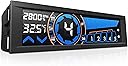

NZXT Sentry 3 Fan Controller - Touch display, 5-channel fan control, 5.25'' single bay - AC-SEN-3-B1
Product ID: 47915907
⚡Ultra-fast response
📱Touchscreen interface
🔌5-channel control
🌬️ Control Your Cool with Style!
The NZXT Sentry 3 Fan Controller features a capacitive touchscreen with an ultra-fast response time, a 33% larger display than competitors, and five fan channels for extensive cooling management. It is compatible with all 3-Pin and 4-Pin fans, includes a toggleable LCD for aesthetic integration, and offers integrated short circuit protection for enhanced safety.
| Brand | NZXT |
| Product Dimensions | 17.5 x 5.99 x 7.92 cm; 235.87 g |
| Item model number | AC-SEN-3-B1 |
| Manufacturer | NZXU4 |
| Colour | Black |
| Standing screen display size | 5.4 Inches |
| Voltage | 5 Volts |
| Wattage | 75 watts |
| Hardware Platform | PC |
| Are Batteries Included | No |
| Item Weight | 236 g |
| Guaranteed software updates until | unknown |
V**I
Excellent Piece of Kit
As opposed to the many reviews on here about it malfunctioning, I have found mine works perfectly fine and as intended. It doesn't have any ugly knobs sticking out from the front so fits in really nicely with the rest of my case. Also the screen is much brighter with more vivid colour than I previously anticipated. This is very much a non compulsory item for a PC build and more of a premium product so only consider purchasing it if you'll take full advantage of it. Some of the disadvantages are mostly unique to my case (Bitfenix Shinobi Mid Tower). One of which is the backlight for the screen leaks out of the sides which is most visible in the dark. This is probably the result of the fact that my case has 2 long indentations on both sides of the 5.25'' bay, but most cases don't have that so it'll most likely be fine. I fixed this with some rubber lining but I would expect something in this price range to not have such imperfections. Overall, a great piece of kit that makes my PC run near to silent on idle and quiet on load.
T**R
Great little addition to my rig.
Totally satisfied with this, the only part of it I was dubious about was how accurate the thermal probes (It comes with two, one fitted and one as a spare, or I believe you can fit both.) would be and as it turns out, after testing, they're spot on. It looks good, it's easy to use and beyond easy to install. It supports both 3 and 4 pin fan connectors. It fits perfectly into a 5.75 inch drive bay. It has 3 different fan modes, 2 are pre-set and the other is manual. Performance mode is for when you want good airflow and noise isn't an issue. I thought it wasn't working at first because when I put it in that mode, nothing seemed to happen. But after I ran War Thunder for a minute or two, the fans picked up to 60% after the case temp went up to 25.c. The lower pre-set does the same but it favours a slower, quieter fan speed. The manual setting, well that just does what it says, you set up the fans as you want for positive/negative pressure/max/min airflow. Using the link option is easy too. You simply press the link button on the panel for 3-5 seconds and you'll get a 'beep' from the controller, then you can choose which fans you want to link, then once linked you just use the slider or arrows to adjust the fan speed. The temperature alarm is easy to set, simply press and hold your finger on the temperature readout on the display then use the up/down arrows to select which temperature the alarm will come on at. I originally had it set for 35.c then when it went off, it was certainly loud enough to get my attention! When the alarm goes off, the controller will put all fans up to their maximum speed in an effort to cool the case down again. The temperature display can be set to either Celsius or Farenheit simply by pressing the temperature readout on the display, according to your preference. The rpm readout at the top left can be set to display either the rpm or percentage again, simply by pressing the rpm readout. I don't know what more I can say about the Sentry 3, it's not an absolute must have for your rig but it's a really smart little add-on that I'm 100% pleased with.
D**N
Looks good and works well - Sentry 3 review
Good for controlling 3 pin fans. I've got quite a few including a couple of high static pressure fans in a push pull configuration round a rdiator. This controls them all ell and allows individual settings, for example, I seminars to get better cooling with the push fan at 00% and the pull fn at 70% - turbulance maybe? Anyway I can set them at this with this controller. Also controls 4 pin pwr fans fine. The only negative is the probe, that is pretty useless really. It is only useful in giving g a vague ambient inner case temperature. There's no way you could use it for cpu temp (should be using core temp anyway) but I guess it's OK if used for an overall case ventilation guide. The instructions say place it on cpu heat exchange pipe- implying it will give you accurate cpu temps- it won't, and it could be hazardous to your cpu's health you try and use it in this way. There's plenty of software core temp monitoring apps that will give far better cpu accuracy
L**N
Great budget fan controller
I did a lot of research before purchasing this fan controller and I found this one to be the best quality for my budget. The fan controller is simple to install and manages to control five fans easily. I love that you can connect ('link') the fans together so that you can adjust all of them at the same time, rather than individually. The display looks great and fits well into a standard sized bay, however, at certain angles, the display is difficult to see and glare can really affect its visibility. Finger marks can also be seen easily so you'll want to keep a microfiber cloth handy. The temperature reading is accurate so long as you place the digital sensor in the right place. If you care about the aesthetics of your internal build, it might be hard to make this look nice as from behind, there's an exposed circuit board and the wires that protrude to connect the fans are quite long which is good for a big case but it makes cable management more difficult. It really does look barebones from behind, it's just the display and the circuitry which can also mean that if you're heavy handed, you might accidentally push the display back into the bay unless you secure it. Overall, great budget fan controller that does the job well and looks great. I would recommend it for any build.
A**M
This fan controller has made my computer 1000x quieter
This fan controller is an amazing product as my computer (with an MSI motherboard) kept on only allowing me to set my fan speeds at 50% (which is the equivalent of 100% on this) so this has made my computer a lot quitter. This controller features alarm settings (if the temp reaches above a threshold that you can program by holding on the temp display), Link settings (where you can link fans together in order to work at the same time with the same speed), and a lot of other features which will benefit any pc builder. Highly recommend this product
C**M
Update : Still going strong
Update : Five years from original purchase and 4 years since the replacement and its still going strong. Definitely a dodgy one was sent out originally, but other than that it's great value for money and I'm very please with it. Original: Broke after one year. Contacted NZXT, they sent out another power cable for free which was great. turns out it is an issue with the unit. Now going to try and RMA it. I'm not going to hold my breath. Overall not happy with the quality, although a good unit whilst it worked. Can't fault NZXT aftercare so far, will update later. Ironically NZXT has told me to rma it through Amazon as they are faster - we shall see.
S**S
Amazing quality fan controller, highly recommend, read my review for more information.
1: Easy to install. 2: Touch-screen is capacitive and glass, not resistive and plastic. 3: 5 Fans is more than enough for the average user. 4: The Thermal Probe is quite accurate, I recommend taping it to the side of your processor socket for best readings. This fan controller is great, does exactly what I need it to do. If it starts beeping like an alarm clock it is because a fan is faulty or you unplugged a fan while in operation. I highly recommend you buy this Fan Controller, you won't regret it, trust The Doctor.
Y**A
Rubbish waist of money
I have had this fan controller for a month now started out well the one by one the controls went on this unit this is pretty poor for some thing that's new. there's that old saying jack of all trades and master of none could be said of this nzxt item. The power slid only works on high setting, the link button no longer works the power button never did work, and the list goes on I got this based on others reviews these things are not meant to last and fail soon after i can not recommend this made in china crap
J**F
Excelente.
El mejor controlador fisico de ventiladores, especificamente fisico, ya que hay otros que se controlan via software como el Hue+ o Grid, pero es otra historia... la pantalla es muy nitida, permite apagarse para que no moleste la luz o en gabinetes que llevan tapa frontal. tiene 1 sensor de temperatura y permite configurar en grados centigrados o farenheit, asi como una alarma a cierto limite, permite controlar 5 ventiladores individualmente, muestra tanto las rpm reales o el porcentaje. tiene alarma por falla, obstruccion del ventilador, alta temperatura. permite controlar el giro desde el 40% al 100% y ademas puedes apagar los ventiladores por completo, si tienen luz esta se apaga tambien al detenerse el giro del ventilador. Pros: Lo mejor... permite apagar cada uno de los ventiladores, detener su giro por completo y si es de leds estos se apagan completamente. extensiones para ventiladores lo suficientemente largas, puede llegar a cualqueir parte del gabinete, y son desconectables para no tener el rollo de cable si no es necesario. controla sin problema ventiladores de 200mm se puede apagar la pantalla si molesta la iluminacion, o si el gabinete lleva tapa en el frontal. Contras: al encender el equipo todos los ventiladores conectados se ponen al maximo, y despues van regulando poco a poco su velocidad hasta llegar al perfil guardado. la pantalla touch se mancha muy facil, recomiendo ponerle una mica protectora estilo de tablet, recortandola a la medida, o dejar la que trae.
M**R
NZXT Sentry 3 - Die (derzeit) beste Lüftersteuerung mit hoher Qualität
Ich bin kein Fan davon, mehrere Gehäuselüfter via Mainboard zu betreiben. Also war ich auf der Suche nach einer neuen und passenden Lüftersteuerung, um meine insgesamt 8 Gehäuselüfter zu steuern. Ich besitze das neue H630 Gehäuse, ebenfalls von NZXT und wollte da wieder auf eine schicke kompakte interne Lüftersteuerung zurückgreifen, nachdem ich zuvor lange mit einer externen Steuerung (welche auf meinem Schreibtisch stand und mit dem PC verbunden war) gearbeitet hatte. Die Sentry 3 ist mit Abstand die beste Stsuerung von allen, die der Markt derzeit so hergibt. Ich hatte am Ende die Thermaltake Commander und die NZXT Sentry 3 im Auge, hab mich dann letztendlich aber hierfür entschieden. Die NZXT Sentry 3 ist super schick und wirklich alles andere als billig. Ich mein, wenn man sich mal etwas Zeit nimmt und sich die ganzen Lüftersteuerungen so anschaut welche es derzeit gibt, wirken die meisten echt total billig. Und auch die Qualität soll bei den meisten stark zu wünschen übrig lassen, denn man liest meist nur schlechtes. Mir war es auch wichtig, dass man das Display immer gut und deutlich erkennen kann, welches bei der NZXT Sentry 3 auf jeden Fall der Fall ist. Bei vielen anderen Displays ist die Ausleuchtung so schlecht, dass man nur wenn man exakt gerade drauf schaut etwas erkennen kann. Abgesehen davon empfand ich die NZXT Sentry 3 natürlich auch gerade für mein H630 genau passend, man könnte wirklich meinen es wäre extra dafür angefertigt, da es keinerlei Farbunterschied gibt. Scheint mir 1:1 das selbe Material und Farbe zu sein, was mir sehr gut gefällt. So wirkt das Ganze bei mir zumindest einheitlich und sticht nicht so als "Fremdkörper" heraus. Zur NZXT Sentry 3 selbst: Die Lüftersteuerung hat einen sehr schönen großen Bildschirm, mit kräftigen Farben. Alles lässt sich wunderbar bedienen, der Touchscreen reagiert genau und zuverlässig. Es lassen sich 5 bis 10 Lüfter (via Y-Kabel) bedienen (mehr würde ich max. nicht anklemmen), die Kabel sind ausreichend lange, jedoch musste ich ein paar dennoch verlängern, wenn man die Kabel schön und sauber im Gehäuse verlegen möchte. Den Temperatur-Sensor habe ich ziemlich mittig im Gehäuse plaziert, das kann man machen wie man möchte. Die Temperaturen schwanken bei mir zwischen 23 und 33 Grad, die Steuerung regelt die Lüfter nun ganz automatisch und regelt die Lüfter so, wie es gebraucht wird. Im normalen Betrieb mit Windows absolut lautlos, selbst beim zocken drehen die Lüfter nicht unnötig laut hoch. (ich verwende Noiseblocker High-End Lüfter, 140mm) Zur Steuerung und Bedienung möchte ich nun gar nicht all zu viel schreiben, da liest man sich kurz und knapp in die beiliegende Beschreibung ein. Es ist aber auch alles irgendwie selbsterklärend. Das Wichtigste: Man kann die Lüfter zusammen oder jeweils einzeln ansteuern, man kann sie automatisch oder eben manuell regeln, es bleiben eigentlich keine Wünsche offen. U/Min und Temperatur wird dauerhaft angezeigt, somit hat man immer den Überblick. Ansonsten sei noch gesagt: Beim Einschalten vom PC fahren die Lüfter erst einmal auf 100% an, dies dienst zum Selbsttest. Bedeutet, wie man das auch von einem PC kennt, ist es erst mal etwas lauter. Aber keine 5-10 Sekunden später pendelt es sich je nach eigener Einstellung ein. Bei der Sentry 3 handelt es sich um die Größe 5,25", man braucht also keinen Einbaurahmen. Sie hat die Größe von einem DVD-Laufwerk, benötigt also einen freien Schacht. Ebenfalls braucht die Lüftersteuerung Strom, welche sie von einem 4-Pin Molex bekommt. (falls nicht am Netzteil vorhanden, sollte man sich einen Adapter mitbestellen!) Die einzelnen Lüfter werden via Spannung und nicht via PWM gesteuert. Kurz und knapp in Stichworten: - Sehr schick, wirkt hochwertig und ist top verarbeitet - Funktion zuverlässig, Display und Touchscreen ist wirklich prima - Preis/Leistung top, kein billiger Müll (wer billig kauft, kauf 2x ;) - Lüfter lassen sich individuell steuern oder einfach komplett abschalten - 5 Anschlüsse vorhanden, via Y-Kabel 10 Lüfter möglich Von mir voll und ganz verdiente 5 Sterne, ich würde sie mir jederzeit wieder kaufen. Ich hoffe meine Rezension war hilfreich und hilft dabei, die richtige Kaufentscheidung zu treffen.
A**O
bonioto y practico
Muy buen controlador de ventiladores, lo tengo conectado a 3 ventiladores independientes que enciende y apaga cuando quieras, eliges la velocidad de rotación, etc. visualmente muy bonito, con control táctil, lo llevo usando bastante tiempo y perfecto, muy recomendable.
A**U
exceptional, nothing quite like it
Amazing touch interface and functionality; There is nothing quite like it in our domestic market; comes from USA and takes its own time to ship; default modes are more than enough, definitely remembers settings on power off
S**N
Easy installation, good functionality, great aesthetics
I installed this fan controller fairly quickly as it was straight forward with no unnecessary wires. The process was as easy as follows: - mount controller onto bay - connect controller to power supply - connect fans to controller The connections are modular so you can remove extra wires (I use the controller for 2 fans so I can easily remove 3 wires to have a cleaner setup behind the scenes). The display is beautiful and very user-friendly with its touch screen. The three available modes (performance, manual, and quiet) are pretty neat HOWEVER the performance and quiet modes are dependent on the temperature probe - the flaw is that the probe will always measure lower than the true temperature so the fan speed will likely be lower than you would want in a performance state. For me it is not a big deal because I go on manual anyways, but it would be cool if a future model can provide a more accurate reading of the temperature. Temperature can be in either Celsius and Fahrenheit so don't worry about that. Overall, I'd say this is the best looking fan controller in the market, in both aesthetics and functionality and I do recommend this particular one if you are looking for a fan controller..
Trustpilot
3 weeks ago
1 month ago