🔒 Elevate your security game with crystal-clear 4K vision and AI-powered tracking—because your peace of mind deserves the best.
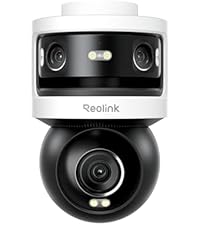
The REOLINK PTZ Security Camera System delivers professional-grade 4K video with dual-lens technology, offering both wide-angle and telephoto views simultaneously. Featuring 355° pan and 90° tilt, it provides comprehensive 360° coverage with auto 6X hybrid zoom and AI-driven tracking for people, vehicles, and pets. Powered by PoE for stable, wired connectivity, it includes instant motion alerts with spotlights and sirens, making it an ideal outdoor surveillance solution for millennial professionals seeking reliable, high-tech home or office security.


| ASIN | B0B4S6F749 |
| Alert Type | Motion Only |
| Antenna Location | Outdoor Security |
| Are Batteries Required | No |
| Best Sellers Rank | #89 in Dome Surveillance Cameras |
| Brand | REOLINK |
| Built-In Media | Trackmix PoE x1, 1m Network Cable x1,Quick Start Guide x1 |
| Color | White |
| Compatible Devices | Reolink NVR with Hw H3MB18/N2MB02/N3MB01 to the latest firmware version |
| Connectivity Protocol | Ethernet |
| Connectivity Technology | Wired |
| Control Method | App |
| Controller Type | Android |
| Customer Reviews | 4.3 out of 5 stars 1,030 Reviews |
| Effective Still Resolution | 8 MP |
| Effective Video Resolution | 2160 Pixels |
| Enclosure Material | Aluminum |
| Field Of View | 107 Degrees |
| Focus Type | Auto Focus |
| Form Factor | Dome |
| Frame Rate | 25 frames_per_second |
| Indoor Outdoor Usage | Indoor, Outdoor |
| Indoor/Outdoor Usage | Indoor, Outdoor |
| Installation Type | Screw In |
| Item Dimensions | 8.98 x 5.79 x 4.33 inches |
| Item Height | 11 centimeters |
| Item Weight | 1.95 Kilograms |
| Light Source | Infrared Led |
| Manufacturer | Reolink Digital |
| Model Name | Reolink TrackMix PoE |
| Model Number | Reolink Trackmix PoE |
| Mount Type | Wall Mount |
| Night Vision | Night Color |
| Night Vision Range | 30 Meters |
| Number of Channels | 1 |
| Number of IR LEDs | 2 |
| Number of Items | 1 |
| Other Special Features of the Product | PTZ Technology |
| Photo Sensor Resolution | 2 MP |
| Power Source | Power Over Ethernet |
| Recommended Uses For Product | Outdoor Security |
| Room Type | Garage |
| Shape | Dome |
| Special Feature | PTZ Technology |
| Specific Uses For Product | Surveillance |
| Unit Count | 1.0 Count |
| Video Capture Format | MPEG-4 |
| Video Capture Resolution | 4k |
| Video Encoding | H.265 |
| Viewing Angle | 104 Degrees |
| Voltage | 12 Volts |
| Water Resistance Level | Waterproof |
| Waterproof Rating | IP65 |
| Wattage | 10 |
| Wireless Technology | Wired |
| Zoom Type | Hybrid Zoom |
D**L
Amazing Camera
I have been using this Reolink TrackMix PoE camera for about a month to monitor my driveway and front yard. Setup was straightforward once connected to a PoE switch, and performance has been reliable. What I like • Very clear 4K video during the day and night • Dual lens view is useful for wide coverage and close up detail at the same time • Auto tracking follows people and vehicles smoothly • PoE connection is stable with no Wi Fi dropouts What could be better • Initial PoE setup may be confusing for beginners • Motion detection needs some tuning to avoid false alerts Overall, this is a solid outdoor PTZ camera with strong video quality and useful tracking features. I would recommend it for anyone who wants wider coverage than a standard fixed camera and plans to use a wired PoE setup.
H**U
Excellent security camera, unbeatable quality and price
I purchased this security camera and it truly exceeded my expectations. The image quality is clear, even at night thanks to its night vision, and the coverage angle allows me to monitor the entire room without blind spots. Installation was quick and easy, both for mounting and connecting to the app, which works reliably with real-time alerts. The price-to-quality ratio is excellent: for what I paid, I got a reliable device with sturdy materials and full features like motion detection and instant notifications. The Wi-Fi connectivity is stable, and the camera responds quickly to commands from my phone. In summary, I am very satisfied. I recommend it 1000% 😅😅, I absolutely love it! It’s totally worth the investment for home or office security.
V**H
Still a good choice
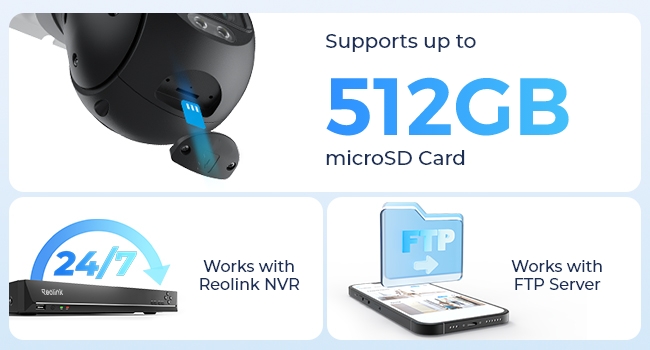
I installed the 2 of the Powered/Wifi versions of this same camera 2 years ago albeit this one is purely POE, so no battery or WiFi options. That's fine because those are the biggest sources of camera complaints. The actual camera & options are identical. It took me half the day to run the 100' wire and complete the mounting but that's mostly my many homeowner mistakes - should have used plastic wire hangers rather than powered staple gun. Also should have used shielded wire - cheap wire kinks too easily. On to the camera. Pros: - The PC app has a great multi-camera view. Note that wired connections are suggested since it live-streams from all cameras, which could overwhelm WiFi. - Dual camera setup is no hype. The 2nd camera's 6x optical zoom, that's automatic, really does help recognize figures that it's tracking. -Very clear image. - Lots of setup options. - Allows for "always record". Even with 2 cameras, it holds recording for several days. The Viewing filters allow me to find the activations by type (person, car, animal, other). If I want to see what happened between those activations, I can. Very helpful for times when it didn't activate. With this option on, I know FOR SURE that I won't miss recording a critical moment. It may not track how I'd want, but that's where having 2 cameras come in because the wider one will is about a 110 degree view, which is usually enough. - Allows for IR to always be on so that it detects everything, then the light comes on for activations. This helps for a better image, as well as for letting the subject know they've been noticed. Having the light track them, even better! Cons: - Physical tracking causes it to blur for half a second every time it moves, which is maybe 6 times just tracking someone walking for 20 feet. It re-focuses and re-sets it's exposure. - Older low-tech exposure tech. Doesn't do advanced exposure manipulation you'd need to have any hope of license plate recognition at night. - All ReoLink cameras only support 256GB, even though Amazon description may exaggerate and say 512GB on some. - Lighting options could be more robust. - The IR recording is very grainy. I've had IR capable cameras that are like a black-n-white moving in near total darkness.
A**R
Overall great camera compared to Wyze Pan Cam
Camera works great, only real complaint is you can hear it moving from inside the house on other side of same wall and how sensitiveit is at night with bugs. Plus side is you know it's tracking something before you get the notification. Notifications are quick, within a few seconds. POE is much better than wifi any day. This one is not connected to the home hub but I did test it and had no issues. For POE you can use any POE+ rated switch on your network and the app will detect the cameras immediately. Im running a 256mb sandisk extreme or better (high endurance or max endurance) cards even if connected to home hub or a soon to be NVR. The hybrid zoom works decent but doesn't replace a good optical zoom. The hybrid zoom is more clear than trying to zoom in on the fixed lens. It has a sensitivity schedule you can set to be less sensitive at say night than day time. At night I had to drop mine down to 20 out of 50 (max setting) to get it to stop detecting flying bugs. Still testing those settings but it is pretty sensitive even in day time but will pick up and track a vehicle 150 ft away especially if you set one of the viewpoints to zoomed in on say a driveway Entrance. You can set preset points to simply click on and have the camera move to your preset monitor points and yes they can be zoomed in fully on the zoom lens or only partially so thats a nice feature. Overall a big upgrade over the wyze pan cams but could use some better AI detection when it comes to bugs and heavy fog (main reason i docked one star) or objects like a parked car. It won't say vehicle detected but it will motion mark it even if just looking at it sitting still if something else moves in the picture. This thing is much bigger than a wyze pan cam and well built. I used Reolink's corner bracket on this as well and it is sturdy and allows the camera to look down two sides of house so I highly recommend corner mounting it if possible. You may still want a fixed camera looking one direction as the camera cant look both ways just nice to be able to rotate it 270 degrees or allow it to track a moving object 270 degrees as well vs one side of house only.
J**F
Works With Blue Iris
Replaced an older reolink IP camera with this. I like the PTZ functionality of it. It has a dual lenses which offer a decent wide angle view and the zoom capabilities of the other lens. It certainly helps when trying to see things over 100ft out. The night vision aspect of the camera is amazing compared to their older cameras. I can now see everything clearly at night. My goal was to incorporate this camera with Blue Iris. It's possible but it a bit of a pain to setup. The biggest Con with this camera is that it doesn't come with a web interface enabled. You have to use the Reolink app in order to dive into the device settings and enable it along with some others things (ONVIF, RTSP). I wish I knew this prior to installation as installed it in a hard to reach area and had to go back to obtain the QR code from the label mounted to the top of the camera. With blue iris you have to manually add the camera in order to view both lenses. Add a camera and name it "**** Wide". Choose reolink as the brand but choose "H.264 RTSP Preferred" add /h264Preview_01_main and /h264Preview_01_sub to the "default" main and sub stream profiles. Also make sure to enable PTZ. Once the camera is confirmed working, clone the camera (add new camera, copy from **** wide") and name it **** Zoom". However change the sub stream profiles from "...Preview_01_..." to "Preview_02_...". That will give you the zoom option. I'd also slow the PTZ speed to 2 or 1 depending on how far away the camera is from the focus area. My camera is mounted high up and it looking over a couple hundred feet out. PTZ control with BI is clunky but works.
N**B
Amazing set of features for such a reasonable price
Really love that it has PTZ and auto tracking all in one affordable package. Those features work pretty well, especially for a consumer-level device. I wish it had greater light sensitivity in near-dark conditions like other cameras on the market because the LED lights are too much to be turning on very bright at night in front of my house. Still, it works fairly well to leave it in color mode even when that LED is off because it does have decent light sensitivity, just not great. The motion detection is where I am going to need to spend more time trying to fine tune because as it is it's firing constantly, even when there's nothing that I can see in frame that is moving (other than maybe leaves in the trees moving ever so little?). The secondary stream for the zoom feature is pretty slick. I haven't found it to be super useful yet because it doesn't seem to want to center itself on whatever it's tracking, so I don't really find it showing me the face of the person in the yard for example. I suspect this might be just a setting problem but it doesn't work great out of the box. However, the wider FOV stream is high quality so you can make out faces on that stream just fine. EDIT: I see that I can reduce the sensitivity of the motion detection to reduce the false positives, which is helping (I still need to tweak more). I also found that changing the "tracking method" to "pan/tilt tracking first" does the trick to make it so the secondary zoom camera is focused on the target. It's actually pretty amazing -- just now I watched it figure out that there was someone walking down the sidewalk across the street from me, it automatically moved to center both cameras on that person, zoomed in to see them fairly closely with the secondary camera while keeping the main camera at the full FOV, and automatically continued to move to keep them in frame. I feel like this will be very helpful in case there's something wonky going on in front of my house now.
J**R
Low price equals low quality.
First off, I've been installing cameras since they were all black and white. I have mixed feelings about Reolink. Price wise, they are cheap. And unfortunately , you get what you pay for. So, this trackmix. The picture quality when compared to other brands 4k is acceptable but not great. The dual lens feature works as long as your jot trying to see something that is more than 30 feet away.the second (zoom) lens quality is no better yhan if you simply took the main image and magnified it digitally. I mounted mine 20 feet off the ground and 20 feet from the sidewalk that runs adjacent to my home and it's disapointing. Some background. I have 6 outdoor Reolink cameras and there are a few warnings that you just know. #1 They are not UV stabilized and start turning yellow within a few months. #2 image quality is poorer than other brands (except for the poe3 wide 4k model) Even on the reolink 12k model it's ok at best. #3 You MUST record the camera onto an NVR i use ubiquity as my primary recorder and have a Lorex nvr record as a secondary backup unit. Why? Because if you depend on the cameras internal card to save video IT WILL LET YOU DOWN! I can't tell you how many times i have checked the app for an event only to find that the camera did mot record it! (I generally look at the app first, get the time, and then find the event on my NVR. #4 The built in white LEDS are annoying. I like them another but they are terrible. Either they continuously turn on due to rain or flying insects or they just don't see a person and don't turn on at all, they are completly unreliable. Settings are frustrating. If you crank sensitively to max you get false alarms and the lights keep turning on bothering neighbors or you turn it down a little and it doesn't record events. Lastly people detection works very poorly at might. Doesn't matter if the camera is in night IR mode or mot. It's almost October here. I'm not going to take this down this year but come spring time this is coming down. 3 pictures First shows poor quality in clear mode person is 30 feet directly in front of camera and it looks like a 1080p camera. #2 Reolink states no lag, not true zoom camera is 3 seconds behind main lens #3 shows overall quality with larger image.
T**1
Amazing auto track camera with 24/7 recording to nvr without battery charging - great support!
Highly recommend nvr and trackmix cameras. REOlink support is great! They answered all of my pre-sales tech questions (as I wanted poe cameras on their own network directly wired back to the nvr vs flooding wifi) and also wanted to learn more about which camera would be best (they have a lot of options). Things to note: 1. My setup is 5 trackmix cameras, doorbell, network switch, and nvr recording 24/7. 2. The trackmix was best for my use everywhere honestly. It can get a very wide shot but can then track with auto zoom on a subject. 3. On initial setup you will see a lot of phone alerts. This is ok. The first thing to do is remove on each camera the push notifications for "any motion". It was going off all the time when it rained or snow. This helped fix the issue. 4. You will need to dial down each camera sensitivity until you feel the phone alerts are correct. This will include dialing back person, vehicle, or animal settings. I was able to do this each day until I was not being phone spammed. 5. My night videos of people walking in the driveway were blurry. I worked with support and they had me change on each camera the Frame Rate Mode to Constant. This provided a clear video of people walking where I could make out their faces. 6. I also bumped up the bit rate to the max on each camera. Since I'm using the nvr and its hard wired, it was ok to increase the bandwidth - after all the point of the cameras are to work well at night and be able to make out any of events clearly. 7. Dont get alarmed if you look at playback and it doesnt look good. You need to switch to clear mode. 8. Doorbell has worked well and wired this up to existing doorbell wiring without a problem. They have a plug chime that comes with this where you can change the chime ring tones. One note, plug this into the wall during initial setup as I believe it has to be setup this way first then you can unplug and wire it to existing door wiring for power. Hope this helps, but highly recommend the REOlink system! I wanted to share screenshots but Amazon kicked back my first review I tried to post so maybe there is something personal on the screenshots I grabbed that they saw or didnt feel were appropriate.
Trustpilot
2 months ago
3 weeks ago