Desertcart purchases this item on your behalf and handles shipping, customs, and support to Iceland.
🖤 Elevate your trackball game—comfort meets control in every tilt!
The ELECOM MP-TBM02BK Trackball Mouse Disc Pad Tilt Black is a compact, ergonomically designed accessory that reduces wrist strain by allowing customizable tilt adjustments. Made with silicone for stable, slip-resistant use, it supports long hours of work with a slanted edge wrist rest. Its eco-friendly paperless instructions reflect a commitment to sustainability, making it a smart upgrade for professionals seeking comfort and precision.


| ASIN | B0B8NCGZPB |
| Additional Features | For Trackball Mouse, Tilt adjustment |
| Antenna Location | オフィス, ゲーミング |
| Best Sellers Rank | #1,710 in Computer Mice |
| Brand | ELECOM |
| Color | Black |
| Customer Reviews | 3.8 3.8 out of 5 stars (223) |
| Enclosure Material | Polycarbonate, Silicone |
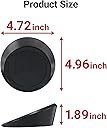
| Item Dimensions L x W | 4.96"L x 1.89"W |
| Item Thickness | 4.8 Millimeters |
| Item Type Name | mouse pad |
| Item Weight | 130 Grams |
| Manufacturer | ELECOM |
| Mfr Part Number | MP-TBM02BK |
| Model Number | MP-TBM02BK |
| Shape | Rectangular |
| Size | 5L x 1.9W inches |
| Theme | trackball |
| Unit Count | 1.0 Count |
J**H
A great solution to a common problem, highly recommend it!
I've tried a bunch of different mice over the years: standard ones that just end up torqueing my wrist and elbow, vertical mice that need too much desk space to move around, and trackball mice that work great but aren't as ergonomic as they claim to be. I was about to breakdown and buy yet another ergonomic trackball mouse when I happened across this product, which has been the answer to my on-going problem finding a good position to situate my mouse in without too much strain on my wrist, elbow, and shoulder. What's great about this riser is that you can continuously adjust it; unlike mice with various plates and angled bases, you can move this one around however you like to find the best fit. I often find myself moving it slightly from day to day depending on how my joints are feeling, which is perfect because 'one-size-fits-all' solutions rarely fit everyone. This is a great way to use the mouse you already like while adding more ergonomic tilt and rise to it so that it truly does fit you. The rubber feet and pads on the riser keep it in place on your desk and keep your mouse from sliding off, and they work great for me. I wish I would have found this sooner and saved myself the trouble and money of going through a bunch of ergonomic trackball mice to find a solution that works for me. Buy it, it's a heck of a lot cheaper than a new mouse and you can adjust it in so many ways to work for you!
D**N
Improved ergonomics (and thus comfort) of my trackball at a standing desk.
I work at a standing desk, and my Elecom Huge trackball created a very uncomfortable bend at the wrist. Long term, that posture also is probably not good for my wrist; it definitely aggravated my tendonitis. I'm using the disc pad to lift the back of the trackball, which drastically reduces the need to bend my wrist. It is much more comfortable when I'm standing to work. And I can remove the disk pad when I decide to lower the desk and sit. I do wish the rubber anti-slip surface was more anti-slip, but there's probably no way to do that without either making it tacky or permanently attached. The disk pad slowly slips across the standing desk's plastic surface, but the trackball did that, too. And the trackball will slide on the rubber surface of the disk pad, but actually less than it did on the standing desk's surface. [EDIT TO ORIGINAL REVIEW: I got a couple of round, sticky, non-slip dashboard gel mats- the kind you might use to hold your phone in place on the dashboard. One between this product and my trackball seems to have successfully addressed the sliding problem.] Amazon's review platform asked me about battery life. I've only had the item for about 24 hours, but I'm willing to bet that battery life is EXCELLENT. I doubt I'll ever have to change batteries in the disk pad.
Z**H
Didn't quite work with the 4 trackballs I tried
I purchased it mainly to see if it could improve the ergonomics of the Elecom Huge. Sadly, the surface (on the slanted side) is a bit too slippery -- the Huge will simply slide down on its own weight. Also tried it for three other trackballs: Elecom deft pro: Wedging works, but it ended up not being very comfortable for me as the new position forced my palm to rest on its pinky side on the desk (one of the things I hate about using a mouse and the m570). Might work for other people. The pad is a bit too big if used with the deft pro. Sanwa Gravi: Not looking to improve anything with the Gravi since it's quite comfortable already ergo-wise, so trying for the sake of trying. The Gravi is kinda long (it's as long as the Huge) and as a result, quite a bit of it will hang outside of the pad and you'll need to fiddle to find the best balanced position: too much of the palm rest out, and it becomes a lever to prop the front end up; too much of the front end out, and you won't have enough weight on the pad to create enough friction and the Gravi will slide like the Huge. Fiddling around too much and you'll probably hit the three control switches (for connectivity and dpi) on the bottom, which I can see myself doing a lot if I wanted to move the trackball around the desk a bit. Kensington Expert: Tried both reverse tenting (i.e. to make the front sit lower than the back) and side wedging. Reverse tenting works, although you'll need to sit higher for your forearm to naturally extend in the same angle as the reverse tent, or have some sort of palm rest (like the one on the Microsoft Sculpt keyboard). Side wedging just feels too weird on the Expert (plus not very stable since the pad is too small to make contact with more than two of the four tiny rubber feet of the Expert) All in all, I think the pad didn't quite work for all the trackballs I tried. Perhaps it's just too tall of an order to have a universal wedge pad. Build quality is good (except maybe the non-slipping coating on the surface being not aggressive enough).
D**Y
Two thumbs up
Great value for the price. The color is black. Makes no noise because it does not move. The mouse sits very stable on it so it functions amazingly. Relieves my wrist so it makes it comfortable to use my mouse.
R**T
Great angle - doesn't work well for me, but might for others.
I had hoped this would work better. It slides around too much on my desk to be comfortable using, and keeps my hand elevated too much so my arm gets tired It's a great angle - I just wish it wasn't awkward to use otherwise. Maybe if I stood more while working it would be more comfortable to use.
N**.
Perfect angle
At first its a bit hard to get used to as the thumb mouse and this pad rotate on you a bit but after a few days its been fine. I have two of them, the Elecom ex6 for my left hand and Logitech M570 for the right. Both are on either side of my keyboard so I can switch back and forth several times a day.
W**L
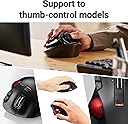
ONLY FOR THUMB-OPERATED TRACKBALLS!
No, I don't really have one of these, but I've used similar things in the past and understand a key fact that Elecom doesn't emphasize enough: THIS WILL ONLY HELP YOU (maybe) IF YOU USE A THUMB-OPERATED TRACKBALL. If you use a finger-operated trackball (like the Elecom Huge or Deft, for instance) you very likely to find that this makes it less comfortable to use, not more. It's just inherent in the ergonomics, so think about it before you buy.
仮**S
手首を自然な角度で保持できるため、使用していないときと比べて明らかに手首の負担が減った。 トラックボールユーザーにはとてもおすすめ。マウスユーザーも、思い切ってトラックボールに替え、こちらを使うことをおすすめする。 仕事柄、ほぼ一日中マウスとキーボードを使用するが、人間の手首はもともと内側を向いているため、通常のマウスパッド等では手首をねじった状態となり負担が大きい。 腱鞘炎など手首にトラブルを抱える人は、長時間のマウス操作はつらいものがある。 2年ほど前に思い切ってトラックボールに替え、ついでにこちらも購入したところ、長年悩んできた手首の痛みが数日で軽減した。 メンテナンス わりとホコリを吸着する。トラックボールの位置が定まりにくくなってきたら、上面、下面を水でさっと洗えばOK。 短所 とくになし。強いて言うなら価格がやや高く感じる。計算されつくした角度、高さではあると思うが、ただの台にしては高い(とはいっても手首の負担軽減の程度から見れば安いものである)。
3**8
品物自体は良くできていて、傾斜を付ける事ができます。 大きさ的には、IST系であれば気持ちよく使えるはずです。 HUGE PLUSでも使用出来ますが、大きさ的に不安定なためあきらめました。 IST系サイズでの使用をおすすめします。 イマイチと感じたところは ・もう少し重量があった方が安定するのではないかと感じた ・本品を使うと少々机上からは浮くことになるので、机に設置させてマウスを傾斜させたい人には、 慣れる必要がありそう
前**々
傾きが良いですね。長年PCでの作業をしていて手首の痛みがあったのですが、コレは楽になります。ただ ・あくまでボールマウスでしか使わない事。 ・傾きの角度が調整できない事。 ・地面との接地面は弱いのですぐ動いてしまう。 ・の割に値段が高い。 これがネックですね。個人的には満足していますが、セール以外でコレは買えませんね。 一応良かった点も、 ・滑り止めは弱いが、ボールマウスはしっかり留められる事。 ・大きさがしっかりしているので、持ち運びはしにくいがそれほど邪魔ではない。 ・前述した通り、手首の向きが楽に出来る。コレが本当にデカい。(長年PC作業やってると何もない時に手首が固まりほぐすようになるので、その負担軽減)
A**I
Work with this pad makes it more comfy.
Y**P
ケンジントンのTB450を購入後、若干高さと角度がほしいなぁ…と思って何かないか探していた所、 こちらを見つけました。 角度も私の理想に合い、疲れにくそうです。 強いて言えば、もう少し安かったらよかったけど…。
Trustpilot
2 weeks ago
2 months ago