⌨️ Elevate your Surface Pro game with the keyboard that blends style, smarts, and seamless power.
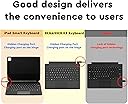
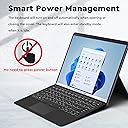
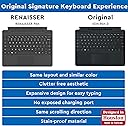
The RENAISSER Pelican K8 Keyboard is a premium Bluetooth keyboard designed exclusively for Surface Pro 9, 8, and X. Featuring a patent-pending hidden charging port, a built-in pen slot for RENAISSER styluses, and smart power management, it offers a clean, durable, and highly functional typing experience that mirrors the original Surface Pro keyboard layout. Its long-lasting battery and magnetic attachment make it the perfect companion for professionals seeking sleek design and uncompromised productivity.


| ASIN | B0B5X198F2 |
| Batteries | 1 Lithium Ion batteries required. (included) |
| Best Sellers Rank | #535 in Tablet Keyboards |
| Customer Reviews | 3.9 3.9 out of 5 stars (159) |
| Date First Available | July 6, 2022 |
| Item Weight | 1.41 pounds |
| Item model number | Pelican K8 |
| Manufacturer | RENAISSER |
| Package Dimensions | 14.25 x 11.54 x 0.75 inches |
D**N
High Quality Bluetooth Keyboard for Surface Pro
Even if the Microsoft keyboard was the same price, I would have gone for this one. I have had the Microsoft Surface Pro 7 for several years and have had many a time where it would have helped to be able to use the keyboard when it was separated from the tablet. I am super impressed with the battery! I used it like a usual keyboard since I got it and after more than a week the charge dropped less than 50%. I definitely wanted a bluetooth keyboard that can be used while charging, which this one is. This way I can continue using it for the foreseeable future, even when the charge doesn't keep as well. A big bonus is being able to charge it from the tablet itself via usb-c. Unfortunately the hidden charge port makes it difficult to keep it connected to the bottom of the tablet while the charging cable it plugged in. It wasn't until I had this keyboard in my cart that I thought to check the stylus I bought 4 years ago. It just so happens to be a Renaisence 520 pen, which fits this keyboard. Nice! Pros: very strong magnets connecting the keyboard to the bottom of the tablet, everything with the touchpad works same as with the microsoft keyboard, battery lasts for weeks even with average keyboard use, can charge from tablet and be used while charging Cons: the left click on the touchpad is pretty stiff, the magnets that hold the keyboard angled and the ones that hold it up over the screen are pretty weak (they work but aren't sturdy), if I am putting pressure on the bottom right of the keyboard then the left click button on the touchpad sticks, the keyboard charge port gets blocked off when attached to tablet I'm super happy with this purchase!
H**.
Not bad for a dupe
I got this after the original that came with my computer broke. The magnet is nowhere near as strong as the name brand one and the edges have started to come apart and fray. Other than that, it functions really well, has great battery life and is a much cheaper option than replacing the original keyboard.
B**0
Good Keyboard for Surface Pro 9!
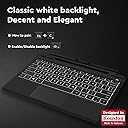
This keyboard paired right up with my Surface Pro 9 and has all the functions you will need with a keyboard! It has a separate charging cord than the Surface, but you can charge it straight from the surface or through any other way you feel like. The keys have a tactile feel to them and I have yet to experience any lag between input and what I see on my screen like I have seen in the past with other bluetooth keyboards. The keys are backlit and feel good to the touch. This keyboard is 1/4 the cost of the "Name brand" keyboard and I feel like it functions better with the exception of pulling power from the Surface itself. With that said, it can also be used when pulled away from the surface, which the "Name Brand" cannot.
D**A
Lacks after 2 years :/
I use to have the original keyboard for the surface proX, but like this product, it stops charging after a while. No i am not rough with my products and i’ve used them consistently for school. At first the product was great but after a year the keyboard ceases to automatically turn on when typing and i then needed to connect with bluetooth every time i wanted to type!!! (Fn+C) ~2+years later it’s finally not charging and for 74$$ i could’ve gotten at least 4 cheap keyboards for 4 years at least, maybe i just got a bad keyboard but was not worth it in the end. it was convenient for the year bcs it could attach to my tablet and hold my pen but since the pen charges separately, i’m thinking just getting a regular bluetooth keyboard to carry separately will be a better bargain next time
H**I
Best third-party keyboard for surface pro8
The overall production quality is very good. It can be said that it does not lose to the original keyboard, it is better to enter text, and the price is more affordable. The fly in the ointment is probably that the Bluetooth keyboard will not trigger the switch between PC and tablet modes, but this should be a windows problem. , in short, this is definitely the best choice for third-party keyboards!
T**M
Trash.
pros: + backlit + the keyboard feeling, as far as a tablet cover first and keyboard second, is about as good as can be, I think + the alternate f-key functions aren't default 🥳, which means when you put a better OS on your surface you don't have to get some insane workaround to get the correct keys back neutrals (read: negatives, but things that can't be fixed, I think) = some keys have to double up. insert, print screen, home, end, page up, page down are all alternate versions of other keys. = is bluetooth - but again, it's for a surface cons: - visible logo - weird seam on the end? as opposed to a straight line. Like when you have some cheap plastic crap and it gets cut out badly. only this is stitched and fabric, so it'll be a short time before it wears down, looks terrible, and broadcasts its cheapness to any observers within 100 ft -- the way it clicks is bizarre - it naturally wants you to just tap the touchpad to be a click. It *does* secretly, begrudgingly, have hidden buttons so you can left, middle, and right click. But when you left click, it insists on *holding* the left mouse until you do something else. Which means you're going to be furiously *double*clicking everything. making it a failure of a mouse. -- geometrically, it sucks. there's a stupid stylus channel. It's deep, and very rigid - you're supposed to buy the renaisser active stylus to go with this keypad. There's no magnets or anything in the channel, so I can only assume your expensive finger-proxy will fall out of it every time, just like mine. -- geometrically, it sucks (continued). it wants to prop itself up slightly, as is tradition for keyboard ergonomics. but it blocks the bottom edge of the screen. If you want to try and use it flat, to see the bottom bit of your screen, it doesn't quite rest flat. If you push it down, it'll push the whole tablet up, leaning it further and further away. --- geometrically, it sucks (part 3). Because of that stylus channel, when you fold it backward around the tablet, it *will* break its magnetic connection. which means you don't get your surface to be a 2-in-1 laptop (you know, the whole point of getting a tablet that begrudgingly provides full, real computer hardware) you have a less good keyboard that kinda sticks to it. but here's the big one. it doesn't have palmcheck. I can't get through a single sentence without cursing at it, noticing it clicked *somewhere* else, having to do some detective work to figure out what my keystrokes did in whatever window it brought up, then fix that, then continue typing. This is a good enough reason alone to throw this piece of junk in a fire, then salt the earth wherever its ashes are. And then buy a *real* keyboard.
J**N
Works fine as a keyboard to write on a tablet, however, if you wanna play a game on your surface this keyboard shows its flaws. Insane lags, wrong inputs, keys don‘t respond to releasing and clicking again properly. For >100€ there should be slightly more than just an average tablet keyboard
D**O
The battery can really last a very long time. Easy to connect. However the magnet isn't that great so when I close the cover it tend to delatch it self
C**N
Unico neo, peccato che non ci sia la tastiera in italiano
J**B
The official keyboard is better for sure, but at this price (~115 € for the keyboard and pen vs 230€ for the official Surface Keyboard+Pen 2 bundle) this one comes disturbingly close. My only irks are the fact that the trackpad cannot be clicked in the middle (seems to be divided into two halves when it comes to clickable area), that it has to be separately charged and that the Surface Pro 9 won't wake when it's opened up like with the official keyboard. Functionality, wise, this keyboard should absolutely satisfy most people.
R**X
So far I've had little or no issue using this keyboard for over 5 month. The battery could go over a couple month with a single full charge, connectivity is easy and stays connected until you say NO 😆... and typing feels smooth as butter. Great alternative for the half the original surface keyboard price
Trustpilot
1 month ago
4 days ago