Desertcart purchases this item on your behalf and handles shipping, customs, and support to Iceland.
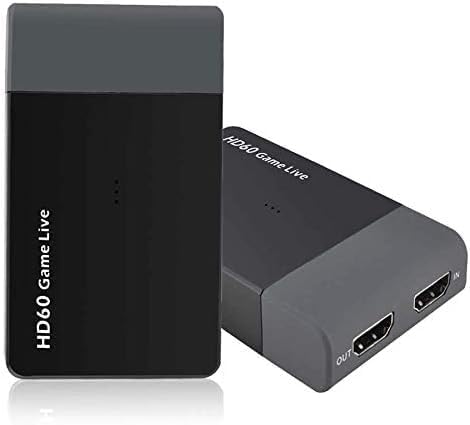
🎥 Capture Every Frame, Stream Like a Pro!
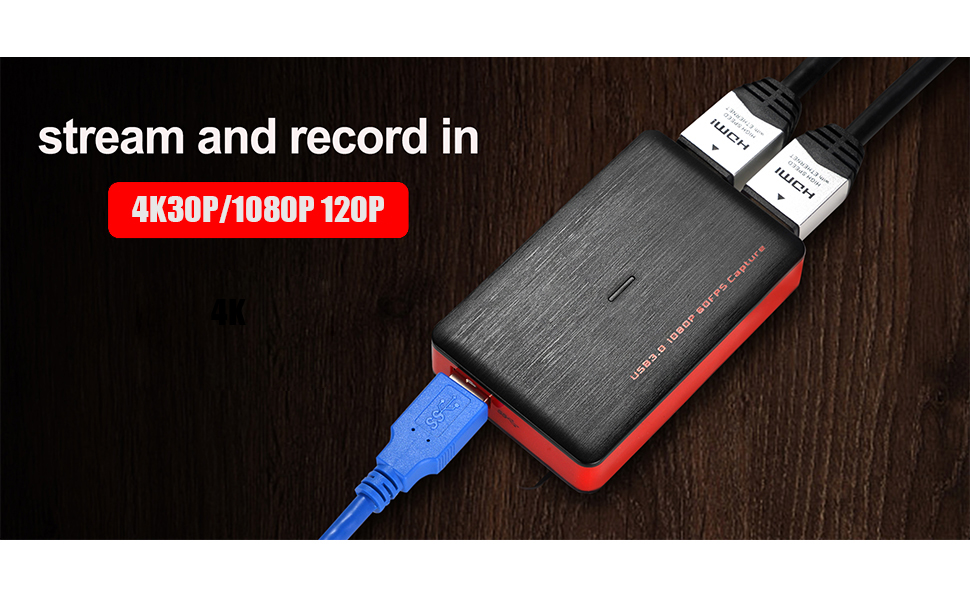
The Y&H USB3.0 HDMI Game Capture Card delivers high-speed, plug-and-play 4K30P and 1080P120fps video capture with ultra-low latency pass-through. Compatible with major consoles and OS platforms, it enables professional-quality live streaming and recording without the hassle of drivers or external power. Perfect for gamers and content creators seeking crisp visuals and smooth performance.


| ASIN | B073WJ2XTZ |
| AV Output | mpeg 4 |
| Antenna Location | Video Recording |
| Best Sellers Rank | #175 in Internal TV Tuner & Video Capture Cards |
| Brand | Y&H |
| Built-In Media | Capture Card, Installation Guide |
| Compatible Devices | Personal Computer |
| Customer Reviews | 4.0 out of 5 stars 307 Reviews |
| Hardware Interface | USB 2.0, USB 3.0 |
| Manufacturer | Y&H |
| Mfr Part Number | ezcap261 |
| Minimum System Requirements | PC: Intel Core i5-3400 + NVIDIA GT630, NB: Intel Core i7-3537U 2.0 GHz + NVIDIA GT735, Mac: i5 quad-core or above, VGA card supporting DirectX 10, Sound card, 4GB RAM, Powered USB 3.0 port: Intel chipset with native USB 3.0 host controller (Renesas, Fresco ...) |
| Model Name | ezcap261 |
| Model Number | ezcap261 |
| Operating System | Windows,Linux Os |
| Other Special Features of the Product | Ultra-low-latency |
| Platform | Xbox |
| Recommended Uses For Product | Video Recording |
| Special Feature | Ultra-low-latency |
| Tuner Type | Digital |
| UPC | 637045269460 721821483024 |
| Video Capture Resolution | 1080p |
F**L
Overall a reliable little capture card.
Recording quality is clean and the video quality is solid for the price. Truly plug and play — no hassle getting it running. Connectivity is stable and the functionality is versatile enough for streaming, capturing, or simple monitoring. Overall a reliable little capture card.
J**W
Perfect 1080p 60fps capture card
I've been using this for a couple years now and have had no issues with it. Always connects just fine, stable 1080p / 60fps video feed. The only issue I noticed was the audio quality on the 3.5mm microphone port was kind of bad, but that might have just been the cheap mic I was using. Normally I just use HDMI audio or an external audio device. Otherwise works perfectly. Amazing value for a 1080p capture card.
A**W
Works well for budget
It took me some time to get everything setup correctly for audio and video to match up. Works well with 1080p 30fps on switch however on xbox there is a loss in color and contrast the video is drown out. Playing high intense games with crazy graphics like red dead redemption 2 ect will not look very good. This is a great buy if you are just planning on streaming video from a camera or games on the switch. Think of graphics that are less intense like games on the switch it looks great and works fine. So the audio you will want to have setup according to make sure there is no aduio lag with the video. I displayed some pictures to help. and makes sure in control panel properties for capture card that the bitrate is set to 48khz same with all other aps. Match it all up to 48khz in control panel sounds and in obs. Might take a bit of tweaking but i made it work with patience.
O**8
Seller does not clearly indicate no mic port on unit
The video capture is great if that's what you're looking for; however this unit cannot capture Xbox/PS5 Party Chat. I will not not buy again as it is not clearly indicated without reading a ton of Q/A.
D**W
the framerate and picture quality are also not as good. In USB 3
Impressed with ease of use. While the shell is plastic, the unit does not get notably warm even after hours of use. This is obviously a USB 3.0 device, but it can be used with USB 2.0 for lesser results, there may be occasional loss of signal and quick flashing of gray screens, the framerate and picture quality are also not as good. In USB 3.0 mode everything functions as it should, the picture quality is "very good" but not pixel perfect, through that's expected with any external capture device. The passthrough can draw power from HDMI to function so you do not need the USB plugged into a computer at all times, but it will have to be supplied power through USB before it accepts power through HDMI. Once you unplug the HDMI outputting device, you will need to add power through USB again for it to function. Using calibration hardware, I tested this unit to have 190ms delay between native output and what is shown in OBS. This is acceptable for video or TV, but will be painful for computer use or gaming. However, using the passthrough will allow you to record on your computer and output to a different device without any measurable delays, which is exactly the reason you should purchase a unit like this with passthrough and avoid those without.
R**R
Strips audio; video grainy and no greater than 720p
I'm a media professional. I work for PBS as a photojournalist. I wanted to get some quick and easy streaming going for my wife and I to stream the new Animal Crossing game. Got this. Fun fact, if you plug it in, it sends your video to the TV at a reduced resolution and to the computer at a reduced resolution, and it doesn't send the audio signal from your device anywhere. Just strips it from the HDMI channel entirely. It's a piece of crap and I'm pretty disappointed. I've tried everything to get this thing to work but there really just isn't any audio coming from it anywhere. This isn't a settings problem, it's a hardware issue. And the hardware is crap.
S**E
Great value for money
A great capture card for the money! You just plug it in and it pops in your computer as video device, no installation needed! Tested on MacOS and Win in OBS and VMix. It can take virtually any resolution (I tested 1080/60p,30p,60i,30i,24p, 720/60p,30p,24p). When testing, it dropped a frame now and then - 270 dropped frames total when running nonstop for 9hrs. Also make sure audio coming through the card is set to 48kHz, to avoid distorted sound (Input sound settings -> Advanced on Windows) Only downside is it adds a bit of contrast and sharpens the image and thus adds artifacts on edges. It's ok for connecting videocamera (image appears to be sharper, but not in an unpleasant way), but if you want to use it for capturing any graphics/texts, I'd choose a different product - it doesn't look the best, texts are over-sharpened (see attachment, it also shifts colors a little but that can be easilly fixed).
D**.
Great starter
Decided to get back into streaming tried this out works great there’s no software if I recall but it does work plug an play with OBS just fine haven’t had any issues yet besides watching movies on PS4 when the PC is off there’s no sound obviously
Trustpilot
5 days ago
1 week ago