Desertcart purchases this item on your behalf and handles shipping, customs, and support to Iceland.
🖨️ Elevate your home office with wireless speed and eco-smart printing!
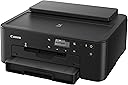
The Canon PIXMA TS702a is a sleek, wireless single-function inkjet printer designed for the modern home office. It supports mobile printing via AirPrint® and Mopria®, offers a large 350-sheet paper capacity, and features automatic duplex printing to save paper. With a hybrid ink system producing sharp text and vibrant colors at 4800 x 1200 dpi, it delivers professional-quality prints at speeds up to 15 ppm black-and-white and 10 ppm color. Ideal for busy professionals seeking reliable, eco-conscious printing with seamless smartphone integration.


| ASIN | B09TG8F4YS |
| Additional Printer Functions | Scan |
| B&W Pages per Minute | 15.0 |
| Best Sellers Rank | #92,007 in Computers ( See Top 100 in Computers ) #193 in Ink Tank Printers |
| Brand | Canon |
| Built-In Media | PIXMA TS702,4” x 6” Photo Paper Sample Pack, Multi-Purpose Tray, Setup CD, Set of Standard Ink Tanks, Power Cord |
| Color | Black |
| Color Depth | 16, 8 |
| Color Pages per Minute | 10 ppm |
| Colour | Black |
| Compatible Cartridge | Canon PIXMA TS702A compatible ink tanks |
| Compatible Devices | Smartphones |
| Connectivity technology | Ethernet, USB |
| Control Method | App |
| Controller Type | iOS |
| Customer Reviews | 4.3 out of 5 stars 1,284 Reviews |
| Display Type | LCD |
| Dual-sided printing | Yes |
| Duplex | Automatic |
| EU Spare Part Availability Duration | 1 Years |
| Global Trade Identification Number | 00013803348118 |
| Hardware Interface | Ethernet, USB 2.0 |
| Ink Color | Black |
| Item Dimensions D x W x H | 36.6D x 37.3W x 16H centimeters |
| Item Type Name | Inkjet Printer |
| Item Weight | 14.4 Pounds |
| Manufacturer | Canon |
| Maximum Copy Resolution Black and White | 4800 x 1200 |
| Maximum Copy Resolution Color | 4800 x 1200 dpi |
| Maximum Copy Speed Black and White | 15 ppm |
| Maximum Media Size | 8.5 x 14 inch |
| Maximum Print Resolution Black and White | 4800 x 1200 |
| Maximum Sheet Capacity | 350 |
| Maximum print Resolution Color | 4800 x 1200 dpi |
| Model Name | CNTS702A |
| Model Number | 3109C022 |
| Model Series | TS |
| Model name | CNTS702A |
| Number of Drivers | 2 |
| Number of Ethernet Ports | 1 |
| Number of Licenses | 1 |
| Number of Trays | 1 |
| Other Special Features of the Product | wireless |
| Paper Size | 7 x 10, 8x 10 |
| Print media | Paper (plain) |
| Printer Connectivity Type | Ethernet, USB |
| Printer Output Type | Color |
| Printer Type | Inkjet |
| Printing technology | Inkjet |
| Resolution | 4800 x 1200 |
| Scanner Type | Flatbed |
| Special features | wireless |
| Specific Uses For Product | Office |
| Total USB 2.0 Ports | 1 |
| Total Usb Ports | 1 |
| UPC | 013803348118 |
| Unit Count | 1 Count |
| Warranty Type | 1 Year Warranty |
N**S
Good investment
I absolutely love this Canon wireless printer! Setup was quick and easy, and I was printing from my phone within minutes. The wireless connectivity works great, making it simple to print directly from my mobile devices without any hassle. The print quality is sharp, vibrant, and professional-looking every time. One of my favorite features is the automatic duplex printing, which saves both paper and time. It prints fast, handles everyday tasks with ease, and has been a reliable addition to my home office. Whether I'm printing business documents, treat designs, labels, or photos, the results are consistently excellent. If you're looking for a dependable printer with wireless printing, fast performance, and convenient double-sided printing, this Canon is definitely worth the investment. Highly recommended!
A**5
good little printer if you live in a warm climate
does what its supposed too mostly no issues, does NOT like cold weather. if your house gets cold it will print like absolute crap and make you think its broken. I literally had to put a heating pad at the top to warm the inks and then run about 5 maintenance runs and head cleanings to get it to print normally again. I lived in Florida so it was only like a week long affair but now that I live in a place with cold winters I'm afraid I'll have to get a new printer this winter haha.
J**Y
So far, so good!!! Update: better and better
I bought this printer mainly for printing ID cards using brainstorm's MP tray. It works beautifully; see the video. The print is almost perfect, with the exception of a little Cyan ink spill on top of the reverse side (not shown). I also printed some 5x7 photos, and they are slightly better than my HP OfficeJet 3830. It appears that this printer prints with a higher resolution. To be fair, I was using the Canon Photo Paper Plus Glossy II on both printers. Here are the bad parts Canon can improve (if they care): 1. The LED/LCD screen is almost NOT readable! I thought I had received a lemon and was about ready to return it. Now I can get by with a flashlight, hahaha! 2. The WiFi setup instructions suck, big time! Canon video instruction also sucks! I ended up watching a video that shows how you can connect it with onscreen instructions to do it manually. P.S. the setup process does not work with dual-band WiFi. Just spend a minute to do it manually by entering the password for your WiFi, a minor hassle. Other than that, the printer is excellent (so far)! 1. Good print quality 2. Large input tray, plus top loading 3. Multipurpose tray for CD (included) and ID badge from the third party 4. Relatively fast 5. Cheap (not sure about the ink yet) Update (02-08-23): I tested it with 120 lbs 325 GSM cardstock, and amazingly it works beautifully! Settings: 5x7, rear tray, cardstock, best quality. Another pleasant surprise - the printer prints 2-sided documents pretty fast. The draft quality looks fantastic. Lastly, the bundled ink lasts for a long time. I printed 10+ full-color 5x7 photos, and it is still 1/3 being used. Will see. If you are not 100% happy with any desktop inkjet printers that are 3 years or older, recycle them and get this one. :) P.S. this may be true for any newer models, Epson, HP, Brother, etc. Technology is just making them so much better nowadays. I chose Canon because of its multipurpose tray.
B**N
Nightmare.
Addendum to initial review: Words fail to communicate how much I hate this printer. It’s a struggle to make it print every single time. It doesn’t connect when you want it to, it connects via wifi instead of your router when you don’t want it to, it doesn’t recognize that it has paper, it doesn’t recognize that the output tray is all the way out, it needs to have the “OK” button pushed for no apparent reason, it burns through ink really fast, the screen is tiny, dim, and impossible to read without a flashlight, you have to downgrade your network security settings with you internet provider to get it to connect at all (takes hours), or a combination of any or all of these things. Even with a lot a patience, it only succeeds in printing about 60% of the time. I sometimes need to print on glossy label stock. It globs the ink on so thick that it never dries. I had the previous generation of this model before getting this one, and it printed stickers just fine. Dunno why they made that not work on this model. Don’t buy this printer. It will only lead to madness. Apparently there is a way to connect this thing to your WiFi router, but that requires downgrading your WiFi security protocol (?) to an older one. I couldn’t make that work, despite a long customer service call. Failing that, you have to disconnect from your WiFi router and connect directly to the printer instead. That doesn’t really sound like a big deal, but if you frequently print from Google docs or other cloud-based programs it means you have to export a pdf and print that because you can’t be online and connected to the printer at the same time. Initial Review: I bought this printer to replace an older pixma that I used to print metallic labels. The old one worked great, this one gobs on the ink so heavily in “highest quality” (same program, same settings as the old one) that it never dries. On “medium quality” it doesn’t cover solidly. I hate it more every time I use it
B**Z
Excellent print quality.
I am very satisfied with this printer. The print quality is excellent, and it has been very reliable since day one. I highly recommend it.
Trustpilot
2 weeks ago
1 month ago