


✂️ Unlock your creative genius with the ultimate smart cutting machine!
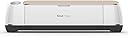
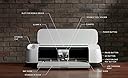
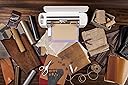
The Cricut Maker is a champagne-colored smart cutting machine boasting 10X the cutting force of previous models, capable of slicing through 300+ materials including fabric, leather, and matboard. Featuring Bluetooth connectivity and a cloud-based app compatible across all major platforms, it offers seamless wireless design access. With built-in tool storage and compatibility with 13 advanced tools, it’s the perfect all-in-one device for professional-quality DIY projects, 3D art, home decor, and more.



| ASIN | B072VYPWM4 |
| Active Surface Area | 144 square inches |
| Best Sellers Rank | #261,823 in Arts, Crafts & Sewing ( See Top 100 in Arts, Crafts & Sewing ) #191 in Scrapbooking Die-Cut Machines |
| Brand | Cricut |
| Brand Name | Cricut |
| Color | Champagne |
| Compatible Devices | iOS, Android, Windows, Mac |
| Customer Reviews | 4.7 out of 5 stars 8,440 Reviews |
| Global Trade Identification Number | 00093573546976 |
| Item Dimensions D x W x H | 3"D x 12"W x 12"H |
| Item Type Name | Cricut Maker |
| Item Weight | 18 pounds |
| Manufacturer | Provo Craft & Novelty |
| Material | Leather |
| Material Type | Leather |
| Model | 2004193 |
| Number of Items | 1 |
| Operation Mode | Automatic |
| Part Number | 2003925 |
| Print media | Paper (plain) |
| Product Dimensions | 3"D x 12"W x 12"H |
| UPC | 093573546976 093573317767 |
| Unit Count | 1 Count |
K**Y
Why didn't I buy this machine sooner!
I bought this instead of sticking with a die-cutting machine since I wanted to do more designs based on my own drawings instead of being limited to what companies offer and some of the larger dies are quite expensive so I figure, I have have like 20 new dies or a Cricut Maker... The Cricut Maker won. I love this machine. I saves me so much time in cutting projects and it handles almost all my requests like a champ. The only things the default blade hasn't been able to handle is extra thick glitter paper (there's a deeper cut blade for that. It handles thinner glitter paper fine) and trying to cut thin cursive letters 1/4" tall (it handles 1/4" tall blocky letters fine). It saves me a lot of time working on my frame-style cards. Never will have a slightly lopsided window again. I was waffling between the Cricut Maker and the Cricut Explore Air 2 since I wasn't sure how much I needed fabric and heavy duty cutting and I had seen some mixed opinions on the fabric cutting ability. But I felt it was probably better to have the machine with more capabilities. In my personal experience with the machine it cuts fabric pretty well, but due to the nature of the sticky cut pads, I don't think it's the best for fabrics that fray extremely easily (like a super delicate silk or super cheap flannel that frays when you so much as look at it funny). If you're importing your own patterns rather than buying patterns made for the Cricut Maker, it is better to vectorize your patterns if they aren't. When the machine cuts from JPG files, the machine tends to lift the blade more often and this makes it go slower because it seems to think the curves aren't one smooth line unlike how it behaves when cutting a vector curve from an SVG file. If you have a lot of patterns drawn freehand and hate vector programs, this might be an issue. Vectors aren't hard, but they are definitely less intuitive than drawing the old fashioned way. It can only cut one layer of fabric at a time, but it still cuts faster than me, so it evens out. The bluetooth capabilities are pretty good. I keep my machine nearly 15 feet from my computer and my computer doesn't have problems connecting. Connects about as fast as I set up the mats The learning curve of Design Space on the computer is not too difficult (I mean it's less complicated than Photoshop). I'm a little sad the Android version of Design Space currently isn't as far in development as the iOS version. Android doesn't have Snap Mat yet. Of the things that don't come with the non-bundle version of the machine, I recommend the spatula the most out of all the tools and getting some extra mats if you plan on doing lots of multi-layer projects so you can prep one mat while the other gets cut to speed things up. A handheld rotary cutter and a ruler is useful if you're cutting a lot of materials that are wider than 12 inches as most fabric is. You may want the deep cut blade for thicker items. I haven't tried the knife blade yet. I dropped the light grip mat face down onto carpet which destroyed the stickiness with dust bunnies and pet hair, but a quick rinse with water revived it. I haven't owned the product long enough to know how long it takes to get irreparably unsticky. It probably varies depending on use. There is a little bit of learning curve on removing paper from the mat without making the paper all curly. At first I thought the cut mats seemed flimsy and it's like oh... they're easy to bend for a reason. I wasn't expecting to like the writing abilities as much as I do. I have horrendous handwriting so I think it's really neat. But I really wish it was possible to use my own pens instead of sticking with only what Cricut offers because what artist doesn't have an excessive amount of pens???? lol The machine comes with a trial for Cricut Access. I don't think I will stay subscribed except maybe for fonts due to the fact I just want to cut my own designs for papercrafts and iron-on t-shirts, but it's very useful to try out the capabilities and the possibilities of this machine. It has definitely inspired a lot of new ideas! Like if you don't know what you want to cut, you will leave wanting to cut All. The. Things. Don't just budget to buy the machine because you will find yourself wanting to buy 10000000 yards of vinyl and iron-on and paper. Overall, I feel like this machine is nearly everything I have ever wanted and a way better investment than my die cutting machine. I have never gushed this long in an Amazon Review....
A**R
My Journey with the Cricut Maker - A Transformational Experience in Crafting
The Cricut Maker is more than just a cutting machine; it's a gateway to creative freedom, a catalyst for inspiration, and a game-changer in the world of crafting. I embarked on this journey with a dash of skepticism, and now I can say with unadulterated excitement that this machine has redefined my relationship with crafting. From making personalized gifts to upgrading my home decor, the Cricut Maker has elevated my DIY projects to a whole new level. For the sake of a balanced and comprehensive review, I will delve into the specifics of the product, highlighting both its merits and any minor improvements that could enhance the overall experience. Rest assured, my review incorporates both my praises and constructive feedback. 🌟 Cutting Force & Versatility: Unleashing the Creative Beast Within: The first thing to catch my attention was the 10X cutting force, which enables the Cricut Maker to cut through over 300+ materials. I’ve successfully used it to cut paper, fabric, leather, and even light wood. Its ability to handle such a wide range of materials makes it a crafter's dream come true, providing an all-in-one solution for various projects. 🌟 Interface & Connectivity: A Seamless Experience: The Bluetooth connectivity is smooth, making it easy to sync with all my devices. I've run it on iOS, Android, Windows, and Mac without a hitch. The user interface, accessible via the Cricut Design Space app, is intuitive and straightforward, offering a quick learning curve even for beginners. 🌟 Project Diversity: From 2D to 3D: The ability to create 3D art is something I initially underestimated. I’ve since made intricate popup greeting cards, layered photo frames, and even small pieces of 3D wall art. The Cricut Maker is not just about cutting; it’s about creating multi-dimensional projects that would be almost impossible to execute by hand. 🌟 Home Decor Revolution: My Space, My Style: The Cricut Maker's impact on my home decor is hard to overstate. Custom-made wall decals, personalized table runners, and even curtain designs have all been made possible, allowing me to infuse my personal style into my living space. This machine has turned me from a crafting novice to a DIY home decor enthusiast. 🌟 Reliability & Durability: Built to Last: The Cricut Maker is robust, and the quality of its craftsmanship is apparent. Despite using it intensively for over a year, the machine shows no signs of wear and tear, and its performance remains consistent, making it a worthwhile long-term investment. However, like any product, there are areas for improvement: 🌟 Software Limitations: While the Cricut Design Space app is generally user-friendly, there are instances where the software could offer more advanced editing features for professionals. However, this is a minor gripe considering that the software is regularly updated, and new features are often added. In light of all these aspects, the Cricut Maker certainly earns a 5-star rating. The incredible cutting force, versatile project possibilities, seamless connectivity, and long-lasting build make it a must-have for anyone serious about crafting. The few minor limitations are far outweighed by the machine's overall capability and utility. To my fellow crafters, and even to those who've never picked up a pair of scissors, I can't recommend the Cricut Maker enough. It's not just a machine; it’s a source of limitless creativity, an inspiration machine that has forever altered the way I approach crafts and home decor. In a world where crafting often involves navigating through numerous tools and complicated techniques, the Cricut Maker simplifies the process without compromising on the quality or complexity of the final product. This machine has acted as a bridge between my imagination and reality, allowing me to bring my creative visions to life in a tangible form. It’s been exhilarating to craft personalized gifts for friends and family, seeing their eyes light up at something made uniquely for them. Moreover, the sense of accomplishment I feel when looking at the home decor pieces I've created is incomparable. The Cricut Maker has empowered me to take creative control of the spaces around me and the gifts I give to loved ones, making each item a unique expression of creativity. For anyone sitting on the fence about this investment, I say take the leap. The Cricut Maker will not only meet your expectations but likely surpass them, offering you a versatile and reliable crafting companion that can handle a plethora of materials and project types. Thank you for investing the time to read this comprehensive review. I sincerely hope that my experience can offer valuable insights into what the Cricut Maker is capable of, making your decision-making process that much easier. Here's to countless creative endeavors and fulfilling crafting sessions ahead!
M**E
This Machine is the Best Cutter I’ve Used Yet!!!
To start off, I have been a Silhouette Cameo user since the very first one debuted in 2012. I went the Silhouette route back then because they didn’t use cartridges and you could cut any SVG files you wanted. Oh and using my own fonts was another big reason. I have since upgraded to the Cameo 3, when it first came out and have had nothing but problems with it. Long story short, I’m pretty sure I received a defective unit but Silhouette won’t even get back to me to try and remedy it! Their customer service is now non existent and it used to be great. Ok enough about my background, I decided to try the Maker because I was so fed up with my Cameo and because I could now do all of the things I couldn’t do six years ago with a Cricut plus more. To me, having Design Space internet based is a huge plus! As is are the mobile app capabilities! Silhouette Design Studio has been just awful since they updated it to the 4.0 version and it takes them forever to issue updates because it’s much more complicated to do for a stand alone program than an internet one. And their mobile app is completely useless and they’ve never updated it! I love being able to design on my iPhone and iPad!! So for the machine itself, I have owned it since February and used it extensively for some parties and gifts since then. The Maker cuts cleaner and faster than my Silhouette Cameos ever did! I haven’t had a single issue yet and I’ve cut all kinds of cardstock, fabric, HTV, glitter HTV, & 651 vinyl with it so far. I love that it will be compatible with future accessories and blades and I really like the rotary fabric blade! I would consider myself to be more technologically advanced than most of the other reviewers, so that maybe why I don’t have any problems using Design Space, I jumped right in and figured it out immediately. I thought it was easier to learn than Silhouette Studio and I’m a regular Adobe Illustrator and Photoshop user! It does everything I need it to do so I don’t understand where some of the other reviewers are coming from. Oh and about the knife blade that still hasn’t come out, I could care less about it because I’ll never use it. If I want to use that style of blade, I’ll just dust off my Cameo 3. But really, the mini exacto knife design sucks on intricate cuts, at least in my experience.
M**Y
The best!!!!
Okay, so I’ve been a Cricut owner for about six years. I had the Cricut Explore Air 2. I decided to upgrade and the Cricut Maker is pretty impressive. First, I read a few reviews where people said that it cut horribly. I would like to remind those that settings and machine are everything. Cricut Air 2 does NOT cut wood, fabric, chipboard or leather. It’s mostly used for paper, vinyl and lighter materials. Second, settings matter. If you don’t put the correct settings on the Cricut, your project will be ruined-no it’s, and’s or buts about it. The small difference between glitter iron-on vinyl and regular iron-on vinyl is crucial. The machine applies pressure to cut depending on what you’re cutting. If you don’t have the correct material set, too much pressure can be applied or too little. Previous Cricut users are no doubt aware of this. If you do that, you should be set. I read a review of someone who cut chipboard on a Cricut Explore Air 2. It’s no wonder the project was ruined. This machine however, is meant for such projects. If you open the box, it has an instruction booklet that tells you the types of materials for the Cricut Maker- including the correct sizes of Veneer wood sheets that are compatible with it. If you follow the correct sizing, your machine should cut through it correctly. But you must also use the correct mat. Green mat is for standard paper, light papers and vinyl. Light blue mat is for lighter materials with the lightest grip. Pink mat is for fabrics. Purple mats are for WOOD!!! It has the strongest grip. Once the wood is applied to the mat, you must tape it in the four, upper corners to secure it. Only then can you cut your thick pieces. If you’re still uncertain, YOUTUBE has tutorials. But this machine is definitely worth it. For me, it’s a total upgrade. Due to being an avid Cricut user, I already knew how to work this machine with no issues. But being a beginner is no biggie. Once again- YOUTUBE baby! It helps. Tells you everything you need to know for whatever project you wish to endeavor in. So good luck! I provided a short video on how the machine opens and the storage inside. It’s sleek af! And it has that whole, new, shiny smell. I can’t wait to make some goodies. This machine is the bomb!
I**Y
So glad I made this purchase. Never too old to try this.
This review is basically for someone who has never done vinyl or card crafting before. I am a total newbie to Cricut. I retired a few months ago and decided to give this to myself as a retirement present! From Thanksgiving to mid-February I read reviews on here and on Cricut and read numerous posts on Pinterest. I watched numerous utube videos. I was unsure if at my age I wanted to take this on as a hobby. However, I am computer savvy and felt I could manage. I read a lot of suggestions on what beginning I would need so here is what I bought initially: The Cricut Maker Ultimate Bundle from Amazon that comes with extras: pens, fabric set, basic tool set, and 40 piece vinyl bundle. Prior to ordering I had purchase a few rolls of iron on, cling and self-adhesive vinyl to have on hand. I also purchased the Cricut EasyPress and the Cricut Bright Pad. I have had my products for about three weeks and I do not regret purchasing any of the products. The Maker quickly was set up with my Windows 10 Sony Computer and quickly paired with my Samsung Tablet and Samsung phone. Within minutes I was making my card. I have found Design Space easy to maneuver. If I can't figure out something I just search on Cricut and find an article that walks me throught whatever I am needing to know. I have made several things from the vinyl and cardstock. Vinyl is by far my favorite. I am sure my daughters and husband are tired of hearing about my machine! I am so glad I made this purchase and I look forward to learning all I can do with this machine. Keep in mind this is not a cheap hobby to go into when you have nothing to start with. However, no hobby is ever cheap. This is very rewarding and I am enjoying it thoroughly.
A**K
I Love It!!!
I have had 2 other cricut cutting machines and never really used them as much as I wanted to. Now that my kids are older I am using this all of the time! First project on my Maker was HTV for t-shirts for my parent’s 50th wedding anniversary. I designed a monogram, with wedding date, etc. used HTV to make 24 t-shirts and 6 aprons so the servers matched the family. All family wore their shirts from aged 70 down to 4! They were a hit! I’ve used it to make labels for my spice jars, t-shirts for my kids, and personalized their sport’s water bottles with name, team name and mascot. I’m currently working with infusible ink and have made coasters and t-shirts. The versatility of the Maker is awesome and has reignited my crafting fun! The maker is easy to use since design space walks you through everything. The cricut design software is not always intuitive but always search for YouTube videos if you get stuck on a project. I recently made 3 layered design cups for all of my employees. YouTube showed me how to work to get my three colors separated out for cutting just be careful-it didn’t warn me that once you go to cut, it will reorganize your project to save on materials. Once I knew that, I worked my way around it and ended up with 19 super happy employees. Cricut Maker was worth the investment for me since I love making things for my family. I am not a professional but for this mom’s needs, it’s great!
L**E
The Cricket...bc otherwise I pronounce it "Cry-cut"
Ever buy something on a whim, only to become addicted and go nuts using it? This is my addiction now. My sister-in-law has the previous model, and my brother was making me jealous with all his customized articles: clothing, mugs, banners, etc. So when this model came out, I had to have it! Now my husband is suffering through me customizing everything in our home. Curtains/plates/mugs/walls, everything is fair game. Can't wait for the wood cutting blade to come out, because then our furniture will suffer too! There is a learning curve with using this Cricut. I highly recommend watching YouTube videos on perfecting certain crafts you may want to try. Some of the videos from random users don't really help: they go from explaining to skipping a few steps...and voila, perfect art; me sitting there staring at the screen wondering: now hold on!! How did you do THAT part?! The Cricut developer videos are really helpful: very short and informative. There is a lot of information though, broken up into short clips (love that btw), but it really doesn't stop me from trying to experiment on my own. The user software is really simple to use, and I love how I can do what I want to make what I want. My 12 year old picked it up super fast...I had to put a password on my laptop to keep her from using the Cricut for the most random things!! Thankfully she hasn't realized that there's an app... I really recommend this for people who enjoy a wide array of crafts/art/projects. It is simple to use, the results are stunning, and the learning curve is actually fun!
J**S
But the Cricut is good, in it's own way
I'm a big fan of cutting machines. I use them in my business: Selling stencils and making stencils and specialitiy multi-media wood signs. I already have the Brother Scan N Cut 350 and the Brother 650 (available only at sewing stores/no online). I purchased the Cricut Maker to see the differences. THERE ARE A LOT OF DIFFERENCES!!! But the Cricut is good, in it's own way. My Brother Scan N Cut 350 paid for itself in 8 weeks with online sales (Amazon/Ebay) of stencils and signs I was able to sell. I'm about 1/2 way done (in two months paying for the Scan N Cut 650/$750.00)....The Cricut is amazing, too,....but different. The Brothers are STAND ALONE MACHINES/no computer needed. I left a big review on Amazon of the 350. You have a screen which guides the whole process. This frees up your computer for sales, marketing, emails, etc. The Cricut Maker MUST BE HOOKED UP TO SOME KIND OF COMPUTER or smart phone. I bought a small $200 tablet, and set it next in between my big computer and my Cricut Maker. The tablet uses the existing Wi-fi already in the house, and does not cost me anything extra each month. TO USE THE CRICUT, YOU MUST SUBSCRIBE TO CRICUT DESIGN SPACE. No if's, and's or but's. It is $5/mo for fonts only, and $10/mo for fonts, images, etc. Some images cost more money each. The big plus the Cricut Maker has is all the fonts. My oh, my....SO MANY FONTS for the Maker and in Cricut Design Space. The Brother 350 has about 10 fonts, the 650 has about 16 fonts. The Maker has tons and tons. For someone who makes their living doing graphic design, stencils, and wood signs...the Maker/Design Space is paradise. Now that I invested in the $200 tablet, my Maker also has a "screen" ., like my Brother does. Using Cricut Design Space is definitely SLOWER than using your Brother Scan N Cut ('cuz others are using it worldwide, too...not just you). Both Maker and Brother cut: cardstock, vinyl, kraft paper, light woods, felt, fabric, etc. You just need to purchase proper blades. That is the same. Both Maker and Brother require you to tend to/take care of your cutting mats. Light mats for light items, strong mats/adhesives for heavier items. Sooooo, if you are just starting out: Brother Scan N Cut 350 is good to learn/no computer required and no monthly fee. Brother 650 is even better, but about double the price...and you'll have to drive 30/60 miles to a sewing machine store to get it. No computer/no monthly fee. When you're ready to rock...then the Maker. $400 for machine, another $100 for all the blades/mats. Then a computer/smart phone/tablet to actually have a "screen"/$100-$200; then the monthly fee: $5/$10......If you like to be able to cut AND use your computer/phone simultaneously, you might not like it. I'll be making a Youtube video soon to show people all 3 of my machines: Cricut Maker, Brother ScanN Cut 350 and Brother ScanNCut 650 and see the differences....SO FAR SO GOOD. Like it.
C**A
Cricut Maker
Ho ricevuto il pacco con grande anticipo! Il pacco è bellissimo, completo e anche assicurato 🤩 non vedo l’ora di testare il funzionamento del macchinario stesso.
A**E
Top Gerät
Ist ein Geschenk an meine Frau. Gerät wurde wesentlich schneller geliefert als angekündigt. Top. Obwohl original ein UK-Stecker dran ist, war ein Zwischenstecker für Ö dabei. Tolles Gerät, meine Frau ist begeistert....
H**E
Tiene las MEJORES HERRAMIENTAS
Si estas buscando un plotter de corte, es probable que ya hayas visto está máquina, la Brother ScannCut y la Silhouette Cameo 4 y que no sepas por cuál decidirte porque parece que las 3 son igual de buenas y hay muchas opiniones de las 3. Yo creo que cada una tiene lo suyo pero cuando nosotros (mi esposa y yo) decidimos comprar esta Cricut Maker estábamos considerando también la Brother ScannCut. De la Cameo 4 fue de la que vimos los comentarios menos buenos. Finalmente fueron las opciones de herramientas y la presión de corte lo que nos hizo tomar la decisión. En este momento hay mas herramientas para la Cricut Maker que para cualquier otra máquina y aunque parece que con las otras maquinas puedes hacer lo mismo, ayuda tener la herramienta específica para marcar dobleces en papel y cartulinas, cortes en tela (con el cortador circular), cortes ondulados, etc. El otro dato importante es la capacidad de la máquina para ejercer presión al cortar y aunque parece complicado de apreciar, es algo que afecta la precisión de los cortes en materiales gruesos (cartulinas de 200 gr o mas) o en tela pues a menor presión, se pueden requerir mas pasadas o las herramientas pueden desviar su trayectoria. La Cricut Maker puede aplicar hasta 4 kilos de presión comparada con los 1.26 kg de la ScannCut. La máquina está super bonita (es la Apple de los plotters de corte) y su mecanismo y herramientas se sienten sólidos y bien hechos. El software de diseño es medio básico y está orientado a que pagues la renta mensual ($175.00 pesos la mes) por usar su amplísimo catálogo de diseños y proyectos y no tanto a que tu desarrolles tus propias ideas. Nosotros diseñamos nuestros propios proyectos con un software de diseño básico (Affinity Designer, CorelDraw, o alguna otra opción gratis como Inkscape) y los exportamos como SVG para subirlos al programa de Cricut. Si hay una curva de aprendizaje y ayuda mucho ver totorales en YouTube (hay miles en varios idiomas). Aun así hay que hacer pruebas y tener paciencia pues cortar diferentes materiales implica conocer muy bien los ajustes de presión para que haga un solo corte o que haga dos pasadas.
A**R
Amazing machine (but you NEED a constant and reliable internet connection)
LOVE this thing! I have used it for paper crafts, such as origami, made leather jewellery, and also cut out pattern pieces for shoes and diaper covers etc. directly out of fabric and garment leather. I love using this for making long-lasting paper patterns for sewing, I cut the pieces out of sturdy card stock including preferred seam allowances, and add info for each pattern piece with the pen. If a pattern piece is too big for the large mat, such as pattern pieces for adult garments, I make them in parts which I simply tape together after they are cut out. This tool is especially useful if you know your way around vector files, and can make your own. I do not need access to the projects in Design Space since I make my own, but I found Design Space to also have a ton on really nice projects for those who are less tech savvy. The machine cuts very reliably so far. The only caveat: I wish it wasn‘t online based, because there have been times when I wasn‘t able to complete a project because Cricut‘s server was down. It would be great if there was an alternative to that, at least! Also, the clamps are about 1 mm off from one another in regards to accuracy. I talked to the Cricut customer service team about this but they are not able to solve this since 1 mm is within the margins of accepted accuracy for them (not for me). In origami, 1 mm is a lot. I have solved this problem by first making several test cuts of simple squares to learn in which direction which clamp was off. Now on files which require both scoring (or writing/drawing) and cutting, I simply offset my corresponding layer by 1 mm in the correct direction.
M**G
Maybe need to adjust pressure.
Had a little trouble downloading the app, managed it with a little help from hubby. Had to adjust cutting pressure for the glitter vinyl as it only scored it and did not cut just a little blip but otherwise a great machine.
Trustpilot
2 months ago
2 days ago