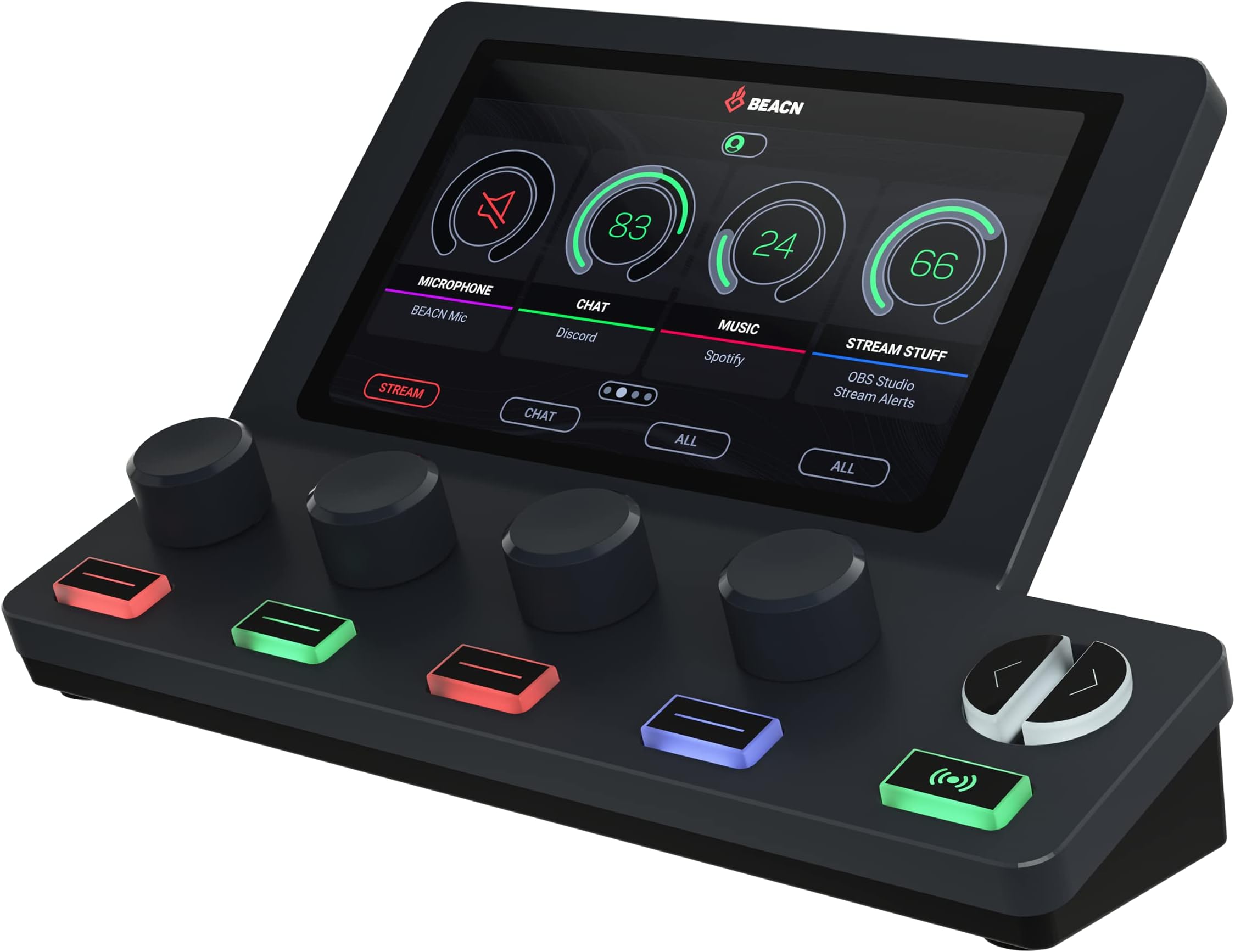
🎙️ Elevate your stream, game, and podcast with BEACN Mix Create — where pro audio meets effortless control!
The BEACN Mix Create is a compact, USB-C powered 8-channel audio mixer designed for PC and Mac users, featuring a vibrant 5-inch full-color display and smooth push-button encoders. It offers advanced audio routing, customizable submixes, and intuitive knob paging to manage multiple audio sources seamlessly, making it an essential tool for content creators, gamers, and podcasters seeking professional-grade sound control and streamlined workflow.


| ASIN | B09DJL6CBV |
| Audio Input | USB |
| Brand | BEACN |
| Brand Name | BEACN |
| Connectivity Technology | USB C |
| Customer Reviews | 4.4 out of 5 stars 321 Reviews |
| Included Components | USB C to A Cable |
| Item Dimensions D x W x H | 3.94"D x 6.89"W x 3.54"H |
| Item Height | 9 centimeters |
| Item Weight | 65 Grams |
| Manufacturer | BEACN |
| Number of Channels | 8 |
| Output Connector Type | USB |
| Power Source | Corded Electric |
| Product Dimensions | 3.94"D x 6.89"W x 3.54"H |
| UPC | 055845300044 |
| Warranty Description | 2 year manufacturer. |
Z**.
Great Device, Great Company!!!
TL/DR: A powerful sound mixer that I highly recommend, even if you aren't trying to be an influencer. It offers a ton of functionality and convenience, it looks neat, and is made by a company with absolutely top tier customer service. -------------------------- I bought this even though I am NOT - and have zero desire to be - a streamer, so the "audience" settings aren't particularly useful to me. This is, however, a highly useful and constantly used part of my PC setup. I am also an old-school computer nerd with a love for tech gadgets, so this also hits hard on that front. My Beacn Mix Create allows me to easily and instantly control my PC's sound, for both system and various app volumes, using knobs, instead of Win11's annoying tray and control panel options. I tried various alternative apps, and it was still bothersome to click out of whatever I was doing, each time I wanted or needed to tweak a sound setting - especially when on the phone, and an app decided to abruptly blare at me. Sure, many of the keyboards in my ever-growing mechanical keyboard collection offer a volume/mute knob, but it's only good for the system as a whole, and I wanted something that allowed for per-app control, as well. While this wasn't the only mixer out there, they generally weren't USB, didn't have a screen, and/or lacked the same crazy amount of customization flexibility and programmable control. A bonus selling point was that this product came in white, which matches my setup. I did have an intermittent issue with my unit, months after the return/exchange date here on Amazon. I worked with Thomas at Beacn, and he was just AMAZING!!! I'll spare the tedious details, but he truly went above and beyond for me, and is just such a wonderful human being. It is increasingly rare for companies to provide even semi-decent customer service, but Beacn's is truly superlative and people-focused!!! If I could afford it, I'd buy all of their products, needed or not, just to support them. For my recliner setup, which has become my go-to as my physical disabilities have worsened, I use a mechanical keyboard on a lap desk. My Beacn Mix Create sits just above the keyboard for easy access, and I love it! I recommend the product, and the company, very highly!!!
S**S
Best purchase I’ve made in my 5 years of streaming.
I have never reviewed anything on Amazon but I had to review this. The software is AMAZING! I have not had any issues with it & this mixer is the best streaming I’ve made in my 5 years of streaming on twitch. I have spent a lot of money on my setup over the years but this tops everything. I wish this was around when I purchased my astro a50s with the mix amp because you DO NOT NEED IT! This mixer lets me control EVERY aspect of audio without confusing them & mixing. I’ve tried different softwares in OBS, mix amps, many different output & inputs but this truly does EVERYTHING & makes it so incredibly easy! I love that I can hear everything my audience does with just click of a button so I don’t constantly have to ask if game sound is too loud or if discord chat is too loud because trying to track using the OBS mixer is not accurate, at all! I’m thinking about getting the mic as well, even tho my hyper x mic sounds pretty damn good, I just want to try their software with the mic. This out classes the goxlr BY A LONG SHOT with the price alone!!! The negative reviews saying it doesn’t save your settings are WRONG! You have to save the settings to your audio profile when you change them! There’s a red dot next to the profile that indicates a change was made. Just like word documents put a star up at the top. This feature is AMAZING because who doesn’t make lil changes to their audio when their streaming that you don’t saved because it was to have a side conversation or to turn down the music or game audio to have a meaningful conversation. This mixer is everything I hoped for & more!!!!
J**K
Magical
This product is absolutely amazing. I use 2 computers for streaming purposes, and the Mix Create makes audio a breeze. I spent weeks scratching my head at the issue of between-PC audio, and this device fixed that in 20 minutes. A single USB-C and all my problems were fixed. (Well, and a few extra 3.5mm cables; check out the BEACN 2 PC setup guide on YouTube for details.) If you have a 2 PC stream setup, this item could make it considerably less complicated. Most streamers and creators use an XLR audio mixer of some kind. That is also simple, but setting up a Mix Create is way easier than figuring out an XLR audio setup. No phantom power, no fuss. Just magic. Very reasonably priced as well. That said, it doesn't play well with other USB microphones. When passing through USB audio to the stream PC, it seems to strip out a lot. I was told that it makes me sound like a robot. For now I am bypassing the Mix Create for mic purposes, but I ordered a BEACN mic today. I'm looking forward to seeing how their own microphone interacts with the Mix Create. This review will be updated when I have had a chance to do some testing. This company has a bright future ahead of it. I'm rarely excited about audio products, but this one is innovative and remarkably user friendly.
A**R
Wish I had this sooner
Essentially this is a way control the volume of individual software with an easy to access dial setup. Specifically useful for gaming since you can have your mic, your teammates mics and the game sound on separate controls knobs. It's so nice to be able to turn up a teammates mic on the fly if their mic is too low or turn them down/mute them if you need to here your surroundings in game. The only reason I didn't give it 5 stars is because from time to time it will go to sleep and not wake up without restarting the software. Or the software will crash once in a while which is frustrating mid-game.
A**D
A must have for gamers and streamers both
Prior to using this, I was using Voicemeeter Potato to control my audio for streaming and gaming. This is a strong step above that. The build quality of the device is fantastic. It's made of plastic but it feels like a strong plastic. The screen is nice and bright but doesn't glare in your face in a dark room while playing games. The setup could not be any simpler. You install the software, plug the device in, and off you go. The support stare are phenomenal. I reached out to them when I was having an issue and they went above and beyond to help me diagnose the issue (turns out, the issue was my old, dying mic. Replaced the mic and issue is resolved.) As a footnote, this device is not just for streamers! One of the greatest things about this device is being able to have multiple audio channels which makes it a breeze to turn your game down when you want to talk to friends or turn your friends down when they won't shut up during that cutscene (lol).
R**O
Is a great mixer for streaming, gaming and just overall PC usage
My primary use for this is to be able to cleanly route my audio and it serves that purpose very well. The software side of things is not quite as intuitive as I would like for it to be, but after setting it up a few times, it gets easier. It can route input and output audio with zero difficulties. My setup includes a Visio Soundbar, Avermedia Capture Card, and headphones for audio output. I was able to use the personal and audience mix settings to have games, different browsers, Teams, Slack, Zoom and skype to have different audio levels and go to different audio output sources without any issues. I have a focusrite which is used to do output audio from my headphones and I also connect my XLR microphone and guitar for audio input. All of which can be controlled by the Beacn software.
J**D
It's getting embarrassing - Update So you're not a streamer **update**
***Update 10/20/24*** So another update. I feel since they did an update, I apparently needed to as well since now their software is not working. It's like they slowly try to improve by making things not function? Every time that I load my PC now, it says "Please connect all of your DEACN devices". Spoiler alert, the one and only one I have is connected and responding. The software however is locked in this manner. So I guess I am good since I did all my customizable adjustments on the last software update? That is assuming that I don't need anything in the near future. Everyone in my family mocks me using "the device" as they call it since it seems to pick when it wants to work. At this point, I can not keep justifying why I am using it and don't want to deal with everyone looking at it like it's some crazy space craft device when the screen decides it doesn't want to come on. I just don't understand. It is a solid product and an easy 5 star. It just needs to actually function with the hardware AND software. With every update, you get a honeymoon period of a few days where it's great! Then... while I don't know what happens. Just to be clear, I have been trying to continue to update and we have went from 5 to 1 stars over the course of about a year. **Update 5/5/24** over the last few months, I have been having enough issues with the unit that I begrudgingly had to come back and adjust my rating. While I understand that a lower rating hurts a brand I truly like, my frustration on getting support has been disappointing to say the least. The issue I've been having is that my unit screen will freeze. You can still make adjustments via the knows or in the BEACN program, but its not reflected on the unit. I've also had the unit crash far too many times for my liking. Support via the company was less than effective which brought me to forums where I am not the only one on the struggle bus. Good to know there are others, but no effective fixes seem to be present outside of going a restart. Which is annoying since rebooting it can take a literal 5-10 minutes while the progress bar sits at 75%. All in all, I think this whole set up is a total game changer, just need the bugs worked out. In the meantime, I hope to see an update soon. Original post: You're not a streamer (or maybe just not yet). That's ok, neither am I, however I absolutely love this unit and get a TON of use from it everytime I sit down at my computer. So why or how would a non YouTuber use the Beacn? Imagine that your employment requires you to give a virtual presentation. How nice would it be to have the freedom of adjusting the volumes of your mic, the presentation, your audience, alerts, ect, all independently? Or how about, in your freetime, you like to play some games with your friends. Turning down the game slightly and your friend up is done in seconds rather than fumbling through menus till you settle with "good enough". Maybe just browsing the web, listening to music and your alerts are just a bit too soft? Easy fix. Maybe you bought a cheap mic on black Friday. No worries, the Beacn will still give you GOXLR flexibility to your USB mic with its software suite which is all included. Sure, there is a learning curve, but that is only because there are so many options and flexibility. It can be slightly overwhelming at first, but after 15 minutes of dialing it in, the results speak for themselves. Is everything perfect? Pretty close, but there are a few things mentioned in other reviews that are true. On start-up, there are times that I have to go back in and reset a few options. Updates? Yeah those happen. Keep in mind though, you now have real professional equipment that will work fine with your barging bin accessories for less than $250. Plus, who knows, maybe you are the next streaming millionaire so having this just makes it that much easier?
A**L
Having sounds trouble?
I’m a small streamer my self & this product is amazing. I can separate different audios like music, in game sounds & mute my self. For people who is having trouble with controlling sounds in your PC I 100% recommend this product. Quality is good & is easy to setup.
Trustpilot
1 month ago
1 month ago