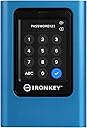
🔐 Own your data fortress with IronKey Vault Privacy 80 — where security meets sleek innovation.
Kingston's IronKey Vault Privacy 80 is a 1.92TB external SSD combining FIPS 197 certified XTS-AES 256-bit hardware encryption with a user-friendly touchscreen PIN interface. Designed for professionals demanding uncompromising data security, it features multi-password support, configurable password rules, and dual read-only modes to prevent malware attacks. Its brute force protection auto-wipes the drive after repeated failed attempts, ensuring your sensitive data remains safe across Windows, Mac, and Linux platforms.


| ASIN | B0B1W53S3X |
| Additional Features | Portable |
| Best Sellers Rank | #157 in External Solid State Drives |
| Brand | Kingston |
| Built-In Media | external solid state drive, neoprene travel case, USB 3.2 Gen 1 C-to-C cable, USB 3.2 Gen 1 C-to-A cable |
| Cache Memory Installed Size | 256 |
| Color | Black |
| Compatible Devices | Desktop |
| Connectivity Technology | USB |
| Customer Reviews | 4.2 out of 5 stars 75 Reviews |
| Data Transfer Rate | 250 Megabytes Per Second |
| Digital Storage Capacity | 1920 GB |
| Enclosure Material | Nand Flash |
| Form Factor | 2.5-inch |
| Global Trade Identification Number | 00740617328424 |
| Hard Disk Description | Solid State Drive |
| Hard Disk Form Factor | 2.5 Inches |
| Hard Disk Interface | USB 1.1 |
| Hard-Drive Size | 1920 GB |
| Hardware Connectivity | USB 3.2 Gen 1 |
| Installation Type | External Hard Drive |
| Item Dimensions L x W x Thickness | 4.82"L x 3.32"W x 0.73"Th |
| Item Height | 0.73 inches |
| Item Weight | 289.5 Grams |
| Manufacturer | Kingston Digital, Inc. |
| Media Speed | 250MB/s |
| Model Name | IKVP80ES |
| Model Number | IKVP80ES/1920G |
| Number of Items | 1 |
| Read Speed | 250 Megabytes Per Second |
| Special Feature | Portable |
| Specific Uses For Product | Business, Multimedia, Personal |
| UPC | 740617328424 |
| Unit Count | 1.0 Count |
| Warranty Description | Limited 3 year |
E**S
Works fine, despite negative reviews
I've bought one Kingston IronKey Vault Privacy 80 and one DataLocker DL4 Encrypt Disks. They seem to share software/firmware as the features are basically the same, while menus and operations are exactly the same. The only differences I could notice are SafeConsole and support for symbols on DataLocker drive (Kingston Ironkey does not allow for symbols on password). Which comes as no surprise as the IronKey seems to target end-users while DataLocker is Enterprise-driven. Other than that, and casing, the drivers are very very similar. I've seen some negative reviews on Kingston due to frequent disconnections. Well, it's not caused by the drive but Windows energy management on notebooks. It does not happen on PCs (yes, I've tested it). Nor on Linux or Mac. That's why most negative reviews seem to be about using the drive on Windows while many positive reviews come from Mac/Linux users. The User Guide does mention steps to prevent it, but for Windows 10. No mention to Windows 11. Turns out, the solution is simple and mentioned in the User Guide. Credit to EmbeddedFlyer's review for pointing me to the right direction. Despite the fact it does not mention Win11, the same steps on page 10, under "Disabling Windows Power Save", will work on Win11 and fix the frequent disconnection issues. It worked for me. I've let the drive with no activity for 30min and no disconnection. Should Kingston Support read this, I'd suggest you to update the User Guide and create a KBA/FAQ article to explicitly tell users how to fix it on Windows 11. It's something simple, but as per negative reviews, it's hurting the product reputation. One more thing to mention is performance. One should not expect the drive to achieve native SSD speeds. For a simple reason: it's an encrypted drive. The encryption/decryption process requires processing, which means the drive will perform additional (and cpu intensive) tasks that a regular drive won't. Some could say "use a better processor"... Well, true. But there would be trade-offs: higher price, higher energy consumption (which could froce the manufacturer to add external source) and heat generation. So it's about balancing requirements, features and performance. And I'd say Kingston has a good product.
M**G
Exactly what I was looking for in a secure drive solution
This unit will provide a very high level of storage security, no matter which drive capacity is purchased. There are many aspects which I really like, and only a few minor negatives. Physical size of the drive is somewhat larger and heavier than one would expect, but I think this may be due to the durable shell of the unit, and the amount of electronics inside the shell. The drive was not exactly "plug and play" at first setup. However, it was easy to change the setup step to initialize the drive, making it visible in Device Manager; and also, to switch off the power save option for external drives in Windows 10 Drive Manager. (I observed that a few the 1-star comment ratings could likely have been avoided if Device Manager settings had been correctly set). A BIG positive was the multitude of available user modifications to the drive's default operational settings. For example, I changed the default number from 15 to 5 on failed password attempts which will wipe the drive. The documented speed of the drive is not fast as compared to certain others, but this is unavoidable due to the complexity of encryption. I tested replay of a few video clips using VLC app, and noted zero playback speed issues. Speed of navigating stored files on the drive was fully acceptable. (This is not a slow drive). Related: The drive performed without noise, there is no spinning disk. I formatted the drive to exFAT, and validated compatibility with both Windows 10 and also OS 18.5 for iPad. Overall value for the money is excellent, in terms of the security this provides. Great warranty also.
T**2
Solid, Secure but not blazing fast
If you’ve researched an SSD drive you’ve probably found that it’ a difficult task to find a balance between build quality, design, read/write speeds, security features, portability and company reputation. Kingston has found that balance with this device. It feels solid, well constructed and looks great. I personally like the color finding it easy to spot when searching around the office space, or bed. No sharp corners. Some non-slip silicon pads on the back would have been nice. It comes with a zippered neoprene case which is black with blue highlights. A nice feature is that it’s not super easy to take the SSD in and out of the case, which is just what you want if you forget to zip it shut during transport. It has an non-closable, outside slip-pocket which ends halfway up the case. Too shallow for the cords and manual to fit securely. It would have been a nice extra to have an additional zippered pocket to keep these in or to have the pocket extend the full height of the case. The user LCD screen is large and well lit, as are the numbers and letters for entering the password and moving around the menu options. The user interface is super-intuitive and easy to move around in. Fingers work fine but for big fingers and/or fewer mistakes, using a stylus is optimal (again, a deeper side-pocket would have been nice). The password is easy to set up and you have some different menu options for that - length, letters, numbers or both. It allows different user passwords and you can enable a variable shut down timer. The device powers off as soon as you detach it from your device - also a great peace-of-mind security feature. It’s not a blazing fast SSD but I found that all the super-fast SSDs didn’t have any security features, like password protection, at this price point or even somewhat above. I can only comment on the write speed at this point which, using a Thunderbolt 4 port and cable on an iPad Pro with M2 chip, resulted in writing 58GB in just under 10 minutes. If my math is correct, that’s 100 Megabites (1/10th of a GB)/second or about 840 Megabits/second. I’ll try to edit this review when I have a read speed using the same device and cable. The password protection and encryption is second to none. No one is getting any data from the device without your password. That’s priceless. No software to install or update on each device, go extinct or compromise your data. It’s super-portable, having read that it works with all major desktop and mobile OS’s - MacOS, iOS, Windows, Android and Linux (prob. more). This, in combination with no security software, you can be almost guaranteed to plug this into any device, enter your password (if you set one up) and be good to go. Kingston has has great reputation and long history in the data retention/security world and I’ve heard that their customer service is really good. Overall, outside of a few relatively minor tweaks that would have been nice, a well-balanced device with which you can confidently keep your data secure.
K**R
Great quality and easy to use
Excellent. Intuitive and easy to use. Really good touch screen. Took 1 minute to set up after reading the instructions. Very well built. Love it!
E**R
Many negative reviewers here didn't read the manual
First of all this drive is useable and, when used properly, mostly works as advertised. But there are lots of things to be aware of. As many negative reviews have mentioned, out of the box, this drive does indeed disconnect after about 60 seconds of non-use when connected to a modern Windows 10 or Windows 11 laptop. Right in the Kingston manual (a PDF on the drive) it explains this is Windows putting the USB port into low power mode causing then drive to lock. They tell you how to change your windows settings to prevent this and then it stays connected nicely. MacBooks and Linux don't have this issue. It would have been nice if the Kingston engineers could have avoided the above problem as other competing drives don't seem to have the same issue and play nice with default Windows settings. If the drive could run with the original USB standard of 2.5 watts, instead of the rather high 5 watts it requires, I suspect it would be fine. My next gripe is it takes 10 seconds or so every time you plug it in for it to "boot up" then you have to enter the combination. Whatever processor they're using is likely either ancient or very low end. It's not a huge deal but it's annoying. The speeds of this drive are really poor by modern SSD standards. Weirdly it writes quicker than it can read which must have to do with the encryption as that's not how flash memory works. Average read speeds are around 200 MB/sec for large sustained reads. Average write speeds start out at around 350 MB/sec and gradually fall to about 250 MB/sec. Both are between a decent USB 3 thumb drive or SD card and a really cheap external SSD. Even cheap external SSDs can manage 1000+ MB/sec read speeds. Again, this is likely due to the encryption being handled by an ill suited processor. That said, the speed is usable depending on your expectations. For example copying 64GB of video files to this drive it will take about 4 minutes. I should point out these speeds are roughly double a typical 2.5" spinning external USB drive. I should also point out if you're say dumping SD camera cards to this drive it's still faster than your SD card so it shouldn't be the bottle neck. The name "Ironkey" is a bit misleading as this drive clearly isn't physically tough as it's mostly plastic. Worse, if anything damages the touch screen your data is gone forever as there's no other way to unlock the drive. It also doesn't have any sort of IP rating for water resistance. I would suggest using the somewhat poorly designed neoprene case when transporting it to help protect it. It's rather big and bulky it's literally bigger than 8 Crucial external SSDs stacked 2 deep in a 2 x 2 layout. Or put another way it's about 3 iPhones (no cases) stacked on top of each other. Does it work? So far yes. It also has a 3 year warranty and claims to be "designed and assembled in the USA" which is nice if true. iI supposedly is FIPS rated which is a genuine security standard. It's somewhat of.a pain to use, and slow, but that's the price you pay for hardware encryption with a keypad. Well that and paying about triple the price of a non-keypad drive. While I'm taking price it's just wrong they charge so much more for the higher capacity models. The added cost of more/bigger flash chips is a tiny fraction of what they're charging. You can buy an entire much faster 1TB drive for the difference in price between the 1TB and 2TB Ironkey drives. Are there better options? Perhaps but, in my research, I didn't find any clear winners at least around this price point. I would like to see Samsung, Crucial, or Sandisk make a similar product. It would probably 4 times smaller, have a real metal case, be water resistant, not have a fragile touch screen, and work without having to change settings deep within Windows. But this might be the best compromise for now.
H**A
hardware encrypted external SSD
One of the only hardware encrypted ssd's that has other features i like, like touch screen data protection and the screen always re-organizes each time I turn it on so the numbers or letters are never in the same order. I think this is good protection of your files if your traveling because the ssd will erase after two many brute force attacks. Like anything that is secure one day someone will create a hack for it but for average people this works great as its security is all inclusive with hardware. May not be for everyone especially if you need a really fast drive to edit large video files on but you can still edit video off of it. Do your research to determine if this will work for you.
M**W
Drive went bad fast
Got this brand new in March but now the drive is corrupt. Lost all my file and it won’t connect to windows or Mac. Disk unreadable!!! $1000.00 for a paper weight. After resetting it still won’t work. Safe your money. 3TB lost!!!
G**D
Was very easy to setup
The overall process of setup was simple. This was on a MacBook Pro. It doesn't come with a manual for full setup, but the setup process can be found on their website. After I completed the setup I attempted to drag and drop some files and it worked out very well. These were just documents, not photos. If the documents are in the cloud, it's a little slower because of the download, but where I am the internet is slow. I'm happy with my purchase and if I have any issues I'll edit this review.
Trustpilot
1 month ago
3 weeks ago