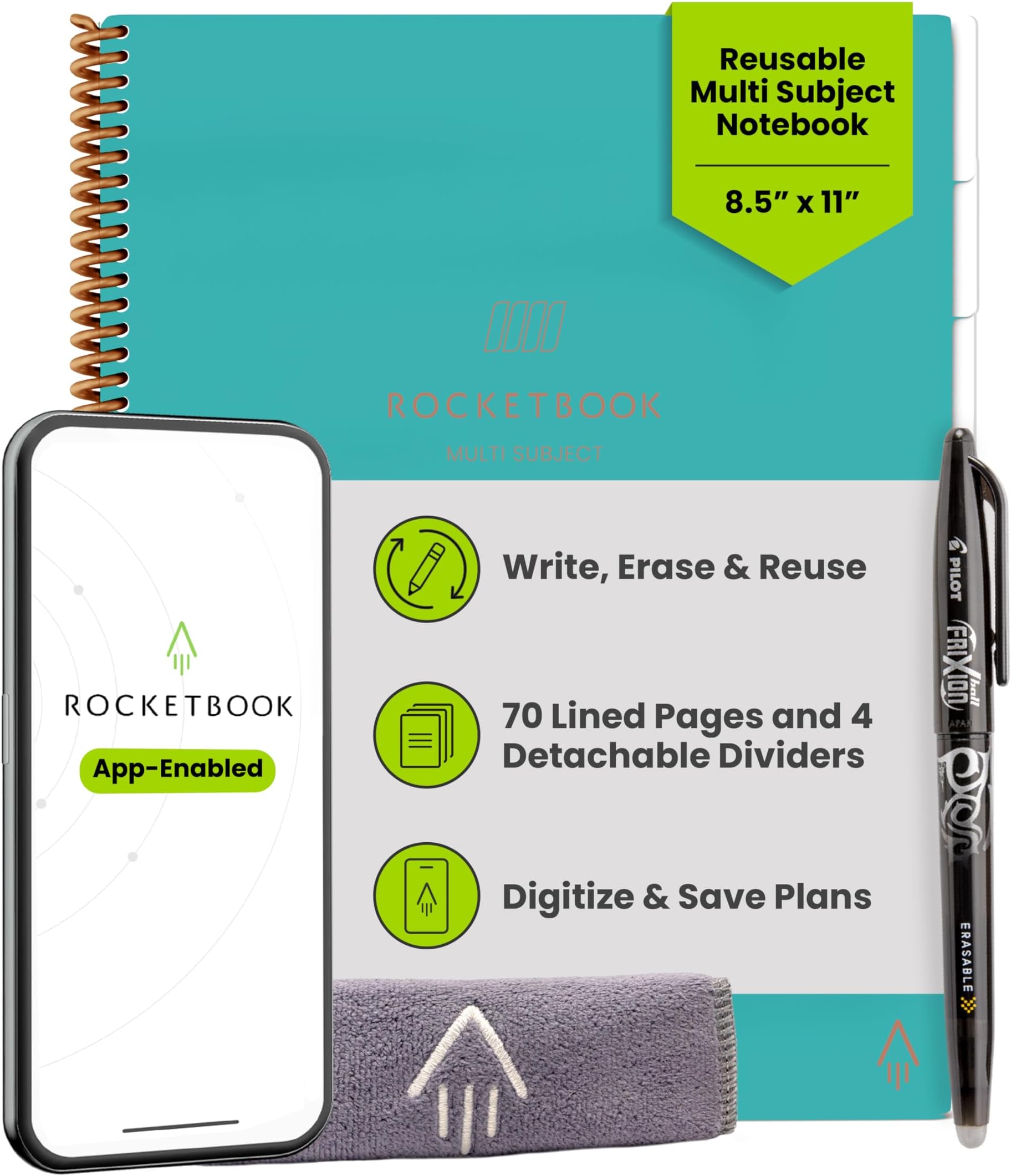
♻️📱 Organize, digitize, and reuse—your ultimate smart notebook for the modern multitasker!
The Rocketbook Multi-Subject Reusable Smart Notebook features 70 erasable lined pages and 4 adjustable dividers to create up to 5 sections, ideal for school and work. Its smart scan technology syncs handwritten notes to popular cloud services via the Rocketbook app, while Smart Titles convert notes into searchable files. Sized at 8.5x11 inches and paired with a Pilot FriXion pen and microfiber cloth, it offers a premium, eco-friendly writing experience designed for professionals and students who value organization, sustainability, and digital convenience.


| ASIN | B09ZXH7TWC |
| Best Sellers Rank | #135,627 in Office Products ( See Top 100 in Office Products ) #644 in Subject Notebooks |
| Binding | Office Product |
| Brand | Rocketbook |
| Brand Name | Rocketbook |
| Color | Teal |
| Customer Reviews | 4.5 out of 5 stars 2,456 Reviews |
| Item Dimensions L x W | 11"L x 8.5"W |
| Manufacturer | Rocketbook |
| Number of Items | 1 |
| Number of Sections | 5 |
| Pages | 70 |
| Paper Size | 8.5 x 11 inches |
| Ruling Type | Squared |
| Sheet Size | 8.5 x 11 inches |
| Special Features | Dividers |
| Specific Uses For Product | Note Taking, Office, School |
| Style | Notebook |
| Theme | Book |
| UPC | 810056882105 |
| Unit Count | 1.0 Count |
W**W
Amazing!
I have always loved Rocketbook notebooks since they first came out with the Wave in 2015. I lost the Wave I had back then and kind of forgot about them until just recently and wow! Their options are amazing! The app has come a long way since the last time I downloaded it. PROS: - Truly reusable with very helpful subject dividers (that you can move and place wherever you need them!) - Works with all of the Frixion pens, markers, and highlighters I've bought - Pen that it comes with actually works, unlike some other notebooks I've bought that come with a pen that are bone dry by the time they get to me - The app allows you to choose folders to upload your scans into on various online cloud sites like Google Drive, OneDrive, and Dropbox, but it also can go to sites like Evernote, Slack, and an email of your choosing - So far, the OCR feature in the app has been relatively accurate with some exceptions, which is fine. Even Adobe struggles sometimes. I also have oddly spelled names in the story ideas I've written in mine and a lot of very unused words (like ballagarraidh, which is technically Scottish Gaelic) - The app has tutorials built in so you actually know how to use all the features and it has an obvious spot in case you forget how to do something - The ink only takes about 10-15 seconds for it to dry, which is pretty sweet CONS: - I don't recommend using the Frixion highlighters on it. I used it and it smudged the word I was highlighting pretty badly. I rewrote the word to see if that would help, but it just created a pool of ink that didn't dry even though a decent amount of time had passed. - There will come a point that you will not have a clean paper no matter how hard you try to get it all out. It's sucky. I'm hoping this is just a problem with the microfiber cloth needing to be washed so we'll see if that's the case. - You have to buy your own spray bottle. - The microfiber cloth is kinda too big to me. When I try to get a nice, smooth wipe to not get other parts of what I've written on the page, the cloth will just wrinkle on itself and start removing ink in spots that I don't want it to. It is NOT as easy and smooth to wipe all the ink off like they show in the video. Overall, I just love this notebook and am excited to finally have a notebook I can use for classes that doesn't end up filled and unusable and taking up space on my desk shelf like normal notebooks. I definitely recommend getting the pen packs from Frixion, especially the colored ones since it's not a good idea to use the highlighters to emphasize things.
L**Y
PERFECT for college students!
This was my first experience with a rocketbook & all I can say is - you need one. the pages are smooth, sturdy, & it's endlessly reusable which means you'll never run out of notebook space again! on top of that, the multi-subject comes with 4 sturdy dividers & 8 tags which are very nice quality, i was impressed It also comes with a pen & a large towel (the towel I used in the video is from my cloud cards) & is well packaged. The app is also relatively simple to use & if you do encounter any questions/issues, Rocketbook has a lot of informative information on their website that you can refer to! I REALLY like the app feature because I enjoy studying in bed & this way I don't have to have a pile of papers strewn about, bound to get crumpled, torn, or lost, AND your significant other can sleep soundly while you study away in the dark (: I included a screenshot of one of my pages I scanned in the app. overall 11/10 ⭐️ from me I would highly highly recommend a rocketbook to any & every one. **just make sure you're using friXion brand pens/markers/highlighters**
S**L
Great product, it DOES include a pen a towel
The Rocketbook works great! I own the Core, Fusion Plus, Mini, and Multi-Subject. It works exactly as advertised. When scanning with the app, image quality is as good as your camera will allow. OCR text recognition is as expected... it really relies on handwriting quality and consistent lines (I tend to reduce pen pressure at the end of each letter, so most OCR software struggles with my writing). The dividers in the multi-subject notebook work in the other letter sized notebooks. While the dividers can be removed and replaced many times, I think the tabs that go in the coils could eventually break. The ink erases easily with a dampened towel (use the included towel to protect the page surface). Note: don't press too hard when erasing, otherwise you can end up removing the surface coating. Don't press too hard when writing either. If you experience "ghosting" (happens if you leave dark ink on the page for an extended time), a hot, wet towel can remove it. Keep in mind also, the ink is heat sensitive. If you leave the notebook in your car during a hot summer, the ink might disappear. (If this happens, you might be able to recover it by placing it in your freezer). Every notebook comes with a towel and pen. The envelope has a big compartment that holds the notebook and towel. Then a smaller, sealed separately, compartment holds the pen. Any review stating there wasn't a pen likely didn't notice the separate compartment. Note about Frixion writing utensils: the pens work well. I haven't been impressed with the markers.
I**7
Solid erasable notebook with plenty of pages and good writing feel
I actually love this Rocketbook notebook way more than I'd expected. I use it every day now. I find the black pens erase very well but have had colored ones leave more of a ghostly mark. The pen-paper writing feel is good. The ink takes a few minutes to dry and if touched right away it will smear so probably a tad challenging for left-handed folks. But I use mine heavily and ended up buying a second one. I'd love to see them amend the Pro version so it has more binder ring style to remove and reorder pages, but am still content with this. The notebook has removable sections, which are helpful, though the plastic is flimsy and bends so I've ended up keeping them were they are. There are plenty of pages for multiple subjects or projects in the same notebook. The pages are thick enough to feel sturdy and hold up to erasing. And the writing to text feature works well with the Rocketbook app scanning. Some things could be improved, but overall works really well for a physical erasable notebook. Scanning to the app will only save as a pdf format and not convert writing to text, BUT the writing is searchable which is nice. So for example the pdf will scan as all handwritten words but when saved, can search for words in it. It's not perfect but pretty good (and probably depends on your handwriting). Taking off a point since the spiral binding pulls out of the ends of pages and the spiral end of some of the tab dividers snapped. But overall very good. The price is a tad high, but it works well for me.
G**C
Love the new paper texture!
I’ve bought a few Rocket books now and I have to say, the new paper texture makes this one the best! It feels more like real paper and writes much more smooth and satisfying than the old pages. It’s still the same thickness as the old pages, which I like. I really like that it has more pages because I use it for school and need enough pages to get me through the semester without washing it off. I really like the tabs that are included and use them to separate my sections.
K**R
Perfect Note Taking System
RocketBooks has streamlined and simplified my university life!!! No more digging around through a bunch of notebooks looking for notes to study, I title all of my notes and upload them to my cloud or drive and access them from my IPad or laptop from anywhere. It's so easy! I like that with this notebook I can take notes on multiple chapters or multiple classes (I'm a student at university) and I can divide them and name the sections and turn to them easily with the insertable dividers. Then I can upload them to different folders just by taking a picture. All of my notes are so easy to find and reorganize if I need to. My desk is clean no eraser crumbs all over the place and with the pens I can color-code my notes or just make my notes fun with all the color choices. Definitely give RocketBooks a try if you haven't. I was hesitant to try it at first but I am so glad I did. I've never been more organized.
J**B
More issues than my other Rocketbooks.
I will start by saying I LOVE Rocketbooks and I use them literally every day of my life, and have for years. I use them at work daily for note-taking which has saved the earth who knows HOW much paper waste. I journal in them nearly-daily. It's nice to have my entries tucked away digitally. I make grocery lists on them and then wipe them away afterward. And since I'm a writer, I use them to plot story lines, write down character traits, etc. and then can keep those files forever, organized digitally, rather than needing space to store the notebooks filled with random info. Another bonus of them is of course that the ink is erasable... and I love that there's so many cool Frixion pens available for it AND that they are refillable. For newbies, I'll say that new Frixion pens average about $2/pen, and I try to snag refills when they're about $1 apiece) and that they do not hold a LOT of ink but you get over that quickly, just keep refills or extra pens on hand. Continuing on... I have two of the dot-grid letter-sized Core, two of the dot-grid executive-sized Core, and this one I am currently reviewing. This one is my least favorite of them all for multiple reasons. 1. This one isn't traditionally-lined; the lines are lines of dots. Originally I was thrilled about this. However, I had to switch this to my work notebook. This is because I never scan my work notes; when the projects are done I have no reason to keep the notes, so I just wipe them away. I used to use this as my journal, but could no longer do that. There is something about the lines of dots that makes it difficult for the app to pick up my dotted i's and j's, or periods, when scanning. So my entire scan would have no periods or dotted i's. I'd have to find the color of pen I used and make each dot and period very large in order to scan it. Very inconvenient. I'd have loved to use this as my journal due to the quantity of pages rather than a work notebook where I don't need a ton of pages. But I just can't spend 2-3 minutes a page darkening periods and dots before scanning. 2. The tabs on my plastic dividers got really curled. I don't know why this happened as I can't think of a time where they were super hot or cold, or where the notebook got bent in my backpack (it's usually sandwiched between my work laptop and a library book at any given time.) I have tried setting heavy objects on the tabs for hours to flatten them, to no avail. The whole notebook itself also has a curve to it. This has not happened to any of my other Rocketbooks. 3. There aren't enough dividers right out of the package. Maybe an average person only needs four dividers, but I often have more than five projects going on at work and it's inconvenient not to have a section for each one. I thought I saw on the app where you could purchase more, but I haven't seen that option on Amazon anytime I checked. 4. Randomly, for some reason, some of the pages just do not take the ink very well anymore. (This has been an issue in my newest letter-sized Core, too. The top side of its pages are this way while the bottom side of the pages are perfect.) I kept thinking it was a pen issue, but then I'd use the pen on another sheet and it was totally fine. I'd re-wipe the pages again even though they were clean, and the pens still wouldn't work well on some. I will say, this was not an issue when this Rocketbook was new; it happened over time. I've owned this one for about 17 months. (On my other one mentioned right above, this was an issue from the get-go on the one side of the pages.) So overall I loved this notebook at first, but due to the scanning issues with periods and dots not showing, curly dividers and a curled notebook, and random pages not taking ink well... I kind of don't recommend this one. I'm getting concerned about the quality of their products, too, since my newest Core doesn't take ink well on the top sides of each page (that one was purchased seven months ago and the pages were that way right out of the package.) I certainly do not expect these to hold up forever, especially as heavily as I use them. But I'm not seeing them hold up like my early notebooks lately. I still do recommend them if you are a heavy paper user and want to change that. Just know about these possible issues.
J**E
Improved page material but easier to smudge
The first Rockebook product I've used is the Flip, and I like the idea but the page material was very plasticky, smooth, and did not seem to allow the included Frixion pen to leave ink very well. I wondered if that was just the included pen's fault, and I prefer clickers to caps, so I got some navy Frixion clicker pens to try. I think the navy ink color on the Flip page is better, but still not great. I read reviews of this multi-subject notebook saying the pages were improved, so I picked one up in Used Good As New condition to try. The multi-subject page texture is definitely different, and I like the texture and ink surface better, but I did notice they also allow the ink to smudge much longer than the Flip pages did. In attached photos I've written on both page types with the same pens to show the difference in ink quality and smudging. In one photo, the top is the multi-subject notebook page where the ink is darker/thicker, but I noted the 2nd line "Rocketbook" word looks a bit smudged. Bottom of that photo is the Flip page where the same pens' writing looks thinner/weaker in both cases, but no smudging appears. The next photo I took was writing a word on the page, waiting a few seconds and then wiping my finger across the word to see how easily/how much it smudged. Both smudge easily for a few seconds, but after 20s the Flip page barely smudges, while the m-s notebook page still smudges to be unreadable. I had to wait 30s for the m-s notebook page to mostly-survive a smudge try. This means the idea of finishing notes on a page, then immediately flipping the page over is very likely to leave smudges on the back of the facing page (where the ink touches). If you're writing on a narrow student desk, try leaving the first page hanging to dry off the edge of the desk while writing on the next page. If writing on a wider desk, try not folding the first page under the notebook while it has time to dry now face down, and don't write on the back side of that page immediately. Ultimately, I hope Rocketbook considers releasing notebooks of recycled material, but non-plastic, non-reusable pages that would capture ink from any pen much like "traditional" notebook pages do. Re-usable is better for the planet, but the real value-proposition (to me) of a Rocketbook is its digital integration with various cloud platforms and making taken notes electronically searchable, sharable, and editable. If its pages are subject to easy smudging to the point it could ruin notes and usefulness, recycled-paper notebooks seem like a fair compromise.
Trustpilot
1 month ago
2 days ago