Buy anything from 5,000+ international stores. One checkout price. No surprise fees. Join 2M+ shoppers on Desertcart.
Desertcart purchases this item on your behalf and handles shipping, customs, and support to Iceland.
🚗 See More, Drive Safer, Stay Connected — The Future of Dash Cams is Here!
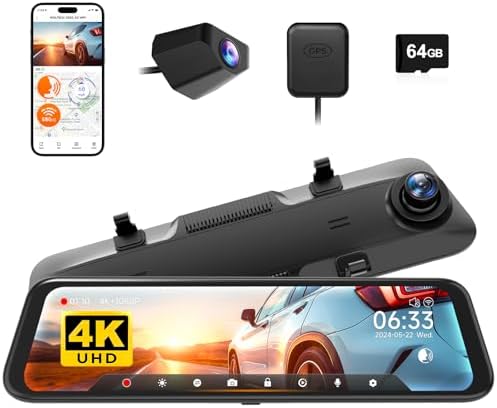
The WOLFBOX G850 is a premium 12-inch 4K rearview mirror dash cam featuring a 4K front camera and 1080p rear camera with WDR for exceptional day and night clarity. Equipped with 5.8GHz WiFi for fast wireless video transfer, intelligent voice control for hands-free operation, and advanced safety features like G-sensor collision detection and parking monitoring. Includes a 64GB memory card and GPS, making it a comprehensive smart mirror dash cam solution for modern drivers.


| ASIN | B0B1LLMCS9 |
| Are Batteries Included | No |
| Auto Part Orientation | Drivers Side |
| Auto Part Position | Front Inside |
| Best Sellers Rank | #1,850 in Electronics ( See Top 100 in Electronics ) #2 in Car In-Mirror Mounted Video Players |
| Brand | WOLFBOX |
| Built-In Media | 1080P rear camera, 11 feet car charger, 20 feet cable for the rear camera, 4K mirror dash cam, 64GB card |
| Color | black |
| Compatible Devices | WOLFBOX vehicles, Bus, Car, Minivan, Truck |
| Compatible with Vehicle Type | Car, Truck |
| Connectivity Technology | USB |
| Control Method | Touch |
| Customer Reviews | 4.3 out of 5 stars 2,989 Reviews |
| Display Type | Touch Screen LCD |
| Field Of View | 170 Degrees |
| Flash Memory Supported Size Maximum | 256 GB |
| Flash Memory Type | card |
| Frame Rate | 24, 25, or 30 FPS |
| Included Memory Card Size | 64 GB |
| Item Dimensions D x W x H | 11.85"D x 2.83"W x 0.71"H |
| Item Type Name | mirror dash cam |
| Item Weight | 1 Kilograms |
| Manufacturer | WOLFBOX |
| Mfr Part Number | G850 |
| Model Name | G850 |
| Model Number | G850 |
| Mounting Type | Rearview Mirror Mount |
| Optical Sensor Technology | CMOS |
| Other Special Features of the Product | 1-YEAR GUARANTEE & CUSTOMER SERVICES WOLFBOX: the backup camera mirror comes with a 12-month guarantee, software upgrades, and 24/7 customer service. |
| Real Angle of View | 140 Degrees |
| Screen Size | 12 |
| Supported Standards | TS |
| Unit Count | 1.0 Count |
| Vehicle Service Type | Car, Truck |
| Video Capture Resolution | 2160p |
| Warranty Description | 1 year manufacture |
Y**0
Great Dash Cam
I ended up getting the g850 after having glare issues during sunny day with the g930. Unfortunately Wolfbox doesn’t make anti glare film for the 10” product line. After installing the anti glare film on the g850 it pretty much took care of the glare issue and made it usable at any time of the day. Yes the video isn’t as crispy with the film on, but it has no effect on what’s being recorded so it’s not a big deal. I did notice a difference in the back camera at night. It was a lot better and the light blowout from headlights wasn’t as bad. I was actually able to see separations in headlights behind me unlike the non wdr rear camera where the headlights just blended together. I was lucky enough to get all types of weather in socal this week so I got to see how the camera did during sunny days, cloudy days and now rainy days. My particular concern was rainy days with the rear camera since I use it as my actual rearview. There were times where drops of water completely made it useless, but it only last for a few seconds if that. When it does get wet there’s a ton of light bleed from headlights, but again once you start moving it clears up. I would see this as an issue when you’re backing up into a drive way or parking spot and there’s no wind or movement to get the drop of water off the lens. Overall I’m very happy with the dash cam. This 12” version definitely has its benefits, one being the greater field of view you see on the screen and of course the WDR rear camera. The video recording is nice an clear on the front, but the back, since it’s 1080p, it’s obviously not as sharp an image but you’re able to make out license plates a slower speeds and stand still. Update: Finally got around to hooking up the wiring that engages the reverse camera and parking lines. Works great. I love how the video automatically angles lower to show more of the ground. If you drive a 2011 CT200H it’s the red wire that goes to the reverse light. Note: If you do plan on installing the anti glare film be ready for a headache. Lint central! Be patient and start at one end and press down the middle. I would list the film back up if I noticed bubbles caused by lint and removed it. Too some time, but eventually got done.
G**E
My Favorite Dash Cam
This is a great camera system. Mirror dash cams are definitely a different breed but in a good way. Almost everything I dislike about regular dash cams are not an issue with this WolfBox 850 model. I installed the camera and all accessories myself. It was a big deal to get the rear camera installed, location, wiring, tapping into the reverse light power, but that is true for all rear camera installations. One could always take to a professional if needed. The end result is awesome and totally worth my time. I am so impressed with the touch screen functionality. All settings, viewing, playback, switching cameras are immediately accessed via touch screen, and mirror dash cams do not take up more window real estate which I like. The picture is great and can be adjusted up or down as needed when recording. If you need to look at files on a PC, the WolfBox Player works great and has map tracking capability. I installed the hardwire kit for parking monitoring (only up to 24 hrs) and collision capability. When the mirror cam is off, the reflection is a little on the dark side, but it gets the job done for my needs. I really do not want to use the screen saver as I would rather constantly see the rear video stream. I do, however, have one issue with how the front mirror cam attaches to my old mirror. My mirror has OnStar buttons that protrude along the bottom. Therefore, my mirror is not straight across the bottom, and it keeps the mirror cam from fitting perfectly (see pic). The attaching mounts should be about an inch more apart or offset a little since the camera lens is on one end of the mirror cam, thus keeping it from being centered on the old mirror. Also, larger mirrors will stick out on the other side slightly. I contacted customer service and they were the simply outstanding! My solution was to use their mirror mounting bracket (see pic). This bracket replaces my old mirror completely. I will lose OnStar capability, but that is not an issue for me because I do not use it. Hands free calling still works with the OEM mirror removed. I am completely satisfied with this mirror dash cam. Not everyone will need to replace their mirror, but it is a clean look to do so, and it increases the awesomeness and functionality of this mirror dash cam system.
L**E
Not a replacement for rearview mirror
+This is a great dash cam. Picture quality is great in both directions. I really like the backup camera function with the parking lines. The playback quality is also great! It can also be used to review the recording for clarification of what passengers have said while in the car. +Installation was simple and straightforward for the wires. If you choose to mount the dash cam to the rear view mirror (RVM), this is quite easy as well with the straps provided. I had to be creative and mounted this to the dash using: old RVM, a toggle bolt, regular bolt and lock nut (underside not pictured), and a metal plate. Epoxy did not hold the old RVM to the plastic dash. -Sometimes, the newer LED headlights will appear to flicker, likely due to framerate. This can be distracting thinking that it is an emergency vehicle. --It does not function well at replacing the RVM. When used as a mirror, it is as if you are trying to look beyond the reflection- you have to train your eye to ignore the immediate information (reflection/camera display) and see the reflection in the glass behind as you would when you move the regular RVM at night when someone is using high beams behind you. The viewing angle is also much further away and you cannot see as much or in as much detail (speeds of other cars, distance of other cars) as you would with a regular RVM. I have the rear camera mounted just above the rear license plate. In terms of useful information for the driver, the RVM exceeds the Wolfbox rear camera view. -When driving at night, some of the newer headlights (i.e. Mercedes at night in the attached photos) can wash out the view. +/-When it rains, mist can accumulate on the rear camera causing some obscurity (see photo). This varied widely due to the amount of current rainfall. +I decided to mount this dash cam to the dash (go figure) instead of hooking to the RVM. I believe it functions a lot better this way and am happy with it. +/-First one, the power display button malfunctioned about a month in and would not respond. Everything else was working fine; I wanted to turn the display off for driving at night. Customer service was great, they sent out a new one and paid for shipping. TLDR; Great as a dash cam, not suitable as a rear view mirror replacement.
T**N
Great 4K Camera for Front and Rear of your vehicle!
I have been living without a working front and rear dashcam for a while and had been eyeballing this Wolfbox G850 for a bit. I installed it in my 2018 Kia Optima EX and I gotta admit, it was both pretty easy and it looks/fits great in the vehicle!! Installation: If Kia or if your vehicle has MICRO fuses, use this: https://www.amazon.com/WOLFBOX-Hardwire-Parking-Multiple-connectors/dp/B09X9F8GMT due to multiple adapters. Otherwise, if your vehicle has MINI fuses you can go with https://www.amazon.com/WOLFBOX-Hardwire-Parking-Multiple-connectors/dp/B09X9F8GMT/ which is the standard USB C Hardwire kit for MINI fuses. I installed this by hiding the wires within the liner of the vehicle on the windshield and down the trim line for the USB C Hardwire, GPS, and Rear Camera cabling. A little more wires than I'd love, but with all the attachments, it's necessary (Wish GPS could just be build into the mirror!). I was able to route the cable to the rear camera through the inside of my vehicle and I ran it through the trunk lid liner and popped the cable out through the same hole as my license plate light. It was a tight fit, and doesn't allow the light to fully seat, but it's minimal and I don't anticipate any moisture intrusion. If observed, i'll likley place some putty or foam to keep the moisture out. The directions are super simple to follow and the Camera itself looks GREAT. It has numerous features such as speed minder (alert), flipping the camera view or mirroring it, etc. You can see both the front and rear cameras simultaneously OR you can have it show one or the other -- simply swipe to the left or right to cycle through the different views. The 4K quality both front and rear are impeccable. You can download Wolfbox's software for video viewing/editing directly on their website as well, which makes editing and posting the videos a breeze! I did have to use the MICRO FUSE adapters, and Wolfbox's customer service took care of me via WhatsApp in less than 24 hours and had an alternative item shipped to me quickly for the installation. I am in love with these cameras for numerous reasons: Video Quality, product quality, ease of installation, size of cables (easy to hide), hardwire option, and customer service.
M**L
Works great!
Love this product. Gives clear video all the way around my vehicle. Easy to download video from the app. Important for people who drive frequently and are worried about other crazy drivers. Bought one for my youngest son as well.
D**N
I’m very impressed by this Mirror Dash Cam and Rear Cam
I am really impressed with this Mirror Dash Cam (Front & Rear). Here are my Pros and Cons: Pros: Camera (picture) quality is very sharp, colors are perfect. There are 3 quality settings; Front Only = 24 FPS; 2160P Front Only = 30 FPS; 1440P - smoothest playback Front Only = 24 FPS; 1080P Front & Rear = 24 FPS; 2160P + 1080P - a little jerky during playback because of the details in the pictures Front & Rear = 30 FPS; 1440P + 1080P - smoother playback since more frames per second Front & Rear = 24 FPS; 1080P + 1080P – keeps the playback of the 2 cameras in sync better Download the FREE WolfBox Player or play the recordings directly from any video player that supports .TS files (most players do) Both of the camera’s day or night recordings are extremely clear and can easily read license plates Abundant Settings to control the cameras (see attached picture) Loop Recording increments of 1- or 3-minute segments, oldest recordings are overwritten by the newest recordings 128 GB card = approx. 11 hours of recordings before being overwritten. but since it loops you could get by with a smaller card. The 128 GB SD micro card is around $17 on Amazon for Samsung U3 A2 V30. Audio quality seemed fine. Can hear my music, any talking, and engine accelerating Hardwire Kit required for Parking Mode and IMO is a MUST HAVE as it turns off the camera when you get out, but still supplies power to record if the Parking Mode G-Force sensor is triggered and it doesn’t drain your car battery. The Rear Camera includes a red wire that connects to any reverse light that shows the back-up lines when in Reverse I put this camera in my Silverado 2500 Long Bed Crew Cab mounted to the inside rear-view mirror. There was plenty of extra wire for the power (both in the supplied cigarette lighter and also the hardwire kit). For the rear camera cabling I used the 33-foot (10 meters) extension cable and it was enough to run from the rear-view mirror, into the door molding to go outside and under the truck, hiding the wire all the way to the bumper with plenty of cable left over. Thankfully they include a plastic trim spacer tool that helps tuck the wire into the trim moldings. Easy to deploy firmware updates I love the 12-inch display (inside mirror) for the picture quality and also the Touch Screen for selecting the various options. Fantastic Customer Support responds within 24 hours to each email and are genuinely concerned, kudos!!! Cons: Hardwire Kit, took a little over an hour to install, but worked perfectly the first time I initially had an issue with playback on Windows 10 desktop using GPS Player or using WolfBox Player had no audio. I finally discovered a setting for Spatial Sound (new in Win10) set to OFF by default. Change setting to "Windows Sonic" or to "Dolby Atmos" and that allowed the audio to play perfectly. Search Google for how to easily change that setting for Windows 10. G-Force detection set to LOW creates recordings when hitting bumps while driving and even shutting doors. Medium seems to eliminate False Triggers and is sufficient to monitor Parking Mode triggers. Must mount the Rear Camera with Flat side UP or the recording is inverted Day Light Savings setting manually moves the time forward or backward, it’s not set automatically Hope this review helps someone deciding if this camera is right for them.
F**N
Camera is GREAT but he service department is TOP TIER.
The camera and display quality is great but there's something else that I like better than the camera. I purchased this system in May 2025 and it worked perfectly up until the end of the year. For whatever reason the display stopped automatically turning on when I started my truck (I have it hardwired to the fuse box). At this point I had the camera system for over 7 months and was beyond the Amazon refund time limit. I thought I would just reach out to the company for some troubleshooting assistance. I could still turn it on with the power button but wouldn't turn on by itself like it once did when I first installed it. The tech assisted me with troubleshooting and even sent me a new hardwire kit thinking that may be the problem. He continued to communicate with me until I got it installed and that still didn't fix the problem. Once I informed him that the kit didn't work he sent me complete, new system at no charge. THAT IS GREAT CUSTOMER SERVICE. Like I said the camera is great but that customer service says it all. THANKS MARK from Wolfbox service department.
Y**Y
Good overall purchase
It was not hard to install/set up and the from camera does have a bit of a glare. I did get this part for it: 90Go CPL Filter for WOLFBOX G840S/G850/G900/G900Pro 4K Mirror Dash Cam, Anti-Glare Polarizer Lens for Front Camera, Enhance Clarity and Reduce Reflections, Ideal for 2160P UHD Recording. With this lens it looks very clear, but the rear camera does not look good when it is not in a well lit area. I am going to see if there is anything to help that and if it does I will update then.
Trustpilot
1 month ago
1 month ago