Desertcart purchases this item on your behalf and handles shipping, customs, and support to Iceland.
🎬 Stream Smarter, Not Harder — Elevate Your TV Game with Roku Ultra!
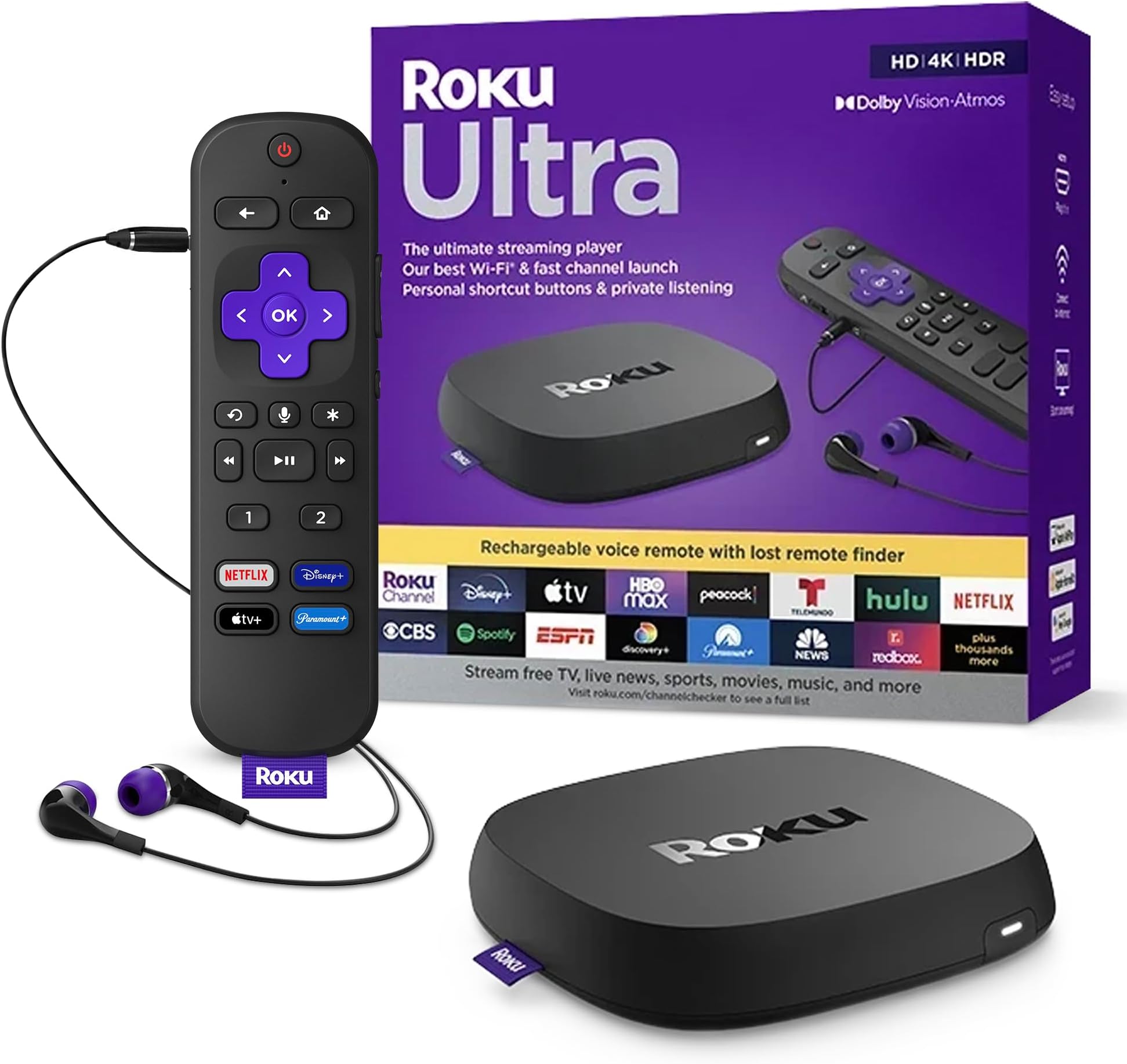
Roku Ultra is a premium 4K streaming player designed for professionals who demand speed, stunning visuals, and seamless control. Featuring lightning-fast app launches, dual Wi-Fi and Ethernet connectivity, and cinematic Dolby Vision HDR10+ with Dolby Atmos sound, it transforms any TV into a smart entertainment hub. The rechargeable Voice Remote Pro offers hands-free commands, headphone mode, and personalized shortcuts, while broad smart home compatibility ensures effortless integration. With 8GB storage and 2GB RAM, Roku Ultra handles dozens of apps smoothly, making it the go-to choice for millennial managers who want premium streaming without compromise.


| ASIN | B09T4VZDYV |
| Best Sellers Rank | #20,627 in Electronics ( See Top 100 in Electronics ) #97 in Streaming Media Players |
| Brand | Roku |
| Built-In Media | Headphones, Power adaptor, Roku Ultra streaming player, Roku Voice Remote Pro, USB charging cable (for remote) |
| Color | Ultra (with Wi-Fi 5) |
| Compatible Devices | Television |
| Connectivity Technology | Bluetooth, Ethernet, USB, Wi-Fi |
| Connector Type | HDMI |
| Controller Type | Remote Control |
| Customer Reviews | 4.6 out of 5 stars 12,570 Reviews |
| External Testing Certification | Não Aplicável |
| Form Factor | TV Stick |
| Item Dimensions L x W x H | 5"L x 4.9"W x 1"H |
| Item Weight | 5.9 ounces |
| Manufacturer | Roku |
| Memory Storage Capacity | 8 GB |
| Mfr Part Number | 4802R |
| Model Name | Roku Ultra 2022 |
| Model Number | 4802R |
| Number of Items | 1 |
| Other Special Features of the Product | Bluetooth streaming / Works with Apple AirPlay and HomeKit / Works with Google Home / Works with Alexa |
| RAM Memory Installed | 2 GB |
| Resolution | 4k |
| Special Feature | Bluetooth streaming / Works with Apple AirPlay and HomeKit / Works with Google Home / Works with Alexa Special Feature Bluetooth streaming / Works with Apple AirPlay and HomeKit / Works with Google Home / Works with Alexa See more |
| Supported Internet Services | Hulu, Netflix, Pandora, Prime Video, Vudu |
| UPC | 829610005201 |
| Video Codec | h_265 |
| Video Output Resolution | 3840x2160 |
| Warranty Description | 1 Year Manufacturer Warranty |
M**T
This connects for streaming! Yea!
With all the "short cycle" expectations of the electronics industry, the software outgrows the chips on higher end electronics before the expected end of life of the electronics. In our case, the TV still works beautifully, and can display the 4k material that is available - as planned - but the built in streaming chips can no longer be updated with the new streaming software sooo, glitches, cutouts, failure to load.... To extend the life of our current entertainment electronics we needed a new streaming chip. This fits the bill perfectly! The price is right, it connected easily to our existing system and provides a new chip to do the streaming function. The software for the install worked easily, and we were up and running again. It has the voice recognition stuff included, but we find that more trouble than functional - voice recognition is not quite there yet, it misunderstands too often, so we have disabled it for now - since we didn't use it before, we don't consider that an issue, but if that is important to you, you will need to test it out. We also have 1 minor criticism - the remote is all smooth and curves, which is a very pretty design, but it slips and slides in the hand resulting in unintentional button pressing while trying to pick it up - often interrupting the program or muting the sound when we just wanted to adjust the sound up or down - this is in part due to the sound buttons being on the sides of the remote. Cute, but not functional. Also, with the programming for this remote, it has each subscription defined to use different buttons for the simple functions so you have to stop and think which subscription (am I in Netflix, Amazon, or Roku....) you are using before you can navigate the screen. Not a deal breaker, but this could have been done better. Very happy with this system, and pleasantly surprised at the additional material offered by Roku! We will buy an updated version of this when THIS chip is exceeded by the software. Ok, back for an additional comment. We have been using this 6 months, and only 1 issue. the Roku overheated the day the air conditioning was on the fritz. This is not uncommon with many very small models of an electronic form. If it gets too hot, it malfunctions in a weird ways. If it isn't working for no apparent reason and feels warm, try disconnecting and letting it cool down for 20-30 minutes before panicking. We now keep ours on a small baking rack to allow air circulation - end of problem. Others on the tech network have suggested a small air circulating fan, especially if located near other heat generating electronics. This is not a major issue for us, but it is good to know when planning location (no completely enclosed spaces that have no air circulation) and for troubleshooting - before you go buy new cables, pitch it, or other drastic measures.
C**S
For its price. It’s the best streaming box.
So far I have owned, a Roku Ultra Lt, Google Chromecast 4K, Firestick 4K Max, Apple TV 4K, and a Fire cube 3rd gen. In my opinion. For streaming movies and tv shows. The Roku Ultra is hard to beat for its price. You get 4K, Dolby Atmos + on many streaming apps, It loads quick, even with 35-45ish apps downloaded on it. It zips right through its menu. Loads video’s fast. Make ranking by box for quickness between apps and movie/tv loading times. 1. Fire Cube 3rd gen. It’s the fastest, with 16gb memory some of fastest processors going. Only the Uber expensive Nvidia Shield tv pro comes close in some benchmark test. It also has one of the cleanest menus and way of finding apps. And looks like it fast ly becoming the only affordable box that still allows for side loaded apps. Roku, Apple, Google, are banning apps and side loading. Oh and the cloud gaming power of the Cube is awesome. 2. Roku Ultra. Fast, easy to navigate around and search for apps. Easy to set up little things like screen saver, wall paper. Seems to have plenty of memory. I have 35-40 apps on my at any one time and it goes between apps and loads movies very well. I reall like my Roku Ultra. And would have put it in first place. But you can not game on it like the Fire Cube 3rd gen. You won’t go wrong buying a Roku Ultra. 3. Goes to my Firestick 4K Max. Even with only 8gb of memory. It still worked great and loaded very well with its limited factory memory amount. 4K picture was always very good. 4. Kind of a tie between the Apple and the Chromecast. Both have many adds, and no way to clean things up like Roku’s or Amazon Fire devices. The Apple does not produce as good a picture as the others. The Chromecast was easier to adjust its picture settings, but the Apple even with its much higher price. makes you jump through hoops. I did like that I could link my Apple TV device to my iPad. Until all the extra adds started and down load request. So it was fast becoming not worth its 125-ish price. The Chromecast 4K falls short in its adds, picture quality, and it losses apps every day now. For 50-ish price is a good deal if you have no other streaming device. Just be warned. It’s fast becoming an apple like product. Which you need to pay for everything right now. And Google is banning a lot of side loaded apps and have shut down many of them. Or just spend a little less and get a Roku or Firestick 4K of some sorts and enjoy. I have not tried a Nvidia shield pro but I do know the the 3rd gen Fire cube beats it in many benchmark test. And I also know, the Shield has the most space, is the best for cloud gaming, but the Apple Cube beats it a movie streaming. In my opinion, if you have the money and want an everything box, buy the Fire Cube 3rd gen. If you like, movies, gaming, utility apps. If it’s just movies and tv with an awesome picture. Get a Roku Ultra.
T**E
Roku - Absolutely The Best Streaming Device - Ever - Bar None!!!!
Whoop-De-Doo For Roku! Yahoo! Sorry. So happy to have received my Ultra recently. And now I can see Yellowstone Season 4 after the Season 3 cliffhager, when CBS literally left it's viewers hanging. But I digress. Rokus really are the best streaming devices on the planet. If you have never owned one of these, I highly recommend them. And by all means, get the Ultra - With A USB Port! It supports more advenced media formats like 265HEVC, and others You may find interesting content on the internet that you can download and put on a USB stick to play on your TV (hint, hint). Back in 2016 I bought some Roku3's so I could finally tell the cable company where they could get off. Christ! I guess I have saved more than $50 per month in that time. You still need internet to use Roku devices, but then who does not have that these days? A few things I like about the Ultra: - The rechargeable remote with voice commands, and a Lost Remote Finder feature. However the voice recognition is not all that great. - The Ultra also works with an RCA universal remote, that I prefer to use anyway. You can order one of those from Amazon: "RCA RCRBB04GR 4-Device Big-Button Universal Remote Control", ASIN: B00CXDIPVS Only two things I do not necessarily care for, but not enough to change the rating: - The white light on the device stays On, even after the device has turned Off after its idle period. On the Roku3s this light goes Out. In that way I would know if I was not unintentionally streaming anything. - The USB port is moved to the back, which can make it a difficult to line up and insert a USB stick. Update: 5 May 2025 I have had this device for at least two weeks. This morning after streaming some news, I "parked" the device on the home screen, switched back to my TV and turned it off. The Ultra white light went Out. When I turned my TV On the Ultra light turned On. I don't know what changed, a software update or what. I checked all the settings. I do like this a lot better than having the Ultra light remain on. However, the Ultra light goes Out even if something is streaming. So it is not a reliable indicator that the Ultra is idle. Update #2: 17 May 2025 I did not have all my info correct about the Ultra White Light (UWL). I later observed that after the UWL goes out, it later turnes back on again. And the last sentence about the "UWL going out if something is streaming" - I don't remember why I wrote that, but I don't think that is correct - unless it goes out when the TV is turned off while something is streaming. Regardless, the UWL turns back on at some point. So again, it is not a reliable indicator that the Ultra is idle. Perhaps Roku can fix that with a software update.
V**J
This is a problem solver!
We have a high end Denon receiver and a surround sound set of Klipsch speakers. We get our entertainment streamed through Starlink, viewed on a very large Sony 4K Bravia which runs on Google Chromecast. We get no OTA broadcast signal here so depend on our Internet connection for that. These are all connected through ethernet cables or HDMI cables (we do not use the wireless for the entertainment center). So why did we get the Roku Ultra? Read on.. Our setup worked pretty well except for two things. The major one was that when streaming Amazon Prime Video it took a long time to connect. If we paused the feed more then a few seconds it would basically lose the connection and we would have to go through it again. Error messages would come up and we would just wait for them to clear to get to the next error message, and after a minute or three it would finally connect. The streaming quality was good but we could visually see that would occasionally drop down in resolution quality. Some research found others having the same or similar problems so we decided to try the Roku Ultra 2022. The instructions are simple and the initial setup was painless. The voice remote even allows you to 'say' the letters when doing a search and is very accurate and WAY FASTER than 'typing' on a screen keyboard. We even created a new Roku ID and password in no time by 'spelling into the remote.' The Roku website has detailed help files when it comes to setup and use, the included instructions gloss over the the use of the HDMI output of the box, but it is always recommended to connect devices by cable and not through a wifi if possible. We did just that. The remote is rechargeable by USB and the Ultra unit has a USB port on the back and they include the USB cable. Although we needed and purchased a longer high-speed HDMI cable, the Roku Ultra 2022 does come with one. Not only did the Roku Ultra 2022 end the waiting game with Amazon Prime Streaming it also supplied a superior image and steadily so. On a cooking series we had been watching my wife even commented, "I did not know the cute red-head girl had freckles!" That first night we watched for about three hours and I never saw the screen image drop to a lower resolution. Some complain about the basic remote, but that is not a factor in my opinion- just have two remotes by the side of the couch if need be. Have we become so spoiled that having to use two remotes is such a chore? If you have the sorts of issues I mentioned (slow response, low resolution, etc.) try the Roku Ultra 2022. if you don't like it Amazon's return policy makes it easy to say, 'No thanks.'
Z**C
Similar to older models with some new features and some old issues
I have a Roku 2XS that I replaced with this unit. The Roku 2XS worked fairly well, but Roku has abandoned that platform -- so no new features and apps support is dropping. Some recent generation added one of those 'voice control' features that I detest. This 'feature' is frustrating (or just annoying) to use in every device on which I have tried it; I almost never get accurate behaviour from artificial idiocy based voice recognition. There is no way to turn this 'feature' off. Roku says it does not listen to the room except when you hold the microphone button, but many other companies have made a similar claim and so many have been lying -- at least some ambient room noise was being sent to the vendor's cloud to be processed whether the microphone was 'muted' or not. The new remote drinks power. The AA cell powered units of the previous revision would run dry in a month sitting mostly idle (maybe a few hours of use, no voice recognition, no headphone use). The newer units with rechargeable remotes do not seem to fare better. My old 2XS unit's remote would last a few months on two AA cells under the same use patterns, so I strongly suspect the remote is either doing something full time or at least disappointingly inefficient. As before, you can not disable the TV control buttons (volume, mute, power), and it guesses your TV from the HDMI data exchange, which works pretty consistently, meaning these buttons very likely do something. Since Roku does not seem to play nice with other inputs when the TV is set to permit device based input control, the TV buttons on the remote are almost useless to me -- they could be useful if they at least included an input selection button, so the Roku would only take control of the TV when I want, instead of immediately interrupting whatever I am watching otherwise when I so much as brush against the remote accidentally. I turn off device based input selection because of this sort of thing, so I end up preferring to use my TV remote to control my TV: prohibiting the Roku from stealing the TV when it wants means there is no way to get the TV to switch to the Roku without using up the TV remote, so I just use the TV remote to control the TV. The user interface is about the same, except that these newer units do not allow you to turn off sharing of your personal information -- instead they just say that they are unable to connect to their cloud to effect the setting, even if the device was streaming moments before and you start streaming moments after. For some reason, Roku no longer offers a simple fade-to-black screensaver, and the old bouncing clock screensaver crashes (so it just sits in the same spot without even updating the time) after some random period of time has passed. It is meant to have a better processor and more memory and more storage (at least, than the 2XS generation), but it seems like the user interface software swallows any hardware improvements whole. Still takes minutes to boot on power up (I do not leave it plugged in full time since it never even goes into a standby mode as long as it is plugged in), the menus appear to be framerate limited, and even then it still stutters sometimes when moving around in the menus. At least complex video streams do seem more stable, so there is some improvement. Newer units lack an SD (or MicroSD) card slot, but still have a USB port. Playback from these, however, still seems to be limited to a few formats and CoDecs. I'm happy they still have an Ethernet port. I would not buy one that lacks this critical feature. Wi-fi is so cluttered in my area (about 50 advertised SSIDs in the 2.4GHz range alone near me, and even a fair bit of 5GHz clutter now). Wired is so much more stable and reliable. Roku remotes always seem to have had four dedicated service buttons on them. In general, I have found these buttons useless, as I use few to none of the services they put there, and annoying, as accidentally tapping one would immediately switch from what I am doing to a service I probably do not use. It would be so much better if these could be reconfigured by the user. But instead of this, Roku has added two programmable buttons above the fixed service buttons (so still four buttons I never use and that are annoying if I hit accidentally). It would be much nicer, in my opinion, if I could assign all SIX of these buttons to something I use instead of just two of them (or at least let me disable the fixed four -- individually! -- so they do not cause it to suddenly switch from what I am doing to a service I do not use).
E**R
Excellent remote
I've used the Roku Ultra for years, and just upgraded after my Roku Ultra 2020 model somehow lost the voice command capability. The new Roku Ultra is more sophisticated, in that it immediately checked and validated that I have 4K capability throughout my system - my cables, my receiver, and my TV. Also, the 4K video comes through beautifully, even though I use a Wi-Fi rather than wired connection. When playing music videos on YouTube, the sound is great. Another improvement that I like is that the remote is rechargeable. The charge last for weeks and weeks, and the remote recharges very quickly. I also appreciate its durability. I've dropped this new remote on my tile floor probably 5 or 6 times, and it keeps on working. It has the usual minor annoyances, such as lots of junk on the Home screen. Plus they set up the default for the microphone to be listening all of the time. Maybe I'm in the minority, but I don't want a microphone listening to everything my wife and I say 100% of the time. So I switched it off. But these things can be fixed very quickly. The only improvement I'd recommend is to program the device so that you can adjust the volume through the receiver, not just TVs. My setup adjusts the volume through my Yamaha receiver, not the TV. There aren't that many receiver manufacturers on the market, and it shouldn't be that difficult to program the Roku Ultra (maybe with a software update?) so that the Roku can send a signal to my receiver to adjust the volume. But these things are minor stuff. The bottom line is that I love this little remote. If you want an excellent remote for streaming, look no further! Get this remote!
R**T
Simple, intuitive, easy to set up, great remote!
I have Apple TV and now Roku as well hooked into my Sony TV and audio system. Why both? Roku has some sports streaming, particularly MLB that is not available on any other platform including Apple. And more is coming. I’ve been using Apple for years and now this Roku side by side for over a month. Overall, the Roku is the better device because it’s less expensive, the Roku remote is light years ahead of the wonky Apple Remote, a spare Roku remote is only $20, not $60 like the Apple spare remote. The Roku remote looks better and works a LOT better. Both devices have similar appearances - see the photo. I hate, despise, dislike and otherwise want to bury the Apple Remote in my backyard. It’s super touchy, the slide touch panel is annoying beyond belief and it’s not intuitive. If you mishandle the Apple Remote you could be 5 apps away in 1 second. I put a yellow non-slip cover on the Apple remote because it’s slippery. The Roku remote has a non slip textured finish. Setup of both devices is similar with the most difficult part being adding new apps with their respective passwords. The Roku seems to offer more QR codes for password use so you don’t have to type in a multi character passwords on a POS remote like the Apple Remote. Picture and sound quality appear similar. I’m running a 4k Sony TV connected to McIntosh MX-122 home theater preamp with both devices running through the MX-122. The MX-122 offers audio “pass through” so I can use the Apple or Roku with either the TV or the McIntosh sound. Dolby Atmos and Dolby work well with both devices and my McIntosh system. But the remote control on the Apple is the deal breaker for me plus the extra $50 for the actual Apple device. The Apple Remote is annoying junk and I hate that thing. I find myself using the Roku more and more just for the remote. I can see a time in the future when I might get rid of the Apple and just keep the Roku. Apple better come up big in their next gen Apple TV device and remote and drop the price or Roku will make them obsolete.
C**C
I'd give it 4.8 stars if I could
We basically only ever use it for youtube and streaming our devices to. And in those roles, it's awesome. Hooked up to an obnoxious samsung 50 inch smart TV with a truly inexcusably horrid user interface and a pair of swan OS10 speakers, it's exactly what we needed for our bedroom setup. Remote has good signal strength, I like that i can use it to turn on the TV and never need to touch that hateful samsung remote again, I only wish it could control the volume of the swans, and that the swans didn't occasionally drop out and require restarting when the tv was slept for a while (I think this is a samsung issue though) The only complaint I have is that the remote uses MICROUSB. WHO STILL USES THAT TERRIBLE CONNECTION ANYMORE. Having to keep a stupid microusb cable around to charge it occasionally is a small gripe, but roku should have fixed that several years ago. I will say the remote's party piece of powering headphones is actually REALLY GOOD. Don't use the included headphones. Please god don't. Hang onto the silicone eartips though, they're useful on other stuff and I liked the fit. If you can afford this, you can afford some moondrop quarks or moondrop chu II's or truthear hola's. Any standard 3.5mm headphone will fit the remote and it has a surprisingly excellent DAC and amplifier in it, with enough power to run any of my normal in ear monitor headphones or average headphones. If you want a genuinely upgraded audio experience that will OBLITERATE even an expensive bose sound bar, get a pair of the headpones I described above. or if you want normal headphones, the koss kph40i or even better some grado sr60x's. You've got NO idea how good your media can sound until you've heard it through good headphones - and the remote to the roku can actually power them properly with no background hiss. They obviously ain't powering some 300 ohm sennheiser HD600's, but some grado sr60's or moondrop quarks or simgot em6l's? TOTALLY. If you want an even cooler party trick (I seriously can't undersell this feature enough) get two pairs of anything I described - grado's in particular do this trick so, so well, stick with the cheapest sr60 ones or get some used ones since they're indestructible - and run them through a cheap splitter. It will power two pairs of 32 ohm headphones easily, I've tested it, and you and your partner can listen to a movie together with truly audiophile level sound through the freaking remote. If you're on a budget and setting up your home TV, don't waste your money on a soundbar. Get the roku and a pair of real headphones - even $12 moondrop quarks or $20 moondrop chu II's will give you an audio experience on par with a thousand dollar home theater setup.
J**O
Calidad
He tenido el privilegio de tener 4 de diferentes modelos; el ultra (2018), la barra chica, la barra pro y ahora el ultra 2022. Sin queja de ningún modeló, estan brutal. No puedo compararlo con otros reproductores porqué no he probado otras marcas; desde que conoci Roku me encanto por ser intuitivo (facil de usar) y super fluido. En mi caso adquirí el 2022 por los formatos que soporta: HDR10+ y Dolby Vision/Atmos; con éste, logre explotar la capacidad de mi pantalla en el formaro que más utilizo mkv. La única función que no trae, es la de poder instalar de forma nativa algun navegador o app que cumpla con ése propósito. Aunque se puede suplir de otras formas, es algo que pueden mejorar los desarroladores. Por ahí leí algún comentario donde critican la calidad de los materiales del control remoto... De las versiones que he tenido, no tengo ninguna queja, como mencioné arriba, es muy intuitivo (por lo que el control se ve muy simple, muy básico) a pesar de eso en mi experiencia todo el kit: decodificador, accesorios: cables, audífonos, y el control remoto son de alta calidad y cumplen con el propósito perfecto. Nunca me han fallado, cambio de equipos por actualización y heredo los reemplazados. 100% Recomendado.
A**R
Deffective - returned
It was working fine for a few days, then it went down. It's broken, nothing on screen. I tried different cables, different HDMI ports, even a different TV - nothing, It gets power as the front light is lid. I tried to 'reset' it but the light does not flick as indicated in the 'reset instructions'. I can still return it but too much IDs/passwords in there, I may take the hit with the loss. Update: I found a solution, I 'unlik' the device from my Roku account, nothing can be accessed now. I returned it and got my money back.
D**A
Amazon prime video
Amazon prime video not available, tried many times... resetting many times the device but no use.
M**N
Don't bother if you're in the UK. No BBC support, poor connection stability.
A year on from purchasing and using... Utterly useless for UK users. Roku have effectively abandoned some key streaming services (the BBC player doesn't work for Pete's sake!) and they've shown zero interest in updating or dealing with the issues so IMHO, look elsewhere. It also frequently lost connection, stopped to buffer and generally was just poor at maintaining a signal regardless of what we did to our network. We switched to an Apple TV unit and have no looked back.
D**E
Muy útil cumple lo que describen
Excelente cumple lo q describen
Trustpilot
1 month ago
5 days ago