Desertcart purchases this item on your behalf and handles shipping, customs, and support to Iceland.
โก Power your home network with speed and simplicity โ no wires, no worries!
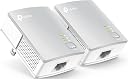
The TP-Link AV600 Powerline Ethernet Adapter Kit delivers reliable wired internet by transforming your homeโs electrical wiring into a high-speed network with up to 600Mbps. Its plug-and-play design requires no new cables or configuration, making it perfect for streaming, gaming, and expanding your network effortlessly. With a compact form factor and energy-saving mode reducing power consumption by up to 85%, itโs an efficient and future-proof solution compatible with all TP-Link AV adapters, backed by a 2-year manufacturer warranty.


| ASIN | B00AWRUICG |
| Best Sellers Rank | #4 in Powerline Network Adapters |
| Brand | TP-Link |
| Built-In Media | 2 ร Ethernet Cables, TL-PA4010 KIT |
| Color | White |
| Compatible Devices | Desktop |
| Customer Reviews | 4.2 out of 5 stars 20,557 Reviews |
| Data Link Protocol | Ethernet |
| Data Transfer Rate | 100 megabits_per_second |
| External Testing Certification | CE๏ผFCC๏ผRoHS |
| Global Trade Identification Number | 00845973032029 |
| Hardware Interface | Ethernet |
| Item Dimensions L x W x H | 2"L x 1.1"W x 2.6"H |
| Item Weight | 12 ounces |
| Manufacturer | TP-LINK |
| Mfr Part Number | TL-PA4010KIT |
| Model Number | TL-PA4010KIT |
| Number of Items | 1 |
| Number of Packs | 2 |
| Product Dimensions | 2"L x 1.1"W x 2.6"H |
| UPC | 845973032029 |
| Unit Count | 1 Count |
| Warranty Description | 2 year manufacturer |
H**M
Just As Good As The More Expensive Brands With Intercompatibility!!
I've been a Network Engineer for over 10 years and ever since I've dealt with computers, cabling is one of the worst aspects of the job. I can't tell you how many times I've run/extended CAT3/CAT5/CAT5e/CAT6 cabling and ended up terminating both ends and testing them. Some situations are easier than others when you're allowed to run a cable across the floor or above ceiling tile... but in other situations like getting networking in a certain room in your house can be a total pain in the butt. For the average home user, the only way to get networking from point A to your house to point B is either wired with cabling or use WiFi & bridging if the WiFi didn't extend far enough. When Powerline technology came out it added convenience of using existing power cabling but still was a little flaky and troublesome. But since then, Powerline has jumped leaps and bounds since and is much more reliable & faster. When it came time to buy originally back in July 2012, I put a lot of research into looking into the latest powerline solution for my home. I wanted something with high performance and the current version of "high performance Powerline devices" allows 500Mbps transfer rate. Even still, I was having trouble selecting which manufacturer to go with (Belkin, Cisco, Netgear, etc). After my homework (and despite Netgear's horrible sales support), I ended up with the NETGEAR Powerline 500Mbps Nano Adapter - Starter Kit (XAVB5101) . Despite the insane price point (currently $87.99 on Amazon - 12/13/2013; I bought these for $108 back in July 2012), the Netgear adapters worked wonderfully in my home. I was able to maintain faster throughput from device to device while on wired Ethernet while not saturating my WiFi network. However, over the course of a year and a half, the number of devices I had in my house grew considerably (especially over WiFi). In the past year, I added a few cell phones, a laptop, a tablet, a Roku 3, a Western Digital TV Live, 2 Chromecasts, and a new Smart TV. Because of that, my WiFi started to become degraded because every single one of those new devices was connecting to my network over WiFi. When multiple devices would start streaming things like Netflix and I was doing transfers from my media server to a PC, Netflix would stutter and my WiFi throughput would literally crawl slower than a snail on a salt bed. That's when I realized I needed to invest in more Powerline Adapters for certain rooms to speed up transfers as well as help reduce the load of my WiFi network. But you see, despite being pleased with my Netgear adapters, I didn't want to spend another $100. A friend of mine (who I told the Netgear adapters about) bought another brand of Powerline AV 500Mbit adapters from a company called TP-Link to save money. He said they worked pretty good. After finding out that they were $35 on Amazon, I immediately pulled the trigger. I mean after all, I had a word of mouth approval from a friend and you can't argue saving over $50 vs another set of my Netgear adapters... the result? Absolutely no difference in speeds. Just like the Netgear adapters, these are essentially Plug & Play. There were literally no problems connecting these in my house. I went to the living room where I needed wired connectivity and plugged these up to the wall. The TP-Link adapter immediately recognized my existing Netgear Powerline adapters and the 2nd LED (Powerline LED indicator) immediately lit up. I plugged in my small 10/100 switch to it and then my Roku & TV up to it and the 3rd LED (Ethernet indicator) lit up and the devices could not only talk to other devices on my LAN, but they had Internet access as well. I personally noticed NO DIFFERENCE in throughput speeds both within the LAN and the Internet. The *ONLY* difference between the TP-Link set and the Netgear is the that the TP-Link doesn't tell you the "current speed" of that adapter's Powerline network. The Netgear has multicolored LEDs that indicate the speed of your Powerline network. While this normally won't matter to a lot of people, it will tell you whether you are having degraded performance within your home's electrical wiring. It also aids in troubleshooting as well. But it's not a show stopper... Personally, I would recommend this product over the Netgear adapters I have. 1. The price is a LOT cheaper. 2. TP-Link has a TWO YEAR WARRANTY vs the Netgear's ONE YEAR WARRANTY. If you're really concerned on whether you're buying "a crap product", rest assured that this works just as good as the bigger name brands and you have an extra year of product care! Highly recommended.
A**N
A Very Good Explanation of What This Is
This won't be too much of a technical review. I live in a 3-story apartment with 5 guys. The router is dual N band (linksys) 2.4Ghz/5.0Ghz. Most of our devices run on the traditional 2.4Ghz band. Unfortunately the router is by the TV, microwave and other electrical appliances. Did I mention we live in a 3-story apartment? Well, I was looking at wireless repeaters for a long long time and was getting dizzy by the number of reviews that contradicted themselves. I decided to stay away from it altogether. But then these products came up and utilized something that's been around for a long time. Powerline technology. I admit, the process still eludes me, but if data can be transferred via our old school copper telephone cables, why couldn't it be transferred via the power lines that ran throughout the house? I was very skeptical but took the plunge. I went with the TL-PA4010KIT AV500 (up to 500Mbps). I have a macbook with windows installed on it (via bootcamp). On the mac side (Mavericks), just plug ethernet cable into laptop and turn wifi off and works like a charm. With windows (Win 7) it was not working at first. I had to disable my wifi entirely before it could receive data from the ethernet cable. But just for good measure I installed the Drivers from the website and downloaded the firmware update as well. Though I don't have to disable wifi anymore, the laptop will always prefer wifi for some reason. So I just turn wifi off when plugged in with a cable and I get connection. And boy that connection! Once you install the utility driver off their website you can view the speed of the connection via cable to adapter. On wifi, I was getting 26Mbps (3.17MB/s). Once I connected the ethernet cable and shut off my wifi I opened up the utility and saw my connection speed a whopping 320Mbps (39MB/s). *on the central coast of California, we have Charter internet so its very very fast and not throttled. Watching Netflix, downloading files, everything....was much faster. When I say much faster, I don't mean it will speed up your internet. That is dependent on your internet plan with an ISP, the modem/router you use (update, update, update [firmware]), and any interference of devices near your router if going wireless. If not wireless, then the cable. Are you using cat5/cat5e cables? If you are paying for 25Mbps internet connection you will most likely be consistently getting 15Mbps (I also live in La and can attest to this). This device is rated for 500Mbps. Not even our internet plan with charter reaches that speed yet. Our router can't even push those speeds. So I went for over kill, yes. But when we updrade our speeds in the near future, we will be future proof. Besides, the build quality on these looked superior to the level below it (300Mbps?). ****How These Work You plug each of these into an electrical outlet (not surge protector); you need a constant volt of energy being supplied. You plug in one near your router. You plug in the other near the area you'd like to have internet connection (room, office, patio, etc.). Next (you will need cat5/cat5e ethernet cables) you take one ethernet cable and connect it from the router to the adapter in the outlet. You connect the second ethernet cable from the second outlet into your laptop/pc. You press the square button on the bottom right side (below the blinking lights) of BOTH adapters. This will tell them to look for each other and automatically connect (aka "pairing"). If you are on a mac, installation of drivers is not neccessary. Though many Windows users have successfully just "plugged and go," it wouldn't hurt to install the driver software of your product BEFORE you plug anything in! *Sometimes I will not get internet connection. Our router is getting old and finicky. It will not send data to the adapter and the adapter may disconnect. All you have to do is "pair them" again. Just press the square on both (or if you bought more than 2 adapters) and wait for them to find each other again. Has happened only twice over 3 months? ****What these DON'T do These are not the same as wireless repeaters. They do not connect to the wall outlet and magically transmit data wirelessly to every room in your home. These need to be physically connected to a source and a destination. There is a model on here that uses Powerline technology AND acts as a wireless repeater, but it is more expensive and the wireless speed is not as fast as the cable speed you will get from the adapter. They do not speed up your internet. If you are in big metropolitan areas you will most likely be throttled. Certain ISP throttle (artificially slow down) your speed no matter what your geographic location! And some throttle during peak hours (the equivalent of rush hour traffic). Use ookla speed test to determine what your speeds are and at different times of the day. If unsatisfied you can change ISPs, pay more $ for higher speed, or perhaps its the router they supplied you with and you should ask them to replace it if they value your patronage (routers get outdated very fast). ****Final Words If you have multiple computers upstairs you can run the ethernet cable from the 2nd adapter straight to an ethernet port/switch (looks just like a usb hub except for ethernet ports) and plug multiple computers into that little hub- though you will now be splitting the incoming speed between multiple devices and it won't be as fast. I have read many reviews between these and wireless repeaters. Wireless repeaters sound nice in theory but there are too inconsistent. They are still affected by stairs, concrete, walls, devices, microwaves, etc. If you want something that has consistency, been used for a long time, and has a solid track record, try this option out. ***UPDATE*** 6/21/2015 Still working like a charm. A month after my review, the unit was a little buggy and kept disconnecting randomly. I was patient with it and just unplugged the units and plugged both back in. Ever since then I've had 0 issues with them for 5+ months now and amazing, uninhibited speed.
W**Y
Try different outlets
EDIT: 6-1-2014 TP-Link TL-PA4010KIT AV500 is the product this review is for. Its been brought to my attention that the ethernet cables that come with these are only Cat5 not Cat5e. Also, the gauge is too thin. Replace them as soon as you can. I did and am now having better results. I hope this helps. ORIGINAL POST: We had the option to add network cabling when our house was built, but we did not. We did not know someday everything would be connected to the Internet. I want ethernet cables for my wired devices and wifi for my wireless devices in order to get better internet signal all around. I saw Powerline Adapters on Amazon and ordered them on a whim. Normally I don't do something like that but I figured for $40, what the hell. My hopes aren't too high but I'm hoping these gadgets work pretty well. It took a week for them to arrive, and in the meantime I was so excited I kept reading reviews on Amazon just to get some ideas on installing them. I usually get little bits of information here and there from reading Amazon reviews, so thanks fellow reviewers for all of your tips and tricks. I also consolidated some outlets in areas I knew I wanted to test them. They arrived on a Thursday. I planned on installing them on Friday after work, but was so excited to test their performance, I ended up installing them at like 2am. They are very small and un-intrusive looking. They synced up and connected super quick and easy. I didn't even push the sync button, just plugged them in. I did a speed check on my connection speed and was getting the same as a full wired connection. Awesome! But about 20 minutes in, my computer lost connection to the Internet. I was still connected to my network, just not the Internet. I fiddled with some connection settings on my router to ensure that it was a wired connection and not a wireless one. Power cycled everything back on, & I was back on the Internet.... For about 20 more minutes, then it disconnected again. It connected up by itself a few seconds later. Neither of them are plugged into surge protectors, they are plugged directly into the wall. They keep losing connection, it's worse than wifi. I think it could be some sort of power spike in the electrical lines. I don't know. I'm not sure if a different outlet would do any better in my house or if something is inherently wrong with my home's electrical wiring. I've also read that noise from other electrical appliances could cause interference. This is connected to my desktop PC in the kitchen obviously with a lot of other appliances. I do not want to update the firmware or try to re-pair these I might just put them in the box and send them back to Amazon. Most reviews would have you believe that this is more stable than wifi, it is not. It's about as reliable as wifi, maybe less. For $40 it was a worthy experiment. Who knows, it might work in a different application such as a Blu ray player without wifi, I will have to test that. I was hoping this would give me the same performance as a wired ethernet connection. Installation is definitely fast and easy, the connection is just not reliable. I just wanted to try a pair before I bought a bunch of them. Kinda disappointed, not surprised, but disappointed. Update: I really wanted these to work. I installed one in the master bedroom instead of the kitchen, where I have a non- wifi Smart TV as well as a Blu-ray player. I set up an old router as an access point and connected it to the adapter. Now the TV & Blu-ray player have internet. I've streamed some movies (in HD, of course) while running the vacuum on the same circuit, no problem. Being on the kitchen circuit must have been the problem in my first installation. Or maybe my ISP was doing maintenance on the system. It was 2 a.m. after all. A week later, I have not had a single disconnect. Plus, the second router is boosting the wifi signal all over the house and to the backyard. I must concede that powerline adapters are very reliable and dependant on the electrical lines to which they're connected. Like a lot of networking devices, environment, equipment and settings play a big part in success. Update 2: Just for fun, I took the adapter back out to the kitchen and reconnected it to my desktop PC. It had some connection issues on the first day, but only to the internet and not to my home network. After a week, that's been the only one. I have no idea why they only have the connection issues at first. Now, I'm considering getting another pair of these. They seem to be working out very well. I will update further if I have any more issues. I'm changing my rating to 4 stars for ease of installation and convenient network configuration. It is plug and play, but it took some fiddling to get it to work right. Update 3: I've had it in the kitchen for over a month now and only get a few disconnects. Sometimes where a web page won't load, but it usually connects right back up when I retry. I added a six plug outlet adapter to this outlet just to see how it would work, and it is no problem. I also used this computer to serve some video files to the ps3, wirelessly and that worked well too. I am going to get another pair of these and put them in my entertainment areas.
S**T
This powerline adapter works perfectly! + some minor hiccups
This is PERFECT! First, my setup. I have a NAS from where I stream all of my media (mostly to my Minix NEO X8H Plus using Kodi / XBMC) using the wifi served by router A. Only my TV box and laptop are connected to the wifi served by router A (everyone else's devices use another wifi network served by router B) but nevertheless it kept losing a lot of its link speed when everyone was home, mostly in the evenings, when a lot of streaming occurs (my devices from the NAS, everyone else I assume netflix or just browsing. Only my devices have access to the NAS). This resulted in buffering occurring sometimes which was very annoying, particularly because I knew the wifi local network could stream my files without problems, as it did most of the times. I tweaked the channels the wifi network on router A used (made sure they weren't the same as router B's, etc.), also made sure the laptop wasn't connected to the wifi from router A when I was streaming from it just to make sure, but the buffering still occurred. I needed a permanent solution. I didn't even know what powerline adapters were a week before buying these, but I read about someone's setup using them to stream from a NAS on a forum somewhere and immediately started looking up what this devices were about. I'm glad I did, and particularly glad that I went with these TPLink ones. TPLink has quickly become my go to brand for any home-related networking and for good reason: they perform very well. THE GOOD Pairing both units is as easy as the quick installation guide says (I used the pair button method). Once it's done and you locate your devices where you need them (unit 1 connected directly to the power outlet closest to the router, unit 2 to the power outlet where closest to my android TV box) it's like you're connected directly to your router using an ethernet cable! Some buyers have reported that their units kept disconnecting every week or so and luckily that's not something I have experienced at all! Using the software utility I see that the link speed between both powerline units (please note that this is different from the link speed between devices in your local network) is anywhere from 196Mbps to 211Mbps which, theoretically, is enough to carry the 100Mbps output that can be sent through this units ethernet port (it is not a gigabit port). This also means that it probably makes a big difference to buy the AV500 version over the AV200 one. I have the AV500, I'm just guessing but this probably means that it lost more than half of the supposed 500Mbps connection speed on my house's wiring alone. I don't know if this means that you will get less than 100mbps connection speed between both units using the AV200 version but if you're a first time powerline adapter buyer (like I was) maybe it makes sense to throw a couple of bucks more to make sure that your experience is at least optimal. My apartment is relatively new (around 16 years, we are first tenants). I don't know how long the wiring is between one outlet and the other but actual distance between the two must be around 25 feet (they are in different rooms, there is a room between one and the other). The wired distance must be longer since has to go through the walls and I believe it has to go through the power switch before reaching one another. THE BAD *I don't know if using high voltage household appliances has an effect on the performance of powerline networks but so far that seems to be the case in my house. I had some video buffering happening while ironing some clothes. It was very unusual and it has not happened again but I will update this review if I can figure out exactly what may have caused it. Maybe someone can offer a more technical explanation? *The power saving feature seems to work great but unit 1 seems to never go into power saving mode. I guess it makes sense because the router is always powered on but I kind of assumed both units slept after not being used for a while. *There isn't a version of the software utility for Linux. I installed it via WINE but it didn't run, there may be a way tweaking it and doing-who-knows-what but I'm too old for that now, I just booted up windows and installed it there. They should work some kind of web interface for this utility. A desktop application for a networking device? What year is this? *It would've been useful if the software utility could tell you which pairing method was used on the units, given the fact that if you just plug both units to the power outlet they get paired, once you use the pairing button method (which is allegedly more secure) you don't know if the pairing worked via the pairing button or it just fallbacked into the regular "just plug it in" pairing. I ended up establishing my own network name between both units manually using the utility because of this. According to tplink support this is what the pairing button method does, only that it generates a random network name for both units to use. *The powerline utility doesn't work unless you connect your computer directly to the powerline unit via the ethernet port. That was very disappointing since my laptop doesn't have one but I guess it makes sense technically. Still it would've been nice if there could be some kind of web interface that could be used if both devices were on the same network (maybe TPLink could integrate one in their routers?). This was the most disappointing of all but once you setup both units to your liking you really shouldn't need to use the software utility. You may not need the software utility at all. I did not find the software utility as unpleasant as some people did, it does the job and it has a simple and clear interface. Why the hate (besides what I just outlined lol)? TECHNICAL SUPPORT While the technical support representatives were relatively prompt to respond to my queries (they took at least 12 hours to answer) and very informative once they did, the technical support website JUST SUCKS. Seriously, there is something seriously wrong with the way it handles its cache. Sometimes I got an email about my ticket being answered and when I opened the link via the email it still showed the website as it was in my last visit, as if no response had been posted, I had to manually refresh it even though I had just opened the darn website! It's crazy and very confusing. I didn't try phone call support which is the one you may need to use if you need urgent help, I just needed clarification on some technical aspects of the units. CONCLUSION Someone more picky (or prickly) could very well have take one star off from the review judging by the negative points I listed but they all amount to minor matters in my book. Only one of those could become an ongoing worry (video buffering while high voltage appliances are being used) and the review will be updated accordingly depending if the issue occurs again, even though that may have to do more with the powerline adapter standard than the units themselves. The remaining issues have little to do with the performance of the units once they're set up. Luckily, the units perform very well for what I wanted them and that is more than enough for me.
P**I
Working wired network solution
I got this product (500Mbps version) to replace wifi for my workstation in my office upstairs, hoping it will provide a more stable connection to the rest of my home network. While wifi speeds were good enough (more like I can deal with the limitations), it kept disconnecting on me at random times, often every time I refreshed a website I was working on, using various wifi usb dongles. I tried 3 of them, the last one was a beefy TP-Link for my similarly beefy TP-Link gigabit router. While I'd love to install a CAT6 gigabit network between the levels of our house, it's rented and the landlord wouldn't quite appreciate if I cut large holes into the drywalls, we may already be in trouble for installing shelves and decoration. :) So I thought it's worth a try for $40 to see how this gadget works. In short, it works really nice. Installation is something you could finally call "plug & play", it wasn't quite like that when the term emerged about 15-20 years ago. According to my tests with the two target rooms right above each other, it didn't matter if I used the two wall sockets at the same wall in the same location, or if I used the other wall plug in my office, speeds are the same. The device works if you plug it into a UPS's "surge protected" outlet, the speeds are more or less the same as with the wall outlet directly, but of course if you plug it into a battery backed outlet, speeds drop significantly as expected. However, technically it still works that way too, so thumbs up for that! About the speed... All these devices try to fool you with some theoretical maximum speed that can be reached in one direction if you're in a special lab, so it's best to expect that it will be way much slower in real life. I got about 50Mbit (~5MB/s) transfer speed in both directions, using the cables the devices came with, and also with other proven CAT5e cables, so that's pretty much the maximum I can get out of this. It's nowhere near the 500Mbit it's advertised with, plus the 10/100 connectors on the devices seem to make sure that you'll never go that fast anyway. However, a few other reviewers had better luck, bringing out even 200Mbit of the 500Mbit model, so it might be just my home that limits it... Try it for yourself, but you may want to go for the gigabit version for double the money, that somehow I didn't even see when I ordered this. All in all, I'm satisfied with it so far, because it seems to give me the stable connection I wanted, with about the same speed as my wifi connection was. Eventually I'll get my true wired gigabit home network, but for now it will do. It's a bargain for $40, especially if you need it only to connect your computer to your router elsewhere and your internet connection isn't faster than the 50mbits that you can realistically expect from it.
M**O
Nice system to extend your wifi range on your property
After a week of moving my Zoom5363 to literally every plugin in my house, and doing the same with my Securifi Almond 2015 (setup as range extender) my frustration level about spotty wireless connection reached the boiling point. After a couple of days of research for a solution, I finally ended up trying the TP-link power line kit. This kit did solve my problem. I live in a 2200 sqft ranch house mostly made of concrete and metal wire, so I didn't expect to achieve lightning speed. However, I know get a wireless connection without problems everywhere in my house, as well as everywhere within our pool cage and large lanai. The average speed away from the gateway is now at around 29/30 Mps. This is still a far cry from the 150 Mps speed I pay for with my ISP, but it is satisfying enough for streaming without buffering. This is how I set the system up: First I put the two LP-Link plugs in the same double outlet and paired them. After both, the power light and pairing light were steady, I removed them and moved one to the outlet where my gateway is plugged in. Then I connected one of the gateway's LAN ports with the LAN port on the TP-Link plug. Then I set my Almond up as an ACCESS POINT and connected one of the LAN ports of the Almond to the LAN port on the second TP-Link plug. Since my (main) gateway is on one end of my house in my office, I tried to put the Almond Acces point to a more central location in the house. This is the second day of running my wireless in this setup, and it is still going strong. I would have given this product 4 stars, however, their support website lacks ease of use. If you run in any kind of problem and you try to use their FAQs, be prepared for bucko frustration. Here is a short example: If you run into problem X, it could be caused by Y and you need to adjust Ys settings. ( for information on how to change Ys settings please read FAQ 786). FAQ 786 is at least written link form, so you can jump there immediately. In the new faq window you will actually find the info with regard to changing Ys settings, paired with the note, if you are having problems with adjusting Ys settings please read FAQ583. Wow!!! So I am your average technology user.I know the basics and am intelligent enough to follow instructions. However, if a support site has me running through their "support" like I was in a maze, I am not a very happy camper. Since this is marketed as a plug and go item there is not much of a user's manual provided, if you actually do run into problems. The included utility application cd is outdated. It didn't run with Windows 10. This is not a big deal, since you can download the software for free from their website. Since a lot of systems don't even come with CD-drives anymore, why not just stick with the downloadable version, and lower their ecological footprint, by producing less garbage? So far I consider this product as a success in terms of what I was trying to achieve, and I would recommend buying it, if you want to extend the wireless range on your property.
L**R
Decent performance, but *completely* insecure.
----- UPDATE ----- Dropping rating to one star. It is trivial for anyone to break into your network if they can get plugged into your power grid, which, depending on where you live, could mean they don't even have to enter your property. This is not an issue with the HomePlug AV spec, but in how TP-Link (and probably some other manufacturers) implements it. Search "plc dak attack" for details. In short, there is a password that is unique to each device that allows it to be remotely configured from any other device. TP-Link derived that password from the MAC address of the device, *which is broadcast in the powerline communications*. If you want to see for yourself, install the open-plc-utils package on GitHub (which is distributed by Qualcomm Atheros, the manufacturer of the powerline chipset used in these devices) and run "mac2pw -l 20 aabbccddeeff", where aabbccddeeff is the MAC address of the device (should be printed on it). Compare the result with the password printed on the device. Anyone could use this to insert themselves into your network without you knowing. TL;DR: Having these in your network is as bad as having open WiFi. It's possible for these devices to be done correctly, but TP-Link didn't do it. ----- ORIGINAL REVIEW ----- First and foremost: DO YOUR RESEARCH! Don't buy this or any other powerline communication device and expect to be able to just plug it into any two outlets and get the full advertised speed. You'll want to learn a bit about your house's wiring, and read up on the effects of the multiple legs/phases of power in most houses on equipment like this. These devices conform to the HomePlug AV standard, and should thus coexist peacefully with other communication/automation devices that also follow that standard. (Note: I have not tested that, as I don't have any other devices to test.) While these will work "plug and play"-style without any additional setup, I *strongly* urge you to do the extra (very simple) pairing process. The devices use encryption to secure communications, but until you pair them, they are using the same default encryption key as *every* other device. That means anyone may be able to walk up to your house, plug into an external power jack, and have immediate access to your network. (It may even be possible to do with without actually entering your property, but I haven't heard of anyone actually successfully doing that.) For security, the HomePlug AV standard uses AES-128, which is considered likely to remain secure for quite some time yet. Unfortunately, from my reading of the HomePlug AV whitepaper, one thing it leaves up to the manufacturer is how the network key (NMK in HomePlug parlance) is distributed to new devices (in the pairing process). There are secure and not-so-secure ways of doing this. I couldn't find any detail in the product documentation, so I asked TP-Link support to clarify how they exchange keys. After a few days, the response received was "After confirming with our engineers, we are sorry to tell that we can not provide the information you want!". It's not clear whether they *can't* or *won't* provide the information. This is a pretty big hole to me, though, so unless I can find the information somewhere, I can't recommend these devices to anyone who is at all security-conscious. (To be fair, though, this is my first experience with powerline communication devices, so I don't know if I'd be able to find this information about *anyone's* similar devices. Also, I realize that there are ways to mitigate this risk. But the fact that they can't or won't divulge details of the security methods used by the devices is a reg flag for me.) I set these up and did some speed tests by simply copying a large (~500 MB) file via FTP from one statically-addressed computer to another. All outlets behind the same breaker got me about 80 Mbps, a little low but reasonably close to the 100 Mbps limit. Between two different breakers on the same leg/phase (whether the same floor or different), I got about half that. Still plenty to saturate the internet connection, which is my intended use for this. I then tried a couple of connections to the opposite leg/phase... the first resulted in a painfully slow (think dial-up) connection, the other couldn't make a connection at all. So, going back to the first paragraph, do your research and know what these are and aren't capable of (without additional equipment; see "phase couplers").
A**R
Good product, does not work with BX wiring
Advertised as AV600, but was actually AV500. Product works well enough, but mis-advertising always gets 3 stars. update: AV500 and AV600 are the same thing, TP-Link marketing snafu. Increased to 5 stars. Note that this does not work particularly well with old BX wiring--it works like a Faraday cage and it was not stable enough for me to use. That is not a product issue, but a wiring issue, but be aware.
B**A
Works very well for Indian wiring also. I was ...
Works very well for Indian wiring also. I was tired of collisions occurring in typical wifi range extenders as they share the same radio channel thereby reducing bandwidth to half and frequent dropouts. With this I was able to add a "wired" access point to a distant part of the apartment and setup a seamless wifi handoff by adding a basic router to it
S**K
ุบูุฑ ู ููุฏ ููุง ูุนู ู
ุงูุฌูุงุฒ ูุง ูุนู ู
A**A
Perfeito! Internet chega sem perda de sinal
Produto cumpre o que promete! Original e consegue trazer o sinal sem perda para todos os cรดmodos da casa
W**W
Perfect for the job
Purchased based on other reviews. So glad I listened. Fast delivery and so simple to set up. Was chuffed.
J**G
Slower than the 2 port version (tested non-scientifically)
I have both the 2 port and the 1 port (this) version of the AV600. For some reason, when I switch the plug at my router from the 2 port to the 1 port version, my speeds fall by 1/3. So from a max of 9.8MB/s download on steam, I only pull off a max of 6MB/s. Kind of odd and a bit sad that's the case.
Trustpilot
3 weeks ago
1 day ago