We remain fully operational. Our teams are working around the clock to ensure your deliveries continue safely.

DOWNLOAD THE APP


Copyright © 2025 Desertcart Holdings Limited
DOWNLOAD THE APP
Buy anything from 5,000+ international stores. One checkout price. No surprise fees. Join 2M+ shoppers on Desertcart.
Desertcart purchases this item on your behalf and handles shipping, customs, and support to Iceland.
🎮 Compact. Durable. Ready to game anywhere.
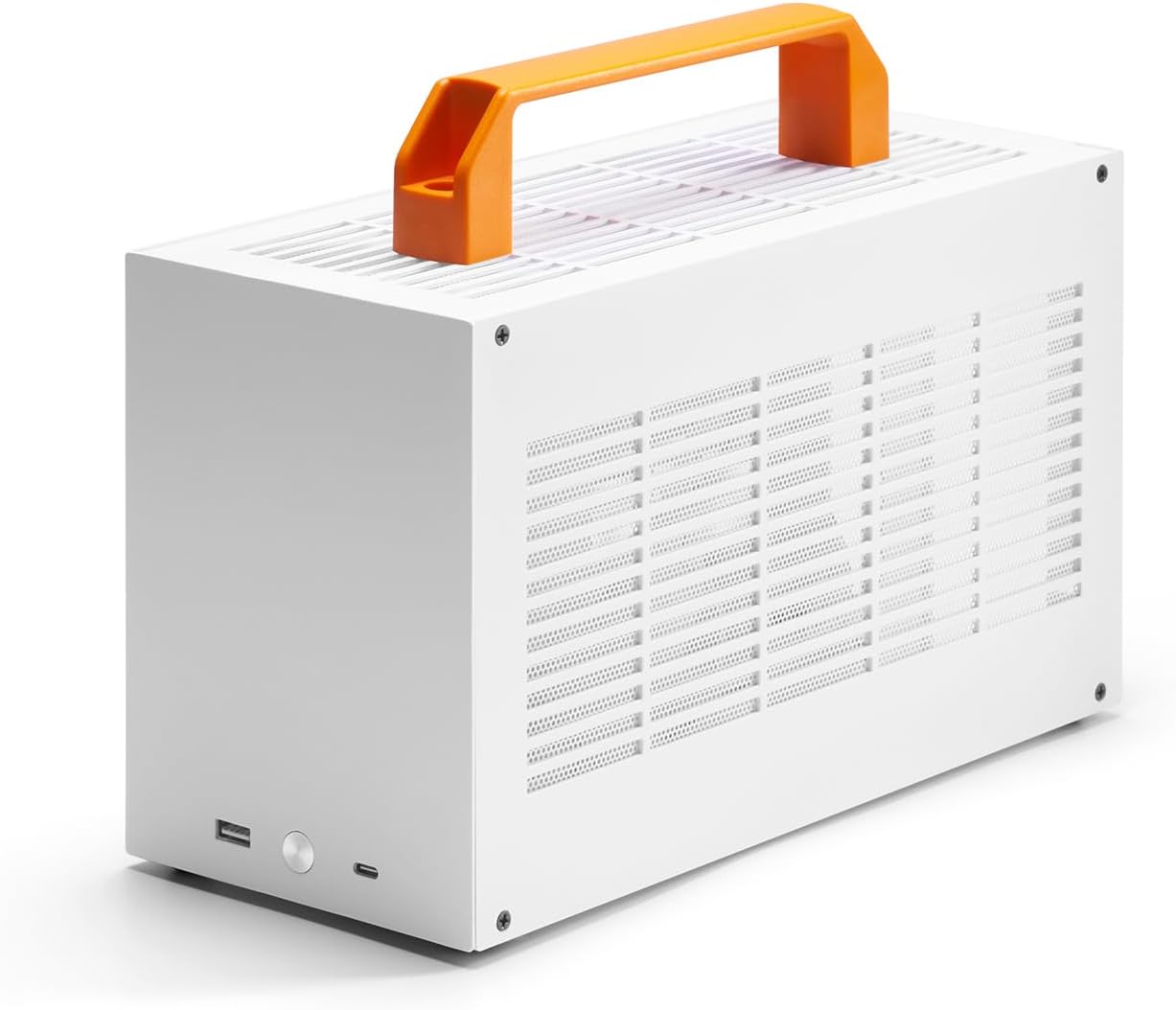
The SGPC K49 is a premium 7L Mini-ITX gaming case crafted from sturdy 1.5mm SPCC steel, designed for professionals who demand portability without compromise. It supports up to 56mm CPU coolers, 300mm GPUs, and SFX power supplies, while offering front-panel USB 3.0 and Type-C connectivity. With dual carrying handles and a ventilated acrylic side panel, it balances durability, cooling, and style—ideal for millennial managers who game hard and move fast.


| ASIN | B09MPFZSZT |
| Antenna Location | Gaming |
| Best Sellers Rank | #294 in Computer Cases |
| Brand | SGPC |
| Case Type | Desktop |
| Color | white |
| Compatible Devices | Mini-ITX Motherboard, SFX PSU |
| Cooling Method | Air, Fan |
| Customer Reviews | 4.0 4.0 out of 5 stars (64) |
| Enclosure Material | Alloy Steel, Plastic |
| Hard Disk Form Factor | 2.5 Inches |
| Internal Bays Quantity | 1 |
| Item Dimensions D x W x H | 12"D x 5"W x 7"H |
| Item Weight | 2.47 Kilograms |
| Light Color | White |
| Manufacturer | SGPC |
| Model Name | K49 |
| Number of Fans | 1 |
| Other Special Features of the Product | Front I/O USB & Type-C Port, Two Handles |
| Power Supply Mounting Type | Top Mount |
| Supported Motherboard | Mini ITX |
| Total Expansion Slots Quantity | 1 |
| Total USB 2.0 Ports | 1 |
| Total USB 3.0 Ports | 1 |
| Total Usb Ports | 1 |
| UPC | 785382835265 |
| Warranty Description | 1 |
J**Z
Great with a Few Caveats
For the price this case is pretty great, it's sturdy, it looks good and although it isn't recommended for beginners it wasn't too difficult to build in to either. I had a blast building with it and enjoyed the challenge it brought compared to my old Corsair NR200P, everything fit in the case with barely enough room. There were a few small QC issues like screw holes that weren't cleaned out properly which caused difficulty screwing things in, some imperfections with edges on the interior, just nit-picked issues for thought. Note: The Asus ROG STRIX B660-I motherboard will only fit in this case if you remove the VRM heatsink. It will otherwise hit the bottom of the case and will cause the motherboard holes not to line up with the standoffs.
S**Y
Not for inexperienced PC builders
I thought my Cooler Master NR200 case was pretty compact. Compared to this SGPC K49 case, NR200 is HUGE. I would have liked to have spent slightly more for better quality case, but most of the higher quality SFF cases out there are either way too expensive or bigger than this case. My setup: Asus ROG B550-I Gaming motherboard Ryzen 5 3600 CPU Noctua NH-L9a CPU cooler with foam fan duct kit 2 X 8GB ram 2 X m.2 SSD EVGA SuperNOVA 650W SFX PSU PowerColor RX 5600 XT Red Dragon Pros: - Overall quality is not great, but good for the price - Solid / heavy steel construction - Front USB C connector - Minimalistic design - Small form factor Cons: - NO assembly instructions whatsoever - Paint finish along edges can be better - Lots of additional stand-offs and screws are included, but I couldn't figure out where to use them due to lack of instructions. I ended up not needing most of them. - 2 carrying handles included are tacky and obstruct the minimalistic design of the case. I didn't use mine - Included taller white color feet attach to the case with double-sided adhesive. Wish they were screw-ons. Worth mentioning: - Both front panel USB A and C ports connects to the motherboard with ONE USB 3.0 header cable, no need for a dedicated USB C front panel header - No power LED - Not mentioned anywhere, but taller GPU may have trouble fitting inside the case. My GPU is 118mm tall and barely fits - I bought and used PCIE 3.0 riser cable from the same vendor / listing - I don't recommend GPU's longer than 240mm. I used the spare space for tugging in excess cables - Remember to plug GPU directly to the motherboard without the riser cable initially and manually set the PCIE setting to 3.0 in the BIOS if you're using a 3.0 riser cable. Keep in mind that if you're an inexperienced PC builder, I highly recommend that you avoid this case. Everything is very tight and cramped. You will have to apply more force than you're comfortable with to manage excess PSU cables. The temperature on CPU and GPU are almost the same as my previous NR200 setup which had 3 case fans. CPU - low 40C idle, max 70C GPU - 38C idle, max 68C Overall, I'm very satisfied with the finished build. If you're looking for a sub 10-liter SFF case, I highly recommend this one.
R**P
Very small footprint.
It is a very compact PC case and it’s much cheaper than competing American brand case. However, this is not for the first time PC maker. You should have some experience in building PC before you can attempt this. The hardest part is to attach PSU with its cables. Make sure to watch YouTube videos before assembling it because instructions included with the case is not sufficient. Also there is no LED/light on this case indicating if motherboard/PC has turned on or off. Also I installed "Thermaltake AXP-120 X67" CPU cooler in it which only fits with supplied side panel spacers. I heard the 'ID Cooling IS-55' also has 120 mm fan and it fits without modification, so I may be installing ID Cooling in few months. if you’re using a longer GPU, then it would get blocked by a screw on the opposite side. You would have to take the screw out. I made 2 of PCs with 2 of these.
D**E
K49 Steel Review Small and Structural Sound
I would like to go ahead and state that this K49 Steel, is SUPER sturdy. Like its heavy and beefy. If your getting it for being light well it won't be, however... I am okay with this because it will be transported every weekend. I am NOT afraid of slinging this around in a backpack. If you are on the edge of being it wondering how good the quality is, don't worry about if its not strong enough. You will not have to worry about this. I will keep you posted, I am currently building in it now. The only so far issues I've had which are user issues, not company is I kinda messed up the stand off, it comes with stand off's but it doesn't come with the short golden ones. There's already some built into the case itself. Which for room and SFF, I am just going with what is already built in, not going to throw a stand off on top of another one. Update: 05/22/2022 I've hauled this thing back and forth to work already a couple of times. Its still pretty sturdy. I use the dual Steel Panels for transport and I use my acrylic panel for at my house so I can see the inside better. I wouldn't recommend the transport of the acrylic because with all the vents it bends easily on the inside. However... I rather it have more vents than a pure solid piece. Just really depends on what you want. Its a great product. I would like to mention, it was not EASY to put my Mini ITX in there. My built in stand off's wouldn't match up. I'm not sure if its because of me, or because maybe you are suppose to take the back piece off. I know some people when they build in this, they dissemble everything. Also my MOBO had a built in IO shield. Thus maybe thats why I was off by like 2 or 3 CM off on the stand offs. Also my case didn't come with any instructions and I couldn't find anything online, so I was just going with it. Not many reviews either. I plan to post a youtube video just not sure when. Other than that, I'm happy with the overall case features. Update: 09/15/2023 Case is still going strong. Still haven't had any issues. Its transported in a backpack, every weekend and thrown around. I even caught my one year old standing on it (Forgot I left the backpack on the floor) and the case never had issues or bent. Its super sturdy and strong.
M**I
This is not a case for everyone, but I DO love it. Get a K49 only if you are looking for an SFF and like a challenge. The cut is precise, but not too much. It comes with more screws than necessary, spare panels, dust filters and even a screwdriver. Cable management is the thing that worried me the most and it turned out to be the easiest. The riser is a bit difficult to manage instead. Test EVERYTHING before building and attach all cables before tightening a single screw. This is not a case that leaves room for errors. Also, be careful of the limits for the cooler height, GPU size and everything else. One extra millimeter and you will have a bad time. Overall, I had a lot of fun building in the K49. I wouldn't recommend it to everyone though, it's not the easiest thing to do.
S**Y
Case is good however arrived with missing PCI riser cable that is listed as included needed for GPU install
川**ル
どういう発想で設計したのやら。。。?自作PC歴かれこれ30年ですが、ここまで苦しいとは。電源もちゃんとした製品選ばないと組み上がりません。RTX4070装着には PCT-ex ライザケーブルが必要だったりと結構な出費になってしまった。PC筐体の設計自体は総じて緻密でしっかりしていて申し分無いです。
M**T
Bought this case for my little home server that doubles as a NAS. Installation was easier then I expected and would probably buy a K39 to minimize my workstation one day. Love it <3 NOTE: Riser cable is NOT part of the kit. Purchase these separately. It's about 18cm long with inverse connectors on each end.
五**士
いろいろ詐称しているとこはありますが、説明書には6.9Lと記載しています ぶっちゃけ小さいですので6.6だろうが7Lだろうがかまわないのですが。 M-ITXマザボがカツカツですので、なかなか組んでて楽しいです。 タイプCついてますが、3.0系A変換なのもあり使わないので、スイッチの配線が噛み込んでて手直しついでに外しましたが、スイッチ交換と一緒に戻しました。 パネル自体はスチールでガッチリしています。 オプションのライザーケーブルは4.0を追加しましたが、4060.A620.7700では使えませんでした。たまに使えるのですが、ロス酷くて旧モデル3.0で運用ならもしかしたら有りかもです。 が、もう持ち合わせはありませんので試してないです。 付属品はいろいろ親切に無駄に入っている気がします。取説も日本語ありです。 ネジ位置精度はマザボ、電源、ライザー、グラボは一応固定できる程には締まりましたが、寸法ミスが多少あります。グラボ固定ネジ上のカバーとか加工するか妥協が必要です。 ですが、至るところが白く白ケースを意識したつくりは評価できます。 ただ、65wcpuでも割と熱を持つので天板に排気欲しいなと思いました。9.2ファン×15mm1個入りました。天板フィルタは撤去(排気側なので) ライザーはデュアルリバース19か20cm(18cmはマザー裏を跨がず通すとギリ装着できますが突起に干渉)グラボはスライド固定可能で外面にずらし、ライザ側はねじ固定なしで20cmでつけました。 基本動画等の使用しかしませんが、ベンチ回しても思ったより快適に使用できてます。
Trustpilot
1 month ago
3 weeks ago