Desertcart purchases this item on your behalf and handles shipping, customs, and support to Iceland.
โจ Touch the Future: Upgrade Your Laptop Instantly! ๐๏ธ
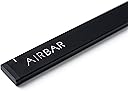
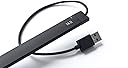
The AirBar by Neonode NNABC3100XU01 is a sleek, lightweight USB-powered sensor that magnetically attaches to 14" Windows 10 laptops, instantly adding touchscreen capabilities. It supports multi-object touch input including fingers, gloves, and styluses, enabling intuitive gestures like tap, swipe, pinch, zoom, and rotate without any software installation. Designed exclusively for Windows 10 laptops sized 13.3" to 15.6", AirBar revitalizes your existing device with modern touch functionality, boosting productivity and user experience.
| ASIN | B06X9QVTZ9 |
| Best Sellers Rank | #73,117 in Computers & Accessories ( See Top 100 in Computers & Accessories ) #3,407 in Laptop Replacement Screens |
| Brand | AirBar by Neonode |
| Brand Name | AirBar by Neonode |
| Cable Type | USB |
| Color | Matt Black |
| Compatible Devices | Finger, Glove, Paintbrush, Stylus, and other objects for touch input |
| Compatible Phone Models | No Compatible Phone Models |
| Connectivity Technology | USB |
| Connector Gender | Male-to-Male |
| Connector Type | USB Type A |
| Customer Reviews | 4.0 out of 5 stars 187 Reviews |
| Global Trade Identification Number | 00853661007037 |
| Included Components | AirBar Touchscreen Sensor, Instructions and legal folder |
| Indoor Outdoor Usage | Indoor |
| Item Type Name | Neonode Touchscreen 14" Windows 10 Notebooks (1005) |
| Item Weight | 1.92 ounces |
| Manufacturer | Neonode |
| Maximum Voltage | 5 volts_of_direct_current |
| Model | NNABC3100XU01 |
| Model Name | AirBar for 14" Windows 10 Notebooks |
| Number of Items | 1 |
| Number of Pins | 4 |
| Other Special Features of the Product | Fingerprint Reader |
| Part Number | NNABC3100XU01 |
| Recommended Uses For Product | Adding touch functionality to non-touch laptops |
| Special Feature | Fingerprint Reader |
| UPC | 853661007037 |
| Unit Count | 1 Count |
| Warranty Description | 1 year warranty against manufacturer defects |
B**E
Instructions recommend 3mm. Test then adjust as needed BEFORE sticking on the magnets.
Works good. May need some adjustment for each laptop. For example, the instructions say to mount the airbar 3 millimeters below the bottom edge of the screen, this is equal to the thickness of the cord attached to the airbar. When I did this, it works except for the top edge was off calibration, meaning I could not close windows that were full size because I could not reliably click the red X on the top right corner of the screen. Following the instructions got 95% of my screen accurate, but you should check the accuracy around all edges BEFORE mounting because the sticky magnets are difficult to remove after mounting. What worked for my laptop was mounting it very close to the bottom edge.....instead of 3 mm, it was more like a half a millimeter(see picture). Now calibration was spot on over 100% of the screen. Down side is when I touch any icons near the bottom edge, I'll end up touching the airbar. Not a big deal for me. Over all, I'm happy with the product.
M**.
Like magic.
Almost didn't expect this to work, but it does. I now have a touchscreen laptop. Not perfectly precise, though, so it's best at swiping or touching larger, more isolated icons. Can be frustrating when dealing with small icons located close together. Also, the little magnets that hold the bar to the laptop keep slipping, so I had to support one end with a Sharpie, but that's not a big deal. If you expect it to work as precisely as an actual touchscreen, you will be disappointed. But as an alternative to the touch pad, it's kind of nice to have. Not perfect, but not sorry I bought it.
T**E
Works great on Windows but not on Raspberry Pi
I bought this to use on a Raspberry Pi project. It worked great on a Windows System but not so much on the Raspberry Pi project I was developing. It does work but not as I needed it to function.
T**P
Does not work
It doesn't work. Magnets were messing up my screen and not opening tabs through touch screen
G**A
Easy to apply/ Works great!
As a result of this item I am now actually using my laptop rather than just using it to show the weather and current temp. It works great?! You just attatch to the bottom of your computer screen and wala you now have a touch screen on your existing computer.
C**Y
Probably not going to use it.
It repeatedly pops up a keyboard on my screen...not sure why I'd want a touch keyboard when there's a keyboard on my laptop I can type much faster on (using all my fingers). Also it makes a high pitched beeping noise when jostled a bit, I don't know why. The touch screen worked like magic, I was really excited about that. It's really neat. However, it's finicky, and I don't like the onscreen keyboard that pops up (I can't find any option to remove it), and it seems to be confusing my laptop about all sorts of things. Like now when I use my mouse wheel to scroll, it thinks I'm pressing Control plus using the mouse wheel-- so it zooms in and out. I can sort of draw a smiley face, but it's not much better than using my mouse, honestly. It doesn't detect when my finger has lifted off the screen and come back down for the second eye.of the smiley, so it's like a cursive smiley. There's a bit of a delay, and also the position is not exact. The advantage of the mouse is that you can see where the pointer is before holding down left click, so you know where you are underlining or drawing. With AirBar, of coures there is no indicator where it's going to start drawing: maybe a centimeter above your finger.
W**K
Great After You Download the FIRMWARE!
Got this for an Alienware laptop that was not touch screen. I read that many people said it was not responsive or accurate. That was the case when I first plugged it in and just started using it without reading any directions. The box directions were okay but youMUST go to the website and complete the setup which includes downloading the firmware --that improved accuracy 100-fold and responsiveness is almost as good as a native touchscreen. The dead zones are still the extreme ends of the screen (5 mm or so on each edge in my case).
K**S
Well that was money in the trash can
First of all you need a laptop with a huge strip of unused space horizontally below the screen. Not a laptop in the house worked. I gave it as a gift and it had that instant Christmas impact when opened and now they will just bounce it from one closet to the next for years. Wasted my money big time.
Y**J
superb
Initially I felt disappointed as it did not work to my speed of touch. Later day2,3 onwards I understood how touch works slightly different from mouse actions. I would say this replicated actual touch screen by upto 95%. The remaining is lag but in few days you get accustomed and understand how to make best use of touch. Recommend for Hobbyist. I now take it everyday to work and it has become an essential part of navigation. The attention and jealousy obtained from coworkers is priceless.
L**S
No funciona
No funciona.
B**R
Wow!
Wow it works! Please send more to Canada asap.
E**.
good
it works like a magic , it really turn laptop or pc screen into touch screen , it works really fine. but only if the sceen size was 14.
W**M
Works well on laptops with a usb on the right hand side
it works well on the windows laptop but not on the MacBook as the connection is on the left hand side for the USB whereas the way it is setup - it needs a USB connection on the right hand side of the laptop. On the windows machine it works perfectly well and am very happy with the product.
Trustpilot
1 day ago
3 weeks ago