
DOWNLOAD THE APP


Customer Services
Copyright © 2025 Desertcart Holdings Limited
DOWNLOAD THE APP
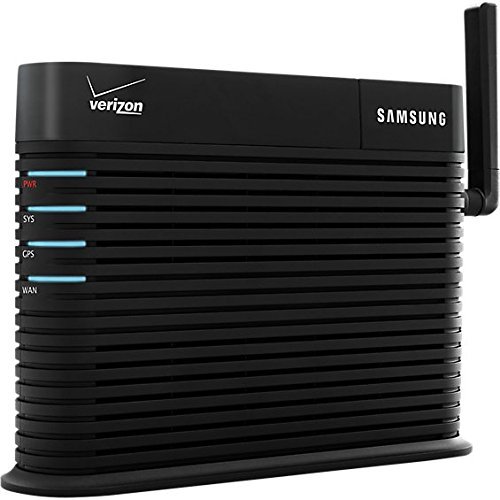
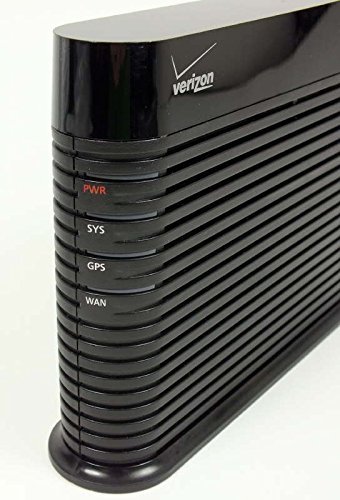
📶 Never Miss a Beat: Turn Dead Zones into Full Bars with Samsung’s Signal Powerhouse!
The Samsung Network Extender SCS-2U01 is a Verizon-compatible signal booster designed to eliminate indoor dead zones by routing calls through your home internet. Featuring a GPS satellite sync and Ethernet connectivity, it requires activation via Verizon tech support. Compact and easy to install near windows, it delivers reliable 4G LTE coverage for small to medium homes, making it a must-have for professionals craving uninterrupted mobile connectivity.
| ASIN | B008LWDX6M |
| Best Sellers Rank | #2,363 in Repeaters |
| Color | Black |
| Customer Reviews | 3.2 3.2 out of 5 stars (230) |
| Date First Available | July 31, 2012 |
| Is Discontinued By Manufacturer | No |
| Item Weight | 1 pounds |
| Item model number | SCS-2U01 |
| Manufacturer | Samsung |
| Other display features | Wireless |
| Product Dimensions | 8.2 x 1.6 x 5.8 inches |
| Special features | must have internet connection other than phone |
B**T
Solved my dead spot problem, but you do need to call tech to activate
I purchased this product because my house seems to be a dead spot for mobile phone connectivity. This is the same product that Verizon sells for 250.00 on their site, no need to pay full price. It's not too hard to hook up, though there is a GPS component that has to be able to get a satellite signal. In order to do this, you either need to install the unit near a window, or use the (included) extension wire and put the GPS receiver in the window. It has a long cord (10+feet) for the GPS extension, so you have a fair amount of flexibility in your positioning, but you might not be able to place it in the center of your house. You also need to connect it to your router via an Ethernet cable (also included), so you're a bit restricted position-wise unless you have in wall Ethernet wiring or something similar. Once I installed it, there was some difficulty in getting it to activate, I needed to call Verizon tech support and give them the info off the unit before it would work. It would have been nice if that was in the instructions as a "must-do" step, would have saved me a few hours of messing around with it before I called tech support. VZW's tech support, however was as good a tech-support experience as I've ever had. The rep was very friendly, was specifically trained in setting up these femtocell units, and even followed up with me later in the day to make sure everything was working. Seriously, the best tech support I've ever gotten. This unit covers my small, single floor house pretty well, but it probably would not do as well with a larger home. Also, you are still billed for data/minutes which travel over the femtocell, which seems silly, since it's your internet connection that's doing the back-haul. It will hand off calls to a tower if you start the call in your house and walk outside, but will not hand off a tower call to the femtocell, FYI. Does what I needed it to do. -1 star for having to call tech support, +1 star for the excellent tech support, so it's a wash.
S**K
Doesn't Work :(
Well, I had high hopes about this as a quick way to provide Verizon coverage to one part of my house but sadly it was not to be. The system fires up well enough but the Sys and GPS lites never turn from red to blue (as they are supposed to). I've swapped equipment (GPS antenna, ethernet connections), moved locations, nothing. Called Verizon a couple of times to confirm the device had been enabled (it had) and spent about an hour walking thru various tests with the Verizon tech. It just doesn't work. Very unfortunate, but I'll chalk it up to experience I guess.
D**Y
Works Great But Requires Some Tech Savvy To Setup, Poor Documentation
I bought this because I'm lucky to get one bar reception at home. I've used the older version which gave me 3 bars, well the new one is giving me excellent reception 4-5 bar reception. But setup is more involved than the instructions lead you to believe. The first thing you need to know is that the extender needs to be able to establish a GPS location (the GPS locator is built in) before it will work. This is for 911 location services and does not feed location information to your phone. It also needs to establish a broadband connection with Verizon. Where the technical savvy comes in is that you may have to modify your router's firewall settings to allow the extender to communicate with Verizon. That can be a daunting task if you're not technical and not on a Verizon router. The other challenge is that the router's status lights aren't well documented and the instructions tell you little to nothing that you'll need to troubleshoot the extender, and fail to tell you what firewall ports to open up. You may also have to contact Verizon to get them to recognize it. But once you get it working it works great up to about 30-40 feet away. Just make sure you get within 15 feet when you first get home so you can establish a connection with the extender and then you're good to go out to 30-40 feet. I have mine in the middle of a 1500sqft house and gives me strong coverage in the whole house and even the garage.
H**R
Cell network comes to life!
Outside the house there is 1 bar of 3G. Inside, zero bars, though you can still make/receive a phone call most of the time. This device (Samsung SCS-2U01) brought that up to 3-4 bars in nearly every room in the house. In other words, a godsend. It took a very long time to lock in the GPS (sitting on a chair right up against sliding glass doors to the outside), and until that locked in, the device wouldn't register with VZW. Once the GPS finally locked in (well over an hour), the SYS light continued RED for another 20-30 minutes. When all four lights went blue, the service started working and has been rock solid ever since (roughly 10 days now). I called VZW to add the device to the account (they knew exactly what I wanted, asking me for the MAC address of the device). Others have said that this step was unnecessary. They may be correct, I called before all 4 lights turned blue, thinking that not registering with VZW was the issue. The box came with a long GPS antenna extension cord. While I ended up not needing it, I'm not sure how I could have used it if I had needed it. There is no spot on the unit that I could see where it could plug in (yes, I slid off the GPS cover and still couldn't find an appropriate connector). I highly recommend this device to anyone with poor VZW cell service in their house. Update: See comment below on how to use the GPS antenna extension cable, it does indeed work. I purchased a second unit for another friend. I am now sure that it was required to call VZW to add the MAC address to the account (at least for the two units I bought). We had the unit plugged in for weeks without calling and it never locked in on the GPS signal. When I visited, I called VZW and after they added the MAC address the GPS locked in under 5 minutes. It took another hour for the SYS light to stop blinking and now they have rock solid service.
Trustpilot
3 weeks ago
2 weeks ago