We remain fully operational. Our teams are working around the clock to ensure your deliveries continue safely.

DOWNLOAD THE APP


Customer Services
Copyright © 2025 Desertcart Holdings Limited
DOWNLOAD THE APP


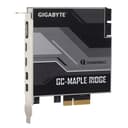

⚡ Upgrade your rig, unlock the future of speed!
The Gigabyte GC-MAPLE RIDGE is a Thunderbolt 4 certified PCIe add-in card delivering blazing 40 Gb/s transfer speeds. Tailored for Thunderbolt-ready Gigabyte motherboards, it enables seamless USB-C device charging and future-proofs your PC with next-gen connectivity—all without replacing your entire system.
| ASIN | B0977K16C5 |
| Brand | Gigabyte |
| Built-In Media | 1 Stück |
| CPU Model | Core i3 |
| Chipset Type | Intel JHL 8540 |
| Compatible Devices | Personal Computer |
| Compatible Processors | Intel Core 2 DUO |
| Customer Reviews | 3.6 3.6 out of 5 stars (56) |
| Graphics Card Interface | PCI, PCI Express |
| Item Weight | 370 Grams |
| Main Power Connector Type | 24-Pin |
| Manufacturer | VIP Computer Centre Ltd - PC Stock Order Account |
| Memory Clock Speed | 1333 MHz |
| Memory Slots Available | 2 |
| Memory Storage Capacity | 40 GB |
| Model Name | GC-Maple Ridge 1.0 |
| Model Number | GCMAPLER-00-G |
| Number of Ethernet Ports | 4 |
| Number of Ports | 7 |
| Platform | Windows 10 |
| Processor Socket | PCIe 3.0 x4 |
| RAM Memory Technology | DRAM |
| System Bus Standard Supported | SATA 3 |
| Total Number of HDMI Ports | 1 |
| Total PCIe Ports | 4 |
| Total SATA Ports | 4 |
| Total Usb Ports | 2 |
| UPC | 753459323687 |
| USB 2.0 | 2 |
B**L
My pc case did not have a usb c header outlet!. I had issues charging my usb devices as not enough/ right power could run via the 3.2 & 2.0 usb A ports. Device is detected and data could be transferred but would not charge. I have not found the right drivers for my gigabyte motherboard that will correct the issue. MSI have a super charge driver/ software which works on their motherboards. Could not find the equivalent. So the round about solution was the gigabyte Maple thunderbolt card which provided what I needed. My iPad Pro can charge together with my other usb c devices including laptop. Works perfect with my gigabyte mother board as it is thunderbolt ready with the exact matching cable heads. Will be great when I upgrade to utilise thunderbolt capable monitors in the future.
N**C
I’ve been running the Gigabyte GC-Maple Ridge Thunderbolt 3/4 PCIe card on a Windows desktop with an RTX GPU, connected to an LG UltraFine 5K display (originally a Mac monitor), and I’m happy to report everything works as expected. The card delivers true 5K resolution, but there’s one important caveat worth knowing: you must connect TWO DisplayPort cables from your RTX GPU to the two DP inputs on the PCIe card before running the single Thunderbolt cable out to the monitor. With only one DisplayPort cable connected, the maximum output is limited to 4K. Both cables are required to achieve the full 5K signal. One more tip for anyone running into image sync issues – specifically a horizontal split or misalignment down the middle of the screen: clean up your Windows registry of any leftover entries from old GPU and monitor configurations. Stale registry data can interfere with how the two halves of the 5K signal are synchronized, causing a visible seam. After clearing those remnants, the image locked in perfectly. I was also pleasantly surprised by the shipping speed – the card arrived just two days after ordering, which is honestly faster than express delivery options I’ve experienced in my country. A nice bonus on top of a product that does exactly what it promises.
G**D
Behöver till min Gigabyte dator
A**L
I made the mistake of buying XReal AR glasses. Those require a USB+Alt-DP input to work, which is rare to find outside notebooks, with some RTX20* GPUs a rare exception. This card allows you to get Thunderbolt output from any ordinary GPU on Gigabyte motherboards that support this adapter. It was also not too expensive. The real disappointment were the XReal glasses, which never worked anywhere near what the vendor promised, so I returned them. I kept the card, both because the return window had expired and because it might perhaps be useful again one day. It did the job it promised, but it's a job that very few will ever need.
M**W
Ca marche bien, c'est rapide. Très pratique pour y brancher des docks de bonne facture. Assurez-vous d'avoir assez de PCIe Lane de disponible avant de l'installer (je ne parle pas du port physique sur la carte mère) !
Trustpilot
3 weeks ago
2 months ago