Buy anything from 5,000+ international stores. One checkout price. No surprise fees. Join 2M+ shoppers on Desertcart.
Desertcart purchases this item on your behalf and handles shipping, customs, and support to Iceland.
🚀 Upgrade your home network to pro-level speed and stability—because buffering is so last decade.
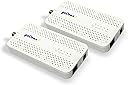
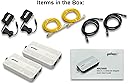
The goCoax MoCA 2.5 Adapter (2-pack) delivers true 2.5Gbps Ethernet speeds over existing coaxial cables, providing a reliable, low-latency wired network backbone ideal for 4K/8K streaming, online gaming, and high-speed data transfers. Its shielded coax technology ensures minimal interference and stable connections, while plug-and-play setup makes it accessible for any home. Perfect for users wanting to bypass ISP routers like Verizon FiOS without sacrificing TV functionality.


| ASIN | B09RB1QYR9 |
| Best Sellers Rank | #24 in Computer Network Adapters |
| Brand | goCoax |
| Color | White |
| Compatible Devices | Desktop |
| Customer Reviews | 4.4 out of 5 stars 563 Reviews |
| Data Link Protocol | Ethernet |
| Data Transfer Rate | 2.5 Gigabits Per Second |
| Hardware Interface | Ethernet |
| Item Weight | 0.72 Kilograms |
| Manufacturer | goCoax |
| Mfr Part Number | WF-91HG-ZM71 |
| Model Number | WF-91HG-ZM71 |
| Unit Count | 2.0 Count |
K**B
Perfect for Verizon FiOS – Keeps TV Guide Working Without Using the FiOS Router
I purchased the goCoax MoCA 2.5 Adapter with 2.5GbE specifically for my Verizon FiOS setup so I could use my own router and still retain full TV functionality, including the program guide and On Demand. It worked exactly as intended. Instead of being forced to use the FiOS router just for MoCA, this adapter provides the MoCA network over my home’s coax while my own router handles the internet. My FiOS TV boxes get guide data, updates, and On Demand services just like they would with the Verizon router, but without the monthly rental fee or network limitations. Setup was very straightforward. I connected the adapter to the coax near the ONT and my personal router, and everything came online quickly. The TV guide populated normally, channel data loaded fast, and there were no issues with DVR or interactive features. The 2.5GbE port is a big bonus, especially on a gigabit FiOS plan. Network speeds are extremely stable with low latency, and it provides a reliable wired backbone across existing coax lines in the house. It’s essentially the best of both worlds: full FiOS TV functionality plus the performance and control of a high-end third-party router. If you want to eliminate the FiOS router but still keep the TV guide, On Demand, and MoCA connectivity for your set-top boxes, this adapter is an outstanding solution. Rock-solid, fast, and a smarter long-term setup for FiOS households.
D**N
Fantastic, just do your homework beforehand
I'll start this review off by saying I'm super happy with my purchase. Setup took me, an IT professional, about an hour, but that will vary based on your local wiring. My biggest recommendation for any one purchasing is to do some homework first on setting up MoCa and what roadblocks you may run into. Below is a summary of my existing setup and a high level overview of the steps I took to get setup, along with my final thoughts. I include some basic latency testing and speed testing information near the bottom. For anyone interested in the MoCA splitter and filter I used, I have included links below. Background: I use an Asus AiMesh Wi-Fi system in a house built in the late 1800s. Basically every room was added on at some point by a person with some free time and spare lumber, so nothing is to code, or even remotely associated with any other room in the house. I've wanted to run Ethernet throughout the house since I moved in, but due to the inherent challenges of multiple, hard-to-access crawl spaces and no attic, I was left with very little options outside of my office other than a spotty mesh Wi-Fi system My goal: Having just upgraded to fiber, I had a house full of unused coax cable. I wanted to send Ethernet over this, and effectively "wire" in my access points. However, I wanted to ensure that if a future owner or myself wanted to return to copper/cable internet, that it wouldn't impact this setup. -- What I bought: - 2-pack of goCoax - 1 pack BAMF Coax MOCA-compatible Coax Splitter https://www.amazon.com/dp/B017T9KF1S - 1 pack PPC MoCA POE filter https://www.amazon.com/dp/B07SLD9QPH -- How I accomplished it: - OUTSIDE: First, I had to crack open the Spectrum box on the outside of my house. Inside, there were a bunch of disconnected coax runs and a single filter connection coming from the outside line to my internet line, along with another "filter"-type device that had a ground line connected to it. I removed their filter and ground connection, and replaced it with the BAMF 4 way splitter on the "In" connection. I also connected the PPC filter in between the outside line and the BAMF filter (so it looked like line from road -> PPC filter -> BAMF "in" port on 4 way splitter). Finally, and this is super important, I connected the ground wire I had removed from the Spectrum filter/bracket to the new BAMF splitter, which has two spots, one on each side, to connect the ground wire. While a ground wire isn't 100% required, it's very important to preserve your equipment. From there, I connected all of the coax runs I wanted to use to the "Out" ports on the BAMF splitter. I then made sure everything fit in the box and closed it up. - INSIDE: Took a two foot piece of Coax and connected it to the coax wall jack where my access point was. Powered up the goCoax unit, connected the two foot piece of coax to it, and ran the Ethernet line to my access point's WAN port. Where my cable modem was originally hooked up and my primary router was, I hooked up the other goCoax box, powered it up, and ran the Ethernet cable to a LAN port on my primary router. Power cycled my access point and waited. Within a few moments, the Ethernet and MoCA lights both lit up on both goCoax devices, and I ran some ping and speed tests. Was getting my max internet speed at the access point, with zero dropped packets. Pinging another device on my network, I averaged 3-4ms of latency with no jumps. Moved a large file between devices at 100MBps, not quite 1Gbps speeds but way, way faster than my Wi-Fi had been. That access point is now getting the fastest speeds I've ever had in that part of the house with super low latency, and I can use it as a jumping off point for additional Ethernet runs. -- SUMMARY: For $60 a piece, these devices are amazing. They required zero setup in terms of configuration, all plug and play, and the most time consuming part was prepping the existing coax setup in my home by adding the MoCA splitter and filtering the outside line. These two steps for essential for ensuring the coax was actually tied together, and that the MoCA signal was not escaping into the outside line. I have some other coax runs in my home and I'll absolutely be buying more of these goCoax units to equip there. I was skeptical at first, but now I'm a total believe in this product. If you have a house full of coax cable and want to put it to good use, this is absolutely the product to buy!
J**N
A Seamless and High-Quality Networking Solution
I recently upgraded my home network with the goCoax MoCA 2.5 Adapter, and it has been an absolute delight. The first thing that impressed me was the sheer quality of the product. In the world of networking, where reliability and performance are key, this adapter stands out. It's well-built, robust, and gives off a sense of durability right from the get-go. One of the best aspects of this adapter is its simplicity and effectiveness. It's a 'plug-and-play' device that requires minimal setup. From the moment I integrated it into my network, it just worked flawlessly. There were no frustrating configuration issues or compatibility problems, which is often a concern with network adapters. The 2.5GbE Ethernet port is a notable feature, offering high-speed data transfer that's perfect for streaming, gaming, or any heavy internet usage. Another aspect worth mentioning is the absence of any notable issues. Often, with networking equipment, there might be occasional glitches or drops in performance, but that hasn't been the case here. This reliability is something I truly appreciate, as it allows for a seamless internet experience without the need for constant troubleshooting or adjustments. However, a piece of advice for anyone considering this adapter: make sure to use a high-quality splitter that can handle the 5-2500Mhz range. This is crucial for ensuring that you get the most out of the adapter and avoid any potential bottlenecks in your network setup. In summary, the goCoax MoCA 2.5 Adapter is a top-notch choice for anyone looking to enhance their home network. Its high-quality build, ease of use, and reliable performance make it an excellent investment. Just remember the tip about the splitter, and you'll be set for a smooth, high-speed networking experience.
B**M
Vastly improved my network performance from my downstairs office, 300mbps w/wifi to 2100+mbps w/MoCA
tl;dr - get a coax explorer before buying to make sure you have a solid coax connection between the two rooms you wish to connect. This thing works as advertised with speeds up to 2135mbps achieved on a 2gbps internet plan. Just make sure all portions of your home network can handle these speeds or you'll have a bottleneck to slow you down. I might also update this review later if I purchase a third adapter for another room in the house for a roommate. Longer Review with context: I recently moved into a house I'm renting that has 0 ethernet wallports and needed to find a creative way to wire directly to my service provider's router (ziply). I bought a 2 pack of these and initially wasn't getting a signal through what I thought was a coaxial cable that would lead to a central coax hub back to the outlet in my office. Per the provided troubleshooting instructions, I tested the MoCA adapters by plugging each adapter on to either end of a disconnected coax cable and verified there was no issues with the adapters themselves. With that my worst fears were confirmed and I found that the coax cable I was hoping lead to my office was actually to the cable box outside. There were also 4 other cut coax cables in my network closet by the router upstairs which I've now assumed are home runs to each different coax port. I popped on over to home depot, got a "Coax Explorer 2 with Remote Kit" for testing and a "Coax Cable Installation Tool Set" in order to turn those cut wires into functional ones. NOTE: I'd highly suggest getting at least a Coax Explorer BEFORE buying this to test the coax connections you wish to connect to the adapters. Once I had working cables it was very easy to track down the correct cable to the correct outlet and BOOM my MoCA adapter was working perfectly! Reading all these reviews I didn't expect more than 1000mbps over one of these, however I was able to clock speeds up to 2100mbps which is at capacity for what I'm paying ziply for which is an advertised 2gbps. My roommate was so impressed they may also get an adapter to hook up their room. I'm still unsure if there will be any interference as I think these cables are just long coax cables run through the walls (not terminating anywhere to cause interference aka home run) but i've obviously been wrong before haha. I've attached a couple screenshots to this review. The first should be just a speed test while using the MoCA Adapter, the other is my speedtest history showing my switch from my Wi-Fi 6e Adapter to this wired connection setup. NOTE: You will only be able to get speeds over 1gbps by connecting to the interface on your router that is rated for faster than 1gbps. My router in particular has a 10gbps interface that I am connected to over the MoCA Adapter. You also need a network adapter capable of handling these higher speeds. You can find if your adapter has the capacity by opening the system information portion of windows. As you can see by my last screenshot, my Network Adapter can handle up to 2.5gbps. Overall I'm super happy with this purchase and the product itself has no issues. I'd say my headaches were entirely my fault due to a lack of preparation. I highly recommend this product if you've got a solid coax connection that can make it to your router.
I**Z
Rock-solid reliability and speed – exactly what I needed!
I purchased these GoCoax MoCA 2.5 adapters on January 31, 2026, after struggling endlessly with a competing brand. The other adapters worked just long enough to get a connection, but they would drop within five minutes, requiring a manual reboot every time. I decided to switch to GoCoax, and to my surprise, they have been fantastic. I currently have Spectrum internet (500–600 Mbps down and 20–25 Mbps up). I am using this setup in a separate room from my router, and I get the full speeds I am paying for over the wired connection. The best part is the reliability. I installed them on January 31, and as of May 5, I have not had to reboot the devices a single time. They have been running flawlessly. Important Tips for Buyer Buy Splitters Separately: Keep in mind that these adapters do not have a built-in splitter or secondary coax port like some competing models. If you need to split the coaxial line, you will need to purchase MoCA-compatible splitters separately. Great Value: Despite having to buy the splitters, the low cost of the adapters themselves makes this a fantastic deal. Bottom line: If you are looking to build a reliable MoCA network in your home, the GoCoax MoCA 2.5 adapters are perfect. Highly recommended!
A**N
This just does not work. Waste of money and huge waste of time
If you sell a supposedly brand new product, sell a brand new product. Ok to be fair, if it's a returned product for whatever reason, and if it's in new condition, I honestly don't care. But if your box has preconfigured set up from the returner, you should've brought back to factory setting. Somebody at your company has been lazy to do that. It took my precious 2.5 hours to try to figure out why your boxes kept blocking my wifi every time I connect the 2nd box. It would've been much easier if I only had 2 COAX outlets, router and modem. But my entire house is smart enabled meaning I had to deal with more than 10 devices to sort this out. Only after wasting so much time checking on each devices, reconnecting all splitters, tracing all coax cables outdoor to make sure nothing's loose, I decided to factory reset one of your boxes and it started working. What a frustrating experience. Most would've just given up and returned your item. Stop wasting people's time and show more respect. EDIT: 3/2/25 I decided to return this. This was my 2nd Moca I tried. This system simply doesn't work. I don't know such many people swear by this. I have a large house, 4000sf in 1.4 acre property. Do these people have even larger house than mine? I doubt it. Most don't. Still they want to use this for whatever reason. My reason was the access point (2nd mesh) doesn't get good connection from the main router. although direct distance is not that far. Mostly I didn't have issues. But I wanted it better. Hence I tried this. NOTHING BUT PROBLEMS.... you want me to share problems? Sure. 1. MoCa relies on COAX cable set up. You'd have to have cables connected throughout the house. If you're not handy, that's already a problem. I am handy. so not an issue. I didn't have existing cables. Hence I installed one where my access point is. If you don't do it yourself, you're talking another 100-200 hundred dollars probably per one COAX outlet. 2. It operates 1200-2600 Mhz frequency (about). My modem goes only up to 1100. This took me a great deal of research to find out after so many issues. Even to this date, I can't say this incompatibility in Hz was an issue. But based on my research, it is. By the time I figured this out, I decided to return this. 3. It constantly back feeds to modem and internet gets disconnected when it does. I don't understand how people deal with this. MoCa is connected to the router via Ethernet cable. Router gets internet from modem through ethernet cable. Moca gets the feed from main COAX cable via COAX cable using a splitter. Means from the splitter, one goes to modem and the other goes to MoCa. This creates a closed loop. Modem-router-coax-modem-router-coax, and so on. Of course, the COAX signal is supposedly one way. Internet service provider (ATT, Spectrum, Verison, etc) line to the source (modem). When you install Moca though, it has to pass the signal to the 2nd moca. If you look at their diagram, you will understand why this may create the havoc. Moca does not emit wireless signal. It has to pass the signal to the 2nd Moca through COAX cable. I suspect that's where the problem occurs. As it tries to back feed to 2nd Moca through COAX cable, it creates disturbances. Hence no internet. Mine has been cutting off sometimes a few seconds, sometimes for hours. I am sick of it. Then 2 d ago, internet completely went down. I disconnected everything. Connected modem directly to my desktop wired. Modem acted weird and I got only 12Mbps downstream, sometimes under 10. Lasted for hours. Called Spectrum. I plugged in everything (4 smart hubs, switch, router). Next day, it became normal for some reason. The service tech came today. He agreed with me that Moca tech is POS. He got rid of all splitters and re wired the whole COAX line just to be safe and got me a new modem. I suspect the Moca messed up my modem although I have no proof. 4. You'd have to have a mesh system in place before you attempt this one. That's another 300-several thousand dollars. The wifi extender thing does not work if you haven't tried. You have to have a mesh system. 5. Even if Moca somehow works for you, if you happen to lose/disconnect power to your modem, you will have to disconnect COAX cable and ethernet cable from the Moca before you boot up modem again. Then you will have to wait till the modem goes fully online before you reconnect the Moca. Otherwise modem will get confused and would not connect to the internet. Same issue with 2 different brand Moca's. I don't understand how nobody raises all these issues. If you have weak wifi somewhere in the house, just get mesh system. Avoid Google and ASUS. Bad brands. Eero has been the best for me. I use it in my business and no issues for the last few months. I used Google for a few years and ended up buying like 6 of them because of connection issues. Then I gave up. I've been using ASUS Zen wifi for the last 6 + months and am very unhappy despite very expensive price. I bought this based on the reviews and here I am. There are just so many lame people who post the review with lies. I wonder if they are all paid. In conclusion, unless you have a mansion, you should not have any issue with decent mesh system WITHOUT using this POS.
A**R
Well worth the money
These moca adapters work well. I can pull about 1 gbps down through them with an older 200 foot coax cable run in between. They do have their issues on first setup. It works best to have them both connected to a small coax cable so it sets up fine. After it worked as it should.
M**K
Works well and easy setup
This worked right out of the box, connected both units, powered up and it worked, easy. My use case is for a garage TV. I have coax run to the garage connected to an older comcast cable box, the new 4K comcast boxes are wireless (but do have an ethernet port). The garage is far enough from my router that the wireless signal was right on the edge. Using the goCoax allowed me to utilize the coax run and get a solid signal to the comcast box - and yes I have a 4K TV in the garage :-)
A**R
Die Lösung
Um WLAN im ganzen Haus (massiv, Stahlbetondecken) verfügbar zu machen habe ich jahrelang mit Repeatern und DLAN experimentiert, eher wenig erfolgreich und sehr schwankend von der Signalqualität. Dann nutzte ich die vorhandene FM-Verteilung, um mit mehreren Access-Points auf den Etagen zu arbeiten. Die Signalqualität hat sich verbessert, aber der Datendurchsatz war aufgrund der verbauten CAT5-Kabel auf 100mBit/s begrenzt. Bei einer Renovierung fielen mir die alten, seit Jahren ungenutzten SAT-Dosen ins Auge und die Frage stellte sich: könnte man vielleicht...? Bei den bekannten Elektronikspezialisten bin ich zwar fündig geworden, aber dort handelte es sich hauptsächlich um Geräte, welche einen Breitbandfilter/-splitter integriert haben und dadurch recht kostenintensiv waren. Schon eigenartig, dass es wohl nur dieses amerikanische Produkt gibt, aber gesehen und bestellt. Die passenden Steckeradapter gleich dazu, da auf den Fotos klar das Netzteil mit US-Stecker zu sehen war. Der Rest ist plug & play. LAN-Kabel vom Router zum goCoax, dann COAX-Kabel am Multischalter ab- und an den goCoax angeschraubt, Netzteil eingesteckt. Im Wohnzimmer mit beiliegendem COAX-Kabel an die SAT-Dose und den goCoax, AP per LAN-Kabel angeschlossen, Netzteil eingesteckt und Injektor des AP mit Spannung versorgt. Die Verbindung kam in Sekunden zustande und es stehen jetzt die vollen 400Mbit/s vom Router stabil zur Verfügung. Inzwischen kam noch ein Switch hinzu, um die Geräte im Heimkino direkt mit LAN zu versorgen. Ich bin begeistert und empfehle gerne weiter.
K**N
Worked perfectly in the UK
I live in the UK so there was a risk that my coax cable wouldn't be high enough quality to support MoCA very effectively. I decided to take the plunge anyway and thankfully it paid off. These worked perfectly to get a wired network up into the loft. I have a 900 Mbps fibre connection to the house and the coax seems to cope with that just fine. I've not bothered testing higher speeds because most of my network equipment is rated for gigabit ethernet. Note that you will need to buy plug adaptors, but the devices support UK voltages so no need for transformers.
A**U
同軸ケーブル使ってルーターからルーターへ接続
前から使いたくて買おうか迷ってたが値下がりしてた機会に購入 きちんと動作してくれて良かったです
M**E
Minimal setup, Decent Connectivity
After working out how to connect Coax end to end I was able to use this kit to connect two ends of my house. The coax cable run is probably 150ft. I connected my equipment with CAT5e cables into the adapters and initially did not see any traffic. I power cycled one of the adapters and it all came up. Speed tests were good (only tested to internet and it maxed out my 300Mbps service) and only 4ms latency is added. So far it's been reliable so time will tell if these adapters hold up.
A**ー
Great
This is a great item for people who dont have a waiting wall conduit or a lan outlet. Seller was also helpful with the shipments. Worth the price
Trustpilot
2 weeks ago
3 weeks ago