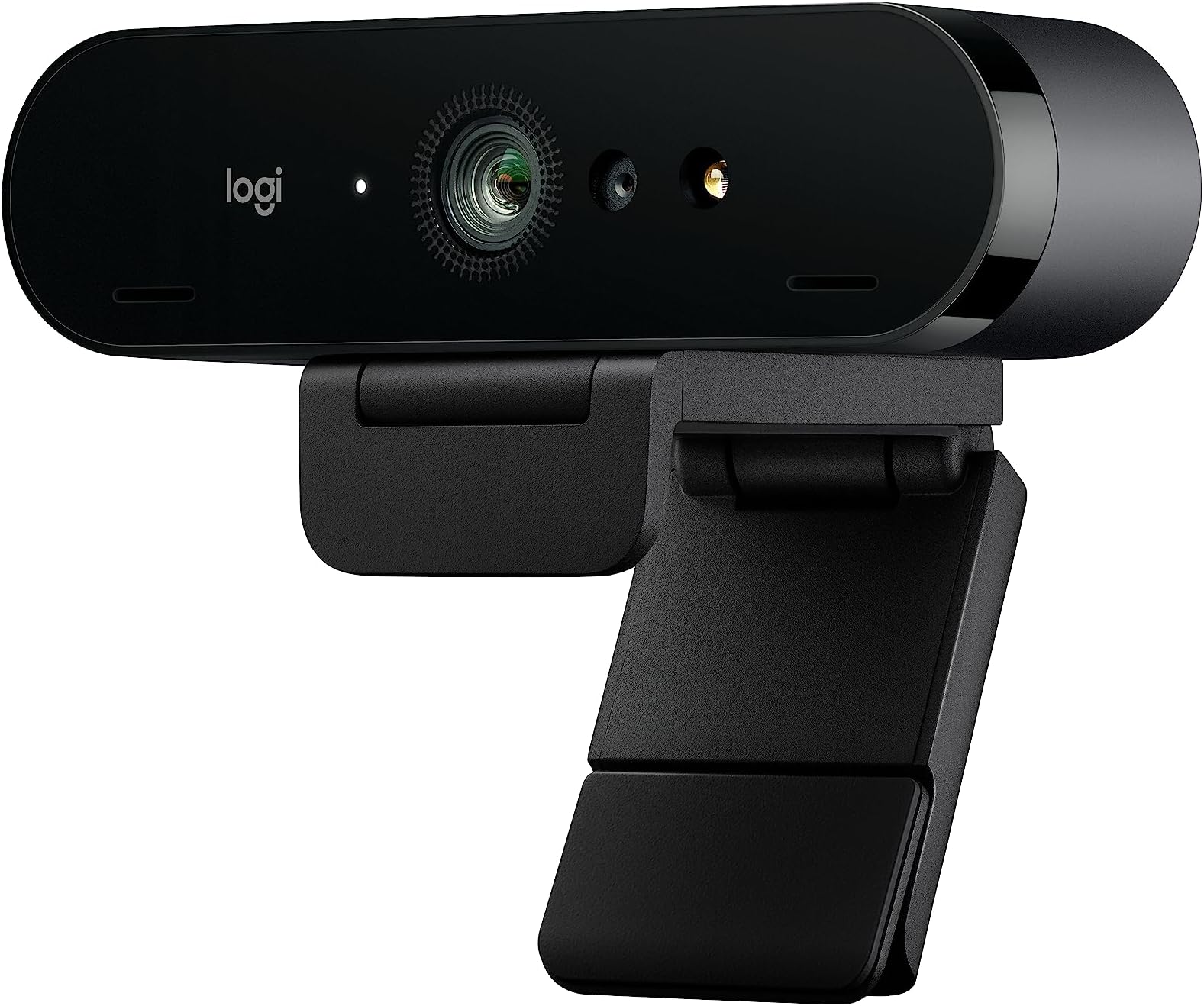
Logitech 4k Webcam
Product ID: 38948224
Details
- BrandLogitech
- Connectivity TechnologyUSB
- Flash Memory TypeSD
- Maximum Aperture2 f
- Maximum Focal Length1.0
- Photo Sensor TechnologyOther
🎥Up to 90 fps smoothness
📸4K UHD clarity
🔇Noise-canceling mics
Buy anything from 5,000+ international stores. One checkout price. No surprise fees. Join 2M+ shoppers on Desertcart.
Desertcart purchases this item on your behalf and handles shipping, customs, and support to Iceland.
🚀 Elevate your virtual presence with Logitech’s 4K Brilliance!
The Logitech 4K Webcam delivers ultra-high-definition video at up to 90 fps, enhanced by advanced HDR lighting and noise-canceling microphones. With versatile field of view options, Windows Hello integration, and device management via Sync software, it’s designed for seamless, professional video collaboration anywhere. Compatible across major platforms, it combines cutting-edge tech with user-friendly features to keep you connected and looking sharp.
| ASIN | B01N5UOYC4 |
| Antenna Location | video conferencing, streaming, video recording |
| Are Batteries Included | No |
| Best Sellers Rank | #38 in Webcams |
| Brand | Logitech |
| Built-In Media | webcam |
| Camcorder Type | Webcam |
| Color | Black |
| Compatible Devices | Personal Computer, Laptop, Tablet |
| Connectivity Technology | USB |
| Customer Reviews | 4.6 4.6 out of 5 stars (17,655) |
| Digital Zoom | 5 x |
| Display Resolution Maximum | UHD |
| Effective Still Resolution | 2160 Pixels |
| Effective Video Resolution | 2160 Pixels |
| Exposure Control Type | Automatic |
| Features | Infrared |
| File Format | MP4 |
| Flash Memory Type | SD |
| Flash Memory Video Speed Class | V30 |
| Focus Type | Auto Focus |
| Form Factor | Laptop |
| Global Trade Identification Number | 00097855088024, 00097855125620, 10097855125627 |
| Has Image Stabilization | No |
| Image Aspect Ratio | 16:9 |
| Image Capture Speed | 30 fps |
| Image stabilization | Digital |
| Item Dimensions D x W x H | 1"D x 1"W x 4"H |
| Item Type Name | Logitech Brio 4K Ultra HD Webcam - 960-001105 |
| Item Weight | 10.88 ounces |
| Lens Type | Zoom |
| Manufacturer | Logitech |
| Maximum Aperture | 2 f |
| Maximum Focal Length | 1.0 |
| Minimum Aperture | 1 Millimeters |
| Minimum Focal Length | 1.0 |
| Model Name | Logitech BRIO |
| Model Number | 960-001105 |
| Number of Batteries | 1 Lithium Ion batteries required. |
| Operating System | Proprietary firmware or embedded operating system |
| Optical Zoom | 100 x |
| Screen Size | 2.7 Inches |
| Sensor Type | Other |
| Shooting Modes | Automatic |
| Style Name | Old: 2017 Version |
| Supported Audio Format | MP3, PCM |
| Supported Image Format | JPEG, PNG |
| UPC | 097855125620 097855135643 097855088024 |
| Unit Count | 1.0 Count |
| Upper Temperature Rating | 113 Degrees Fahrenheit |
| Video Capture Format | MP4 |
| Video Resolution | 4K |
| Viewing Angle | 86.6 Degrees |
| Warranty Description | 1 - year limited warranty. |
| Water Resistance Level | Not Water Resistant |
| White Balance Settings | Auto |
| Wireless Compability | Radio Frequency |
| Zoom | Digital |
S**T
Nice 4k webcam.
Excellent camera. Very clear images and sound. Easy to install and to use. I would buy it again.
C**.
Truly Standalone Camera Quality, but update the firmware first
This thing is amazing. I’ve ponied up for webcams for 15+yrs and strangely they really seemed to peak out as grainy, 2003-era, 30fps 720p-at-best devices for the longest time. iPhone cameras trump them no problem, it’s just hard to hook up a live feed from your iPhone to your PC and casually sync with what you’re doing on the computer if you like to stream (or make youtube videos without spending tons on dedicated professional cameras). As soon as i plugged it in, i expected totally that i’d be getting some horrendous Logitech software that’s plagued their otherwise totally top-notch hardware for decades. But recently there’s been a revamp. I have a Logitech Triathlon Mouse and matching k375 keyboard for work and my mac, which use built-in standard Unifying features and Logitech Flow in a new metro style app. They work absolutely great. I’ve got a G810 orion keyboard and G502 proteus spectrum mouse for my gaming rig, the gaming software is a little clunky and dated but it gets the job done. But anyway, the Brio’s standard Logitech app is Metro-like just like Logitech Flow, is surprisingly speedy and has plenty of features out of the box. Wayyyy more than i expected. Not clunky, not hard to learn. The cam itself is unbelievably nice. As soon as the feed started upon install of the logitech app i was blown away. Crisp, smooth 60fps at 720p, set the res up to 4k and just as smooth- no stutter or frame decrease. Auto-lighting is great, it just works. Then came the Windows Hello setup... pretty much plug-and-play, except it will NOT work out of the box. I spent about 20 mins troubleshooting my event viewer log output to find the issue- they all ship with v1.0 firmware, and that didn’t support windows Hello. Update it from the logitech download page (v2.2 is current), try to set it up again, you’re ready to go. I knew this camera was expensive, but in the past that didn’t really mean ‘quality’ when it came to webcams because they had a really low bar. But this broke the mold, everything people have wanted in webcams for over a decade is finally delivered with this. Worth its price 100%. No clue why there are so many bad ratings here, maybe the old versions of software were previous Logitech quality, or maybe all these guys are videophiles that complain about miniscule issues that normal people would never see. But either way, i love this thing.
S**S
Pleased with camera, mount lacking
Pros Good sensor, for what you can get on a computer (pc/laptop) I’ve tried it in light and dark rooms. It’t not better than what your getting with an iPhone or high end android device. But it’s a lot better than several I’ve used including other Logitech and some off brands and few Microsoft ones as well as several laptops. Why logitech cameras are so good is they use good parts, and have solid software. You really can't over come bad camera firmware even if you put in more expensive hardware. it also has a decent mic. It's an all around camera that you will always look good in an office setting or just conferencing. I think it's worth the money these days to have a good camera like this with everything having gotten so virtual. i use it for work, health care (pt sessions), and calls. No external branded weird software to get in the way. They kept this clean just as I like it. It’s just works. That’s what we want we are working no nonsense Logitech gets it. Software/drivers and hardware is good: Logitech generally an expensive company. You could say overpriced, but their stuff has worked well for me when competing products haven’t. The mice for example are fantastic. They have these little touches and never fails that’s not the review but I’m just saying their products are well together on the software end. Autofocus works no messing around with your operating system trying to get the camera to work. It works fine with Team and Zoom. Cons Cost: I mean 170 is a lot of money for good but not high end camera. Think about a high end Iphone or a highend Samsung phone. You almost expect that for a 200 stand alone camera. This is sharp but it can’t touch those kinds of cameras on color or light handling. Does it matter for office calls. Ehh, but still your spending this you must care right? I did. I got tired of looking like a faded blurry mess which is why i upgraded to this. Your just not making memory here. They aren't artistic beautiful web cam pictures but you look pretty decent. The biggest con for me is the stand. I get it everyone will complain about a stand I’m telling you take their 910/920 series and give me that stand anyway. It sticks better on the monitor, it pivots way better. This thing has a tripod attachment, but I don’t know many offices workers sticking a tripod on the desk. This is the place where I thought they could do a ton better. I mean I can live with it, but it needlessly sucks. Once you get it right it’s basically set and forget well unless if you are a call with a whiteboard and moving around or something (I do that). It's a good camera. I ‘d probably do it again, because again the other ones just don’t create clear video or have other problems, I prefer to buy something good rather and keep it for like 10 years. I had a C910 for 10-11 years until it got a bit flakey. I bought a Microsoft one before that the cam studio where the autofocus never worked right and kept getting crappy ones form my it department that had weird issues or were impossible to see fine details. I finally expensed this, they pushed back and I just appealed to them … environmental care … buy suggesting continuing to buy me crap that breaks or doesn’t’ work will just fill landfills. Just get me a good camera and be done with it. They are happy because I went away and shut up about the camera. And I am because I ‘ve got Gorilla tape holding a great camera to my monitor. It’s win for everyone. I think you’ll be happy. You’ll be mildly annoyed with the stand. Don’t expect iphone. Expect good computer camera for calls.
F**N
Expensive, but the best webcam I’ve owned
This Logitech 4K webcam is definitely on the pricey side, but it performs extremely well. Image quality is sharp and clear, and it handles lighting better than any webcam I’ve used before. Autofocus is fast and reliable, and it works great for video calls, streaming, and content creation. Once set up, it’s very consistent and just works without needing constant adjustments. While the cost may be higher than many other webcams, the performance backs it up. It’s the best webcam I’ve owned, and if quality matters to you, it’s worth the investment.
L**O
Love it!
It is very much plug and play. The video quality is good on this, and the microphone picks up the sound decently. The lighting is what you expect from a webcam, if your room gets dark you'll need special lighting for that. Overall this is a great little camera.
T**2
Great camera from a great company
I have had a lot of logitech products over the years; everything from their flagship gaming keyboards to travel mice and webcams. I really like the compact nature of this camera. Looking at the pictures of the camera I would have expected it to be a bit bigger on top of my monitor. One of the best features and the reason that I went with this camera is that the USB-C cable is detachable from the camera and can be replaces with a longer one if necessary. I was not too concerned with the length as I have it plugged into the USB hub on my monitor, but that hub sits behind a trim panel that needs to be removed everytime I need to unplug it when my computer has issues. These issues are not with the camera as my computer seems to have issues with every webcam that I have used, so being able to unplug it and plug it back in at the camera is a huge time savings for me! The quality is great! I have everything on default settings as I typically just use my webcam a couple days a week for maybe an hour at a time. If I were doing something like streaming or creating content with it I would likely take the time to tune all of the settings that are available with the software mentioned within the instructions. I also do not have any studio lights so my lighting depends on the weather outside and a single lamp that I have off to the side, so auto settings work best for now. The camera does come with a mount for the top of your monitor as well as a privacy cover for when you are not using it. I personally think it adds some unnecesary bulk to the camera so I have opted not to use it personally. You can also remove the montiro mount and use it with a tri-pod or ring light if you would like. I might look into this option down the road. The camera also supports Windows Hello which allows you to log into your computer just by looking at the camera. When I am not having issues with my computer this works great! I typically have to log in and unplug the camera and plug it back in for my computer to recognize everything, but once that has happened it is flawless for the remainder of the time I am at the comptuer. I recomended this camera to family who had previously purchased it and when I finally got fed up with taking the back panel off of my monitor I decided to pick one up for myself. Great camera that I have no problem recmoending 100% to anyone that is looking for a webcam with better quality than their laptop camera or the cheap webcams that are all over the maret these days. I have had logitec webcams for many years and have not been more happy with one of them than I am with the BRIO. If you are on the fence I would say just go ahead and spend the money to get one. You will not be disapointed.
S**T
It does the job.
Reason for purchasing. I purchased this product for improving the picture quality of my Zoom conferencing and other things like that. Did I achieve the result? It does improve upon what I had previously, but I cannot see the 4K quality. Probably Zoom does not allow that (I tried it on a Super HD display!). Let's say that quality is fine, but not as good as I expected though. Viewing angles: 3 different viewing angles (68 degrees, 75 and 90 i believe) provide a good amount of customization although for teleconferencing using a virtual background, I find the 68 the most suitable. If there were more people participating from the same location 90 is definitely the choice. Good option to have, not extremely relevant for a home office though. Autofocus does its job and via the G-Hub it is easy to center myself inside the camera. However, without the G-Hub, I would not know how to do it. I am sure that there is a way. Autofocus can be replaced by manual settings, but when I tried I did not improve upon the autofocus. Instruction manual is miserable, but I downloaded one from internet. Not too useful either. At least the schematics on how to install it are very clear and it is actually quite easy as written earlier. Installation was super easy and it was working within 60 seconds from opening the box. I do have the Logitech G-Hub, as I have also a Yeti Nano microphone and thus the Brio camera appeared immediately on the Hub. To be fair, on a second computer, without G-Hub, I can start Zoom and Zoom gives me the option to select this webcam, but without it, I am not sure where to look for it as no software was installed. As you can see in the picture I attached, the webcam is discrete and it is easy to put and keep in place (I tried it on several laptops and display) I was even able to put it on top of my large speakers while testing with the camera from below my height. Overall, I am fine with this webcam, everything seems to be in order and definitely it improved my situation, but I was expecting (maybe I had erroneous expectations) a tad higher quality of camera as I see many streamers reaching very nice qualities. Definitely better than mine. The quality is not professional grade, not at the top standards at least.
D**H
Good purchase
Excellent. Love the extra light
R**M
Easy go - easy use
For a better picture quality as online trainer I purchased the Logi Brio 4k. Setup was done after connecting it. There is some Logitech Software for the cam - but its not really necessary. I was impressed how much better the picture quality - especially under low light/non optimal light - improved in comparison to my Logitech c925e - which is already a very good one. As a bonus for me does the cam support login via Windows Hello - to login in Windows with your Face. Works really well for me. It's on the bigger side - compared with others. But ok. And its tripod mountable. Thats helpful sometimes. Also prolonging the cable to around 5m was no problem (had my share of problems with a Elgato Facecam Pro here). One thing - the included privacy flap - I didn't realised what the included plastic thing was for at first. Then I got it - you are supposed to clip it on top. An included privacy flap like in the c925e would have been nicer and easier to use. The only thing I regret is that I didn't bought it earlier ;-) ...
S**S
How could Overall rating be 5**, but product gets 4** for each of the three features?
First off, there is no other webcam available to me that I could compare it to, so this is a biased opinion. Secondly, it does a very decent job at serving its main purpose: Logging into a modern Windows 10 desktop PC via Windows Hello facial recognition. I think whenever Hello doesn't work efficiently it's the fault of Windows 10 (amongst this OS' *many* other shortcomings!). Re: the 3 features: It does a good enough job at auto-focussing, I think, again with no other webcam available to compare it to. However, there is a bit of lag even on a machine with 8GB RAM and an 8700T CPU. (VERY IMPORTANT: Note the "T" in the CPU. Maybe if it was the higher-end 8700MHz CPU there wouldn't be any lag. I just don't know.) The Picture quality is decent too, but I find it a bit grainy when using software like OBS. As I am writing this, I changed the Low light rating to 5**, as I think it does an excellent job in medium to low lighting. The mic's quite good on it too. I think unless you're doing really high-end computing (perhaps professional YouTubing), this webcam's mic would serve you very well. I've only had a month to intermittently test it, but I *can* say this: Whether you're using Logitech's own Capture software or something like OBS for recording or streaming, you *will* tax your system. On the desktop PC described, CPU usage went up to over 30% - with its fan going like a jet engine's! The PC's built-in Intel UHD630 goes to 98.5% and up! I'll definitely have to look into what can be tuned on the PC, e.g., graphics RAM allocation (a BIOS thing), etc., to make this webcam work more smoothly. The PC is new too so there could be some tweaking to be done to make things more harmonious. Any proven suggestions that worked for you would be welcome. Oh, and one more thing: If you'll be using this for Hello, USE LOGITECH'S LATEST DRIVERS otherwise you’ll be *extremely frustrated* as to why the feature isn’t working out of the box! That was a lot to say, and it’s only scratching the surface, but it gets the main points across I think.
M**A
good webcam, bad price
there was a brief time period where this camera was the go-to option of many, that period is long gone and much better alternatives are available for less than half the price. Would I buy it again? don't think so
C**N
Excelente, solo 2 detalles... Ojalá mejoren en el futuro
Uff, excelente producto, buenísima calidad de materiales, es pesada, lo que me asegura que tiene muchos componentes internos que soporta los vídeos y fotos en 4K, se siente la textura de buena calidad y materiales, realmente enfoca y lo hace rapidísimo, aunque tengas poca luz te ilumina con sus ajustes predeterminados bastante bien, sin distorsionarte ni pixelarte, realmente te sientes adentro de un vídeo en 4K, eso sí, no incluye software para ajustes, así que te recomiendo que entres a la página de Logic, y bajes los 2 software que son gratis, para que modifiques y optimices la cámara para que de el %100 del 4k, así como el zoom y otras cositas, porque la aplicación predeterminada de tu computadora no sirve para ajustarla. Lo único que me parece extraño y no me gustó... Fue que no se puede girar físicamente la cámara hacia la derecha ni la izquierda, tendrías que comprarte otra base que le embone y si se puede mover a los lados, porque únicamente te permite moverla de arriba hacia abajo, es lo único malo, ya que con la base que trae, tienes que mover la computadora si quieres que se vea tu perfil bueno, ya que actualmente la realidad es que nadie se enfoca de frente todo el tiempo, necesitamos movilidad, ojalá lo arreglen para futuras cámaras, otro pequeño detalle es que se calienta rápido, por eso recomiendo usarla en un ambiente con aire acondicionado, sin embargo sigue funcionando, no se apaga ni reinicia como hacen algunas camaras go pro, entre otras
D**I
Great future proof camera
Had multiple chance to use c920 for many years due to work. I’m glad that I did not cave in to buy c920 and chose to get brio instead. It worked perfectly straight out of the box with everything set to auto. When compared to the built in webcam on the laptop the differences was beyond words. It will cost more but having different fov, 4k and usb-c meant that the product is future proofed. Given that c920 is still on sales for so many years I’m pretty sure brio will stay relevant in the years to come. Quality product.
Trustpilot
1 week ago
3 days ago