Desertcart purchases this item on your behalf and handles shipping, customs, and support to Iceland.
🎬 Elevate your storytelling with Canon’s powerhouse camcorder—zoom, stabilize, and capture like a pro!
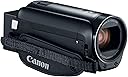
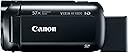
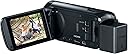
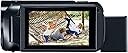
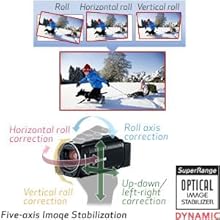
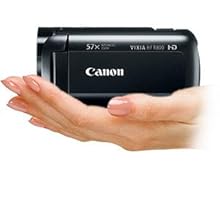
The Canon VIXIA HF R800 is a lightweight, portable camcorder featuring a 3.0-inch capacitive touch LCD, 57x advanced optical zoom, and a Full HD 1080p CMOS sensor. It offers SuperRange Optical Image Stabilization for smooth handheld video, clean HDMI output for webcam use, and up to 3 hours of battery life, making it ideal for professional-quality video recording in diverse environments.


| ASIN | B01N7OAH3I |
| Antenna Location | High-quality video recording, home videos, events, and recitals |
| Battery Average Life | 3 hours |
| Best Sellers Rank | #421,975 in Electronics ( See Top 100 in Electronics ) #1,428 in Camcorders |
| Brand | Canon |
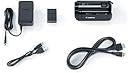
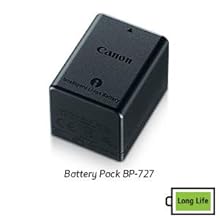
| Built-In Media | Battery, Compact Power Adapter CA-110, Mini-HDMI Cable HTC-100, USB Interface Cable IFC-300PCU/S, VIXIA HF R800 Camcorder |
| Camcorder Type | Video Camera |
| Color | Black |
| Connectivity Technology | HDMI |
| Customer Reviews | 4.5 out of 5 stars 1,750 Reviews |
| Digital Zoom | 1140 x |
| Display Resolution Maximum | 230000 |
| Effective Still Resolution | 3.28 mp |
| Effective Video Resolution | 1080 pixels |
| Exposure Control Type | Automatic |
| File Format | MP4 |
| Flash Memory Type | SDXC |
| Flash Memory Video Speed Class | V60 |
| Focus Type | Manual Focus |
| Form Factor | rotating |
| Global Trade Identification Number | 00013803288520 |
| Image Aspect Ratio | unknown_aspect_ratio |
| Image Capture Speed | 60 frames_per_second |
| Image stabilization | true |
| Item Dimensions D x W x H | 4.6"D x 2.1"W x 2.3"H |
| Item Weight | 8.48 ounces |
| Lens Type | Prime |
| Manufacturer | Canon Video |
| Maximum Aperture | 2.8 f_stop |
| Maximum Focal Length | 1853 |
| Minimum Focal Length | 32.5 |
| Model Name | Canon VIXIA HF R800 Camcorder (Black) |
| Model Number | 1960C002 |
| Number of Batteries | 1 Lithium Ion batteries required. (included) |
| Operating System | Proprietary Firmware/Embedded Os |
| Optical Zoom | 32 x |
| Photo Sensor Technology | CMOS |
| Screen Size | 3 inches |
| Sensor Type | CMOS |
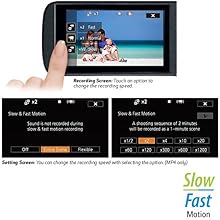
| Shooting Modes | Slow Motion |
| Special Feature | Portable,Lightweight |
| Style Name | R800 |
| Supported Audio Format | AAC |
| Supported Image Format | MP4 |
| UPC | 013803288520 |
| Unit Count | 2.4 Ounce |
| Video Capture Format | MPEG-4 |
| Video Capture Resolution | 1080p |
| Video Resolution | 1080p |
| Warranty Description | 1 year limited warranty |
| Water Resistance Level | Not Water Resistant |
| Wireless Compability | Bluetooth |
| Zoom | Optical |
U**6
Great camera!
Used inside and outside for recording. I am very pleased with the outcome. The built in mic works fine but does give you wind noise in windy conditions. If you use an auxiliary mic it has an on-screen meter to let you know that it is recording and at what level. Worked perfectly. The touch screen monitor allows you to take a still photo of whatever is on the screen at that moment. It stores the photo on the memory card and these stills pop up as a separate section when reviewing the card. It is very easy and comfortable to hold (in your right hand) and click the record button on/off with your thumb. The strap is Velcro for easy adjustment for the hand. The zoom button is also easily accessed with your index finger on the top rear. Excellent zoom features. The stabilization feature also works great. The battery life indicator jumps around depending on if you are in record mode or playback. I purchased an extra battery but found that I could record on and off for 4 hours without issue. Excellent value.
A**E
Great battery life, Great 60p video, but transfering from camera takes forever.
Updated Review 6/5/2017: I updated my review from 2 stars as I had initiated a return, but the shipping didn't work for me. I decided to cancel the return and try to work on the issue of extremely long transfer times. Seriously, if you're going to buy this camera, make sure you have a card reader. Transferring 10 GB of footage from the camera will take about 25 minutes, LONGER if you use the Cannon transfer software. I bought an external USB 3 card reader, and 10GB file transfers now take about 90 seconds. I had also previously complained about not having AVCHD recording for smaller file sizes. However, the Highest quality MP4 60p recording makes it so much easier to Edit in Sony Vegas. Rendering times are faster than real-time. a 30 minute video will render in about 16 minutes in Vegas. I use these for shooting pinball video's with a 2 camera setup, which I upload to YouTube at a very high quality. I edit these in Vegas, as mentioned, and they come out stunning and with the 2 videos combined, Picture in picture, it takes close to the actual amount of time to render. Again, a 30 minute video will render in about 34 minutes, keeping the MP4 settings as close to the original footage specs as possible. With the AVCHD files from my other cameras, it took more than twice as long to render - about an hour for a 30 minute video. Plus, this MP4 format uses my Intel graphics chip to aid in rendering. I previously mentioned the indoor quality was not so great, but a few lighting adjustments and the picture is perfectly fine. I still wish that you could record 60p at lower bitrates. These files takes up a TON of space. However, with being able to transfer the files much faster, this isn't so much of an issue. Again, if you want 60p recording, you have to use the highest setting of 35Mbps recording. This will only allow a maximum of 16 minutes and a few seconds, after which a new file is created. They appear as 1 video in the camera, but if transferring to a computer, there will be multiple files that have to be edited together. While the video is seamless, there will be a slight glitch in the audio track. One other thing, as far as audio, it's stereo only. No 5.1 surround. But I can live with that. Battery life is where this camera really shines. The battery lasts significantly longer than my previous cameras. Kudos to Cannon for including a larger battery in the box, and a charging unit with a long enough cord so I can record while using the charger. I'm glad I decided to give this camera second chance, and that I got the transfer issues sorted out.
K**Y
Great starter cam for YouTubers, buy refurbished if you can!!
I have been shooting with Canon Vixia's for years and they've always been winners! Recently my oldest one (as in mini DV tapes) started having problems with the shutter not opening all the way and I was told it would cost more to replace the part than to buy a new one, so I bought a new one, and by new one I mean this refurbished one. Mostly what I use these cameras for is to record local concerts and arts events to make performance videos for different groups like high schools and colleges. A few of these cameras set at different places in a concert hall really make for a nice finished product! You should know however that I don't use the built in audio. I either pair it with house mic recordings when available or use my own pair of stereo mics with a zoom H4N recorder. That being said, the audio on these isn't half bad for the price! I also use this to shoot video for a YouTube channel. I sing and tour with the Salt Lake Vocal Artists all over the world and record our audio and video as we perform in different churches and venues and need equipment that is light and easy to pack/travel with/set up and this Vixia is perfect for that purpose! If you want to see a sample of the kind of end result I get with these Vixia's go to YouTube and search Salt Lake Vocal Artists if you want to see a sample of what the finished product of this camera looks like. ALL of these videos were shot with Canon Vixia's. I love how easy these cameras are to use, but it would behoove any first time user to spend a little time with the manual going through and arranging the settings one by one to make sure everything is set just how you want it for your purposes before you start shooting. That being said, you can use it right out of the box without messing with anything if you don't feel like it. I love the touch screen and that you can flip it around to face you if you're filming a YouTube video for instance, so you can see what is being captured and frame your shot correctly. The picture is sharp and clear! My only complaint is that I wish the battery life were longer. That being said, I don't know that it's any worse than other similar cameras at similar price ranges, and it will last for an entire concert which is mostly what I use it for anyway. If you need the battery to last longer, I suggest buying one of those plug in batteries that you can connect to an outlet and use as long as you want. I also have to say I'm REALLY thrilled that these are offered refurbished on Amazon! If you're nervous about the word "refurbished" don't be. These cameras come looking and working like new and you save a boat load of money! I buy refurbished on Amazon whenever I can and I've never been burned! I highly recommend this camera for all kinds of uses, especially for entry level YouTubers or those who don't have enough room on their smart phones to capture everything they want to capture. For the record I paid full price for this! Hope this helps!
S**S
good camera for the cost
I find the reviews about seeing the screen in bright light are correct but I have the same problem with my cell phone so its nothing I can't work around, the videos are sharp and pictures too, the zoom works fine and sound is good for what I've recorded at this time which is either myself talking to explain the video or wildlife included in the video, the camera allows four quality video selections. I see many attachments for this video camera and some I may be purchasing, I do recommend this video camera it is a good solid value. Also, this is the third camera I received, the first two produced an annoying background noise while playing back video that was quite noticeable. Amazon made it easy to produce return labels and sending new units, the second camera I received produced the same playback noise the third one plays back video perfectly.
I**S
Much much better than the Sony CX405
I needed a camera for my streaming/zoom set up. I found a Sony Cx405 used in like new condition for $140 so I got one to try out. I also bought a Canon R800 as well from Canon's refurb store for $165. Having the two side by side really helps. First, they are almost the same size, but the Canon looks and feel a bit sturdier. Both are very light weight but the Canon feels like less of a toy. Both have clean HDMI out. The Canon uses mini HDMI, the Sony uses Micro HDMI. The Canon has a microphone input, the Sony doesn't. In use the first thing I noticed was that the Canon has an on/off switch. The Sony turns on when the screen flips open. The Canon can run plugged in without the battery, the Sony has to have a battery in order to turn on even if the power is plugged in. If your battery is low, the Sony gives an error message saying it cannot record and charge at the same time. The LCD screen on the Canon is vastly better. It's touch screen and is much higher quality. The Sony uses a joystick. In terms of picture quality in good light, they are similar. The Canon has a bit warmer color tone. The Canon is miles better than the Sony in anything less than perfect lighting. The Canon autofocus is so much better. The Sony some time hunt and often falls asleep. I'd have to wave my hands in from of the lens to wake up the autofocus. In too bright or low light, the Sony autofocus is helpless. One thing the Sony has over the Canon is its lens is wider at the widest setting. I must admit, my use of these 2 camcorders is atypical. I only use it for streaming. Even with a perfect lighting setup, the Canon is so much better in every single way that I bought 2 more Canons. At $139 for my used Sony I'll find a use for it. But I highly recommend the Canon over the Sony.
K**O
Read this before you buy. One Big Complain about it
First with the good Pros: Let me say the canon vixia hf r800 takes good quality 1080p videos 60fps. Nothing extraordinary, so it is a good camera. Camera build quality is good. It does not feel cheap. And it looks simple, but in a good way. Easy to use. Many buttons are onscreen and touchscreen is very responsive. Customizable buttons is a plus. Now the cons: Low light video quality is not that great. It's just ok Picture quality requires excellent light to be great. Otherwise I find them noisy (I am no photographer and I noticed). Now the big complain. It does not make a continuous video file. It splits the video in 4 gb files. So in one hour 1080 60p video I get four video files, that then I have to get edit and piece them together to make them usable. It destroys my video edit workflow. If you make tons of small videos for youtube and it goes well with your workflow, go ahead get it. At least you are informed. This was a deal breaker for me. Having lots of files instead of one. If it at least gives me the option to split the file or have a single file, I would have kept it. Nobody, in reviews or item description mentions this. No firmware update from canon. So I have no hope it would be implemented. I will go for a different brand and make sure it doesn't do this. UPDATE: Most consumer cameras do this, due to the fact that in the old days of windows 95, when fat32 was implemented, the maximum file size was 4 gb. To maintain compatibility with most sd cards, they keep it at 4 gb, even using more modern file systems, like exFat, which do not have the file size limitation, but the cameras still split the videos. In order to get a camera that does NOT do this, one will have to look a lot. Problem is this limitation is not advertised, warned or reviewed anywhere. Hope it helps.
S**N
Great camera
I am able to zoom in and obtain details such as license plate at 200 meters with just the 32x optical zoom enabled in 1080/30P. The camera has excellent image stabilization. The camera is able to view a license plate at night with slight illumination from a street light located approximately 30 feet away and the license plate is bright on the screen. Noticed an issue with the camera set on highest quality while trying to film many moving objects simultaneously on a bright day (at ice rink). The video appeared glitchy when set on the highest setting while trying to track these numerous fast moving objects. I resolved issue by reducing quality setting down by one and have not noticed any further issues. The quality setting must be reduced by one from its highest setting in order to use decoration features such as date-timestamp anyways, which the date-timestamp is output on the final video as well. If using for extended periods of time with intermittent activity and a need to maintain the date-timestamp on video then purchase an external cable with USB end and plug into an external battery pack. This will keep the camera from going into power saving mode and prevents the user from having to manually add the date-timestamp decoration each time the camera sits, so long as the view screen remains in the open position. Another option is to disable the power saving feature, which allows the camera to stay on for the entire duration of when the date-timestamp is required; however, an external power source will be required after approximately 178 minutes of run time (so charge often). Another useful feature of this camera is the manually controlled audio source. The audio can be manually turned all the way down, which essentially acts as a mute button for those who do not want audio in their videos.
C**9
Amazing For the Price!
I am a professional broadcast video engineer with more decades of experience than I care to think about. Canon has done a lot of things right with this camera. It is amazing given its price. There isn't much to complain about, just a few nits to pick. It would be unfair to give it less than five stars. I would give it 6 stars if I could. The touch screen is rather fiddly. Someone with large fingers could have trouble with it. My fingers are fairly slender and I'm a little bit challenged to navigate the menus on its small screen. I tried to operate the touch screen using a toothpick as a stylus, but no joy. Canon has loaded up this camera with a lot of consumer-y gimmicks but you can ignore those or disable them. The documentation omits a couple of neat tricks, but thankfully people have made videos documenting some of them. The documentation doesn't cover this, but he camera can be used for live streaming. I use an Elgato Cam Link which goes between the HDMI output and a host computer's USB 3 input. You can then use an application such as OBS to record or stream your video. You do need to disable the icon display on the HDMI output to see your picture over HDMI without icons. There is a video on YouTube that show you how. You can also export videos over USB without installing Canon's app to do this. Once you make the USB connection, press the "playback mode" button (on the left below the on-off button) and it should show up as a device on your computer, at least it does in Windows 10. The external mic input is truly amazing. Somebody at Canon really understands audio and they got it right with these camcorders. They use a mic preamp which actually provides enough gain for a microphone, unlike many dedicated audio interfaces. A mic can require up to 60 dB of gain and this camcorder doesn't disappoint. I have connected a Shure SM 63 dynamic mic using a Hosa MIT-156 to go from XLR to mini-plug. Listen to the voice of experience: this is really the correct way to do it. You will then have a trainsformer-balanced mic input, greatly reducing the chances that you'll pick up the local 50-kilowatt AM station (been there, done that). This solution costs all of $21. You could then use an E-V 635A or a Shure SM 58 or even a ribbon mic. After putting it through its paces, I have to say the auto white balance mode is poor. It puts in too much red and too little blue. The tungsten white balance mode works much better. My plan is to leave it in "tungsten" mode and use an 85B filter when I use it outdoors -- just like film! Having owned this camera for a few months, I will add that the DC connector from the AC power supply is very flimsy and does not mate well with the camera. In addition, the camera does not do 59.94 frames per second at all. The maximum frame rate is 29.97 fps.
C**O
Fait du travail très honnête pour le prix
Elle est facile à configurer, la qualité d'images est bonne, petit format qui est facile à transporter et on peut brancher un micro externe et des écouteurs lors des prises de vues.
M**L
Five Stars
Fantastic camera for money use it for teaching . Amazing fast delivery
C**A
Simples e eficiente
Achei ela muito fácil de configurar e gravar. Ótima imagem e captura de som. Excelente custo X benefício
V**.
excelente camara
Estoy muy contento con los resultados en el material que pudo generar con esta camara, ideal para exteriores y situaciones con luz de día, en condicioones de poca luz ya mete un poco mas de ruido pero en general gran calidad
A**R
NICE CAMCORDER(HANDYCAM)....GREAT PERFORMANCE!
Great camcorder with 32x Optical Zoom, External Mic(line in) Jack which is more important. No other company's Camcorder giving such featured in this price range(32000 Rs). Nice!!!
Trustpilot
2 weeks ago
1 week ago