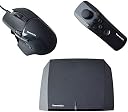


🎯 Elevate Your Game with Precision and Style!
The 2017 Tuact Venom X X4 V4 FPS Controller Mouse is a cutting-edge gaming accessory designed for serious gamers. With its stylish gel material, it offers comfort and grip, while being fully compatible with PlayStation 3, Xbox One, PS4, Xbox 360, and PC. Featuring 7 customizable buttons and a long-range connection of up to 100 meters, this battery-powered controller ensures an immersive gaming experience without limits.
| ASIN | B00COO0D9S |
| Additional Features | Ergonomic |
| Brand Name | Mcbazel |
| Button Quantity | 7 |
| Color | Black |
| Compatible Devices | PC, Playstation 3, Windows, Xbox One |
| Connectivity Technology | USB |
| Controller Type | Windows |
| Customer Reviews | 3.9 3.9 out of 5 stars (395) |
| Global Trade Identification Number | 00013964155105 |
| Hardware Platform | PlayStation 3, PlayStation 4, Xbox 360, playstation 3, playstation 4, xbox one |
| Included Components | Mouse |
| Item Dimensions | 9.06 x 3.15 x 7.48 inches |
| Item Weight | 0.73 Kilograms |
| Model Name | Venom X X4 V4 |
| Package Quantity | 1 |
| Power Source | Battery Powered |
| UPC | 781055982878 013964155105 |
J**Y
Bought For The Numb-Chuck, Majorly Impressed By Everything Else
So I am one of those a-holes that likes using a controller/gamepad on the computer for most games. Lately I have gotten back into first person shooters (Rainbow Six Siege and Overwatch mainly) and can play with a keyboard mouse setup, but just don't do as well as when I use a controller. My problem is the odd hand positions I have to do on the keyboard, having this unnatural movement scheme with "WASD", and being used to having my right hand do most of the functions in game via a controller/gamepad. The drawback with a controller/gamepad is the lack of accuracy in aiming which is superior with a mouse. I had been looking for some kind of Wii numb-chuck type device to use with my mouse for a long while now and finally came across the Venom X4 product. I originally just bought it for the gaming wand (the numb-chuck part) since it seems like no one else makes these, but can say that I am extremely pleased with the whole package. Now to preface this, I am not a hard-core gamer, so I haven't had much experience with many gaming mice, so take the mouse review with a grain of salt and don't hate on me too hard :P ====== The Review ====== === Gaming Mouse === This mouse does not disappoint. The 6 function keys on the left side of the mouse are the main selling point for me and are awesome! The placement is very nice. I can reach most of them with minimal movement of the thumb. I can even hit multiple buttons at once or hit one button then another while holding the first one with relative ease. The 7th function button on the top of the mouse is somewhat standard for other gaming mice I have seen and used, but requires movement of the fingers from the left/right click buttons (which should be expected and isn't a drawback in my opinion). All function keys have very good feedback and a relatively short activation distance.when pressed. They do make click noise equivalent to a mouse click. I wouldn't say it is quiet, but there are mice I have used that have really loud click noises. This one is pretty decent on the sound factor. The activation distance is good and all buttons can be quickly pressed pretty quickly multiple times in a short time frame. The scroll wheel/middle click is nice in my opinion. I know this is another big point for hard core gamers, so you may disagree depending on your preference. The scrolling ability has a nice middle ground between those free-rolling no resistance mouse wheels and the ones that are stiff and tick pretty hard on each roll. It rolls very smoothly with a small feedback tick every few degrees of rotation that makes no noise. I personally find it prefect for my taste as I like having at least some minimal feedback when I scroll. The mouse also has CPI/DPI settings ranging from 500 to 12000 that you can set in increments of 500. The mouse also has 3 CPI/DPI profiles that you can set and then change on the fly via a small button in the mouse weight compartment. Very useful in my opinion. There is software that lets you map the function buttons and change all of the CPI/DPI and sampling setting. All of this configuration is pretty intuitive via the Windows software and there is also an Android app that you can use to make adjustments on the fly when playing on a console. The only drawback I could find is not being able to set the CPI/DPI in increments of something other than 500 and not being able to have a difference of less than 1000 between the 3 CPI/DPI profiles. Other than that, this is a great gaming mouse that I would have gladly paid for separately at the same price I got the Venom X4 package for. === Gaming Wand/Numb-Chuck === The game wand/numb-chuck is just awesome. I bought this whole package mainly for the numb-chuck and being able to use it with any kind of mouse on the PC. I can say that this numb-chuck/Venom X4 hub combo is well worth the investment even if it came without a mouse. The numb-chuck is wireless and connects to the Venom X4 hub. From there you use the same software used to configure the gaming mouse to configure the function keys on the numb-chuck. It is all very easy and strait forward. It has a total of 15 function pre-sets that you can modify. The joystick accounts for 5 of these pre-sets. Up, right, down, left are the standard ones and the joystick has a click function kind of like an Xbox or PS controller has which is great for sprinting or melee. This is a big plus in games like Rainbow Six Siege or Call Of Duty if you are used to the default controls on a console. The numb-chuck also has 4 built-in motion controls which is something I was not expecting. There is one each for left flick, right flick, back flick towards yourself, and forward flick away from yourself. These 4 function pre-sets really add some versatility without overloading the fingers. The rest of the function pre-sets are the are the buttons you can see on the numb-chuck in the pictures. This includes the power/connection button. Just like the mouse, the feedback and press distance for all of the buttons are very good. The buttons and interactions with them feel quality compared to some of the cheap gaming devices I have played with in the past. The movement with the joystick is almost the same as moving with a gamepad joystick. It isn't quite the same as it is just pressing "WASD" for you which is more choppy than true 360 degree joystick controls, but still very usable. There are a few drawbacks that hit me when I was using the numb-chuck that I'll describe here. The biggest drawback for me is the numb-chuck ergonomics. It looks nice in the picture and in person, but could definitely be designed to fit in your hand a little better. While some might see this as a small nit pick detail, it does matter to me and many others. There is no real grip or curvature to fit your hand which would have given it a really nice feel. The bumper function buttons (labeled 1 and 2 in the picture on the end of the numb-chuck) are just flat buttons. For someone with small hands like me, they are also are pretty far out from the index and middle fingers. To fix that I just choke up on the numb-chuck/wand a bit which makes me have to move further to hit the plus pad and power key (which doubles as a function key). Again this is not something that is make or break for me, but with all of the examples of good button layout and design, I would have liked to see some of that incorporated. Someone with larger hands will probably not find any of this an issue. Keep in mind though, overall I am extatic about the numb-chuck as it works amazingly well for what I wanted it for (to replace "WASD") and has surpassed my expectations overall even when considering the above drawbacks. One last oddity is the "F" function key (the small button to the left of the plus pad). It can not be configured via the software and I can't really figure out what it does. I probably haven't played with it enough to figure out its purpose, but this leads me into my next topic, documentation. === Documentation === So I obviously ordered this via Amazon after doing some research online. I found a few review videos, but nothing that really put me at ease when buying this for about $150. When it arrived, the packaging was very nice and the box had some neat pictures and some basic documentation along with the company's website. When I opened it up, there was no additional documentation or anything providing me a basic understanding of how to proceed to use my new toy! I soon found out that there are .PDF documents on Tuact.com (the company's website) that you can download. That being said, the documentation could be a little bit better. It does a lot of labeling of the various ports, buttons, connectors, led status modes, and some basic installation instructions. That being said, I still had to try some things and play around with it on my own to get it all working how I wanted. The android phone app documentation did not work for me as written, but I am going to try something they posted in their forums about connecting my phone to the Venom X4 hub WiFi network. I am big on documentation, but I know how to try things on my own too so I wasn't too distraught. === Android App === The app is 3rd party software, so you have to manually download it on your phone and install it. This requires you to turn off the the "un-trusted software" setting on your phone during the install. No big deal really. As of now, I still have not gotten the app to run successfully. The documentation says the app has to download the profiles from the hub, but does not go into detail how to do that. I found a forum post on the Venom X4 forum describing what to do, so after I try that I will report back here with the results. === Conclusion === The Venom X4 product is a really really good deal at what I paid which was about $150. You could potentially pay that same amount for a regular gaming mouse. With the Venom X4 you get so much versatility in addition to getting an awesome gaming mouse and gaming numb-chuck. You can use it on both PC and Gaming consoles like XBox One, PS4, PS3, and Xbox 360. You can connect any mouse and any keyboard that are supported by Windows and can even connect your console remotes and re-map things via the software. There are functions in the software that allow rapid fire, aim down sight lock, etc. Although I don't agree with those functions as I think they make games less fun, they are there for those who enjoy them. Really any single component in this package is worth the price, but you get them all! Hope this helps you out because I bought it taking a risk, but can tell you that I am already considering getting some more for friends.
G**E
As good as Xim4
Okay, I had owned 2 Xim4s before I used Venom X4. I sold Xim4s to quit the games, but I ended up shop another K/M converter. I paid $119 for my previous Xim4s (from official site with coupon), but somehow the price of XIM4 went up to $190 when I tried to buy it again. I was not willing to pay an unreasonable premium, so I switched to Venom X4. When I had PS3, I had FregStein which is two generations before Venom X4. I had fairly good experience with it, so bad review did not stop me from buying it. The Good: 1. Great packages for money. 2. 12000 DPI gaming mouse (Similar quality when compared with $25 “TeckNet HYPERTRAK Programmable Laser Gaming Mouse with 16400 DPI, 10 Programmable Button.”) 3. the Nun-chuck controller is my favorite part of the system. You can snap a KontrolFreek Thumbstick attachment for better control. 4. When you set DPI to Max, It works as well as Xim4 setup 5. You can use another mouse and a keyboard The Bad: 1. Android app asks phone call permission (Deny it) 2. It is very tricky to pair an android app to a VenomX4 (You must connect your cellphone to 2.4Ghz WIFI during initial pairing) 3. The DPI switch button is located under a plastic cover I recommend the firmware Ver 4.1.3 (2017-11-19) for PS4. Other newer firmware seems to cause connection issues Overall, It is as good as XIM4 even you own a good gaming mouse.
M**L
I love it but it could be even better.
FIRST IMPRESSIONS: It works amazingly (when you get it to work) I found it kinda difficult to get the app and PC profile editor to work. But other than that minor annoyance. This thing beats console controllers in shooters like a drum! GOOD: Buttons on the mouse work well for face buttons. Mouse is fits the hand very well. Strafing is easier (at least for me) than keyboard with the (it's pretty much a Wii nunchu so I'll be calling it that). Bad: The nunchu is not very ergonomic but manageable. (Maybe just add a hand strap.) (And I'm probably just nitpicking here but I found when having to select a weapon in doom or in anygame where you pull up a radial menu to select something, its way more difficult than it needs to be.) Sometimes it refuses to work. Just unplug reset and fixed. Overall if it 20-40 dollars cheaper. It would be a shame if you didn't get it. Well worth it in the long run.
A**F
Super Happy
This item does exactly what I expected. It's wonderful being able to use a mouse on my fps games. The included mouse and wand work great. There's no motion lag. It's true 1:1. Consequently, the VenomX4 transceiver cannot translate mouse acceleration. basically, the side to side motion maxes out at a certain speed. The setup was slightly painful because of the poor instructions, and YouTube videos were based on an older model. So, here's a few tips: -Use the stock wireless Xbox one controller as the input controller. I tried a wired Xbox mini controller and it didn't work. -Do not power on your controller. Leave it off and simply plug it into the transceiver. -Plug the Venom X4 into the console last. Connect all the other plugs first. Remember, keep the controller off. -Download the Xenom X4 software from their website and update the firmware. -When updating the firmware, do not plug in the Xbox controller or the mouse. -I play Battlfront, unfortunately the Battlefront profile is a dead link on the tuact website. But, the Halo 5 profile is very very similar. That's all I can think of off the top of my head. ...back to Battlfront.
E**O
Très bon produit. Software un peu galère à maîtriser pour les néophytes mais une fois qu'on a compris le truc ça roule tout seul. La souris possède une très bonne réactivité et une très bonne precision in game, de plus les raccourci sont placer plutôt correctement. L'ergonomie est aussi au rendez-vous. On regrettera juste de ne pas pouvoir changer le dpi a la volée ( pratique pour les fps ). Le nuchuck est tout aussi valable que la souris. Petit bémol le bouton R3 du joystick qui sert normalement a sprinter ou à sniper est un peu raide a mon goût et les grip concave de remplacement du joystick idem pour les changer ( armer vous de patience ). J'ai acheter ce produit pour mon frère qui vient de commencer les fps ( son fragfx fish a lâcher ( n'achertez jamais ça )) je prendrai le même pour moi en remplacement de mon hori tac pro.
S**O
Facile da installare, software facile da utilizzare. Versatile e ben costruito. Ho dovuto restituirlo a malinquore perché non compatibile con ps5... Per le altre console e il PC acquisto consigliatissimo
S**G
Good product. Fast delivery
P**W
This is so far the ONE AND ONLY gaming controller/converter that seamlessly delivers PC FPS game experience on Xbox one X or S series. I’ve tested various competitors product along side Venom X4 and absolutely NO other came close. I’ve been using this product since 2018 and I’ve now ordered another unit for member of family. Also to clarify I have spent hours and days researching and testing all sorts of controllers and cannot stress that this is THE ONLY ONE that will truly satisfy your FPS needs on the console. That is from the point of granular configuration, quality of hardware and software and experience in the game.
C**3
Viele Einstellungsmöglichkeiten was es kompliziert machen kann die richtige Einstellung zu finden. Wenn aber die Einstellungen gefunden worden sind, perfekt geeignet für Online Matches. In Vergleich zu FragFX Shark PS4 ist Tuact Venom X4 ein Highlight. Tuact Venom X4 ist sehr präzise, batteriesparender, zickt nicht rum, hat keine Verbindungsprobleme, fühlt sich wertvoller aus, ist zwar kompliziert zum Einstellen, aber man hat hiermit erst recht spaß beim Spielen. Ich habe den Tuact Venom X4 zweimal besorgt, einmal als geschenkt und einmal für mich persönlich. Parallel habe ich den FragFX Shark PS4 verwendet und kann nach 3 Jahre Verwendung definitiv den Tuact Venom X4 empfehlen. Der FragFX Shark PS4 ist zwar plug & play und von den Knöpfen so gut gegenzeichnet das man damit sofort loslegen kann, aber nicht präzise genug, verliert die Verbindung öfters als es einen lieb ist und führt auch manchmal Befehle aus die man nicht gegeben hat. Wenn man nur gegen Bots spielen will, wo man auch pausieren kann ist der FragFX Shark PS4 nicht schlecht, aber für online Matches oder wo es auf reaktionszeiten geht kann man nur den Tuact Venom X4 verwenden. Einzig bei der Software kann man sich Beschweren aber Firmupdates welche Probleme an der Hardware entfernen machen es wett. Am Anfang musste ich immer meine PS4 neu starten damit Tuact Venom X4 als Kontroller erkannt worden ist, nach ein Firmware Update ist es kein Problem mehr, ob man die PS4 in Standby schickt, den Kabeln des Tuact Venom X4 rauszieht und später noch mal anschließt und die PS4 startet, dies wurde wohl mit einen Firmware Update behoben. Es gibt schon in Internet Einstellungsvorschläge, sind aber nicht für jeden geeignet und man muss sich wirklich etwas antasten um herauszufinden mit welche Vorschläge man am besten klar kommt. Dazu noch persönliche Vorlieben anpassen und je nach Spiel (einige sind von Haus aus bei der Steuerung schwammig) kann man problemlos Wochenlang eine Pause anlegen und man kommt dennoch schnell rein im Spiel nach ein paar runden. Positiv: + präzise + gute und viele Einstellmöglichkeiten + der „Kontroller“ saugt nicht so viel Batterien leer im Vergleich zu FragFX Shark PS4 + fühlt sich hochwertig an und gut verarbeitet + Befehle werden sofort ausgeführt und Reaktionszeiten sind sehr angenehm + Firmupdates + Mehrere Profile einstellbar + On the fly Konfigurationsmöglichkeiten + Kabel sind nicht zu kurz geraten + Persönliche Vorliebe Konfigurierbar + Für Schotter sehr, sehr, sehr, sehr zu empfehlen Negativ: - Software nur für Windows erhältlich oder Android (unkomfortable, wenn man in der Apple Welt lebt) - Bedienungsanleitung etwas mager und kompliziert sich bei den Einstellmöglichkeiten einzuarbeiten - Homepage veraltet - der "Kontroller" kann nicht manuell ausgeschaltet werden um Batterien zu sparen
Trustpilot
2 months ago
2 weeks ago