๐ Print Smart, Print Fast!
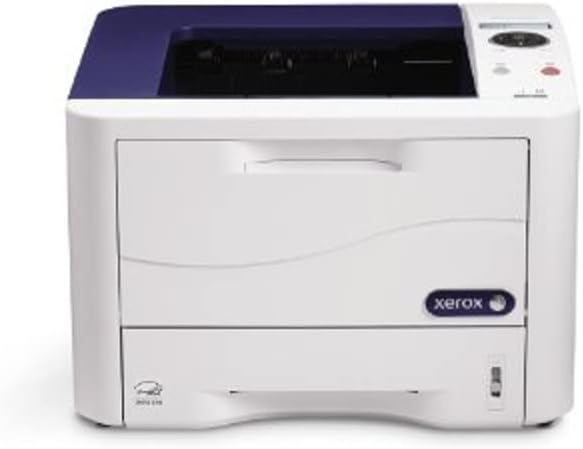
The Xerox Phaser 3320/DNI Monochrome Printer is a high-performance laser printer designed for busy professionals, offering rapid printing speeds, exceptional print quality, and versatile connectivity options to enhance productivity in any office environment.


| ASIN | B0088YPIWU |
| Additional Printer Functions | Print Only |
| B&W Pages per Minute | 35 ppm |
| Best Sellers Rank | #974,268 in Office Products ( See Top 100 in Office Products ) #1,339 in Laser Computer Printers |
| Brand | Xerox |
| Built-In Media | Toner Cartridges |
| Color | Monochrome |
| Compatible Cartridge | Xerox laser toner cartridges |
| Compatible Devices | Laptops, PC, Tablets, Smartphones, Cloud Printing |
| Connectivity Technology | USB |
| Control Method | Remote |
| Customer Reviews | 4.0 out of 5 stars 32 Reviews |
| Dual-sided printing | Yes |
| Duplex | Automatic |
| Global Trade Identification Number | 00042111599127, 00095205861846 |
| Hardware Interface | USB |
| Initial Page Print Time | 1.89 seconds |
| Ink Color | Black |
| Item Type Name | Phaser 3320DNI Mono Laser Printer |
| Item Weight | 21.8 Pounds |
| Manufacturer | Xerox Office Products |
| Maximum Copies Per Run | 100 |
| Maximum Copy Resolution Black and White | 1200 x 1200 dpi |
| Maximum Copy Speed Black and White | 37 ppm |
| Maximum Media Size | 8.5 x 14 inch |
| Maximum Print Resolution Black and White | 1200 x 1200 dpi |
| Maximum Sheet Capacity | 250 |
| Model Name | DNI Monochrome |
| Model Number | 3320/DNI |
| Model Series | 3320 |
| Number of Drivers | 3 |
| Number of Ethernet Ports | 1 |
| Number of Trays | 1 |
| Other Special Features of the Product | Auto Document Feeder |
| Output sheet capacity | 150 |
| Paper Size | 8.5 inches |
| Power Consumption | 420 Watts |
| Print media | Paper (plain) |
| Printer Connectivity Type | USB |
| Printer Output Type | Monochrome |
| Printer Type | Laser |
| Printing Technology | Laser |
| Processor Count | 1 |
| Resolution | 1200 x 1200 |
| Scanner Type | Sheetfed |
| Series Number | 3320 |
| Special Feature | Auto Document Feeder |
| Specific Uses For Product | Office |
| Total USB 2.0 Ports | 1 |
| Total Usb Ports | 1 |
| UPC | 519585152573 163121316563 809190625235 823887419556 641438726409 042111599127 791836572679 132017842493 012302572529 952058618464 804891040899 805095892000 012300806398 095205861846 095205861778 218177109963 809391353685 |
| Unit Count | 1.0 Count |
| Warranty Description | 1 year depot |
| Warranty Type | limited warranty |
| Wattage | 420 watts |
S**N
Excellent printer for home or small business
This printer has met all my expectations. If is very fast and prints clearly and crisply. Most of all, it is dead-quiet when in the ready-mode (not just when in the power-save mode). This was not the case with the Xerox 3600 model which I returned because it was too loud at idle, in the ready-mode (the 3600 was silent only in the power-save mode, however). When printing, the 3320 is not any louder than I would expect a printer to be. Lastly, the printer is very well built, much better than most of the other brands in its class, which is the primary reason I chose Xerox over the others.
M**S
Some of the internet reviews on this printer were not that great so I was a little bit apprehensive but this ...
I'm no expert so I really rely on other peoples reviews and research a little myself, Some of the internet reviews on this printer were not that great so I was a little bit apprehensive but this has turned out to be a fabulous purchase. The printer is so fast and the print quality is awesome. So, after ditching my ink jet and going with this printer the cost effectiveness it mind boggling! The printer comes with more memory of any comparatively priced printer with still room for more. The only negative I would have is the setup instructions, if you could even call them that! It was a "picture story" which is kind of silly, no written words. I guess I will give them a pass because I'm a little tech savvy but if Xerox is going to try and target the average consumer they are going to have to improve in this area. That being said I LOVE THIS PRINTER!
M**N
Well...... I did buy another one.
First, I feel that five star reviews ought to be reserved for a product that is exceptional. As a result, I rarely give one. I own a small law practice. We may print 1000 - 1500 pages a month per printer. Graphics are not a priority. Neither is color. Envelopes and business checks are important, both in quality and ease of use. The professional appearance and print quality are important. The speed to warm up and the speed of the actual printing is important. The quietness of the printer is important. The cost of the printer and the cost of replacement cartridges are important. All-in-one is not desirable at all. Wireless connection to the router is not significant since it would be hard-wired to the Secretaries desk top, but using a wireless router connection would be helpful when I want to print text messages or photos from a client's phone. When selecting a new printer I researched printers made by Xerox, Lexmark, Dell, HP, Brother, Cannon and Oki. The Oki we were replacing only lasted three years, but more importantly it was not user friendly when printing envelopes. My secretary drew a line in the sand on that manufacturer. Prior to the Oki she used an HP and was quite happy. It also lasted six years. Given the relatively low cost of a laser printer in this class, I replace the drum when it needs replacing only if the secretary is happy with the printer. Otherwise I order a new printer. We replaced the HP drum. We did not replace the Oki drum. The features are similar for all these printers if they are in the general price range and the general class. Eventually I went with Xerox based upon company reputation and the fact that it had the lowest per page cost. My secretary loves the printer. It has the speed she needs. It is relatively quiet. It doesn't have a large footprint on her desk. It does have some issues with envelope printing that are relatively minor and will likely iron out as the printer is broken in. It is low cost per page as advertised. But what really impresses her is the quality of the printing. She feels that this printer is hands down better than the previous HP and Oki printers. A month after installing it another secretary lost her printer. We ordered another Cannon without hesitation. I can't say it is better than the others on the market because neither I nor my secretaries have tried the others. But if I lost another printer in the future, I would definitely replace it with this model.
M**S
Great When It Works
When this printer works it is excellent. It has serious problems with wireless printing and the directions are skimpy and less than adequate. I am not a novice computer user. I've used home computers since DOS 2.0 and the floppy disc. The Phaser was a replacement for my Brother laser printer purchased 15 years ago. Paper would get stuck in the Brother printer roller and we had to open the back cover to carefully pull out paper with every print job. We figured it was time for another printer and we also wanted a wireless printer. My floor is a jungle of cords. The Phaser looked good, the price was reduced and we purchased it on the 2015 Back Friday sale. Once I set up the Phaser, I had to call product support to get the printer set up for wireless printing. This required several phone calls and 2 hours because the tech has to assume control over our computer. Phaser worked great for one month, then in January 2016 it would not print wireless. The printer would go into standby mode. I called product support again and as before the tech assumed control over the computer. This time problem was not resolved, because the printer network card was bad. The solution deliver the Phaser to a repair center in my area and the repairs are free. So I called the repair center phone numbers the Xerox tech support provided, made an appointmen. The Phaser weighs about 25 pounds and I was not going to carry it fifty or more feet from a large parking lot, into the building, to the elevator, get off the elevator and walk to the repair center drop off. I asked the repair technician to do me favor and come to pick up the Phaser, my SUV was parked at the office door. He said No, I can not do that. You should have told me earlier that you needed help. If you want to get the printer repaired, then you are going to need to bring it in the office yourself. I said, I have back problems, I can not lift the printer, my husband placed it in the trunk, please come get the printer. He replied No. I asked may I have the number to Xerox to locate another repair office or do you have the number to another repair office? He said, I don't have these numbers, when you get back home, then you can locate the number to Xerox. He ended the call by hanging up. I mobile called Xerox and customer service gave me other repair locations and their phone numbers, one phone number was disconnected and the other two centers only repaired large business printers. I made a fourth call to Xerox and requested they send me another printer, which they would not do. Consequently, I called Amazon to request a product return label because I can not get my in warranty printer repaired by Xerox.We are paying more money to get a HP Laser Jet Pro. The Phaser 3320 is being returned immediately to Amazon. I believe that a few of these printers come out of the factory with faulty internal cards and they will not work correctly. I dislike that the documentation is sparse and very difficult to understand how to set up printer for wireless printing. The printing is noisy, a higher noise level than my old Brother laser. The control pad is a joke, it has a very small LCD screen, almost need a magnifying glass to read it and the screen does not provide any prompts for setting the controls. We never had any problems printing, documents came out very fast, easy to use sheet feeder, easy to print labels. It was difficult to print labels from the Avery Wizard because the Phaser sometimes would not recognize the bypass tray option. I would skip this Laser Printer, either get another Xerox model or pay more money to get something better. You may get a great printer but if you get a lemon, then in my opinion it is not worth the time and trouble to get it repaired or replaced.
S**T
Not recommended for multi-sized papers
I have owned Epson, HP, both laser and ink jet, but this xerox has to be the worst printer I have ever owned. I have also owned a Xerox copier and used a Xerox print with the solid ink and they were both great machines. The print quality of this printer is good--I have no problem with that. That is the only thing that got this two stars instead of one. I use a mixture of paper sizes--standard 8.5 x 11 and the statement size (half page). I use the standard paper tray for the larger paper and the bypass tray for the half page size. The only way I can print half page is to pull the main tray out, turn the printer off and then back on. It will print a "Configuration report," but since the main tray is pulled out, it prints it on the half page--a waste of paper. It will then print the document I need on the half page from the bypass tray. I have to follow this process even though I change the properties before attempting to print. To print a full page I have to push the main tray back in and it will print it. Then the cycle starts over again to print the next half page. Update. This multi size paper thing has become such an irritant I have had to lower my rating. I am currently searching for another printer and will donate this one to some charity or just dump it even though it still prints.
J**N
Small, Fast, Sharp and reliable.
Great little printer that seems to do it all (high res, quick printing, duplexing and networking) at a great price. Unless you must have wireless, this is the way to go.
M**2
Three Stars
Nice little printer, fast but loud when printing.
U**N
Very good product!
This was the first time I did not buy a HP printer, as they now now seem to have a cheap plastic feel to it. This Xerox printer does an execellent job, I have it connected to the network by cable. Absolutely no regrets so far, love the duplex printing.
Trustpilot
3 weeks ago
2 months ago