Buy anything from 5,000+ international stores. One checkout price. No surprise fees. Join 2M+ shoppers on Desertcart.
Desertcart purchases this item on your behalf and handles shipping, customs, and support to Iceland.
⚡ Upgrade to Archer AX55 — The Wi-Fi 6 Router That Keeps You Ahead of the Curve!
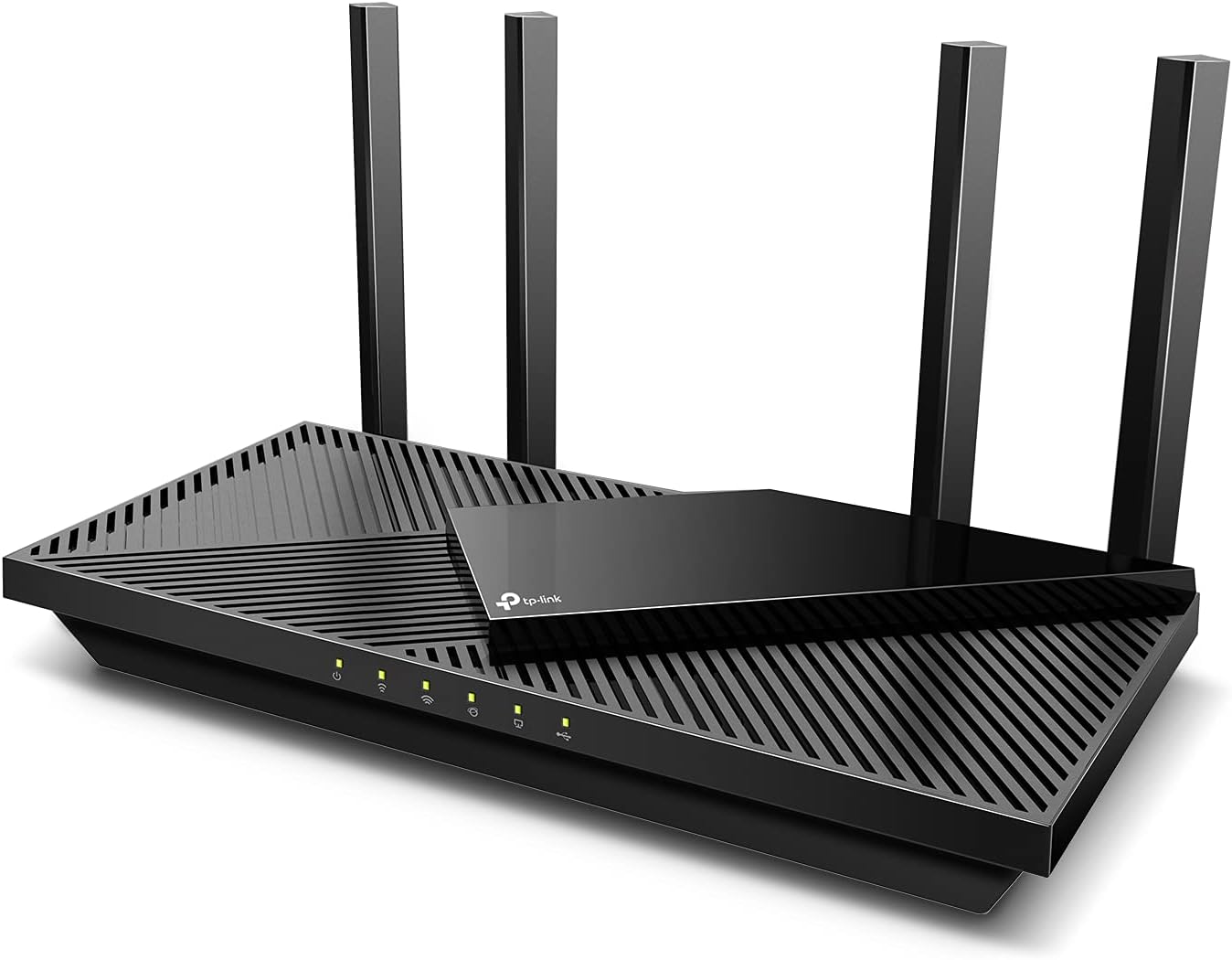
The TP-Link Archer AX55 is a cutting-edge dual-band Wi-Fi 6 router delivering up to 2976 Mbps combined speeds with advanced OFDMA and MU-MIMO technology. Equipped with 4 high-gain antennas and Beamforming, it ensures expansive, reliable coverage throughout your home. Featuring robust WPA3 security and built-in VPN client/server capabilities, it safeguards your network while supporting seamless streaming, gaming, and smart home integration. Easy to set up and control via app, web, or Alexa, the Archer AX55 is designed for professionals seeking fast, secure, and hassle-free connectivity.


| ASIN | B09G5W9R6R |
| Antenna Location | Gaming, Home |
| Antenna Type | Fixed |
| Best Sellers Rank | #172 in Electronics ( See Top 100 in Electronics ) #1 in Computer Routers |
| Brand | TP-Link |
| Built-In Media | Power Adapter, Quick Installation Guide, RJ45 Ethernet Cable, Wi-Fi Router Archer AX55 |
| Color | Black |
| Compatible Devices | Gaming Console, Personal Computer, Security Camera, Smart Television, Smartphone, Tablet |
| Connectivity Protocol | Wi-Fi |
| Connectivity Technology | Ethernet, USB, Wi-Fi |
| Control Method | App |
| Controller Type | App Control |
| Coverage | Strong, reliable Wi-Fi coverage |
| Customer Reviews | 4.4 out of 5 stars 10,539 Reviews |
| Data Transfer Rate | 2976 Megabits Per Second |
| Frequency | 5 GHz |
| Frequency Band Class | Dual-Band |
| Global Trade Identification Number | 00840030703041 |
| Has Internet Connectivity | Yes |
| Has Security Updates | Yes |
| Is Electric | Yes |
| Is Modem Compatible | Yes |
| Item Dimensions L x W x H | 12.99"L x 9.45"W x 2.87"H |
| Item Type Name | WiFi 6 Router |
| Item Weight | 1.66 Pounds |
| LAN Port Bandwidth | 10/100/1000 Mbps |
| Manufacturer | TP-Link |
| Maximum Upstream Data Transfer Rate | 2402 Megabits Per Second |
| Mfr Part Number | Archer AX55 |
| Model Name | Archer AX55 |
| Model Number | Archer AX55 |
| Number of Antennas | 4 |
| Number of Ports | 5 |
| Operating System | TP-Link firmware |
| Other Special Features of the Product | Guest Mode, Internet Security, QoS, Remote Access, WPS |
| RAM Memory Installed | 512 MB |
| Router Firewall Security Level | High |
| Router Network Type | dual-band, Wi-Fi 6 |
| Security Protocol | WPA2-Enterprise, WPA2-PSK, WPA3 |
| Smart Home Compatibility | Smart Home Compatible |
| Special Feature | Guest Mode, Internet Security, QoS, Remote Access, WPS |
| UPC | 840030703041 |
| Unit Count | 1.0 Count |
| Voltage | 240 Volts |
| Warranty Description | 2 year manufacturer |
| Wi-Fi Generation | Wi-Fi 6 |
| Wireless Communication Standard | 802.11ac, 802.11ax, 802.11b, 802.11g, 802.11n |
| Wireless Compability | 802.11ac, 802.11ax, 802.11b, 802.11g, 802.11n |
T**S
Solid performer
[updated] I updated from a TP-Link Archer C7. I have an Arris SB8200 modem. Here are a few notes. The AX55 signal strength seems a little better, especially in the 5 GHz band. It also adds 802.11ax and WPA3 security as well as "Smart Connect" which allows you to combine 2.4G and 5G bands under a single SSID and have the router decide which to use with each client. You could just give the separate bands the same SSID with any router. In that case each client would decide which band to use. The router login no longer uses a username, only a password. I have now tried "Smart Connect" with 2 TP-Link routers in 2 different houses and I am not impressed. On both I eventually had to separate the 2 bands. It was especially dysfunctional on mobile devices (phones, laptops, etc.). It doesn't seem to switch bands very easily as you move around. Even stationary devices seem to bounce inexplicably between the two bands, which can have very different signal strengths. The wi-fi encryption settings can be a problem depending on your equipment. The options are: None WPA2-PSK[AES] WPA2-PSK[AES]+WPA-PSK[TKIP] WPA3-Personal WPA3-Personal+WPA2-PSK[AES] WPA2-Enterprise WPA/WPA2-Enterprise I wouldn't touch either WPA or TKIP. Previously I used only WPA2-PSK[AES]. I would have liked to have used WPA3-Personal+WPA2-PSK[AES] here, but I have an older 2.4G printer with WPA/WPA2[AES or TKIP]. It would not connect unless the router was set to WPA2-PSK[AES] or WPA2-PSK[AES]+WPA-PSK[TKIP]. In the end, I set the 2.4G band to WPA2 (only) and the 5G band to WPA2+WPA3. Configuration and Installation ----------------------------------- Installing the router was pretty straightforward. I turned off wi-fi on my laptop, wired it (DHCP) to one of the router's client ports, browsed to 192.168.0.1, and logged in (password is on the bottom of the router). Alternatively, you could leave your wi-fi enabled and connect to the router's default SSID, also on the bottom. Doing it over wi-fi is just a bit more risky. I configured it entirely through the web interface using the Advanced menus. I changed the password and IPv4 address and left it with a temporary SSID while walking through all the other settings. After that was done, I shut down my old router, changed the temporary SSID and passcode on the new router to the permanent ones, shut down the new router, and connected it to my modem. I have not as yet found anything I can do with the Tether app that I can't do, and more easily, with the web interface. The router would not connect to the internet when I powered it on until I remembered that the modem has to be rebooted to pick up the router's MAC address. It won't connect to a new router until then. I powered off both, powered up the modem, waited until it was fully up, and then powered up the router. It connected immediately and has been running fine since then. Once connected, I reviewed the internet (IPv4 and IPv6) status and settings. For Comcast, at least in this area, the IPv6 WAN connection type is Dynamic IP(SLAAC/DHCPv6) with DHCPv6 and prefix delegation selected. The LAN type is SLAAC+Stateless DHCP. I prefer to use Google's public DNS servers (8.8.8.8, 8.8.4.4, 2001:4860:4860::8888, and 2001:4860:4860::8844), I've set those to override the Comcast-provided defaults. Performance --------------- I have 400 Mbps Comcast service with an Arris SB8200 modem. The modem indicates DOCSIS 3.1 service on the downstream side, but not on the upstream side. My laptop wireless NIC is an Intel AC7265 dual-band b/g/n/ac adapter. On a wired connection to the router, I get download speeds of 475+ Mbps. 480 would be the most I would expect given Comcast's typical practice of over-provisioning by 20%. On 5G wi-fi with 40 MHz channels, I get 475 Mbps next to the router and about 20' away in the same room. I get 355 Mbps in the next room, which is 73% faster than with the Archer C7. On 2.4G wi-fi with 20 MHz channels, I get 100 Mbs in the next room and 45 Mbs 2 floors up on the opposite side of the house. That's 25% and 80% faster than with my Archer C7. Those who have unexpectedly slow wi-fi performance and who have "Smart Connect" enabled may be connected via the 2.4 GHz band without realizing it. Another reason not to use that feature. I live in a crowded wi-fi neighborhood with people who think it's a good idea to use 40 or 80 MHz channels in the 2.4 GHz band. Don't do that. It makes all your neighbors' performance worse and doesn't really help yours.
A**.
Huge Improvement in wireless speeds and over-all wifi signal strength and coverage!
Update 5/21/24: We just dropped our ISP and went with a new Fiber Optic 1GB ISP just on our street. no matter if you have a cable modem or a Fiber Optical connection, they all terminate to a standard ethernet connection. Our old cat 5e/6 ethernet cable works fine with this and were are getting ~800mbps upload and 725 mbps download speeds on wifi. (wired ethernet will almost always be fastest, but, our speeds are excellent for our wifi setup with the AX3000). I swapped out the WAN cable from my old Motorola cable modem, plugged in the ethernet cable from our Fiber Optic box, rebooted the AX3000 and bingo, back in business. It was that easy. The tech doing the installation here said he wished others would choose the right Router for higher speed internet services and he said he knows about the TP-Link routers and that the AX3000 was a great choice for our new internet service. ---------------------------------------------------------------------------------------------------------------------------- After about 10 years with an apple airport extreme that was working well, but, was outdated and no longer supported with firmware updates by Apple nor have adequate range in our house for Wi-Fi, I decided to look on Amazon for a newer and higher speed Wi-Fi six router. I tried a couple of other brands of wifi 6 routers, but, they just did not work out that well and lacked the desired GUI and setup screens I wanted. The TP Link AX 3000 router was my next choice to try and its GUI, setup and performance has been superb since set up. We use Xfinity\Comcast Internet service and our plan has a maximum of 450 Mbps download/12 mbps upload and right after setup, this router is seeing about 150 Mbps more speed using wireless in the house then AirPort Extreme could do even standing next to it. The AX3000 gives us our plan speed! I tried many varied settings for the airport extreme to see if I could get more speed out of Wi-Fi including trying different channels for 2.4 and 5 GHz, as well as a few changes for ipv4 and ipv6 settings and nothing I've tried could raise the numbers at all and at best, speeds were best about 250 mbps for Wi-Fi when within a room away from or even standing next to the router. The attached pic for a speed test for the AX3000 was done a room away from the AX3000 which is mounted high in a closet situated in the middle of the house (in a hallway) for best signal everywhere inside. The wifi speeds I am seeing now are close to what my wired ethernet speeds are and at the speed our plan is. That's impressive! What I'm seeing with the AX3000 for general Wi-Fi speeds are between 400-425 Mbps. I am also noticing a huge improvement in the Wi-Fi signal strength over-all. I can be at either end of my house or even out in the backyard now and still have plenty of signal and Internet speed to use. I could not do that with the airport extreme in which the wifi signal strength fell off much quicker by distance whether I was in the house, or in my backyard (where there was a weak signal to connect to, if I could connect at all from outdoors). We have a metal enclosed patio room and due to the metal walls, the Airport Extreme just could not reach there well out there from its closet/hallway location and internet speeds were reduced to around 200 or sometimes a lot lower mbps. I used a wifi extender out there as needed (with the Airport Extreme), but, as tested, the AX3000 has very adequate signal and speeds out there as well. Wifi speeds drop just a little out there using the AX3000 at around 375 mbps vs the 400+ mbps indoors and away from any metal. Impressive! No extender needed for my setup. A few reviewers noted, there's some special settings required for the AX3000 and some cable company ISPs. We have Comcast/Xfinity and I ended up having to mimic the MAC address of our old router to be able to finally connect. Having the ability to use default, clone or a unique MAC address on the AX3000 made the setup so much easier. Comcast does have an app where you can switch over to the new router basically where you will update the MAC address (to the Comcast server for your internet connection) for the new router so it works with your cable modem. I chose to work around that so I wouldn't have to use any app and that works better for me if I ever have to put the airport extreme temporarily back into use because I'll be using the same MAC address as I am now. Some of the routers I tried previously had no way to just put in their IP address and do the setup using a browser. These routers required an app to setup the router. The AX3000 lets you set up either directly at it's IP address using a browser or by using the free TP-Links "TETHER" app. One feature I really like in the advanced settings for the AX3000 is that you can choose either to have the IPV4 and IPV6 channels separate (using two separate WiFi network names for the 2.4 and 5 GhZ) or combine them into just one name and the router in that case will choose which one (2.4 or 5 GhZ) to connect to based on the signal quality, the device wifi capabilities and the location of your devices. My air airport extreme only allowed a separate 2.4 and 5 GHz Network to select from, but, with the AX3000 you can combine both into one (network name) and let the Router handle the best and fastest way to connect to each of your devices. That's nice for me because one name to connect you for Wi-Fi and your Network is all you need. It just simplifies things a little bit. The setup for the Guest network is similar. The AX3000 does have a very significant amount of adjustment and settings in the advanced mode, and I did change a couple things there, including the DNS servers that we normally use. Are use open DNS servers, using a primary and a secondary DNS and I put those into the router settings so that's where I'm connecting to (and then to Comcast). I have found better Internet speed overall when I'm using a public DNS rather than going directly to Comcast service. Your mileage may vary! I also use TunnelBear VPN here and the AX3000 has the option to basically always login and connect through the TunnelBear VPN servers which is really nice. Again because it's a much outdated model, my Apple Airport Extreme did not allow that but with the AX3000 I have the option of having a VPN on 100% using the router to connect to the VPN servers and not having to deal with turning it on it on each device using an app...very nice! Be advised that typically using a VPN will slow down your Internet connection a little because then you have a third-party access point in the loop that you're utilizing for your connection, but, for me, I have found that my VPN service does a superb job of keeping the Internet speed up substantially over a few others that I tried in the past which degraded speeds substantially. Given the large speed improvement using the AX3000, I'm fine with loosing some speed with a VPN. Also be aware the AX3000 has a full VPN setup that can b used to connect to your VPN through your router, rather then the need to install and use an app on each of your devices. VPNExress is supported in the AX3000 internally so if you have an active account with VPNExpress, you are good to go! My TunnelBear does not support router installation for it's app so I'm still using their app on each device to turn it on or off. Moving to a new router is always a bit of trial and error and tweaks to get it right and become familiar with a new GUI and protocol on the new router. The AX3000 took some time to tweak, but, once that's done, you going to be very happy with the maximum speed it will give you as well as the great signal coverage it has. Be sure to back up each time you change some settings. Its far easier to do that then try to remember all the changes you just made that did not work out. Backup and restore is the way to go. So far, so good and I'm very impressed with this new wifi 6 router. I'll update this review as required while this model is still current and available to buyers. 5 Stars all around!
D**N
Ditch the ISP Router and Buy This
A much needed upgrade if you have a 1Gb plan. This router isn't the best performing on the market, but it is a damn good router for 1Gb or less internet and if you don't have devices that can utilize 2.5 Gbps speeds. It's a great value. You can choose to set it up with an app or by using the classic local web interface. Newer Spectrum routers lock set up to being done through their horrible app. You can't set manual IPs for devices or forward ports easily. They are also designed for homes with a lot of wifi devices and only a few ethernet devices. On the other hand, this router is easy to setup. The app is optional, not mandatory, and it supports 4 ethernet LAN ports. The speeds also seem better than the Spectrum router, and the 4 antennas are modest but seem to help with connection to rooms further from the router. Overall, this router is a great value, easy to set up, and a much needed upgrade over the horrible routers that ISPs are making.
A**V
⭐⭐⭐⭐☆ Great Router, Mint Condition Used – But Packet Loss Issue Still There
I bought this TP-Link Dual-Band AX3000 Wi‑Fi 6 router in used condition, and I was honestly surprised how good it was. The router arrived in mint condition, very clean, and it came with everything in the box like new. Build quality feels solid and setup was easy using the TP-Link app. The Wi‑Fi speed and coverage are very good, and overall performance feels smooth. For the price, I think this router is worth the money, especially if you find it used in this condition. It definitely feels like a quality product from a reliable brand. That said, it did not fully solve my packet loss issue. I was hoping this router would fix it, but the problem is still there. At this point, I’m not sure if the issue is the router or something on my internet provider’s side, so I can’t blame the device completely. Everything else works fine, but the packet loss situation is still under testing. ✅ Pros: Mint condition even though it was used Everything included in the box Easy setup and good build quality Strong Wi‑Fi performance Good value for the price ❌ Cons: Did not fix my packet loss issue (may be ISP-related) Overall, this is a solid Wi‑Fi 6 router, and I think it’s a good choice if your internet connection itself is stable. My issue might be outside of the router, so I’m still checking with my provider.
D**D
Good purchase
I had this for awhile to test it out. It works great. Its easy to setup using the phone app or you can setup using a computer. I get good distance too for Wifi. No complaints here.
C**S
great router, hardware switch for wifi signal shutoff
This is a very popular router for many reasons. It is easy to install, configure, and use, is reliable, has a good track record, performs well, and looks good. It also has one other feature which is very rare in routers these days, and that is a hard-wired switch to shut off the wifi radios. Now, I know that most people love and drool all over themselves because of wifi, but I don't really care for it. I don't like adding even more RF radiation to my environment, and I prefer the security of wired circuits. Yeah, I know I'm old school, but that doesn't make my reasons for avoiding wifi any less true. I like the physical switch because software switches can be compromised more easily. A physical switch requires a physical presence to engage the switch. It can't be compromised from an online or otherwise software based attack. On some occassions, I have to use wifi (phone updates, etc.), so I like having the option to turn it on when needed. This is the only router I have found which has that capability. I think it is stupid that others don't have this capability. When I have used the wifi, it has worked well. I found setup very easy with plenty of instruction available online. It was instatnly compatible with my Spectrum cable modem, and I have have absolutely no issues with it in about a year of use. I cannot speak to the extra security features, as I also have a hard-wired cuttoff switch to air gap the router from the modem when not in use. I also turn the router off when not being used for long periods of time. The display LEDs are very simple and make it quite easy to monitor the status of the router, its connection to computers, its connetion to the modem, and the on or off status of the wifi radios. Simple and effective. I have just bought another one on sale for future use in creating an internal network which will not connect to the internet. I find it to be well designed, functional, and so far pretty much trouble free. Your mileage may vary. If any US company wants to compete with TP-Link for making a really great router, they would do well to study the design of this router. And, for Heaven's sake, put mechanical switches in for critical functions like shutting off various radios like wifi and bluetooth. Good job, TP-Link. I highly recommend this router. (Possible devious backdoors notwithstanding, IF they even exist).
T**A
Good router so far, fast, seem less, easy to set up
Better than NetGear. This router is in a 1,450 square-foot home with the router at one end of the home and I seem to have good coverage throughout the house, better than Nighthawk. I’m getting fast service and no problems with three people and one a light gamer. I love the app, and it has more features than the Netgear nighthawk app. I am able to use parental controls on the app to shut off the Internet at night for the teen. The set up is simple using the app. I had a Netgear Nighthawk which only comes with three months support warranty. About four times the router stopped working and when I called Netgear support I was told that I would have to buy six months of warranty for $89 and they would get it working again. Three of those times I kept calling and talking to them until they finally set it up at no charge. The fourth time, they were adamant telling me the same thing they always told me; it was a very good router and once they fix it, I would never have another problem but on the fourth time they would not fix it for me without me paying the $89. The other issue I was having is my new business laptop. I was having issues connecting to the Internet on certain websites and I kept having to reload it and same issue. Netgear said that if I paid the $89 I could set it up so it would work on that laptop. Instead of paying the $89 for a one time fix, I bought this TP link router and much happier than the Netgear and I am optimistic that the support will be better. Don’t go to Netgear just get the TP link and see how it works for you. So far I’m happy.
S**A
Great Router
Super fast WiFi 6 speeds with strong coverage. Handles multiple devices smoothly—great for streaming, gaming, and everyday use. Easy to set up and very reliable
A**I
Powerhouse Router
Really fast and furious does wonders for so less price , im able to stream 4k , 8k videos without any lag and smooth gaming on ps5. Much recommended for streamers and gamers. Speedtest results is astonishingly remarkable
F**R
Ótimo Roteador
Recebi muito rápido, roteador superou as expectativas.
C**R
Buen producto
Llegó en tiempo y forma, y cumplió con lo descrito en la publicación, parece ser un buen producto por el precio, gracias
H**N
منتج يستحق الاقتناء
منتج رائع وأنيق جداً. سعره رخيص مقابل أداء قوي بالإضافة إلى صفحة تحكم في منتهى السلاسة. أنصح به وبشدة.
D**M
Outstanding Performance and Easy Setup
The TP-Link AX3000 WiFi 6 Router (Archer AX55) has been a fantastic upgrade for my home network. Setup was quick and straightforward using the TP-Link app, and I was online in minutes. The WiFi 6 performance is excellent—strong, consistent speeds throughout the house with noticeably better coverage and stability than my previous router. Streaming, gaming, video calls, and multiple smart devices all run smoothly at the same time with no lag or dropouts. The gigabit ports deliver fast, reliable wired connections, and features like advanced security and parental controls are a great bonus. Overall, this router offers exceptional value for the price. Reliable, fast, and easy to manage—I highly recommend the Archer AX55 to anyone looking for a powerful and future‑ready WiFi solution.
Trustpilot
1 month ago
1 month ago