✈️ Take control like a pro—because your cockpit deserves the best!
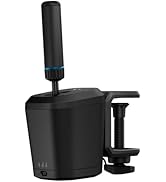
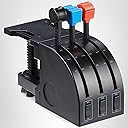
The Logitech G Saitek PRO Flight Throttle Quadrant elevates your flight simulation with 3 precision axis levers, 3 two-way rocker switches, and a customizable LCD display. Designed for professional-grade control, it features an adjustable mounting bracket and interchangeable lever heads to perfectly tailor your setup. Compatible with Windows 7 through 11 and USB-ready, this throttle quadrant is the essential upgrade for serious sim pilots seeking immersive, versatile, and ergonomic flight control.








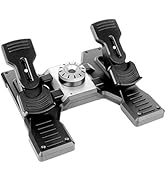


| ASIN | B01M00UHE3 |
| Additional Features | Ergonomic |
| Best Sellers Rank | #10,088 in Video Games ( See Top 100 in Video Games ) #32 in PC Game Flight Controls |
| Brand | Logitech G |
| Brand Name | Logitech G |
| Button Quantity | 6 |
| Color | black,blue,red |
| Compatible Devices | Windows |
| Connectivity Technology | USB |
| Controller Type | Throttle Quadrant, Yoke |
| Customer Reviews | 4.4 out of 5 stars 1,674 Reviews |
| External Testing Certification | ANATEL |
| Global Trade Identification Number | 00097855127976, 10097855127973 |
| Hardware Platform | PC |
| Included Components | Pro Flight Throttle Quadrant, QSG, additional lever heads, desk clamp |
| Item Dimensions | 4.33 x 6.5 x 3.54 inches |
| Item Type Name | Logitech G Pro Flight Throttle Qudrant (945-000032) |
| Item Weight | 17.67 Ounces |
| Manufacturer | Logitech, Inc |
| Manufacturer Part Number | 945-000032 |
| Model Name | Logitech G Saitek PRO Flight Throttle Quadrant |
| Model Number | 945-000032 |
| Package Quantity | 1 |
| Power Source | Information Not Available |
| UPC | 097855127976 |
| Warranty Description | 90- Days |
A**D
Good beginner throttle quadrant for playing games.
Bought this throttle quadrant to play Diesel Railcar Simulator. It does the job. Hasn't broken yet - don't tighten it to the table too much. Some of the knobs are a bit sharp if you grab them by the palm of your hand. Good value for money.
C**M
Excellent, Affordable Addition
This is an excellent, relatively compact, exceptionally versatile controller to add for pretty much ANY gamer. It works extremely amazing for single engine aircraft in flight simulators, consisiting of the standard controls for most small craft. Space sims like Star Citizen? Who CANT find a use for three more slider axis?! Tank simulators/games like War Thunder? You can use these for individual track control on tanks, etc.. Its pretty fun when you play a game with multiple crew in a tank and you can drive using just the throttles.. Its affordable. Its pretty solid. The desk mount is versatile. After a few weeks, the sliders still are very accurate, smooth, and have no "wobble" to them. You will not find a better throttle/slider quadrant for the price.
A**Z
Great Entry-Level Throttle, with One Odd Design Flaw
Great entry-level throttle to make dogfighting in my F-16 more fun. Downside is that the mount screws into the unit in a (very slightly) rectangular pattern instead of a square which eliminates perpendicular mounting configurations resulting in me having to mount it sideways (lame). If they made the mounting screws equidistant (a change of a cm or so) this could have been avoided, odd because Logitech is know for its quality design and this very small change could have optimized it. I only took off one star because this is a fairly niche issue (my desk setup by necessity unusual). Otherwise for the price point this is a good unit. The plastic parts feel a bit cheap but good hardware is about the innards and Logitech always delivers in this aspect. The aesthetic aspects are a nicety but that's what higher price points are for.
L**Z
Excellent
I own 10s of thousands of dollars worth of high end flight sim hardware and some of the Logitech stuff is top notch. This throttle is priced very low and is a great throttle. Shows up in flight sims with no plug ins needed. Feels great despite being plastic. I purchased a Cessna style throttle from a company I will not mention, and paid $400 for it and was very disappointed. The next day I purchased 2 of these for a fraction of the price and now I have a great twin throttle. Do not let the low price and plastic fool you this is a great throttle. Yes there are metal and better ones but your looking at a minimum 10 times the price.
F**O
Good auxiliary flight controller
This Logitech G Pro Flight Throttle Quadrant works well. I have had it for almost a year and I have had no issues, It has 3 Axis control levers and 3 double setting switches which give you 6 actions you can control. The axis controls are incremental. I use one lever for the flaps and the other two for the brakes on my DCS World P-47D, I don't have foot pedal rudders and brakes and you can't steer a P-47 on the ground without brakes and with this I substitute two levers for the brakes. The more you move the lever, the more pressure is applied to the brake. . It is recognized by DCS World as a controller. All the levers and switches can be mapped to what ever action you want in DCS World. I can't speak to its compatibility with other flight sims. It has a bracket that allows you to clamp it to a tray or a table edge, or you can take it off and screw it to a surface, or put Velcro tape on it and Velcro it to a surface. It is a good control for adding the extra axis and buttons that you are falling short of on your HOTAS.
E**S
Works Fine for X-Plane and MSFSX
I had a Logitech Yoke system with the Throttle Quadrant which I purchased about five years ago or more. When I purchased a new HoneyComb Yoke I could no longer use the Logitech Quadrant since it has a proprietary PS/2 connection which only works with the older Logitech (a.k.a. Saitek) yoke. So I needed to buy this newer model which has a USB connection. It works just like the original and is recognized by X-Plane so it can be configured using the in game configuration setup. All of the switches can be programmed for various functions. The levers are per-configured by X-Plane when it's first installed, but you can change them to suite your needs. I have played Microsoft Flight Simulator and it works equally well with that game too. The device operates smoothy and is a very well made and solid throttle quadrant for the price. Unlike the older model this one can be mounted in a few different ways to your desk or flight sim setup - which is pretty cool. If you are looking for a well made throttle quadrant and can do with just the three levers this one is a solid choice and money well spent. There are a lot flight simmers who use this throttle, which should tell you something. It is probably the best one at this price point...IMO.
T**R
I was like many other flight sim enthusiasts who wanted this throttle ...
I was like many other flight sim enthusiasts who wanted this throttle quadrant but wasn't going to pay the exorbitant prices that used, known broken, or the occasionally rare "new" throttles were going for on an auction website. When I found this past week that these were back on sale and in inventory from Logitech I couldn't click "Buy" fast enough! I already owned the Saitek yoke flight system which included the yoke, pedals, and initial throttle quadrant. Great setup and I've used it since 2014 without issue, but the obvious drawback was that if you wanted a more realistic multi-engine experience you had to buy the separate throttle quadrant. My other issue at the time was flying aircraft in FSX that were "stick" aircraft (i.e. fighter aircraft) where I wanted to use my Force Feedback 2 joystick along with the Saitek throttle. What a PITA that was because the throttle for the yoke system is a PS/2 connection and requires the yoke to be setup to power it! So I'd have this mess of components just to use the throttle quadrant and joystick. Not anymore! This is indeed the "add-on" quadrant with USB connector and it functions as a standalone device in Windows Devices panel. A couple of notes: •On first use and every time I hook it up I "sync" each lever's axis with a program called DXTweak2. It makes sure that the physical range of each level matches the axis input values (i.e. throttle all the way "off" = 0; all the way "on" = 65535). •On first use with FSX I found that for prop and throttle axis controls the lever being "off" or 0 was reflecting 50% on the controls in the plane rather than 0%. If you have this issue do the following: Go to Settings → click Controls button → on Calibration make sure the controller is selected (3 axis 9 button joystick) and click the Advanced Controls radio button → make sure all three axis Sensitivity sliders are all the way to the right and the Null Zone sliders are all the way to the left. Lastly, the table clamp has an insert that goes into one of the three holes molded into the clamp bracket. The insert is held in place by two small, silver screws under the clamp bracket. My clamp bracket shipped with the insert in the very farthest hole which didn't allow it to clamp firmly on my desk. The booklet instructions don't tell you about adjusting this insert, so if you find your clamp not securing properly then remove it and reinstall it to the middle or closest hole.
M**R
It's a great starter but far from flawless
I've been using this for about a year now with MSFS 2020. No matter what I do, the controls are never super accurate. Moving the throttle control just a hair can either not increase throttle at all, or increase it by 30% all at once. Same issue with programming flap controls, it doesn't recognize every position and isn't all that accurate. Overall for the price it's a good throttle quadrant to start out with. If you're not a beginner though, spend a little extra and get something with better response.
T**Y
That it works very well.
Used for flight simulator.
U**6
Best and high quality product, highly recommended
Very good quality, highly recommended. Beat seller on amazon . Friendly seller.. showed how to assemble product and was friendly..Good customer service skill
D**O
Ótima imersão nas simulações
Como todo produto logitech, é de boa boa qualidade, mesmo sendo algo de entrada. Mas com certeza é uma outra imersão nas simulações. Ajuda bastante nesse sentido. Por um preço justo. Vale bastante.
Y**S
Good
Good product
G**S
Muy buen producto
Lo bueno: Palancas suaves, el soporte se puede montar de diferentes modos, es muy cómodo, se siente bien hecho, plástico de calidad y funciona perfectamente, poder cambiar los pomos de las palancas lo hace configurable para cualquier tipo de avión. Lo malo: Esta hecho 100% de plástico, si las palancas fueran metal seria mejor.
Trustpilot
2 months ago
2 weeks ago