


💾 Upgrade your speed, secure your success.
The Samsung 870 EVO 2.5" 500 GB SSD leverages SATA III interface and advanced V-NAND MLC technology to deliver fast, reliable, and durable storage in a compact form factor, ideal for professionals seeking efficient data management and enhanced system responsiveness.

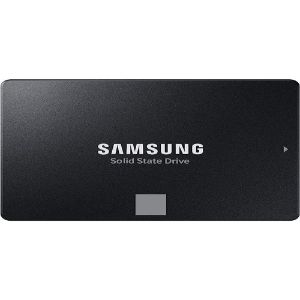
| Brand | Samsung |
| Product Dimensions | 0.68 x 10 x 6.98 cm; 45 g |
| Item model number | MZ-77E500BW |
| Manufacturer | Samsung |
| Series | 870 EVO |
| Form Factor | M.2 (2280) |
| Computer Memory Type | DDR DRAM |
| Hard Drive Size | 500 GB |
| Hard Disk Description | Solid State Drive |
| Hard Drive Interface | ATA |
| Wattage | 3.5 watts |
| Are Batteries Included | No |
| Item Weight | 45 g |
| Guaranteed software updates until | unknown |
Y**M
Reliable Cost Efficient SSD
Easy to replicate your HD using the software from the website. Use a 2.5 to 2.5 adapter if you are replacing a 3.5 drive.
T**M
I replace the 1tb Hitachi HDD in my Asus UX303 14inch laptop with this 512gb SDD. I'm not a techie, so, after watching mulitple instructions on Youtube, I very slowly and carefully, managed to get it swapped successfully. The Samsung Magician software also makes the process very intuitive and without a hitch. My old laptop has just been given a new life. Boot up is so much faster. I'm a happy man!
A**R
It's Samsung. What more is there to say? You pay a price for a premium product and you get premium performance!
P**O
bien recu pas encore tester
M**I
After reviewing several reviews and doing comparisons with other brands. The EVO 870 was the one who got the highest ratings with almost no negative feedbacks. Even though it is 40% more expensive than other brands I decided to go for it as my laptop is a 10 years old Samsung an should have to compatibility issues, and I was right so far. The installation and cloning was easy and straight forward, boosted the laptop performance incredibly, startup reduced from almost 9 minutes to less than a minute, all programs open smoothly. It is very good value for money, it is advisable to upgrade the RAMs as well,
H**Y
Superb piece of tech. Just be aware that if you are using this with a USB converter and adding to your PC or other device as another drive, you'll need to add a drive partition on Windows. Easy, but it's not plug & play in that application so you need to be a tiny bit tech Savvy. If you want to mount in a pc, it has holes but no screws. Really beautiful piece of tech - I used it to give me some space on my Wacom Cintiq which had a 50GB HDD which became insufficient to run Photoshop with my pen tool. Now it's a dream again!
Trustpilot
2 weeks ago
1 week ago



