Desertcart purchases this item on your behalf and handles shipping, customs, and support to Iceland.
🔥 Upgrade your binge game with Roku 4K — where stunning visuals meet effortless control!
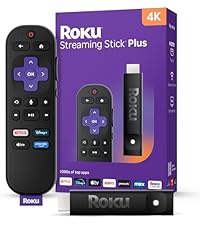
The Roku Streaming Stick 4K transforms any compatible TV into a powerhouse streaming hub, delivering stunning 4K UHD picture quality enhanced by Dolby Vision and HDR10+. Its long-range Wi-Fi receiver ensures smooth streaming even in distant rooms, while the voice remote consolidates TV power and volume controls for ultimate convenience. Compact and sleek, it fits discreetly behind your TV without blocking HDMI ports. With access to over 500 free channels and personalized content, it’s the definitive upgrade for millennial professionals craving premium entertainment with zero hassle.


| ASIN | B09BKCDXZC |
| Best Sellers Rank | #9 in Electronics ( See Top 100 in Electronics ) #1 in Streaming Media Players |
| Brand | Roku |
| Built-In Media | Power adaptor, Roku Streaming Stick 4K, Two pre-installed AAA batteries, USB power cable with Long-range Wi-Fi receiver, Voice remote with TV power, volume, and mute buttons |
| Color | Black |
| Compatible Devices | Television |
| Connectivity Technology | Wi-Fi |
| Connector Type | HDMI |
| Controller Type | Remote Control, Voice Control |
| Customer Reviews | 4.7 out of 5 stars 98,829 Reviews |
| External Testing Certification | Não Aplicável |
| Form Factor | TV Stick |
| Item Dimensions L x W x H | 3.7"L x 0.8"W x 0.45"H |
| Item Type Name | 2021 Streaming Stick 4K |
| Item Weight | 25.54 g |
| Manufacturer | Roku |
| Memory Storage Capacity | 16 GB |
| Mfr Part Number | 829610004853 |
| Model Name | Roku Streaming Stick 4K |
| Model Number | Roku_Streaming_Stick_4K |
| Number of Items | 1 |
| Number of Packs | 1 |
| Other Special Features of the Product | Dolby Vision, TV Control |
| RAM Memory Installed | 1 GB |
| Resolution | 4k |
| Special Feature | Dolby Vision, TV Control |
| Supported Internet Services | Hulu, Netflix, Pandora, Prime Video, Vudu |
| UPC | 829610004853 |
| Unit Count | 1 Count |
| Video Codec | H.264/AVC, H.265/HEVC, AV1, VP9, HDR10/10+ |
| Video Output Resolution | 4K UHD (up to 2160p at 60fps) |
| Warranty Description | For any Roku Smart Home device, Roku streaming player, Roku Streaming Stick, or Roku audio device, Roku warrants the hardware against defects in materials and workmanship under normal use for a period of one (1) year from the date of purchase ("Warranty Period") if used in accordance with the provided documentation. If Roku determines that the device’s hardware is defective during the Warranty Per… |
D**C
Love my Roku stick
Love this product! It expands my viewing pleasure with apps that my Vizio TV does not have. I have the flexibility now of switching from my Vizio streaming apps to my Roku when I want to watch my major League baseball app. It's setup is very easy, the functionality is very self-explanatory and flawless. It's compact size keeps it well hidden and picture quality of course is very good. It's receiving of my Wi-Fi signal in the home is also very good. It beats the previous model Roku stick that I had. This one has expanded range capability of picking up the Wi-Fi as I am halfway across the house. The quality of streaming has not suffered.
D**O
Best streaming device I've owned — simple setup, great picture
Picked this up to upgrade my home setup and it delivered on every front. The 4K HDR and Dolby Vision picture quality is noticeably sharp, and the interface is fast and responsive — no lag switching between apps. Setup took maybe 10 minutes tops. The remote is intuitive and the voice search actually works well. If you're running Plex or any of the major streaming apps, everything runs smoothly. Great value for the price — hard to beat for what it does.
M**�
Fast Setup and Excellent Streaming Quality
This Roku was quick to set up and works flawlessly. The picture quality is sharp, the interface is easy to navigate, and the remote is simple to use. Streaming is smooth, and it gives you access to all the major apps in one place. Great value for the price.
X**R
Bought Two—and Glad I Did
I’m a big fan of these Roku Streaming Sticks. I ordered two, and I’m actually using one right now while on vacation in Venice Beach. Setup is quick and easy, the interface is simple to navigate, and streaming has been fast and reliable. The picture quality is excellent, and I especially like having one familiar, easy-to-use streaming platform regardless of which TV I’m using. The remote works great and eliminates the need to juggle multiple remotes for basic TV controls. For the price, these are hard to beat. Small, fast, easy to set up, and they just work. I liked the first one enough to buy two, which probably says it all.
N**�
Roku Streaming Stick 4K: Calidad 4K, instalación rápida y excelente rendimiento
The setup was quick and easy, and within minutes I was enjoying my favorite streaming platforms. The 4K picture quality with HDR10+ and Dolby Vision is excellent, with vibrant colors and a very sharp image. The voice remote works perfectly and makes searching for content much easier. Furthermore, the Wi-Fi connection is stable and fast, with no interruptions during playback. It's an excellent option if you're looking to turn any TV into a Smart TV with a compact, easy-to-use, and high-quality device.
A**R
Enjoy streaming — Select channels and shows to start watching
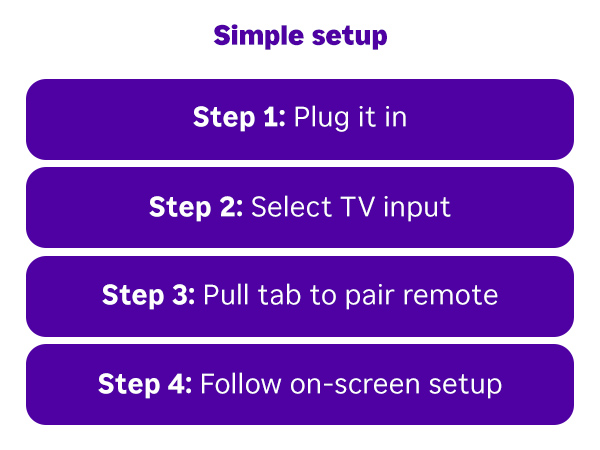
Highlights • 4K streaming with Dolby Vision & HDR10+ — stunning picture quality with rich colors and sharp detail • Long-range Wi-Fi receiver — reaches farther from your router than most competitors • Compact design — won't block neighboring HDMI ports; stays hidden behind your TV • Voice remote — search, play content, and control your TV with your voice • 500+ free TV channels — live news, weather, sports, movies, and shows included • Works with all major apps — Netflix, Hulu, Prime Video, Pandora, Vudu, and more • Price: $49.99 with FREE Overnight delivery Specifications • Model: Roku Streaming Stick 4K (2021) • Video Output: 4K UHD (up to 2160p at 60fps) • Video Codecs: H.264/AVC, H.265/HEVC, AV1, VP9 • HDR Support: HDR10/10+, Dolby Vision • Memory (RAM): 1 GB • Storage Capacity: 16 GB • Connectivity: Wi-Fi (802.11ac MIMO dual-band with long-range receiver) • Connector Type: HDMI • Dimensions: 3.7"L x 0.8"W x 0.45"H • Weight: 25.54 g (less than 1 oz) • Remote: Voice remote with TV power, volume, and mute buttons • Batteries: 2 AAA (pre-installed) • Supported Apps: 500+ channels including Netflix, Hulu, Prime Video, Vudu, Pandora • Warranty: 1 year Durability • Customers report: Many users note their Roku sticks lasting 5-10+ years with no issues — one reviewer mentioned using theirs for about 10 years with no end date for use as long as internet is available • No moving parts — solid-state design is inherently durable • Heat management: The stick design allows for good air circulation to prevent overheating • Remote durability: Mixed feedback — while most find the remote sturdy and not fragile, some users report remotes stopping working after 2-3 months, though this is not universal • Overall build quality: Customers praise it as "excellent quality" and note it doesn't "wear out" like traditional devices How to Use It 1. Insert into HDMI port — Plug the stick directly into an available HDMI port on your TV (not blocked by other cables or ports) 2. Connect power — Plug the USB power cable into an AC outlet or powered USB port (included in box) 3. Insert batteries into remote — Place 2 AAA batteries into the voice remote (pre-installed, but you may need to replace) 4. Turn on your TV — Press the power button on the remote 5. Follow on-screen setup — Roku will prompt you to connect to Wi-Fi and link your Roku account (takes about 5-10 minutes) 6. Scan QR codes — Complete activation by scanning codes shown on screen 7. Browse the Home Screen — Personalized recommendations appear automatically 8. Use voice commands — Press the microphone button and say things like "Search Netflix," "Play Prime Video," or control your TV volume 9. Install apps — Add streaming services from the Roku Channel Store 10. Enjoy streaming — Select channels and shows to start watching What's Included • 1x Roku Streaming Stick 4K device • 1x Voice remote with TV controls (batteries pre-installed) • 1x USB power cable • 1x Long-range Wi-Fi receiver • 2x AAA batteries (pre-installed in remote) • 1x HDMI extender cable (if needed for tight spaces) Quick start guide and documentation
W**N
A great streamer
So I’ve been using Roku devices since their very first one, and one of the main uses these days is to stream my own media on Plex. I’ve been pretty slavish about using the devices from Roku that supported wired ethernet instead of relying on WiFi because I don’t want to deal with buffering or lag, and just didn’t have confidence in WiFi (despite having WiFi-6). Other streaming devices (which shall remain nameless) with WiFi-only connection have disappointed me. My previous Roku died over the holidays and so I took a chance (and a gift card) to try out this Roku 4k stick. I’m glad I did. First off, I needn’t have worried about the WiFi not being up to streaming 4k video from my server. It handles it just fine. It’s a good experience as long as you have a newer router that supports WiFi-6. Second, setup was amazingly easy. They’ve streamlined the whole process, and any apps you were already using on another Roku device are instantly logged in and ready to go. New big-name apps are almost as easy, just requiring a QR code scan and a quick login to the app on your phone. My biggest complaint is that something about this Roku really pumps up the saturation in some of my own home-edited videos. I can’t figure out which setting is making that a thing, but it’s clearly something to do with the way my video editing app saves the video. Roku just isn’t playing nice with it, but that’s not on Roku; that’s in the editor. Everything else, however, looks incredibly good. The interface is snappy, and honestly I was shocked that this stick is faster to load and navigate than my previous Roku Ultra LT. I can think of only one negative point to the stick, and that is that it only works with the special remote it comes with, which I believe is a sort of WiFi direct connection. It won’t support an IR remote nor a Bluetooth one, rendering my universal remote useless for the Roku streaming stick 4k. It also won’t work with most of the stack of previous model Roku remotes I own. And of course, as with every Roku remote, the four quick-launch buttons are a pain in the neck. I only subscribe to one of the services in them, and will likely never subscribe to the others, which means accidentally pressing them is a bit of an obnoxious experience. I understand they’re sponsored and Roku makes money putting them on their remotes and making them permanent, but they could •at least• add two more buttons in there that are fully programmable to access the favorites we actually do subscribe to. The voice search function is handy, but sometimes the screen will prompt you to use the voice search when the normal manual actions are easier and more direct. I don’t really need to press the voice button and say “launch YouTube” when I can just press the OK button on the first app in my list (YouTube) and it launches. However, for searching for a specific movie or show, it’s a great feature. It’s also nice for people who hate typing on screen using directional buttons, as you can speak letter-by-letter to enter email addresses and passwords if need be. Bottom line: I’m impressed. Except for a few minor caveats, it’s a great streaming device that is responsive, intuitive, and provides fantastic video and audio quality, even up to Dolby Atmos in a 4k stream. Five stars.
D**D
Made my old TV Smarter!
This works great. It’s easy to install, anyone can do it. The interface is easy to maneuver, and you can move apps around. We got a new living room TV, and moved our old bigger one to the bedroom. One of the things I like the most is you don’t have to aim at it, or the TV. The old TVs port doesn’t have enough power for it so I had to plug it in at the outlet. It’s behind a dresser and the remote still works fine. It’s small so it’s not a problem. There are plenty of free streaming apps to add, so lots of free things to watch I couldn’t get before. Amazon Prime, YouTube, any paid streaming, even the library app (in case you don’t know, most libraries allow movie and music streaming for free!) I’ve found all of the things you can add to a smart TV. Cons The volume is on the right side of the remote and it’s kinda a funky place. I hit it by accident all the time and mute it. I have to switch source to use it from Uverse. But that’s because it’s in the HDMI port and I have to select it. I would buy it again, and probably will next sale for our old TV in our guest room that is analog and would need an antenna. I don’t want to pay monthly for another Uverse box that won’t be used very often.
Trustpilot
5 days ago
1 month ago