We remain fully operational. Our teams are working around the clock to ensure your deliveries continue safely.

DOWNLOAD THE APP


Copyright © 2025 Desertcart Holdings Limited
DOWNLOAD THE APP
Buy anything from 5,000+ international stores. One checkout price. No surprise fees. Join 2M+ shoppers on Desertcart.
Desertcart purchases this item on your behalf and handles shipping, customs, and support to Iceland.
🛡️ Protect your view, power your day — glare-free and scratch-proof!
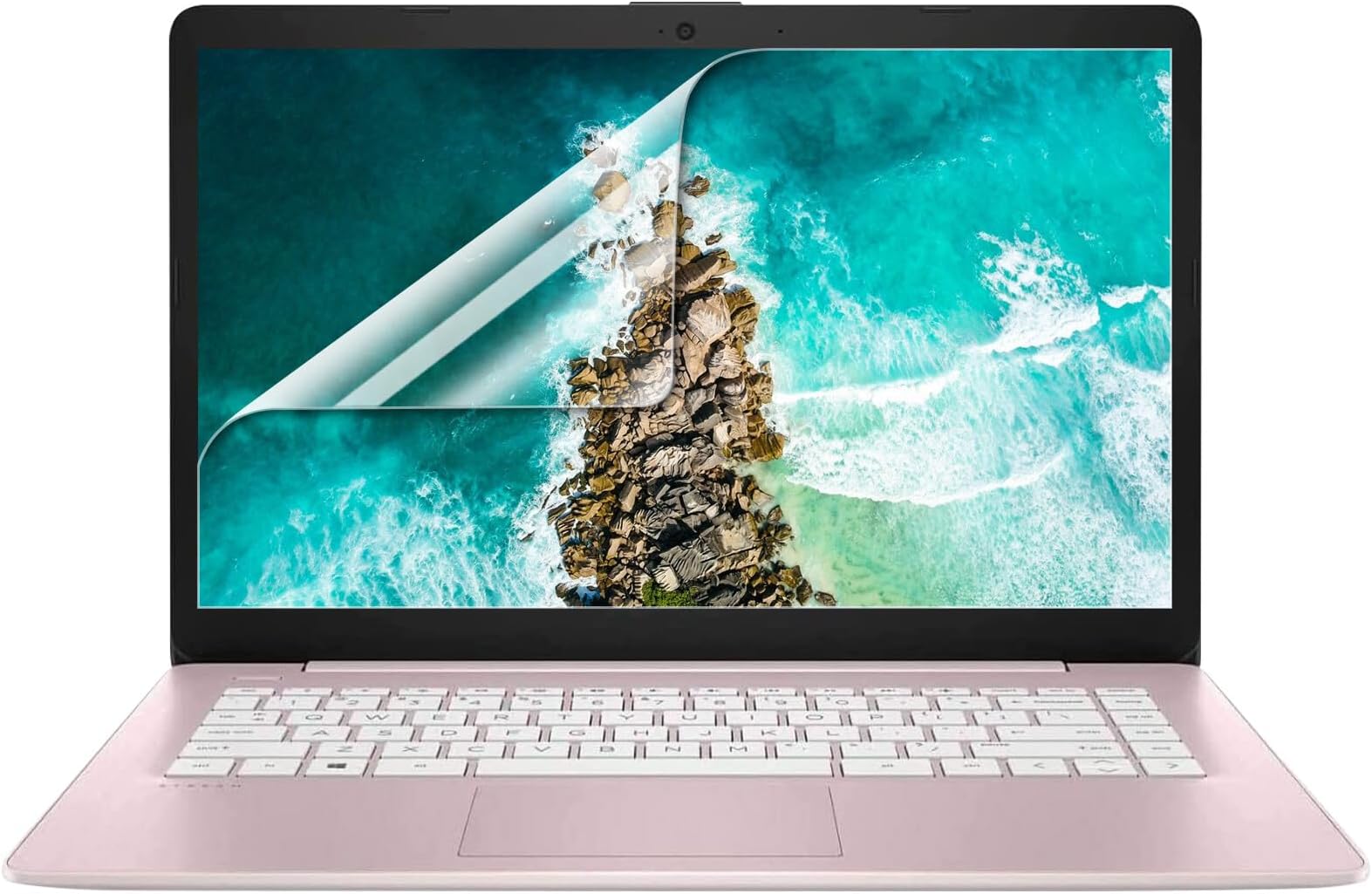
The F FORITO 2 Pack 14-inch Anti Glare Matte Laptop Screen Protectors are precision-cut for 16:9 aspect ratio laptops, offering a durable 6H hardness surface that reduces glare and eye strain while preserving vibrant screen clarity. Featuring fingerprint resistance and full touchscreen compatibility, these protectors combine sleek matte aesthetics with robust defense, perfect for professionals seeking digital wellness and device longevity.


| ASIN | B01LEC2WLW |
| Best Sellers Rank | #97 in Computer Screen Protectors |
| Brand Name | F FORITO |
| Clarity | 95 |
| Color | 14" -Anti Glare/Transparent |
| Compatible Devices | 14 Inch Computer with 16:9 Aspect Ratio |
| Compatible Phone Models | 14 Inch Computer with 16:9 Aspect Ratio |
| Customer Package Type | FFP |
| Customer Reviews | 4.1 4.1 out of 5 stars (2,445) |
| Finish Type | Matte |
| Included Components | Screen Protector × 2, Cleaning Kit × 1 |
| Item Dimensions L x W | 5"L x 0.1"W |
| Item Hardness | 6H |
| Item Weight | 0.19 Pounds |
| Manufacturer | F FORITO |
| Material | Polyethylene Terephthalate |
| Model Name | FM-SPU14-AG |
| Model Number | FM-SPU14-AG |
| Number of Items | 2 |
| Part Number | FM-SPU14-AG |
| Screen Size | 14 Inches |
| Screen Surface Description | Matte |
| Special Features | Anti Glare |
| Unit Count | 2 Count |
| Water Resistance Level | Water Repellent |
Z**A
A very nice screen protector
I recently received a new laptop through my employer, to use to work part time from home. We live in a magic time of technological joy. In order to protect the investment that my company has made, I purchased a keyboard cover, a vinyl skin, and these screen protectors. Overkill? Probably. But with cats, a kiddo, and regular travel between the office and home, it's a cheaper option than paying for repairs on a machine that I can't afford to replace. A flat, hard screen protector with the protective film on both sides is, in my opinion, one of the easiest to install. As long as you do the installation properly, life is good. If you mess it up, you have a second sheet all ready to go. The most important thing to remember is TAKE YOUR TIME! Clean the screen completely. Think you have it clean? Wipe it down again, either with an anti-static wipe or a microfiber cloth. Go ahead and hit it with some canned air, too, just to make sure that all the dust and cat hair is removed. Peel the smallest amount of the back film that you can, and tuck the screen protector in place on one edge of your screen. Slowly peel the back film away while using the squeegie card to smooth out bubbles as you go. Do not remove the last of the film until you've got the entire screen protector down. Once you get it down and smooth and bubble free, you can take off the top protective film. This fit perfectly on the screen of my 14" laptop. You can't see it at all, except way up at the very corner where it is a curved corner instead of square. You really have to look to see it at all. The edges stuck down perfectly after the first day, but did require some fussing at first. Is it anti-glare? I'm not sure what that means. It is a slightly soft appearance, so maybe? It doesn't make the screen look fuzzy, but it doesn't look like smooth glass either. It doesn't affect colour quality or my ability to read what I've got to in order to do my job. My computer is not touch-screen, so I can't speak for texture or how it affects touch screen functionality.
A**R
Pleased with my purchase
I just put on this screen protector, and I'm happy with it. I tried a different seller's glass screen protector on my laptop for about two weeks and it was just so insanely reflective that it was actually difficult to use my laptop in any room that wasn't pitch black. This one gives a slightly hazy look at low brightness setting, but I can't see my reflection at all unless the screen is completely off which I greatly prefer over the super reflectiveness of other protectors. The "anti-fingerprint" actually seems to work really well and I haven't noticed any issues with touch sensitivity yet. I'll certainly update this if anything changes as I use it more. I put this on a Lenovo Yoga 920. Got it on without any bubbles and no noticeable dust spots. The protector is basically the exact same size as the screen, so if you aren't careful with the application, you may leave part of the screen exposed. Wasn't a problem for me, but just something to watch out for.
J**Y
Nice screen protector. Perfectionists beware.
I'm a perfectionist, so installing this was basically the worst day of my life. I got this for a Lenovo T440, to keep the keyboard from putting wear marks on the screen. The product itself is good, but I was expecting too much from it. The Bad: Unless you're in a clean room, it's impossible to apply this without bubbles. This wasn't really the fault of the product itself, but more a limitation to what's physically possible. It's easy to install a bubble free screen protector on a small rigid screen. But on a large display like this, the size of the protector moving around is enough to kick up dust no matter what you do. You basically need a clean room. My particular laptop doesn't have a strong glass front on the display, so forcing the bubbles out without damaging the LCD panel was very difficult. Because I'm a perfectionist, I finally eliminated all bubbles and dust on the 3rd attempt... and damaged the LCD panel. That part is my fault. I got a decent result on the second try, but I HAD to go for perfection. Lenovos are easy to work on, so I just replaced the panel and moved on. The GOOD: OK. So aside from my ridiculous expectation that the protector go on as flawlessly as a rigid, tempered glass, phone screen protector, I think this is a great product. The matte finish looks indistinguishable from the matte finish on an OEM display panel. It came with everything you'd need to apply it, and I'm sure it would protect your screen from scuffs, scratches, and the keyboard wear marks just fine. So, if you don't mind a few tiny specks or bubbles at the edges or in the corners, this is a great screen protector. If I was to do this over again, I would get screen cleaner and use the wet application method. This method worked best for me, but by the time I figured this out, the multiple tries had taken their toll on the LCD display. If applied carefully, I think this method would give the best results.
M**D
جودة عالية 👍🏻
S**L
It is a very good product. Looks like plastic but I think it is made of plastic and glass both. Perfectly fits my 14” inch laptop screen. And it truly is anti glare and anti scratch. I’m very happy with it 😊
A**S
I NEEDED SOME ANTI GLARE SCTREEN PROTECTORS FOR MY LAPTOP AND THESE ARE PERFECT. HAD IT FITTED FOR ME AS I KNOW IT CAN BE QUITE TRICKY. HIGHLY RECOMMEND.
ل**ع
different Size مو مناسب للشاشة مقاس 14انش Not For 14inc
A**E
Easy to use
Trustpilot
3 weeks ago
3 weeks ago