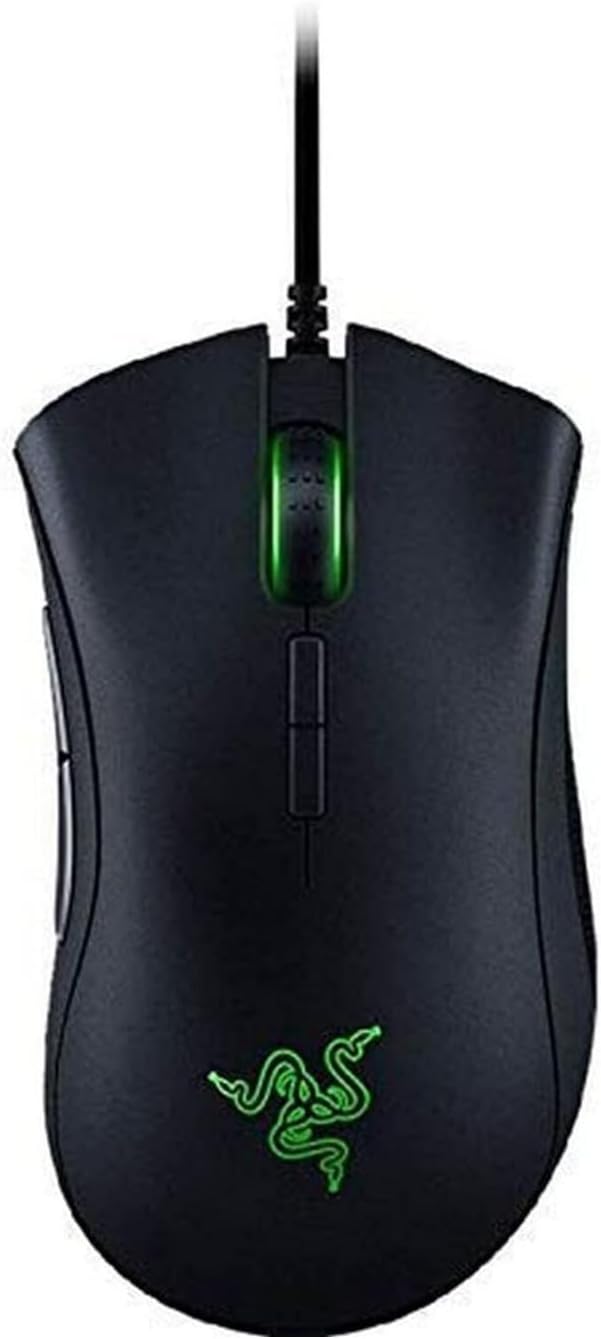
🎮 Elevate your game with precision, power, and style — the DeathAdder Elite leads the pack!
The Razer DeathAdder Elite is a professional-grade gaming mouse featuring a true 16,000 DPI optical sensor with 99.4% accuracy, 7 programmable buttons, and customizable Chroma RGB lighting with 16.8 million colors. Designed for esports and serious gamers, it offers ergonomic rubber side grips and durable mechanical switches rated for 50 million clicks, ensuring both comfort and longevity. Backed by a 2-year warranty, this USB corded mouse delivers ultra-responsive performance and immersive aesthetics to keep you ahead in every game.


| ASIN | B01LXC1QL0 |
| Additional Features | Programmable Buttons |
| Antenna Location | Gaming |
| Are Batteries Included | No |
| Are Batteries Required | No |
| Best Sellers Rank | #1,990 in Video Games ( See Top 100 in Video Games ) #107 in PC Gaming Mice |
| Brand | Razer |
| Built-In Media | mosue |
| Button Quantity | 7 |
| Color | Black |
| Compatible Devices | Personal Computer |
| Connectivity Technology | USB |
| Customer Reviews | 4.5 4.5 out of 5 stars (16,777) |
| EU Spare Part Availability Duration | 2 Years |
| Embellishment Feature | LED |
| Enclosure Material | Plastic |
| Global Trade Identification Number | 00814855021871, 08886419332084 |
| Hand Orientation | Right |
| Hardware Platform | PC |
| Item Dimensions L x W | 5"L x 2.83"W |
| Item Type Name | Razer DeathAdder Elite - Multi-Color Ergonomic Gaming Mouse - World's Most Precise Sensor - Comfortable Grip - The eSports Gaming Mouse |
| Item Weight | 13 Grams |
| Manufacturer | Razer Inc. |
| Model Name | Deathadder Elite |
| Model Number | RZ01-02010100-R3U1 |
| Mouse Maximum Sensitivity | 16000 Dots per Inch |
| Movement Detection | Optical |
| Number of Batteries | 1 AA batteries required. |
| Operating System | Microsoft Windows |
| Power Source | Corded Electric |
| Range | 30.0 feet |
| Style Name | DeathAdder Elite |
| UPC | 814855021871 |
| Unit Count | 1.0 Count |
| Warranty Description | 2 Years |
G**R
Very Impressed
Last week the middle mouse button on my Corsair M65 finally gave out after months of poor functionality, and I was compelled to buy a new mouse. On Amazon, I looked at reviews for a Logitech Mouse, a similar Corsair, and the Death Adder. At the time, I liked my Corsair very much and probably would have bought another one if it hadn't been for a few reviews stating that the middle mouse button was effectively prone to failure. So I went with the Death Adder despite some otherwise glowing reviews of the Corsair, and a higher price tag. The first thing I noticed about the Death Adder was how light it is. The box itself felt feather light. The next, how large; it really is a big mouse. The cord, too, is light but supple, an improvement over the thicker, stiffer Corsair's. When I plugged it in, the Razer logo was set to "breathing." After downloading Synapse, the Razer software app, I changed the lighting to "static" and lowered the brightness to its dimmest setting. My Death Adder now emits a dim green glow that is not over powering. The Corsair's lighting effects were so aggressive I'd turned them off long ago. After getting into a game to check out the mouse feel, I realized I didn't like the default lack of acceleration. Many gamers think acceleration is entirely bad, but in my experience a touch of acceleration is a good thing (for an example of awful acceleration software, use a mouse on a Macintosh computer). So I went into Synapse and landed on a DPI of 1800, with acceleration at "2" out of 10. With those settings I was very happy with the mouse performance, and am using it like that a few days later without complaint. After I'd calibrated the mouse to my liking I decided to plug in the Corsair to see how they compared. At the time, I expected no big difference. I thought, if someone were to ask me about which mouse to buy, I wouldn't have a strong opinion. A mouse is a mouse. The Corsair is heavier, so if you want a heavy mouse, avoid the lighter Death Adder.... Wow, was I wrong. Even after trying to tweak the Corsair settings (which were less robust, with seemingly no way to adjust acceleration), I could not get it to feel as zippy and responsive as the Death Adder. The heaviness of the mouse was oppressive, whereas the lightness of the Death Adder made it slightly addictive and fun to use. Now, I find myself holding the Death Adder and mousing around for no reason but the pleasure of it. The only thing I'm on the fence about with this mouse is the size. It really is a big mouse, with a pronounced arch. I think I've gotten used to it, though. This is coming from a really big guy who can almost palm a basketball. So if you have small hands you may not like this mouse, though it most certainly is worth giving a shot. Another thing I'd like to touch on is the aesthetics. I think this is a really cool looking mouse, though some may find it tacky. It's a fun gaming mouse design with a really neat logo that glows dim green (as per my setting). I find myself glancing over at it a lot, and I think it's cool. One thing this experience has reminded me of is how important it is to invest in quality products. I got into a game of Borderlands 2 the other day, and I couldn't believe how great it felt. It's because of the mouse. Don't cheat yourself by using cheap stuff if you can afford otherwise.
H**Y
Great mouse
Great reliable mouse. Been using it for around 6 years now. It felt a little large in the hand at first but you get used to it like any mouse. The buttons on the side are great for convenience or key binds for gaming. Have had no issues with this mouse in the long time I've used it.
J**S
Quality mouse, been using for 6 years and still going strong!!
Updated Review (original review listed at bottom) I have been using this mouse for almost 6 years (I bought it in September 2017), and it is still working very nicely. The main isues I have noticed is that I have to clean the mouse every few months to remove dust that accumulates mainly attaching to the braided cord and the rubber side grips. Plus, I have had issues in the past with synapse version 3 not saving its profiles correctly for a couple of months period about a year ago. The one main pain point I have found is that the synapse software doesn't always work. In the past I have had periods where my saved button profiles stopped in being able to work properly. Basically, it would stop being able to utilize the cloud saved profiles and if I tried to change them locally it would basically fail to save and or crash the program. After a bunch of troubleshooting which I don't really remember but most likely involve things like uninstalling and reinstalling the program and drivers et cetera, I was able to get it to work again and since then I have not really had any issue with the software. One thing I you think may have caused the issue was a conflict between the razor drivers and windows, that issue not withstanding I have not really noticed any major issues with the mouse. Certainly not enough where I would consider getting another mouse. The only exception being that sometimes the cord gets in the way, and I have considered replacing it because of that, however I have not been bothered quite enough to fully committed to doing that. - My favorite part of this mouse is the reprogrammable buttons, especially the Razer Hypershift button that allows you to basically double the number of buttons available. I think that one of my favorite shortcuts to program into my mouse is being able to execute a "CTRL+Up arrow key" macro or the "CTRL+W key" macro. These two handy shortcuts allow me to go up a level in folders while using the file explorer or to either close tabs I am done with in a browser or to close folders I am done using. However, I also, love being able to control the volume of my music using my mouse. This is very nice to easily adjust the volume of video games while playing or to adjust the volume of music on the fly. - One other issue I wanted to point out was that finger oil sometimes accumulates on the rubber side grips and is actually pretty gross if I think about it too long. Most of the time I ignore it, but every once in a while, I clean it off. The best way to do so I have found is putting rubbing alcohol on a cloth and rubbing that. It actually works surprisingly well. One tip for cleaning is to either use a microfiber cloth or a denser than normal paper towel. Personally, I use the blue paper towels that are designed for machine shops or mechanics. They can either be found online or you can always get them in places like AutoZone or Home Depot/Lowes. The reason I prefer these types of paper towels is that they are a lot more tightly woven and don't fall apart as easily as white paper towels you find in kitchens. -------- Original Review Below -------- The mouse works well. I like the DPI adjustment buttons on the top of the mouse. I also like how I can use the software to adjust the increments of the jumps in DPI.
S**N
Razer Deathadder Elite Scroll Wheel Dead in 6 Months
For an "elite" gaming mouse with impressive features and a price to match, the quality of Razer is absolute trash. I don't know anyone who buys high-end mouses with the expectation of them being disposable in 6 months. I looked at the bottom of the mouse and it says its made in China, go figure. The limited warranty is for 2 years, so this mouse is now going through the RMA process. But after searching online about this problem, I'm not hopeful that the mouse will not return to this state after another 6 months. It seems that Razer mouses have been having this scroll-wheel-failure issue for years. Now I know what mouse brand I'm no longer buying. If you want a mouse that will stay working, looking elsewhere! UPDATE: My Razer Deathadder Elite's failed scroll wheel was determined irrepairable and required a replacement, but this mouse is now out of stock (probably discontinued due to its failures). I was offered the newer Deathadder to replace it, and so I'm now quite happy with the superior mouse. What I appreciate most bout the Deathadder is its incredible ergonomics, among many other well-designed features. So I've revised my rating from 1 star to 4 stars, because of the replacement and the fact that it is a top-of-the-line gaming mouse--if it doesn't fail. I wouldn't give it five stars just because the previous model died within six months, and the mandatory bloatware is not appreciated for a mouse.
E**A
Gut und Günstig !
E**A
Para mí, la versión anterior era el mejor ratón del mercado, preciso y muy ergonómico. Con esta nueva versión, lo han empeorado. Estoy muy decepcionada. Le han puesto unas gomas de agarre en los laterales que hacen el agarre más complejo. Lleva varias texturas y te vuelves loc@ para encontrar los botones. Además el ratón se rompe enseguida. Duran.. 3 años? Lo uso bastante, supongo que tendrán una vida en horas. Pero, para el precio que tiene 60-70€, pienso que se rompe demasiado rápido ( doble click, botones rotos, botones que clicas y no van). Creo que después de ¿10 años? usando razer... me cambiaré a otra marca, por ejemplo un Zowie con el mismo agarre y la superficie LISA!!
A**E
Great mouse been using it for 3 months love the scroll wheel and the feel of the mouse in my hand, (does take a bit to get used too). It has the 2 buttons behind the scroll wheel for adjusting dpi (or whatever you like) the scroll wheel texture and the better dpi tracker thingy (dont really know what it is). Those are the 3 main differences between this and and deathadder chroma, do be warned my buddy has a deathadder chroma and i tried it and it had a similar feeling at least for me. There is definetly a difference its just very suttle. This is basically the better brother of the deathadder chroma. The deathadder chroma and the elite have the exact same lighting the basic static breathing reactive etc, that you see. It has no wave so it cant sync up with your razer keyboard pretty big bummer cause I thought it did. (if you dont have the razer keyboard no biggy) All the chroma lighting is controlled through the razer synapse software you'll find the chroma there. The mouses dpi is also controlled though there if you dont use the other 2 buttons behind the scroll wheel. It supports up to 16,000 dpi [honestly no reason to go over 5000] the mouse has 5 default presets 800 (pain fully slow :just dont use it, unless you like your mouse extremely slow) 1800 (Basic speed :normal browsing web speed for me maybe gaming for some of you guys) 4500 (Probably the highest you want to go with this mouse: extremely fast for most, took me quite a long time to get used to playing league with this) 9000 (I.. if your high on a day use this) 1600 [MAX] (Litrally nobody uses this l... , you move your mouse 2 inches and its on the other side of the screen:Don't f#$king use it) Or ignore all that and make your own dpi and even change the presets if you like razer is all about that customization life OH YEAH!! Anyways I would recommend this mouse for anyone whos used previous high end gaming mice and need an upgrade. Or if you got some money and wanna treat yourself. Honestly if you dont care about the chroma just get the regular deathadder that was my previous mouse before this I picked this up becausr my old one was getting warn out and I wanted it to match with my keyboard. If you want this to match with your keyboard with the fancy ripples and waves get the lancehead that mouse has those features. I wouldn't have gotten this mouse if I knew about that. DO YOUR RESEARCH KIDS! For a gaming mouse with decent chroma lighting Id give it a 10/10 and its not from ign, its from me.
A**S
as someone who games alot i feel this mouse is brilliant for the price, ive bought two after my first one did give up after 6 years of constant use.
A**A
Nel complesso e un ottimo maus, un po caro ma ci sta.. P. S. Ottimo e robusto alle TILTATE 😁
Trustpilot
1 week ago
5 days ago